Desert Online General Trading LLC
Dubai, United Arab Emirates
Desert Online General Trading LLC
Dubai, United Arab Emirates


🚀 Elevate Your Meetings with Next-Gen 4K Clarity & Wireless Freedom
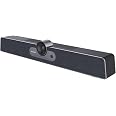
The Enther & MAXHUB S10 is a premium all-in-one 4K video conferencing system designed for small to medium meeting rooms. Featuring a 12MP ultra-HD camera with 120° wide-angle lens, intelligent auto-framing, and 5x digital zoom, it ensures every participant is seen clearly. Its 6-array MEMS microphones capture voices up to 8 meters away, delivering studio-quality sound through 8W Hi-Fi speakers. The system supports one-key wireless screen sharing from multiple devices and offers flexible installation options with a built-in Android OS for seamless plug-and-play operation.


| Package Dimensions L x W x H | 54.9 x 17.3 x 15.7 centimetres |
| Package Weight | 2.43 Kilograms |
| Product Dimensions L x W x H | 6.8 x 6.8 x 18.2 centimetres |
| Item Weight | 2.43 Kilograms |
| Brand | Enther |
| Colour | Silver Grey |
| Has image stabilisation | No |
| Included components | HDMI cable*1, Peeping cover*1, Power adapter*1, Remote control (Batteries not included)*1, USB cable*1, User manual*1, Video conference terminal*1, Wall-mounted*1 |
| Max Focal Length | 2 Millimetres |
| Min Focal Length | 1 Millimetres |
| Plug profile | Wall Mount |
| Part number | Enther-S10 |
| Zoom Type | Digital |
| Focus type | Auto Focus |
| Style | All-In-One 4K |
| Effective still resolution | 8 MP |
| Guaranteed software updates until | unknown |
Y**E
STAY AWAY. NOT PLUG AND PLAY, So many broken promises, it is nearly a scam!
A lot of reviews have complain about the picture quality and focus. I did not get far enough with the set up to see how the camera performs in a meeting. The picture quality looks fine in the setup utility.The issues I have are four (all show stoppers in my opinion):1. The aspect ratio of the screen interface does not match that of my monitor, so I cannot see all the image. I cannot find any settings that address this.2. The link I found in a setup video (cut.ly/ucs10.com) for downloading apps returns the error: “that URL doesn’t exist”.3. I found the link on your site for downloading the screen share app. When I click on the link, nothing happens.4. I have submitted multiple support requests and all I get is crickets.Amazon should be more discriminatory about the vendors they allow to sell on their site. This company is nearly scamming the consumers.
J**R
Works good, set up can be upsetting
Setting this up was the worst part due to the lack of instructions. But after that I works great. High quality video, clear speakers, and picks up voices through the microphone very well.
E**E
Funciona perfecto pero con un error grave de funcionamiento
Funciona todo ok pero encontramos un error de fabrica que el audio se activa solo cuando se usa las video llamadas con la plataforma teams solo pasa con esa plataforma.
E**.
Great Camera/Not so Great Software
I rarely write reviews; however, because many of the reviews of this product appear to miss the mark in my opinion, I decided to dip my toe into the water, as they say. First, any review that says it is easy and set up in a few minutes is not using the system as a stand alone system, but instead, has it connected to a computer. The most accurate review was the one from an Android App designer. This camera comes with no virtual meeting software downloaded (i.e. no zoom, no teams, no Skype). And to get these programs onto the system, you need to find a third-party cite that offers the software in an APK file format (Android Package Kit). Then, you need to download that file onto a computer, transfer the file from the computer to a thumb drive, and then use the thumb drive to download it onto the conference system—I’ve learned this is called “side-loading”. It is not that difficult, but does take some time. After doing this, the camera and speaker system works great and looks great with the clean lines. I also feel that the instructional videos on this product fail to adequately discuss the process of side loading, and the necessity of it. If you are willing to learn how to side-load, then it is a good product for you. Conversely, if you are not, you will not be able to use this as a stand alone system.
N**.
Difficult set up.
Absolutely nothing intuitive about it setting it up. We watched multiple videos, but they glossed over the parts we needed the help with. We finally got it figured out and when we connected a wireless keyboard and mouse everything became easier. They really should suggest people use a wireless keyboard and mouse. The picture and sound quality were excellent. We ended up returning it, though, because although in the description it says it supports Mac OS 10.10 or higher, we could only get it to work with Monterey. We had planned on using it in a conference room where people would be bringing their own laptops for presentations and could not count on people having Monterey. Also, we are required at work to use encrypted USBs. When we tried to upload Zoom from the USB to the unit, the unit would not recognize the USB.
Trustpilot
3 weeks ago
2 days ago