We remain fully operational. Our teams are working around the clock to ensure your deliveries continue safely.

DOWNLOAD THE APP


Customer Services
Copyright © 2025 Desertcart Holdings Limited
DOWNLOAD THE APP
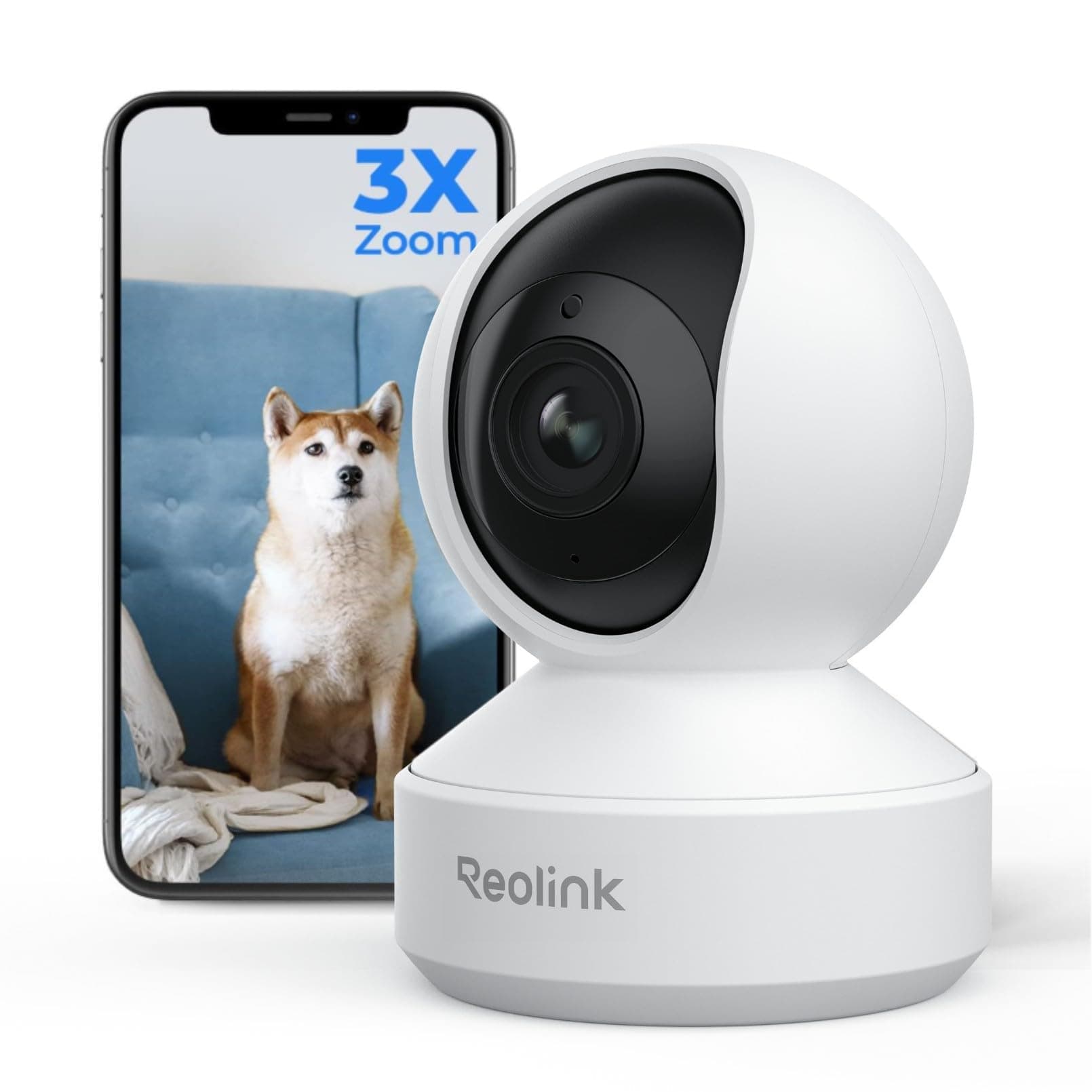
🔒 Elevate your home security with crystal-clear zoom and smart tracking—because your peace of mind deserves the best.
The Reolink 4K Indoor Camera E1 Zoom delivers professional-grade home surveillance with ultra-high-definition 8MP video, 3X optical zoom, and advanced night color vision. Featuring smart pan, tilt, and auto-tracking for humans and pets, it ensures comprehensive 360° coverage. Dual-band WiFi 6 and Bluetooth setup guarantee fast, reliable connectivity, while multiple storage options provide flexible, subscription-free recording. Designed for easy installation and seamless app control, this camera is the ultimate choice for modern, tech-savvy households.








| ASIN | B07K7HPCVJ |
| Alert Type | Motion Only |
| Antenna Location | Indoor Security |
| Batteries are Required | No |
| Best Sellers Rank | 4,972 in Electronics & Photo ( See Top 100 in Electronics & Photo ) 87 in Dome Cameras |
| Brand | Reolink |
| Colour | White |
| Compatible Devices | iPhone, iPad, Android Phone, Windows PC, Mac PC |
| Connectivity Protocol | Wi-Fi |
| Control Method | App |
| Controller Type | Amazon Alexa, Google Assistant |
| Country of Origin | China |
| Customer Reviews | 4.1 4.1 out of 5 stars (6,921) |
| EU Spare Part Availability Duration | 2 Years |
| Effective Still Resolution | 8.00 |
| Effective Video Resolution | 5 MP |
| Focus Type | Auto Focus |
| Form Factor | Wall Mount, Ceiling Mount |
| Frame Rate | 20fps (Default: 15fps) |
| Included Components | Reolink E1 Zoom, Power Adapter, Mounting Plate, Reset Needle, Mounting Hole Template, Quick Start Guide, Pack of Screws, Surveillance Card |
| Indoor Outdoor Usage | Indoor |
| Installation Type | Surface-Mounted |
| Item Dimensions | 11.1 x 8 x 7.3 centimetres |
| Item Type Name | E1 Zoom |
| Item Weight | 300 Grams |
| Light Source | Infrared |
| Manufacturer | Reolink |
| Manufacturer Warranty Description | Reolink provides 2 years’ limited warranty. |
| Material | Plastic |
| Model Name | E1 Zoom |
| Model Number | E1 Zoom |
| Mount Type | Surface Mount |
| Network Connectivity Technology | Wired |
| Night Vision | Night Color |
| Night Vision Range | 40 Feet |
| Number of Channels | 2 |
| Number of IR LEDs | 10 |
| Number of Items | 1 |
| Optical Zoom | 3 x |
| Other Special Features of the Product | 4K UHD, 2.4/5GHz Dual-Band WiFi 6, 3X Optical Zoom |
| Photo Sensor Technology | CMOS |
| Power source | Corded Electric |
| Rear Webcam Resolution | 5 MP |
| Room Type | Bedroom, Kitchen, Living Room, Office, Playroom |
| Shape | Round |
| Unit Count | 1.0 Count |
| Usage | Inside |
| Video Capture Format | MP4 |
| Video Capture Resolution | 4k |
| Video Encoding Format | H.265 |
| Viewing Angle | 98 Degrees |
| Voltage | 5 Volts |
| Water Resistance Level | Not Water Resistant |
| Waterproof Rating | nicht wasserdicht |
| Wattage | 6 watts |
| Wireless Technology Type | Wi-Fi |
| Zoom Ratio | 3X Zoom |
| Zoom Type | Optical Zoom |
S**G
Good camera
I've had several brands of IP cam in the past, each one with its own issues such as poor build quality, horrific setup and poor support. I've always managed to get them working but I pitied anyone going through the same experience if they didn't have a background in IT. Now the Reolink E1 Zoom. Must haves for me were good image quality, email and FTP support, and no sneaky tie-in to subscription services. Oh and easy remote access. It ticks all those boxes. I have had to contact support to discuss HTTPS browser niggles but they were responsive and I feel assured if anything more serious needs discussing they are there to help, which is more than can be said for some of the cams I've had in the past where support has been non-existent, even if you use the documented routes. For some reason 1 of my cams put up a small fight during initial setup, but that was sorted with a little perseverance. On top of the features I really needed, other details are handy and easy to configure. I've seen comments about poor picture quality but that's not what I have experienced. There are options to calibrate and focus, as well as image quality settings via browser or app (Windows or iOS) I've not even bothered with night mode and IR as I am getting decent colour images at night in daytime mode. Main use is via internal positioning to monitor car and driveway, and it's all good. I'm now making more use of tracking function and it seems pretty decent too. In terms of design it is a tidy unit, and doesn't even have an ugly Wi-Fi antenna as my previous cams have had, so it's a single cable install for power only. Only disappointment is that unlike other Reolink cams, there is no power extension cable available, and whilst the standard cable is decent length it would be good if they sorted that out. I've not made use of audio functions so can't comment on that, but all in all I am pleased, so much so, that I bought another.
J**D
Best WiFi camera I’ve had
Needed a decent camera to use as our baby monitor which we were watching via our phones and iPad I have tried eight or nine different cameras all of them claiming to be 1080p but in reality nothing like that when you actually set them up. If ever you tried to zoom in instantly you would see the blockiness and couldn’t really see the picture properly. Finally found this one with three times optical zoom and boy does that make a difference the picture without the zoom is a markable improvement on the other cameras we have tried including the ring indoor camera which I expected to be very good but it really wasn’t. With this camera having the added three times optical zoom feature I was really hoping that the picture quality zoomed in would be just as good And it didn’t let me down at all even fully sending the picture is still an amazing 1080p full HD allowing you to even examine your screen digitally picture still looking amazing. The build quality of the camera and the app that you use are both excellent & simple to set up. Certainly won’t be returning this camera as there are no other cameras on the market that do an optical zoom For anything like this price. This really is one amazing bit of kit and at an in believable price
P**R
Works well with a few niggles worth knowing about.
The camera was very easy to set up out of the box, with the app, even if it was extremely loud in shouting out setup instructions, in various languages before I could get logged in and get it to shut up. Don't try and set this up initially near a sleeping baby (or anyone else that is sleeping for that matter). I wanted to set this up with for directly accessing with RTSP streams on Linux/open source tooling and my heart initially sank with reading initial online documents suggesting this was not possible. Luckily it is absolutely possible, but I had to do a lot of manual playing around before I could get it to work. I will have to write a tutorial/blog post on doing this, but I'm sure that even if I do, the APP interface will likely have changed again, rendering my instructions out of date. Just know that at the current time, you can enable HTTP/HTTPS/RTMP/ONVIF, and then you can acccess it through your web browser or ONVIF client. I found that I had to reboot it after having enabled these, for these to become accessible. It is also good to look up the IP address from directly within the app, and use that for your browser. Somehow I was getting it wrong with my nmap scans but that may just be user error. The optical zoom is dead useful, but less than I had thought it would be. I was disappointed that it did not have a traditional thread-screw on the bottom so I could use some of the mounts I have around the house. In the end, I ordered some reolink-specific mounts off of amazon, and will then screw those into some wood to get the desired effect. I find that I need the mounts, in order to be able to tilt the camera down enough. The pan/tilt covers most angles well, but it does not want to face down much, which is exactly what I need for looking down on the baby in his cot. In the meantime, I just put a thin instruction booklet/leaflet under one side of the base to tilt it enough for what I need. Overall a great camera that is "open" enough for what I need. It would be great if it had a base screw to easily mount it, if it was a bit cheaper, and if the optical zoom zoomed in a little more, but you can't have everything.
M**N
Excellent and highly recomend
Absolutely brilliant piece of equipment Day and night modes excellent clarity. Beats doorbell cams any day Use it to watch over my cars from inside.
H**.
Great camera! Easy to install and it does the job very well!!!!
M**S
Una cámara muy buena. El zoom se agradece. La app es la que más me gusta. En mi opinión, mejor que las Tappo. Funciona perfecta con Home Assistant en local y una cosa que me gusta, a diferencia de la Tappo C320ws, es que cuando conectas a la cam con la app, no se va la conexión desde Home Assistant. La única pega es que la calidad se paga.
M**E
La Reolink E1 Zoom s’est imposée comme un élément clé de mon système de sécurité à la maison. Grâce à sa qualité vidéo 4K ultra-nette, même en vision nocturne ou couleur, elle capture chaque détail avec une précision impressionnante, ce qui est indispensable pour une surveillance efficace. Pour éviter tout risque de brouillage en cas de tentative d’intrusion, je l’ai connectée en RJ45 à mon NVR Reolink, garantissant une stabilité et une sécurité optimales, bien loin des vulnérabilités du Wi-Fi. Ce qui la rend encore plus puissante, c’est son intégration parfaite avec Home Assistant. J’ai configuré un scénario complet : en appuyant sur un seul bouton "Sécurité Maison", j'active l’alarme instantanément, toutes les caméras (dont la E1 Zoom) passent en mode enregistrement continu, et le simulateur de présence active les lumières et la télévision pour tromper d’éventuels cambrioleurs. Avec la détection intelligente, capable de faire la différence entre humains, animaux et objets, élimine les fausses alertes et rend le système encore plus fiable. Enfin, son audio bidirectionnel permet d’intervenir à distance, que ce soit pour rassurer un proche ou dissuader un intrus. Avec un design discret, une application mobile intuitive et des options de stockage flexibles (NVR, microSD, cloud ou NAS), cette caméra est un investissement incontournable pour une sécurité proactive, automatisée et sans faille. Je la recommande sans hésiter !
F**E
This is just the perfect price/quality indoor camera. It has pan, tilt, zoom and a lot of cool features. It integrates with Home Assistant without effort. Mine is wired to a router so I'm not using the wifi functionality. The app is easy to install and takes care of everything. You can set alarm schedules and it has different alarm functions. Just what I was looking for, for my living room!
M**.
Wir haben die Überwachungskamera TP-Link Tapo C200 genutzt. Hatte diese über MotionEye in ioBroker integriert und als Babyphone genutzt. Hierzu ist gesagt, wir haben die Fritzbox genutzt um die Kameras nur intern zu nutzen, dank der einfachen Sperrfunktion in der Fritzbox kein Problem. Die Qualität war ok, aber mich stört immer, dass man im Tablet im Fullybrowser zoomen musste, und dennoch kaum was erkannt hat. Daher habe ich mich etwas umgesehen, und gerade die Reolink Kameras sind scheinbar im Bereich Smarthome in der Community sehr beliebt. Und siehe da, ich habe auch noch welche mit Zoom Funktion gefunden, und nicht einfachen Zoom, nein optischen, der ja bekanntlich wesentlich besser ist. Also bestellt und erfreulich empfangen. Ordentlich verpackt, Stecker als Adapter, einmal für den Normalo in Deutschland mit Schuko und einmal den amerikanischen Stecker. Ausgepackt und als solide empfunden. Das schöne, die Halterungen sind dabei, die Kabel sind in Weiß, macht sich also besser an einer weißen Wand. Wie dem auch sei, das absolute "Highlight", ich kann die bereits vorhandenen Halter der TP Link C200 Kameras weiterhin nutzen, danke, dass es eine Norm gibt ;) Kommen wir zum einrichten, wer eine SD Karte nutzen möchte, findet den Schacht in der Kamera unterhalb der Linse, notfalls muss man die Kamera manuell oder via App nach oben richten, sodass man den Einschub nutzen kann und eine SD Karte einfügt. Für mich unnötig, daher kann ich das Erkennen und Einrichten einer SD Karte hier nicht beurteilen, jedoch wird diese sicherlich genauso hervorragend sein, wie bei der TP Link Kamera. Über die App wird die Kamera angelernt. Dafür hält man das Handy beim Einrichten mit der Kamera in Richtung Kameraboden, sodass der QR Code hier eingescannt wird. Und natürlich sollte die Kamera angeschlossen sein. Das Einrichten klappte bei der ersten Kamera problemlos, WLAN verbinden und ab dafür. Bei der zweiten, hat sich die Kamera nicht so wirklich weiter bewegen wollen, hat sich zwar verbunden, und hier kommen wir gleich zum einzigen NEGATIVEN Teil. Aber die Initialisierung begann einfach nicht, bei der man ein Passwort für den Zugang zur Kamera vergeben muss. Nachdem die Initialisierung durch ist, kann man in den Einstellungen der Kamera noch diverses Feintuning betreiben, die Qualität des Streams ist bereits auf die höchste Stufe gestellt, hier kann man zwischen zwei Modi wählen, Flüssig und besonders Detailreich. Das sind dann auch die beiden verschiedenen RTSP Streams. Ich nutze aber durchweg nur die beste Qualität, da man auf dem "Babyphone" Marke Eigenbau, gerne alles genau erkennt. Kurze Rede und langer Sinn, Hier kann man nun auch die Kamera in den Einstellungen drehen, also das Bild, sofern man die Kamera nämlich an der Decke hängt. FTP Upload einrichten, bzw. abschalten, ist standardmäßig aktiv, genauso wie der Bewegungsmelder und dazugehörige Info als Push Benachrichtung sowie E-Mail Benachrichtigungen können hier eingerichtet werden. Das Bild... klasse, was mich nur wundert, wenn man die Kamera im Schwenkmodus nutzt, um die Position zu erhaschen, gibt es den Punkt daneben mit Zoom, sehr nice, fokusiert an sich dann auch automatisch, der Zoom wird über einen Schieberegler eingestellt, wobei bei 3 fach optischem Zoom, hätte ich eher gedacht, direkt 3 Stufen zu finden, die man auswählt. Genauso gibt es hier noch den Punkt Fokus, den kann man ebenfalls einstellen, wieso und weshalb? Keine Ahnung, mit dem Regler ist es nicht einfach, den richtigen Fokus zu bekommen, und dann auf automatisch kann man nicht wechseln, außer man zoomt noch einmal heraus und wieder rein. Wenn die Kamera eingerichtet ist, ist man wirklich mehr als positiv erstaunt, wie gut das Bild ist, wieviel man erkennt und wie gestochen scharf das Bild ist. Nun einmal zum absoluten DESASTER und negativem Aspekt! Beim einrichten, spricht die Kamera mit einem. Aber nicht mal ebend, nein penetrant, laut, wirklich laut, und dann nicht nur einmal mit der Info, hey, ich bin bereit, nein, die wiederholt sich, bis die Einrichtung beendet wurde. Es gibt bei der App immer die Abfrage, haben Sie die Nachricht gehört, ich hätte mir gewünscht, beim Tippen auf ja, dass die dann zumindest für diese Phase aufhört zu labern. Insbesondere bei der zweiten Kamera, wollte die Kamera nicht initialisieren, sodass mir die nette Stimme ächzend ständig sagte, dass diese mit dem WLAN verbunden sei. Hab die App daraufhin geschlossen, sodass mich die App zum Punkt Initialisierung direkt gebracht hat, sodass ich nur noch das PW für die Kamera vergeben musste, und gut war. Alles weitere mit MotionEye, ist wie gehabt, man trägt ip_address:554/h264Preview_01_main inklusive Passwort und Nutzer ein, eh voilá die Kamera ist nun bereit für den RTSP Stream. Wer eine gute Kamera sucht, mit WLAN, hier wird nicht nur 2,4 GHz sondern auch direkt 5 GHz genutzt, der hat hiermit eine wundervolle Wahl getroffen. Kostet ein paar Euronen mehr, aber, die Bildqualität überzeugt, der Zoom, ist klasse, und was ich noch nicht erwähnt habe, man kann auch die Tonaufnahme und Übertragung deaktivieren, aber noch besser, es gibt die Möglichkeit Zonen zu deklarieren, die man nicht aufnimmt. Die verdunkelt werden, wirklich coole Lösung. Würde ich, sofern ich noch mehr Kameras bräuchte auch wieder kaufen.
Trustpilot
3 weeks ago
2 days ago