


Desertcart purchases this item on your behalf and handles shipping, customs, and support to Iceland.
💼 Power up your productivity and play with Toshiba’s sleek 4TB powerhouse!
The Toshiba Canvio Basics 4TB Portable External Hard Drive offers a robust 4TB capacity with USB 3.2 Gen 1 interface for ultra-fast data transfers. Its compact 2.5-inch matte black design is USB-powered and compatible with Windows PCs as well as Xbox One and PS4 consoles, making it the perfect storage solution for professionals and gamers alike.
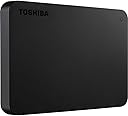


| ASIN | B07KPM58FX |
| Best Sellers Rank | 88,050 in Computers & Accessories ( See Top 100 in Computers & Accessories ) 280 in External Hard Drives |
| Box Contents | Canvio Basics,USB 3.0 cable (Type A to Micro-B),User‘s manual (pre-installed on the hard drive) |
| Brand | Toshiba |
| Brand Name | Toshiba |
| Cache Memory Installed Size | 512 |
| Color | 4TB |
| Compatible Devices | Desktop, Gaming Console |
| Compatible Video Game Console Models | Sony PlayStation 4 |
| Connectivity technology | USB |
| Customer Package Type | Standard packaging |
| Customer Reviews | 4.6 out of 5 stars 13,900 Reviews |
| Data Transfer Rate | 5000 Gigabits Per Second |
| Digital Storage Capacity | 4000 GB |
| Digital storage capacity | 4000 GB |
| Enclosure Material | Aluminum/Glass |
| Form Factor | 2.5-inch |
| Global Trade Identification Number | 04260557510780 |
| Hard Disk Description | Mechanical Hard Disk |
| Hard Disk Form Factor | 2.5 Inches |
| Hard Disk Interface | USB 3.0 |
| Hard Disk Rotational Speed | 7200 RPM |
| Hard disk form factor | 2.5 Inches |
| Hard disk interface | USB 3.0 |
| Hard-Drive Size | 4000 GB |
| Hardware Connectivity | Thunderbolt, USB, USB 3.0 |
| Installation Type | External Hard Drive |
| Item Dimensions L x W x Thickness | 10.9L x 7.8W x 2Th centimetres |
| Item Type Name | Toshiba Canvio Basics 4TB external hard drive 6.35cm (2.5") USB 3.2 Gen 1 (USB 3.0) Matt Black |
| Item Weight | 217.5 Grams |
| Manufacturer | Toshiba |
| Manufacturer Part Number | HDTB440EK3CA |
| Media Speed | 5 |
| Model Name | HDTB440EK3CA |
| Model Number | HDTB440EK3CA |
| Network Connectivity Technology | USB |
| Number of Items | 1 |
| Product Features | Portable |
| Product Warranty | 24 months |
| Read Speed | 540 Megabytes Per Second |
| Special feature | Portable |
| Specific Uses For Product | Personal |
| Unit Count | 1.0 count |
M**D
Playstation 4 & 5 Compatable!
UPDATE: Still using this drive and has been reliable and a great buy from Amazon. Recently after receiving a VIP code for a PlayStation 5 I sold my PlayStation 4 and now on the latest gen. I hooked everything up the same but this time you want to plug the Toshiba hard drive to the back of the PlayStation 5 as it has x2 USB 3.0 ports. I’ve copied some games to it and it’s still been fine and have been running PlayStation 4 games on it such as Wolfenstein Alt Collection, Tony Hawks Pro Skater 1 & 2, Serious Sam etc and has worked flawlessly. This drive will also store your PlayStation 5 games on it but won’t be able to run them as it’s not a SSD so not compatible for that but for storage and being able to run those PlayStation 4 Disc and Digital games it’s still a top gem. At the end of the day it’s an external hard drive and like any other 3.0 with a usb they will work for Playstation or Xbox. If they have their own format tool which they do you won’t have any problems. The first thing that comes up once you’ve connected it and powered on the console a message saying “Not Compatable”. Well it actually is it’s just that it’s not formatted and more like it’s been pre formatted to NTFS which is what windows use. Once you have formatted it, it takes literally seconds that’s it. Once you go to your system settings scroll down to Devices, USB Storage Devices, External USB 3.0 Toshiba. There it will ask you to format to an extended storage. Please note, once you have done this the preferred drive will be the external one, I’d suggest to use the internal hard drive for main storage as it will be more cooled from the fan inside the console. If you have say The Last Of Us which is about 50GB move that over to the external drive as there isn’t anymore updates for that game now. While on the subject keep games like Red Dead Redemption 2 on the main drive I only say as with new games your going to get a lot of updates like still Grand Theft Auto 5 and running the external drive constantly with the updates ploughing at it every day or so wouldn’t be good for it. I haven’t tried any of the games running off it yet but from what I read online they run faster apparently. I would recommend a 4TB hard drive as after the format with the systems own volume putting its own data on your left with about 3.5TB
C**E
The Best of the Best
The Best of the Best I was looking for really big space as my laptop has been having a lot of issues lately and i wanted to back-up everything in one place (especially my university work). I wanted something durable that could last me for years. I've found it! and i don't have to look any further! This is a really nice External Hard Drive, it's really sturdy and nice, and surprising how light this thing is considering how much space it holds (I bought the 4TB)! It's really easy to use, you just plug it in, and you can drag and drop or copy and paste your things over! I highly recommend purchasing this! Plus, 4TB is going to last me a very long time, i don't see myself using that much space anytime soon, so it's definitely getting its money worth out of it. It came packaged really well! I've added an image to this review to show that and it also comes with its own 3.0 USB cable. It is indeed quite short, but this isn't a problem for me as I need it at home more than out and about, it's perfect length for being stationary/having it next to your computer/whatever you're using it on. I haven't taken it out anywhere yet (portable wise), but it's quite small so no doubt it could fit in a small bag/deep pockets! The delivery was extremely speedy as well - it arrived 4-5 days earlier than it was meant to! It looks exactly like the pictures shown and has a lovely blue light when connected to your device, it flashes when things are being transferred, which i think is great. Overall, I am extremely happy with my purchase and I definitely recommend buying. Thank you Toshiba for such a wonderful product!
D**K
It just works
I've got three of the 4TB drives now. One of them I use to back-up my files on the others. ALWAYS BACKUP TO MORE THAN ONE DEVICE! If your files exist in just one place then they are at risk no matter what the storage system is. Anyway, I've found this to be a very simple storage system. Just plugged it into my PC and use it just like any other drive. It's quiet, fast and so far I've had no problems with any of them I've bought or the files I've stored on them. Being so small it's very easy to transport and the case feels solid and durable, though obviously it's not a good idea to bang it about. The drive comes with a standard 3.0 USB cable which should be sufficient for most usage. I've not rated the Tech Support option simply because I haven't needed to use them. Very happy with my Canvios and I can strongly recommend them.
S**N
Great HDD, just not as a working drive.
A nice high capacity portable drive. It’s built fairly solid and I’ve had no issues with its performance or build quality so far. My only gripe is that the drive will put itself to sleep after a short while if not used. This is built into the drive and cannot be turned off. It only takes a few seconds for it to spin back up, but it’s frustrating when working from the drive if you have to wait a couple of seconds for video playback to start, etc, and only serves to add more time to the already tedious process of video editing when working from the drive. It also means the drive might go to sleep and interrupt a process if left unattended whilst doing a background process like generating proxies or rendering. MacOS already has the option to put drives to sleep when not in use, and I’m sure Windows will have a similar option too, so I’m not sure why Toshiba built this into the drive.
C**D
Large and cheap for USB-A devices
This drive is now attached to an Apple AirPort Extreme Router and handles all my Mac backups automatically and reliably. This hard drive has a USB-A connector instead of the more modern USB-C which is useless if you try to plug it into a USB-A device! Something to look out for. It works with no problems, power comes from the router so just one cable. The router only supports two TB partitions, so you need to partition the drive into 2 x 2TB before you can use it for this purpose. The price is below 2 pence per Gigabyte, so no complaints at all.
R**J
Toshiba 4TB external HDD
A little bit on the bulky side but I wouldn't buy any other type of HDD as others that I've had have been rubbish, & as I'm running out of space on my 2TB HD I've just bought this 4TB HD & when I've got some extra cash I'll get another one as a backup you just can't beat the reliability of TOSHIBA & as I've got years of digital downloads some of which you can't get anymore so I need something that's going to last & be reliable that's why I've gone for another TOSHIBA, it's also fast at transferring data & it doesn't get over heated if your using it all the time when connected to your TV with my computer I use a cooling fan just to be safe EXCELLENT PRODUCT 10 OUT OF 10.
D**S
Good Quality Portable Drive but some strange reviews?
I have bought four of these Toshiba drives of varying capacities, this latest one being 4TB. I have one that has failed, I used it as a TV backup and it functioned perfectly but I hardly use it so I disconnected it to use as as PC backup instead but Windows or iOS doesn't recognise it. My guess is that the TV formatted it as an Android device and Windows doesn't recognise the Android formatting, it doesn't appear in Explorer so I can't reformat it as FAT or NTFS so that's my fault not the disc. I am puzzled by some of the scathing poor reviews of this and other brands like Western Digital and Seagate which have always been good brand names? It leads me to suspect they may be 'fake' reviews for whatever purpose maybe to steer people to other products? All I can say is that the Toshiba ones are first class.
C**R
Superb support from Toshiba!
Due to my ineptitude, while tinkering with the partitions on this hard disk drive I managed to 'brick' the drive - to the extent that it wasn't displayed as a new drive when plugged into a USB port. Fearing the worst, I phoned the hotline at Toshiba Storage Solutions, fully expecting a barrage of keypad menus and hours of muzak before perhaps finally reaching a human who could help. Imagine my surprise, therefore, when within three seconds I got through directly to an extremely pleasant, knowledgeable and good-humoured Toshiba technician in Germany. He patiently guided me through the steps needed to resuscitate the drive and also offered some very useful tips. I cannot recommend the support I received highly enough. Given that Toshiba drives are similar in price to those of other major manufacturers, it's worth purchasing one simply because, should you ever need it, their support is superb.
J**K
good
no problem so far
P**P
Exzellente Speicherlösung für Unterwegs: Canvio Basics 4TB
Ich habe kürzlich die externe Festplatte Canvio Basics 2.5 4TB USB 3.0 erworben und bin von ihrer Leistung und Zuverlässigkeit beeindruckt. Das schlanke, schwarze Design ist nicht nur optisch ansprechend, sondern auch besonders kompakt, was den Transport enorm erleichtert. Mit einer Speicherkapazität von 4TB bietet dieses Laufwerk ausreichend Platz für große Dateien, Filme, Fotos und vieles mehr. Die Schnittstelle USB 3.0 ermöglicht schnelle Datenübertragungsgeschwindigkeiten, was besonders beim Verschieben großer Datenmengen von Vorteil ist. Ich habe verschiedene Dateitypen übertragen und die Festplatte lief stets reibungslos und ohne Verzögerungen. Besonders hervorzuheben ist die Plug-and-Play-Funktionalität. Es ist keine Softwareinstallation notwendig, was die Verwendung unglaublich einfach macht. Einfach an einen PC oder Laptop anschließen und sofort mit der Datenübertragung beginnen. Zudem zeichnet sich die Canvio Basics durch ihre Zuverlässigkeit aus. Ich nutze sie regelmäßig für Backups und musste noch keine Probleme mit Datenverlust oder -korruption hinnehmen. Sie ist sowohl mit Windows als auch mit Mac kompatibel, was ihre Vielseitigkeit unterstreicht, obwohl möglicherweise eine Neuformatierung für die Verwendung mit Mac erforderlich ist. Abschließend kann ich sagen, dass die Canvio Basics 2.5 4TB USB 3.0 für jeden, der eine hochkapazitive, zuverlässige und benutzerfreundliche externe Festplatte sucht, eine ausgezeichnete Wahl ist. Sie bietet ein hervorragendes Preis-Leistungs-Verhältnis und erhält von mir uneingeschränkt 5 Sterne.
H**L
Kalitenin diğer adı
Güzel tavsiye ederim çok kaliteli ve çık hızlı
A**W
Developed the click of death
Worked fine as a backup then suddenly lost everything on it after only 8 months of little use. Has developed the click of death so will be going into the bin. The power port on these drive also tend to bend so will be looking for another brand in the future.
D**E
Disque dur externe
L'ordinateur l'a reconnu immédiatement, je n'ai jamais eu de problème avec
Trustpilot
1 month ago
1 day ago