💼 Unlock your digital archives and future-proof your workflow with the ultimate all-in-1 card reader!
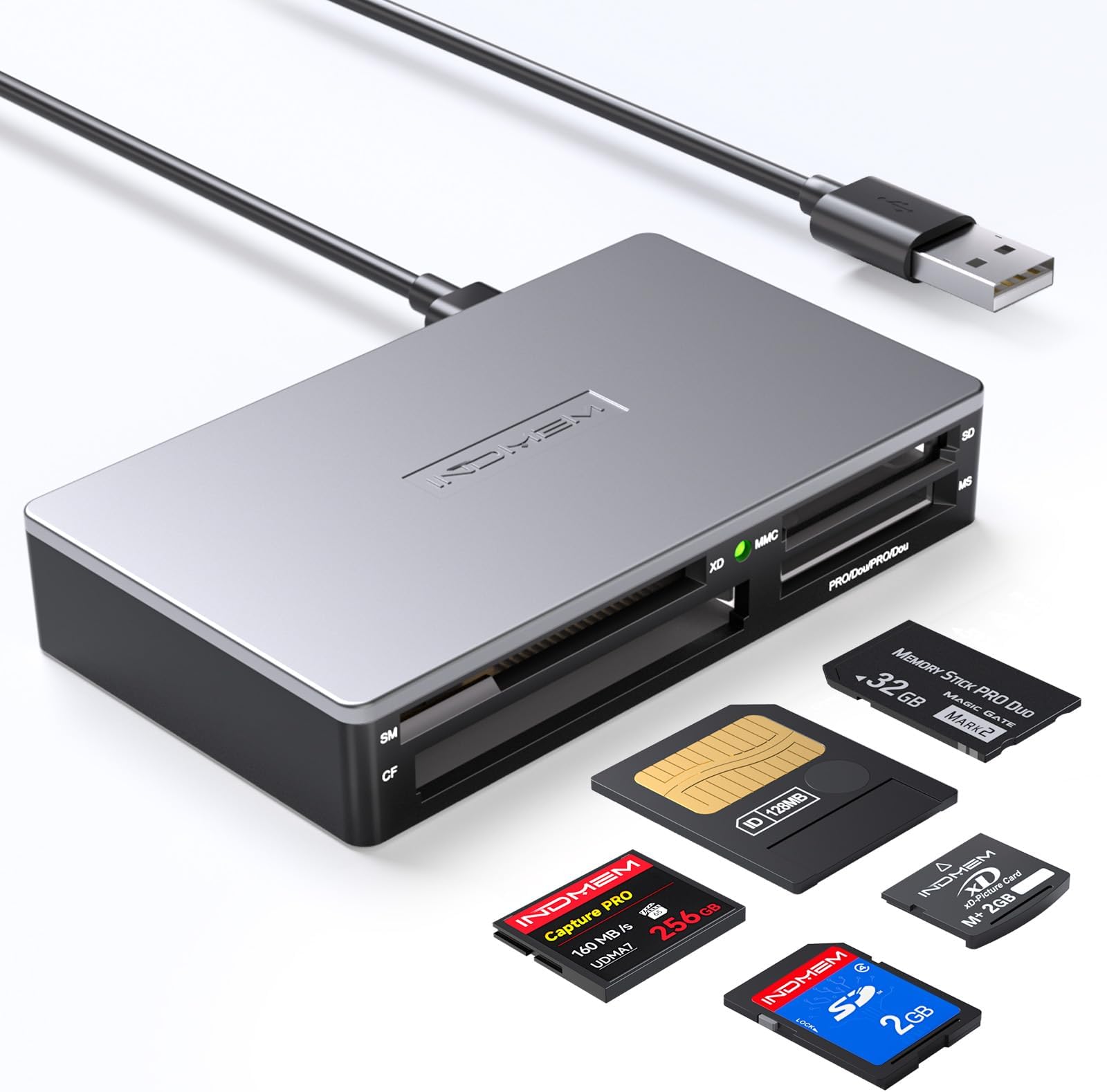
The INDMEM SmartMedia Card Reader Writer All-in-1 is a sleek, USB 2.0 powered multi-card adapter supporting over 17 memory card formats including legacy SmartMedia and modern SDXC. Compatible with Windows, Mac, and Linux, it offers plug-and-play ease with simultaneous multi-card reading and fast 480 Mbps data transfer speeds. Its compact design and broad compatibility make it an essential tool for professionals needing reliable, versatile media access anytime, anywhere.


| ASIN | B07J9WQGDX |
| Additional Features | Plug & Play |
| Best Sellers Rank | #185 in Computer Memory Card Readers |
| Brand | INDMEM |
| Color | Silver-17-in-1-S3 |
| Compatible Devices | Laptop, Personal Computer |
| Connectivity Technology | Micro USB, USB |
| Customer Reviews | 4.3 out of 5 stars 776 Reviews |
| Data Transfer Rate | 480 Megabits Per Second |
| Hardware Interface | USB 1.1, USB 2.0 |
| Item Dimensions L x W x H | 3.35"L x 1.97"W x 0.6"H |
| Manufacturer | IndMem |
| Media Type | CompactFlash, MMC, Memory Stick, Memory Stick Duo, Memory Stick Micro, Memory Stick PRO Duo, Memory Stick PRO HG Duo, Memory Stick Pro, RS-MMC, SD Card, SDHC, SDXC, UHS-1, microSD, microSDXC, miniSD, xD Picture Card Media Type CompactFlash, MMC, Memory Stick, Memory Stick Duo, Memory Stick Micro, Memory Stick PRO Duo, Memory Stick PRO HG Duo, Memory Stick Pro, RS-MMC, SD Card, SDHC, SDXC, UHS-1, microSD, microSDXC, miniSD, xD Picture Card See more |
| Model Name | All-in-1 |
| Operating System | Mac OS, Windows |
| Special Feature | Plug & Play |
| UPC | 723668025436 |
| Warranty Description | One-year manufacturer |
D**E
Works on a Mac. Read my 25-year-old SmartMedia cards that Olympus C-3000 itself couldn’t read.
My practice is to read the 1-star reviews before buying any product on Amazon. Seeing that there were 10% 1-star reviews for this reader was disconcerting. But, like many others, I had three SmartMedia cards left over from our first digital camera, an Olympus Camedia C-3000, and no way to read them. The camera itself could not read any of the cards, and its operating system offered to format them. I of course declined. In hopes that the problem was the camera rather than the SmartMedia cards, I searched for SmartMedia card readers on Amazon and found this one and another one by OneFavor. One reviewer of the OneFavor reader said it would not mount on a Mac. A reviewer (“Bushido”) for this INDMEM reader said it was the only one that worked on a Mac. So I took a chance on this one and it worked great! We were able to see photos we had not seen in 25 years, and download them to our MacBooks.
E**H
Great product.
Works great, needed to view photos on some CompactFlash & SmartMedia cards I found at my grandparents house. Was able to recover the photos perfectly!
R**T
Only SmartMedia Reader/Writer for W7
I spent a long time looking for a SmartMedia (SM) card reader, [not to be confused with a Smart card (SC) reader]. SmartMedia is a defunct card format from the early 2000's used in cameras and some Roland and Korg musical gear. The card readers available for SmartMedia are mostly old stock from that time with drivers for W98/2000 only, not compatible with W7 or newer. I initially passed on this one because it's overpriced, but it was the only reader/writer for SmartMedia I could find that is compatible with W7. So I ended up getting it. (PC Cables makes a SmartMedia reader compatible with W7 but it's not a writer and only reads SM and CF cards. That's the only other one I found.) Pros: Works with W7 Reads SmartMedia cards (and CF, SD formats) Writes to cards as well So far, it works Cons: Build quality is minimalist Does not come with a USB cable For the price point it should come with a cable to be stored with it, imo, and the build quality is lacking. It's very small, weighs nothing (i.e. doesn't appear the case will provide much protection), and the internal plastic guides that separate the bays appear fragile. In short, it does not inspire confidence in me that it will withstand the inserting and removing of card media for all that long before it breaks, but hope I am wrong. There are also no 'doors' on the bays, so the interfaces will be prone to accumulating dust if not kept in a case. I am grateful to have a SmartMedia reader/writer that works with W7, but this isn't an item you want to toss in a gear drawer or handle roughly. I put it in a snap-close plastic case (originally came with screws in it). It fits perfect and will protect it when not in use. And thankfully I won't have to read my SM card all that often. 5 stars for an SM reader/writer that works with W7 2 stars for poor build quality and lack of cable 1 star for being overpriced (for the build) = 3 stars overall
S**R
Works like it should.
It's hard to find smart card SM card reader. And this does them all , from the SM cards to SD cards, i have Keyboards and Sythesizers that uses the SM cards and it's frustrating to try and hook a computer up to one of these products to copy songs you have recorded on them, much easier to just pull the smart card insert into a laptop or desktop and copy paste instead of hours fighting the midi control sequencer on what channels are open and what channels are closed and inputs and outputs , it's always a hassle, this simplifies this problem and makes it easy. Plug and play easy.
B**O
The only SM memory card reader that works on an iMac
While housecleaning, I found an old Olympus digital camera which used Smart Media (SM) memory cards to store photos. In all I had three SM cards with old photos (~20 years ago), but no way to view the images or download to my computer. I searched on the internet and the Amazon site, but only could find this reader and the Sagem CF adapter. The Sagem didn't work for my iMac, but this one worked like a charm. As soon as I inserted the SM card, the external drive popped up on my desktop and I was able to view and download the long lost images. This reader is a little more expensive than most, but compared to the price of a commercial data recovery service, it was well worth it.
C**D
It simply did not work.
I bought this to use with microSD memory cards, and I was okay with putting such a card into an SD adapter to insert into the reader. A light on the reader came on when I plugged it in, but Windows couldn't tell what was there and could not find an appropriate driver, and Xubuntu couldn't seem to tell anything was there at all. In fairness, any link could break the chain of functionality, and such links include the cord, the card reader, the microSD-to-SD adapter, and the microSD card itself, and I didn't try a different cord following the initial failure. I couldn't get the manufacturer's website to come up (it was as though it simply didn't exist, though perhaps the manufacturer included a typo in the URL), so eventually I ordered a Kingston card reader, and after its arrival, I had much better luck.
P**T
So far so good, 3 different PCs and Windows versions, and 3 different card types!
I have tested this on my oldest card format, SmartMedia, from a circa 2000-2001 era Olympus D490Z digital camera. It reads those 8MB and 16MB cards just fine with photos dating back that long on them. Yes I back up all smart card photos to CD/DVD but I still want a universal reader. So far, all smart cards read well with this reader used from both older digital cameras and smart phones (SM, SDXC, Micro SDXC). I also checked all four last recent Windows releases for compatibility from Windows 11 to 10 to 8 to Vista between my desktops and laptops (yes I have an 8 and Vista laptop & PC used only offline as offline backup portals). I did have sporadic issues that were not exclusive to one machine where it would not read the USB reader when connected before inserting the media card. I'd get the Windows chime that a new drive was connected, but no new drive would pop up in Explorer nor would Windows even see it even though the powered green light was on the reader. However, *after* plugging in the reader to the computer and *then* inserting the card, the reader never failed to be recognized again. So try that before you think you have a bad/failing reader. All in all I'm happy we still have reader options out there for smart cards that are now a human generation old!
R**S
S card reader
Worked as advertised
Trustpilot
2 days ago
3 weeks ago