Buy anything from 5,000+ international stores. One checkout price. No surprise fees. Join 2M+ shoppers on Desertcart.
Desertcart purchases this item on your behalf and handles shipping, customs, and support to Iceland.
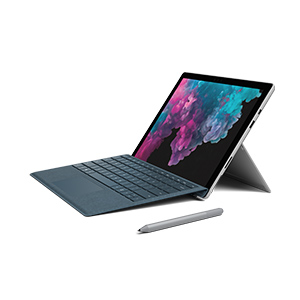
🚀 Surface Pro 6: Power, style, and freedom in one sleek package
The Microsoft Surface Pro 6 combines a powerful 8th Generation Intel Core i5 processor with 8GB RAM and 128GB SSD storage in an ultra-light 1.7-pound frame. Featuring a vibrant 12.3-inch PixelSense touchscreen with 2736x1824 resolution, it offers versatile laptop, tablet, and studio modes. With up to 13.5 hours of battery life and premium accessories like the Alcantara Type Cover and Surface Pen, it’s designed for professionals and creators who demand performance and portability on the go.


| ASIN | B07HZPCWD8 |
| Automatic Backup Software Included | Windows 10 Home |
| Battery Average Life Standby | 13.5 Hours |
| Battery Cell Type | Lithium Ion |
| Battery Life | 5 Hours |
| Best Sellers Rank | #389,303 in Electronics ( See Top 100 in Electronics ) #4,816 in Computer Tablets |
| Biometric Security Feature | Windows Hello face authentication |
| Bluetooth support? | Yes |
| Brand | Microsoft |
| Built-In Media | Device, PSU, QSG, Safety and Warranty documents |
| CPU Model | Core i5 8400T |
| CPU Model Number | Core i5 |
| CPU Model Speed Maximum | 4.6 GHz |
| Camera Description | video |
| Cellular Technology | 4G |
| Color | Platinum |
| Compatible Devices | Keyboards, Mice, Speakers, Headphones, External Displays |
| Connectivity Technology | Bluetooth |
| Control Method | Touch |
| Customer Reviews | 4.4 out of 5 stars 1,059 Reviews |
| Display Resolution Maximum | 2736x1824 Pixels |
| Display Technology | LCD |
| Display Type | LCD |
| Form Factor | Laptop |
| Global Trade Identification Number | 00889842369373 |
| Graphics Coprocessor | Intel UHD Graphics 620 |
| Graphics Description | Integrated |
| Graphics Ram Type | DDR3 SDRAM |
| Hard Disk Description | SSD |
| Hard Disk Size | 128 GB |
| Hard-Drive Size | 128 GB |
| Hardware Interface | USB |
| Human-Interface Input | Keyboard, Touchscreen |
| Item Dimensions L x W x Thickness | 11.5"L x 7.9"W x 0.33"Th |
| Item Type Name | Microsoft Surface Pro 6 (Intel Core i5, 8GB RAM, 128GB) - Newest Version |
| Item Weight | 1.71 Pounds |
| Lithium-Battery Energy Content | 46.5 Watt Hours |
| Manufacturer | Microsoft PC |
| Memory Clock Speed | 1866 MHz |
| Model Name | Surface Pro 6 |
| Model Number | LGP-00001 |
| Model Year | 2018 |
| Native Resolution | 2736 x 1824 pixels |
| Operating System | Windows 10 Home |
| Processor Brand | Intel |
| Processor Count | 4 |
| Processor Series | Core i5 8400T |
| Processor Speed | 1.3 GHz |
| RAM Memory Installed | 8 GB |
| RAM Memory Technology | LPDDR3 |
| RAM Type | DDR3 SDRAM |
| Ram Memory Maximum Size | 16 GB |
| Rear Facing Camera Photo Sensor Resolution | 8 MP |
| Screen Size | 12.3 Inches |
| Speaker Description | 1.6W stereo speakers with Dolby Audio Premium |
| Specific Uses For Product | personal, gaming, business |
| Total Usb Ports | 1 |
| UPC | 889842369373 |
| Unit Count | 1.0 Count |
| Video Processor | Intel |
| Voltage | 240 Volts |
| Warranty Description | 1-year warranty |
| Warranty Type | Limited |
| Wireless Compability | 802.11a, 802.11a/b/g/n, 802.11a/b/g/n/ac, 802.11abg |
| Wireless Technology | Wi-Fi |
J**M
The new i5 is amazing.
Edit after some hardcore use: I took my Surface Pro out to a client manufacturing facility (they make trucks) for a city water survey. I had it in a Moko case. I was absolutely blown away with a few aspects of this device. I was marking up a very large PDF, a layout of the entire building I was in, complete with all city water plumbing drawn. Zooming, panning, marking up, nothing ended up fazing this device performance wise. I used Drawboard PDF, which was exactly fit for my purpose. I was there surveying for 6 hours, no breaks and no charging. I ended up with 63% battery left! Amazing considering the workload(this was a LARGE PDF)! I really cannot say enough good things about this device. I ended up buying the Surface Pen and it is absolutely worth it over the Ciscle. I don't have a single complaint at the moment about this device. I highly recommend it. Original Review:--- I was debating between a new i5 Pro6 and a refurb i5 Pro 5, until I learned that the new i5 in the Pro 6 is a real 4 core 8 thread. I opted for the 6, and oh boy am I glad I did. Performance wise, it really is kind of amazing that a system this powerful can run on passive cooling. I have been mostly using the Surface to annotate PDFs of building blueprints using Drawboard. Zooming, panning, writing, all of it is as fluid as I could ask for, even on massive PDFs of entire factory buildings. Aesthetically, the Surface is a REALLY handsome device. Very pleasing to the eye, and very ergonomic as well. I love folding down into studio mode for drawing. Drawing is great. I opted for a cheap 3rd party pen(Ciscle), but I think I will probably buy a Surface Pen before too long. It is impressive how little lag there is for drawing, it really does feel very natural. I was debating long and hard with myself whether to get the Surface Pro 6, or just get a cheap windows tablet. 300% price difference, but I am absolutely, hands down glad I got the Pro. Awesome device.
S**D
The only Windows device you'll need!
Okay I may have been over-excited with the title but hear me out. I had SurfacePro 4, used it for over 2 years when suddenly I too was a victim of the "Surfacegate Scandal". It randomly just refused to boot up one day. Lost all my data. Wait. I didnt. Everything important was saved on my mounted SD card. Apparently its a big problem with that model. Anyway... I loved the versatility of the SurfacePro4 so much I immediately started saving up for the Surface Pro 6. Its not cheap. But it is beautiful, adaptable and just such a joy to use! Whens the last time using a gadget made you smile? (No, Rabbits dont count) I have the core i5, 8GB ram variant and it performs everything I throw at it with ease. I use it for photo-editing (Gimp), MS Office, website creation, web browsing, Youtube, movies, music and some light gaming (Hitman absolution). Not once has it stuttered. The pen is a must have if you're into sketching and all that. I personally use it for signatures and marking out points in emails and photos. Pros: - Very responsive screen - Speakers have excellent clarity - Great battery Life (I get over 6 hours with light-moderate use) - Lovely build quality (tho get a cover for it if you want to prevent scratches) - Great functionality in either tablet or laptop mode Cons: - From a physical perspective, its not easy to hold as tablet in one hand, unless you have a case with the strap (Check Targus and Joy) - Lack of connection ports (Only one usb 3.0 port and a mini display port), why guys, whyyy? - The kick stand is great, however its sort of sharp if you use it on your lap while wearing shorts. Overall, great 2in1 device for work and media consumption on the go.
M**B
Nice little machine...
Review written after a weekend of use... purchased following a fair amount of research. So far, lots of pleasant surprises with this machine. First was how quickly it came! One recommendation: shop carefully. I found it significantly cheaper to purchase the keyboard separately rather than in a "bundle." (The keyboard actually arrived a day before the Surface Pro.) Most of my work is done on a desktop, the Pro will be a traveling device and is an upgrade from a similar but much cheaper (smaller and slower) device. So far, I'm favorably impressed. It's fast when turned on and quite responsive. One caution is that the keyboard connection is not particularly solid--once while moving everything, the tablet actually fell off the keyboard. I won't say that I've used it enough to give a concrete review but it does seem like a good compromise between a laptop and a tablet. One pleasant surprise is that it appears possible to create a wireless connection between it and a projector/display with the purchase of the proper adaptor--I knew I'd need an adaptor but didn't realize there could be a wireless connection. Like a Barbie Doll, it's possible to spend a lot on accessories. Microsoft doesn't (or at least I couldn't find) provide a lot of helpful information for shoppers, so it can be hard to know if you're making good decisions regarding memory, etc. (The closest bricks and mortar store for me is three hours away.) I find myself wondering if a day trip would have been worth it--if only to confirm that I was making good choices. So far, so good!
K**N
A perfect hybrid, designed for convenience
I haven't had a need for a full PC in years. I rarely do anything interesting in my leisure computing. I was compelled to buy a Surface Pro when I needed to do tasks outside my work computer that couldn't be fulfilled by my Samsung tablet. I'm pleasantly impressed by this machine. It's the perfect hybrid -- extremely lightweight, highly portable but capable of doing all those things that lazy developers haven't brought to the tablet universe yet. I'm totally sold. I really love this design. It was a bit of an investment (~$1k with the keyboard accessory) but the sting eases as you use it. It's a powerful little travel companion, keeping me well connected on the road. I'll admit. It's not the fanciest machine or the heaviest duty processor but it's a good household machine for when you want some distance to have hobbies outside of your work life. (Admit it. You're using your work computer to read this review...) Plus these days if you really need advanced compute, you can use an AWS workspace to spin up the right machine for that specific task and spin it down. Overall, I'm converted. I can't imagine not having this machine in my arsenal. I feel like a wizard. I'm much more organized and productive having a machine that's capable of being both a tablet and a legitimate PC. Huge win in my book.
N**E
Nice device! With an update 2 years later.
I needed to replace my ipad as it was so old it couldn't take any more upgrades. Although I loved the ipad's functionality, I wanted the ability to save word & excel files. I also wanted something with a USB port. After much research, I went with this device. It is lightweight like a tablet but has the full functionality of a laptop. Although the touch screen works well, I highly recommend getting the keyboard attachment if you are going to do some work with word documents and spreadsheets. Kind of expensive, but video and audio quality is extremely good. Overall, I'm very happy with the purchase. 2022 UPDATE: Still one of the best laptops I've had throughout my career. I LOVE It!! One exception, however, the power cord died (THE POWER CORD?!?!?! Yes, the power cord!) At first, I thought it was my electrical outlet or I had not plugged it in correctly as the issue seemed to be intermittent. Who ever heard of a power cord going bad?!?! Well, it did and I had to replace it...to the tune of about $100. There were less expensive non brand name cords available, but I was reading some reviews that spoke of fire hazards. Not a chance I want to take so I broke down and bought one directly from Microsoft. Still love my Surface Pro, but I was very disappointed with the power cord going bad after a relatively short period of time. I hope they have since made improvements.
B**.
It's called surface for a reason
This is a solid performer hardware-wise. A truly impressive piece of tech. But not truly useful. First of all, FU Microsoft forcing me to pay $200 extra for an awkward, uncomfortable, poor quality keyboard. The pen is great, kinda... if you use it yes. If you use it rarely, it's just a very expensive thing to rattle around in your laptop bag. Which AGAIN, you have to pay extra for. Ok so, as a tablet it is awesome... right? Yes, right... as a tablet. Not a Windows computer. In tablet mode, so many websites would not scroll for some reason. So many programs were useless because they're not designed for touch. One very notable case being Adobe. The entire Adobe suite pretty much requires a mouse and keyboard to use effectively. Yes, Adobe has touch versions of some programs, but you don't need a $1500 tablet if you're gonna use those. Yes, some Adobe programs, like Indesign have touch modes, but... who uses Indesign? Photoshop and Premier suck on touch, and they're really everything people use. So it's a good laptop! Yes, correct it is a excellent performing laptop. But is a useless laptop. You can't use it on your any better than you can eat dinner while balancing your plate on one finger. The the back stand and afore mentioned overpriced keyboard is. I'll spare you the list of ways you cannot use it and just say, on a table is the only way you will. Needless to say, I returned it and I spent 1/4 the cost on an ultra-thin convertible and SO MUCH BETTER at being a laptop and being a tablet. I will give MS credit. What they packed into that device is freaking groundbreaking. But like a massive mandangle, impressive does not automatically mean useful. The weird thing is they actually made an ultra-thin laptop version of the surface, but the neutered performance for some odd reason so it can't even compete with other u-thins in it's price range.
D**O
Great for illustrating
I use this tablet for illustration. It is by far the best system I’ve used for drawing. It’s responsive and feels very natural. My biggest gripe so far is the onscreen keyboard. It sucks, and since this is running full blown windows you really need a decent keyboard to work fluidly. Fortunately this is an easy fix since any keyboard can be plugged in to the usb. I had an old wireless keyboard/mouse combo that works great The software available for pc is substantial compared to Mac, but this is actually not a big deal. Most of the best programs are on both systems. The pin is were the real magic happens. The Apple pin has an all plastic tip which feels terrible for drawing. The rubber tip on the surface pin is perfect and actually feels like drawing on paper (sort of). It’s other features work flawlessly as well. There are cheap knockoff pens available but the surface pin is far superior. I’ve used Wacom and iPads in the past but am definitely sticking with the surface pro. If all it did was run my drawing programs I’d be happy. And then it’s a fully functioning pc. The future is now :)
J**O
Very productive
I will point out some minor things first: for Google websites, like Google docs, Google Sheets, it can take a while to load up first and their websites are not so touch-friendly, plus there is a lack of official Google apps in the store, take note if you rely on those heavily. (I bet my device this is because Google wants to promote their Chrome OS) Bring the charger with you if you plan on using it for like 8 hours because without power save (which can affect you performance and touchscreen) it wouldn't last so long. I would say that is understandable consider how much stuff is already packed in this device. Plus the charger is really mobile device charger weight. But besides all those, it's indeed a 2-in-1 that packs all the functions of a laptop in a tablet weight device, I can run all my apps (like MATLAB, mingw) and do some painting (with clipstudio) with this thing. It makes my works seem more fun than they were. It feels like my productivity improved. For the entire week I spent more time concentrated in my work and didn't touch my other laptop at all. I wouldn't say it is the best device yet to exist, but it is definitely one of the best things our current consumer technology can offer.
J**R
Excelente compra
Hasta el momento (dos meses) todo perfecto. Tuve la Surface Pro 4, y esta versión me está dando un rendimiento similar. No ha presentado fallas ni ningún inconveniente.
B**H
Good
Good product , too costly,not fast enough Should have given keyboard and pen as a bundle then might be appropriate for the price...
Z**P
Lightweight and practical
I was looking for a laptop that wouldn't be too heavy to be lugging around at university, but this also doubles as a great note-taker - I can just download lecture slides and write directly on them. The future of university laptops. I also paint digitally, so it's a triple threat! Battery life seems great compared to my last laptop, but I do bring the cord with me everywhere. CON: the power plug is super weird and surface specific, and a friend of mine had his break within a month of getting it. Fingers crossed. Also, the fact that the "optional" parts like a keyboard (not optional - this is a laptop) are super expensive is a rip.
B**S
La tablet definitiva
La compre por un precio mucho menor y llego sin problema, la surface cumple perfecto lo que dice cumplir, es super comoda y puedes hacer mucho sin el teclado aunque el teclado es una compra obligada
H**R
Excelente equipo
Excelente equipo, tenía la Surface Pro 4 y la verdad este equipo es mucho más rápido y tiene una pantalla con más color.
Trustpilot
1 month ago
4 days ago