

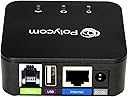
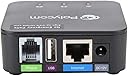
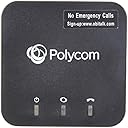
OBi200
Product ID: 80598883
Details
- Compatible DevicesTelephone Fax
- Specific Uses For Productpersonal
- Connector TypeEthernet
- ColorBlack
- Item dimensions L x W x H2.7 x 2.7 x
🌐Supports 4 VoIP services
📞1-port VoIP adapter
📠Google Voice & Fax ready
📞 Elevate your home office calls—never miss a beat with OBi200!
The Obihai OBi200 is a compact, black 1-port VoIP adapter by Poly that supports Google Voice and up to four VoIP services simultaneously. Designed for home and SOHO phone service, it also includes fax support, weighs 8 ounces, and measures 2.7 x 2.7 x 1.2 inches, delivering reliable, multi-service communication in a sleek form factor.


| ASIN | B07FCS1NGM |
| Best Sellers Rank | #510,693 in Office Products ( See Top 100 in Office Products ) #162 in VoIP Telephone Adapters |
| Brand | POLY |
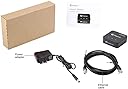
| Built-In Media | LAN cable, OBi200 Adapter, Power Adapter, Quick Start Guide |
| Color | Black |
| Compatible Devices | Telephone, Fax Machine |
| Connector Type | Ethernet |
| Customer Reviews | 4.4 out of 5 stars 3,852 Reviews |
| Global Trade Identification Number | 00610807883753 |
| Item Dimensions | 2.7 x 2.7 x 1.2 inches |
| Item Type Name | Obihai Technology OBI200 1-Port VoIP Phone Adapter with Google Voice and Fax Support for Home and SOHO Phone Service |
| Item Weight | 8 Ounces |
| Item dimensions L x W x H | 2.7 x 2.7 x 1.2 inches |
| Manufacturer | Poly |
| Model Number | OBI200 |
| Number of Items | 1 |
| Number of Ports | 1 |
| Package Quantity | 1 |
| Specific Uses For Product | personal |
| UPC | 610807883753 |
| Unit Count | 1.0 Count |
| Warranty Description | 1 year limited hardware warranty |
T**A
Great unit. You can convert from Verizon mobile home station to Google Voice to Obitalk conversion.
Obitalk adapter box is a GREAT invention that allows you to have incoming and outgoing phone calls for FREE in the US while keeping an old, established landline number. All you need is a Google Voice account (to create an IP address on the internet) and an Obitalk device (to convert internet signal to handset audio) with an Obitalk account. There is a one time $20 port charge from Google, then no further charges unless you want to buy the advance 911 service from Obtitalk. Be aware that after the port, your Verizon cell base line will be cancelled automatically. My story and how to convert from Verizon home base to Obitalk/Google voice for totally free "landline" phone calling using an established number. About 2 years ago, we cut the landline cord to avoid the over $40 per month in Frontier landline costs for a phone we used less and less but for which we'd had that landline number for years. You know, that number which is embedded in so many places you don't even think about who may have it anymore. Since we didn't want to miss the occasional useful phone call that would come to that established number, we had converted that landline to a Verizon mobile home station which in essence is a cellular phone base with antennae that connects to your house handsets to turn them into mobile phones. You simply pay Verizon for a separate cell line, which for us was $20 in our family plan. Spin forward several years, and honestly over 95% of the phone calls to the house are now simply spam. The remaining 5% are older relatives that haven't figured out how to call our cell phone numbers. However, after a major sewer repair costing $$$$, we decided to eliminate all unnecessary costs, and the $20 monthly charge for that home base cell line was the first thing to go. However. hubby was still afraid of completely cutting us off from that old established house number. Enter in some internet research by me and this obitalk unit with Google Voice to achieve keeping that number for free. Totally free. Since any "how to" is NOT really clear in either Google Voice, Verizon, or Obitalk, I'll detail below how to convert from a landline that was already ported to a Verizon "Home Solution PDI" cellular base to now port it yet again to Google Voice and Obitalk for free "landline" calling in the US while keeping an old house number. WARNING: You will need a Verizon PIN for that home base cell line before you can port. You can log into your Verizon account and set that PIN if you have not done so already. Expect a verification text to your cell phone. In minutes, once that is set, you can proceed to Google Voice. Also, that Verizon cell base line will automatically be cancelled once the port is complete. You will not be able to make any phone calls out or receive phone calls in until the Google Voice/Obitalk conversion is complete. STEPS 1. Go to Settings/Account at voice.google.com to choose to add a new number. (If you don't have a google account/gmail, you'll have to do that first.) Type in your home phone number as the phone number you want Google Voice to use (that is the number to be ported from the Verizon cell base). Fill in the Google Voice menu form stating your Verizon provider, and I think it asked for account number (which is the number you are porting). You will need a verification by using your Verizon PIN for that home line number. It takes about 24 to 48 hours for that number to port to Google Voice. (Note I had NO need to set up any "new" Google Voice number to forward to nor new Google account...I simply signed in with my current gmail account. Then I chose to add my home phone number (currently the number on the Verizon cellular base) as the chosen Google Voice number. That is the only number Google Voice is aware of for me.) 2. After you receive email notification from Google Voice that your home phone number has been ported (mine took about 24 hours), turn off your Verizon home phone cell base to avoid it usurping your efforts. You then need to go to Obitalk.com and register to create an account. (It is recommended you use a Google sign in to Obitalk. I used the same gmail account) 3. Next, set up your obitalk device. Plug it into the power. Plug your hand set phone into the Obitalk device using phone cord. Connect the Obitalk unit to your computer ethernet. Your handset is now powered and connected to your internet. You will use this handset to follow the Obitalk instructions calling a code which goes to the Obitalk servers through your internet link. You will have to then follow the steps on the Obitalk menu system. When you come to the fill in portion, place your device serial number, type, and choose "admin" for the password. You will need to replace that with something else once the activation is completed through the Obitalk account page. The Obitalk server will let you know when this has been completed. It took me 3 tries before I could get through the system before timing out as I was not expecting a password for the admin. (I tried several ideas from my Verizon account but then simply tried the old standby "admin" which worked...and later documentation in the Obitalk website stated that is the default.) 4. At this point, test your phone system. Ours worked perfectly. Calls in. Calls out. We had nothing else to do at Google Voice or at Obitalk. I carefully wrote down all the sign in email addresses and passwords, changed my admin code, and all other pertinent website information. I printed off the Obitalk page with all activation and device configuration. At this point I didn't attempt to do any fancy features. I was thrilled to have my old landline number pass from a Verizon home phone cell base, kill that $20 cell line, and now have totally FREE "landline" usage for calls in the US. I think this Obitalk unit is a GRAND idea. If Google Voice ever starts charging money for the service, we likely at that point will simply put a stake through the heart of that old number as by then, everybody should be calling our cells, including doctor offices. Good luck with your unit. UPDATE 5/28/2019 ADDING THE HANDSET ANSWER MACHINE. We've had the unit working for several days. One last work around I had to figure was how to get the calls to go to my answer machine rather than be picked up by Google Voice. For my Panasonic basic hand sets with one base/answering machine and one extension, I found I had to click off "let Google screen phone calls" and let the calls go directly to pick up. (You may need to go to "Legacy View" in Google Voice to be able to see that setting in "general settings." I then set my answering machine to pick up on 3 rings while Google Voice default is 5 rings. That allowed my calls to be either picked up by me with a handset or go directly to my answering machine. Google Voice will now only pick up if I am on the phone and neither me nor my answering machine picks up. I then set Google Voice to send me text messages of any voicemail or call missed and set desk top alert on my PC. Whew...I think that is it! Please be aware that you CANNOT make a 911 phone call on Google Voice. If you want that, you have to sign up at Obitalk for that feature for monthly fee (which is fairly nominal).
M**.
I highly recommended for ANYONE to keep a landline number BUT JUST DON'T WANT TO PAY FOR IT ANYMORE!
I desperately wanted out of my ridiculously expensive monthly Verizon Landline. I've had my number for over 30 years and didn't EVER want to give it up. I researched, read a few reviews, then purchased the OBi200. The setup was quick & easy to my free Google Voice (provided) number. I tested it out a few days, had no problems whatsoever, actually I was very impressed! So on with my plan! 1 - I ported my Verizon landline to a $12.00 pay-as-you-go plan with PagePlus cell service. (I had an old Verizon cell phone doing nothing) It took about 2 days for Verizon to "give it up." Yea! My "home number" was now active and considered as a cell, no longer a landline. 2 - Within minutes of the cell service becoming active, I registered at the PagePlus website to set up my account and create a PIN number. Now I had everything I needed: *My phone number was now considered cellular service. *An Account# *A PIN# 3 - I then immediately started a port into Google Voice from PagePlus. Google charges a $20.00 port-in fee. During this wait, I did receive a call from PagePlus, I didn't answer, I totally ignored them. The port was successful, and it took about 3-4 hours to complete. 4 - Success! My home number is now my Google Voice number! ***Really now, how can one not love FREE home telephone service?*** With the same number I was just paying monthly charges for, no less! Works perfectly! Great product. Easy setup. I was so happy after purchasing this, within a few days I went and purchased the: OBiWiFi5G 2.4/5GHz Wireless 802.11AC Adapter Now my phone base unit is placed right where it always was, no need to run a wire to our router! The whole setup has been bulletproof! Easily saving me $100's a year! All in all. OBi200 - $50.00 PagePlus "pay-as-you-go" plan - $12.00 (considered as "throw-away" money) Google Voice "port-in" - $20.00 OBiWiFi5G Wireless Adapter - $25.00 Total "ONE TIME ONLY" charges: $107.00 Yearly Savings: About 4X that! ***THE ONLY DRAWBACK - NO 911 SERVICE*** It can be had for a subscription fee, but I wanted out of all subscription services. If this was provided for free, I bet they would instantly triple their sales! My Panasonic system has a pre-programmed number to dial our local Police Dept. (Small town, USA) Another comment: I've read a lot of reviews here that stated my Panasonic answering machine would no longer answer calls, and that Google Voice will take over all missed calls. NOT TRUE! Comparing my answering machine messages to my Google Voice logs, identical! And lastly, for some strange reason. When my answering machine reads out a callers number, it's like WARP SPEED! We think it's funny, because when one of our recognized numbers calls us, the readout is normal - loud & clear. (Gotta be a Google thing) I highly recommend this setup for ANYONE who wants to keep the landline number they have had for years, BUT JUST DON'T WANT TO PAY FOR IT ANYMORE!
J**Y
Works Great! Perfect Features
I was looking for a while to switch and quit over paying for my home landline phone. This box works great for taking Google's free Voice platform and turning it into regular landline/home phone. It also has great options for other SIP providers if your not happy with using Google Voice. If you want to keep your existing landline number and use it with Google Voice it's a bit difficult since GV doesn't allow transferring over(porting) landline numbers. Polycom has a guide on it. If you are replacing and existing phone setup the box comes with everything you need, OBi200, power cable, and Ethernet cable. The setup was fairly easy hardware wise which is all documented in the setup guide. Software wise is also fairly straight forward if you also follow the guides. All you had to do was go to ObiTalks site make an account, click add a device, then on your phone dial the number and the Obi200 is added your account and then you can setup up Google Voice or other SIP providers on it. I've had the Obi200 running for a couple of months now and I've had no issues Theirs pretty much nothing more to ask for on the OBI200 - Sound quality is great - Box is small takes up little room -Easy configurations on ObiTalk website -Great API support and advanced local config through local IP, I was able to connect it to HomeAssistant and get sensor data. -E911 can be configured even though Google Voice doesn't support it, E911 can be done with Aveno for 25$ a year. The ObiTalk website makes it easy to setup Google Voice for regular calls and Aveno for 911 calls. One thing I would like added is screw mount holes on the back for wall mounting, as you can see in my setup I made a custom mount with zip ties. Overall the OBI200 is a great box and would definitely recommend for someone wanting to drop their landline but keep the service for free! Or even if your looking for news options!
P**F
Works Great - if you can get it installed (OBi200)
First, I set up my Google Voice (GV) and selected a phone number I liked. Piece o'cake. I used GV on my laptop first to confirm I could send and receive calls (forwarded to my cell ph). Then I went to the ObiTalk website and created my account. This is where things went downhill - for about 2 hrs. On that website went to "Add an OBi Device" and "If you have an OBi Universal Phone Adapter" links. Then below that section: "Add an OBi Device": Instructions: 1. Please pick up the telephone handset, and dial **5 1384 2. You may hang-up when either the visual confirmation is displayed or you hear the automated confirmation response 3. If your device does not connect within 45 seconds, please repeat, starting at step #1. Repeating the process faster than this is not recommended" This is where I got stuck for quite some time. After dialing the above number I got the error over my phone: "IP Address Not Available". After trying multiple things like, doing hard power resets on my wireless router, repeating the call, etc. - nothing worked. Same old IP error message. There is no help on the website for this error that I could find. Finally I got desperate and opened up my Linksys Router config page and looked up the DHCP table with all the IP Addresses assigned to the various wireless and wired (LAN) devices. Could not find the IP Address for my OBI200 (data on bottom of device). Hmmm....looks like a problem! So I entered in the IP Address for my OBI200 manually but the phone still got the ID Add. error when I called the number. ARGGH! But wait a minute! I re-cycled the power on the router and tried again. Called the **5 1384 number again and VOILA! - got some kind of confirmation message. It did a firmware update at this point. I don't recall every step after that, but it was relatively straightforward. Made some test calls and it worked fine, but calls were also ringing through to my cell ph. Went back to GV and removed my cell no. from there so that calls only rang at my new Google Voice number at the house (OBI200 ph. connection). Whew! Good luck with your Installation. Note: I did not "port" my old landline number from OOMA to GV. They can have it (its all spammed out anyhow). Cancelling my service there (ooma).
T**Y
Paired with Google Voice and a ObiWiFi5G - Love It!
We need a landline in our house because the cell phone service is not dependable enough inside to make work calls. That said, I hated paying for something we rarely used. For $50 I bought a Obihai OBi200 and tested it with Google Voice for a week. It was very simple to setup. You have to be tech comfortable, but not tech savvy. Getting Google Voice up and running was easy. What's not to like? I didn't notice any variation in voice quality, though I missed having caller ID on my outbound calls. I did have to let people know my new number - no one picks up unknown callers no,w there is so much spam! Getting ready to "permanently" locate the unit I noticed the WIFI5G dongle. I was concerned a little about the voice quality, but I'm already running a Direct6.0 handset so how bad could it get? IMHO, there was no deterioration. I can locate my multi-unit cordless base anywhere in my house now. Before, it was tied to my service provider modem location (my house isn't wired for POTS or convenient CAT5). I will gripe a little that setup was not as seamless as presented for the ObiWiFi5G. While no expert, I have a background in network security and of course I set my own Webpage Admin Password back when I originally installed the Obitalk. Once I figured out the problem it was a breeze to setup. User: admin PW: (whatever you set - which you can find in the Device Configuration page with the Obitalk Dashboard - see posted pic). Handy things to know is dial ***1 to find out IP address of unit. You can also log into the unit from that address. Lots of customization available there. So basically for $75 and an hour of my time I have a eliminated my monthly phone bills and have a free landline for US/Canada calls. I can also eliminate the internet service provider modem and buy my own instead of renting. Of course I could have done that before, but not the payback is 4 months instead of years for the VoIP enabled modem. As an aside, Google Voice is a great way to create a portable permanent landline # that you can take/manage anywhere. It will forward calls to your cell phone, VoIP phone or a traditional landline. You can use it as a texting platform and it transcribes voice mail to e-mail for free! You need a cell phone to set it up, but I also highly recommend!
L**P
Excellent for faxing, finally dumped Ooma and Magicjack
I have need for a fax line and prefer to maintain a redundant voice line. Bought an Obi 110 years ago but never hooked it up, Obi was flaky and apparently hadn’t nailed down a formal agreement with Google on the Voice implementation. Obi later went EOL on the 110 model rather than maintaining their firmware, hence the need to buy yet another future e-waste product. HOWEVER- after Ooma unethically killed my “lifetime” service and Magicjack annual fees have climbed to about the price of the Obi200, I chose to give Obi my money again instead. And thankfully it’s exceeding my expectations! I bought the 200 unit along with their (overpriced) official WiFi adapter, which plugs right into the back of this tiny unit. I primarily need a landline for occasional faxing, and would just run the phone cord from my fax over to the other room where the Ethernet-to-VOIP is located. The possibility of having a wireless VOIP line at my fax machine seemed too good to be true but I needed to try it. I assembled the pieces, powered up and paired to WiFi, registered the device to their system through a few digits entered into a connected phone. Then went into Obi’s website and a fairly straightforward dashboard walked me through signing in with a Google account I had voice enabled on. Once that was done, unplugged and moved over to my AIO fax machine and put it all together. Shebang! Though I had my worries from other reviews about quality, I can say that my test results were on parity with at least cell voice quality, likely much better. I tried faxing and it was rock solid. My current internet pipe is around 80mbps (Xfinity/Comcrap) but pretty sure it would do fine with lesser bitrates. Color me impressed. So far, this is one of my favorite new gadgets that does exactly what I wanted it to do, is simple and compact, and solves many issues I’ve had with these other VOIP providers. It also gives me the flexibility to have solid, faxing abilities anywhere my fax can grab WiFi. Well done, Obi. Hope you Keep maintaining this unit and don’t repeat the errors of the 100 series.
W**.
Do not buy: Service Outages, Doesn't Work and End of Life Announced
Tried endlessly to set up this device and get it working as advertised, but was unsuccessful even using two different Google Voice accounts and numbers. Was able to make and receive calls only about 4 times but then never again after that. All attempts to call out now get something like "There was no response from the service provider." Received frequent emails indicating service outages for 30 to 45 minutes before (sometimes) receiving an email indicating service was restored. Will be returning this item, along with the Wifi adapter after seeing this announcement on Obitalk's website today when I logged in: "December 18th, 2021 *** Important notice to OBiTALK customers*** Summary: OBi200, OBi202 and OBi212 have entered the End of Life phase with the following key milestones: End of Sale date is December 18, 2021 (as supplies last) End of Engineering Support is December 18, 2023. End of Service date is December 18, 2023. OBi200, OBi202 and OBi212 products have entered the End of Sale phase with the last day of sale of these products to be December 18, 2021 (as supplies last). The End of Engineering support date and the End of Service date for all OBi200, OBi202 and OBi212 products will be December 18, 2023. OBiTALK calling service will continue to be supported for the OBi200, OBi202 and OBi212 until December 18, 2023. OBi200, OBi202 and OBi212 devices may continue to work after the end of service date, but they will not be able to get added to the Google Voice service after December 18, 2023. OBi200, OBi202 and OBi212 devices registered prior to the End of Engineering Support date won’t be able to be provisioned via OBiTALK after the December 18, 2023 and can only be managed and provisioned locally (manually)."
S**R
Great Product !!! Very Happy Customer
I bought this to keep a landline in our house. In the past I have used BasicTalk, OOMA, and another one or 2 that I don't remember the names of. I LOVE this product. I have had a Google Voice # for a few years and fortunately, haven't gotten any spam/robo calls on that number. The annual bill for the OOMA was coming up so I decided to make a change. Now, to be honest, OOMA is a great service, and offers a LOT of features at a reasonable cost. At this point in my life, retirement is coming up and I can do without the additional features. The call quality is Very Good, basically the same or better than my previous systems, which is a Big Plus. The best part is the cost- initial cost was $60, basic service is FREE. This unit fits my needs to a T, and will save me a lot of money. Again- I am Very Happy with the unit. Set up is easy and took maybe 20 mins at most. If you want/need help in setting it up there are a few youtube videos out there (that's what I did). (UPDATE) Having this unit for a while I would like to share some info. I have learned- Once in a while I was having issues with the quality of the calls on the unit. I have some suggestions that have worked for me- A. Once a month unplug your router and/or modem, wait a minute and plug it back in. B. Once a month, If you are using wireless phones (which I assume is 99% of users), unplug the power plug from each of them, wait a few minutes then plug back in. Good Luck and enjoy the savings, I certainly do !!!!
Trustpilot
2 weeks ago
2 months ago