
DOWNLOAD THE APP


Customer Services
Copyright © 2025 Desertcart Holdings Limited
DOWNLOAD THE APP
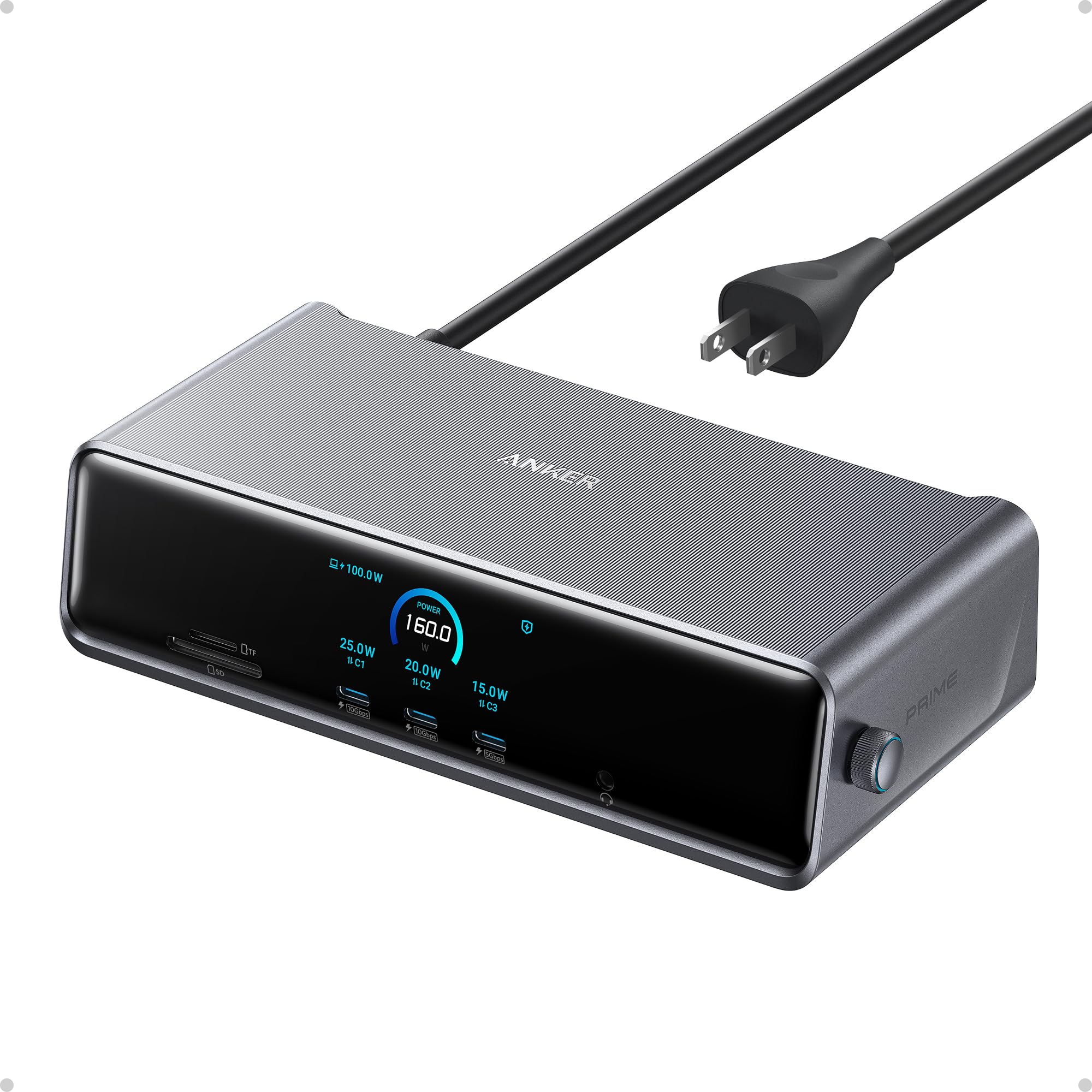
🚀 Elevate your workspace with power, speed, and triple-display brilliance!
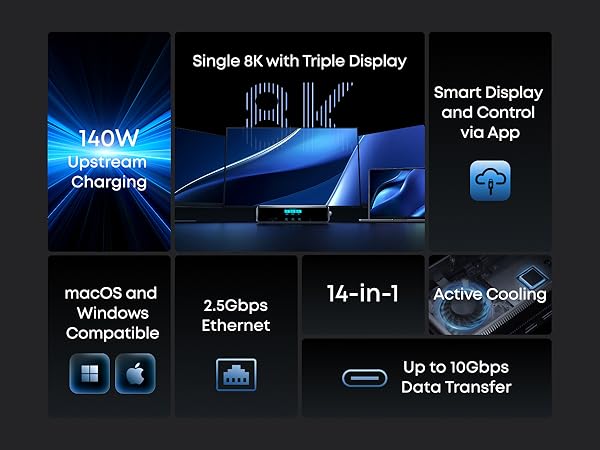
The Anker Prime Docking Station DL7400 is a premium 14-port hub designed for professionals craving ultimate connectivity and multi-monitor setups. Supporting triple 4K 60Hz displays plus an 8K output, it delivers up to 140W charging power, smart cooling, and real-time system monitoring. Compatible with macOS and Windows, it’s the perfect all-in-one docking solution to future-proof your desk and maximize productivity.



| ASIN | B0DTSZC5Y7 |
| Best Sellers Rank | #2,141 in Electronics ( See Top 100 in Electronics ) #32 in Laptop Docking Stations |
| Brand | Anker |
| Color | Phantom Gray |
| Compatible Devices | MacBooks, USB C Windows laptops |
| Customer Reviews | 4.1 out of 5 stars 228 Reviews |
| Hardware Interface | 3.5mm Audio, DisplayPort , Ethernet, HDMI , MicroSD, USB |
| Input Voltage | 240 Volts |
| Item Dimensions L x W x H | 7.67"L x 3.62"W x 1.89"H |
| Item Weight | 834.1 Grams |
| Manufacturer | Anker |
| Number of Ports | 14 |
| Product Dimensions | 7.67"L x 3.62"W x 1.89"H |
| Total Number of HDMI Ports | 2 |
| Total USB Ports | 7 |
| Total Usb Ports | 7 |
| UPC | 194644232849 |
| Warranty Description | 24.00 |
| Wattage | 160 |
T**N
Great upgrade for a multi-monitor desk
I picked this up for my work-from-home setup, and it was mostly plug and play. I did run into a small issue at first where my laptop wouldn’t connect to the monitors, but after updating my laptop software, everything worked as expected. I use this dock to run three monitors, and it’s been reliable with no lag or display issues. The build quality stood out right away—it feels sturdy and well-made, not flimsy like some other docking stations I’ve used. I also appreciate the number of ports available. I regularly plug in my phone and AirPods at my desk, and it’s convenient having everything connected in one place. I picked this up during a Black Friday sale, which made it a great value, and it’s now an essential part of my WFH setup. If you need a solid, well-built dock for a multi-monitor setup, this one has worked well for me.
G**K
Simple, Easy to use Dock!
This dock is a must-have for those looking for a simple, easy-to-use interface to connect their laptops to an external monitor. I must admit, I was on the fence about this one when it came to gauging the value I would get out of this, but I was proven wrong. It is designed well with good weight and build quality. Setup was relatively easy, and it was nice that they threw in a DisplayPort and HDMI cable in the box. It does not take up a lot of space on my desk and the clock feature is a nice touch. Note that the clock is only customizable after you install a firmware update via the Anker Dock Manager PC application, which you can download from the Anker website. The dial is another welcomed addtion as this is present on their Anker Prime Charger 250w. Maneuvering through the settings was a breeze. The device runs cool and does not heat up to such high temps. Anker has done a great job at managing temperatures across it's devices. There are plenty of ports for connectivity, including 3 front USB-C data/charging ports, a SD + TF card reader. The back ports include 1 DisplayPort, 2 HDMI ports, 2 USB-A 3.2 ports, 1 USB-A 2.0 port, an ethernet port, and your standard upstream data/charging port. Upstream charging to the device is max 140w (unfortunately my gaming laptop supports only 100w), and the connection was relatively simple. This device also supports PPS PD charging for Android devices such as the Samsung Galaxy via the front 3 ports. You can also establish a data connection from your phone to your PC. For display, keep in mind that you need to download the Synaptics DisplayLink driver for your pc/laptop to output via DisplayPort to an external monitor. It is a relatively quick and simple download. Once the driver was installed, and I restarted my pc and reset the dock,the video display was seamless. I am currently outputting a resolution of 3440 x 1440 @240Hz with no stutter and no artifacts. This has improved my gaming setup tremendously, and I have not noticed any issues during hardcore gaming. The Anker Dock Manager application is a nice touch and allows you to see the multiple connections that you have on your setup. You can change from Mirroring to Extended display, even change the display direction if you have your monitor set up vertically. Refresh rate and resolution can also be customized. Overall, this is a solid addition to anyone's future laptop/desktop to monitor setup. Though there are other docks out there with more ports and features, the Anker Prime does a great job of incorporating functionality and simplicity for the everyday user.
O**O
Best dock I've ever used
I got this on sale during black friday to replace an old Dell dock that only supported a 4k monitor @ 30 Hz (FPS). I'm happy with it. I have a 4k monitor running at 60 Hz now as well as an 2nd, 1080p screen @ 60 Hz (that's all the monitor supported -- the dock can go higher). I tested a 1440p monitor and it was able to go to 100 Hz as advertized (monitor supported 165 Hz). There are a ton of ports including 3 front facing USB-C. As far as getting to to work, I tried a laptop and a desktop that both had Windows 11 installed, but had never connected to a displaylink device and they downloaded and installed the driver automatically. The desktop didn't have another monitor attached and after booting a few minutes later the screen started working. Completely painless for an already existing system. If you need to get into the BIOS / firmware it seems like you will need to connect a monitor directly. I didn't buy it to game on, but the desktop has an older Nvidia 1650 GPU that was used to render the video and display on either monitor and it was pretty close to native. It's pretty pricy at regular price, but I'd still buy it. For black friday pricing I'm extatic with the purchase.
I**S
MacBook Pro M4 - Not a good experience
Nothing but problems. Mac M4 64GB, with 2 exact same Samsung Monitors. Too many bugs and inconsistencies. Each time I go to use my laptop 50/50 chance left and right screens have swapped. Most of the time one or both of the monitors could be 30hz, hard to get them both 60hz, even if the Anker device tells me they're running at 60hz - seems like just keep unplugging and rebooting to make it happen eventually if youre lucky. Worst of all... OMG, the frame rate drops insanely on just a single monitor, seems random which one it chooses. This device seemed cool. Maybe it works great on Windows - but this is not a final product for Mac, it's not finished.
H**O
Not great out the box but rocks once set up to preference!
Had to fuumle a bit with the settings and the updates, downloads etc.. It also made my Apple magic mouse very slow. Solved with a console command. Also had to search through trial an error the best reosultion x Refresh rate combination. Once the set up is done (Took me like 20 minutes) it works amazingly and even has 3 super fast charging ports in front. An all rounder devce to make the centerpiece of a setup! Display link connection is great, and had 2 other HDMI ports to boot. You can also tell the materials have a certain quality and weight that feels premium, just like its price.
M**T
Finally, 3 monitors for my Macbook Air (and PC)
I use a PC for work and a Mac for personal use. I've been looking for a doc like this for years and have wasted a lot of money in my search. With the Anker Prime Studio, I was able to connect 3 monitors with my laptops open giving me 4 screens. I'm easily able to swap the connection from my PC laptop to my Macbook Air with a single USB-c cable. It works great with very little lag when switching devices. The build quality is solid and it looks good too. Great job Anker!
E**N
EXCELLENT Docking Station
Excellent Product. I have 2 external HDMI monitors plus MacBookPro. This WORKS. I wasted so much time with a different manufacturers solution for Docking station...and it constantly was turning of one of the external monitors. This Anker device is seamless....no video interuption even when closing lid of notebook. Elegantly packaged and beautiful. Also has internal cooling fan. And works with latest Apple OS Tahoe.
A**L
Nice Hardware, Video Output Has Serious Limitations & Driver Crashes! (Review By An Engineer).
- The Good The build quality is excellent. Solid construction, nice weight, and a premium feel overall. The built-in screen on the dock is a nice touch for monitoring connection status and power delivery. Charging works great at 140W, the ports are plentiful, and when everything works, it works well. - The Problem: This Is NOT a True Thunderbolt Display Dock! Despite being heavily reviewed on YouTube as a "Thunderbolt Docking Station," this dock does not pass video directly from your laptop's GPU to your monitors. Instead, all video output must go through DisplayLink technology. SOOO many YouTube videos sponsored by Anker referred to this as a THUNDERBOLT DOCK - it is NOT! Here is how it actually works: 1) Your GPU renders the image 2) Your CPU compresses the frames into a video stream 3) The stream is sent over USB to the dock 4) A chip inside the dock (DL7400) decompresses and outputs to your monitors Compare this to a native Thunderbolt dock, where your GPU renders the image and sends it directly to the monitor. No compression, no extra steps. - No VRR or Adaptive Sync Support! If your monitor supports FreeSync, G-Sync, or any variable refresh rate technology, it will not work through this dock. DisplayLink cannot pass VRR signals because the video stream is being compressed and decompressed. The direct timing link between GPU and monitor that VRR requires simply does not exist with this architecture. - No HDR Support! HDR is completely unavailable through this dock. My Samsung G9 monitor fully supports HDR, but Windows shows "No HDR available" with the option grayed out when connected through the Anker dock. This is another consequence of the DisplayLink compression pipeline. HDR requires precise color data and wide color gamut information to be passed directly from the GPU to the monitor. When frames are compressed and decompressed through DisplayLink, that HDR metadata is lost. - Limited to DisplayPort 1.4 from 2016! There is no DisplayPort 2.1 support, which limits compatibility with newer high-resolution, high-refresh-rate monitors. - System Crashes (Blue Screens)! On my BRAND NEW Windows 11 system, the DisplayLink driver caused repeated blue screen crashes whenever the PC attempted to enter sleep mode. I experienced three crashes in a single day. The crashes continued even after applying commonly recommended fixes such as disabling USB Selective Suspend and disabling Hybrid Sleep. The only way to stop the crashes was to disable sleep entirely, which is NOT a reasonable solution for a laptop dock. - Added System Overhead! Because DisplayLink compresses video frames, both your CPU and GPU do extra work that would not exist with a native Thunderbolt dock. My testing showed approximately 2-5% additional CPU usage just from moving windows around. That may sound small, but it is work your computer should not be doing at all when you have capable GPUs sitting idle. - Added Latency! Frames must be compressed, transmitted over USB, then decompressed by the dock's chip before reaching your monitor. This adds latency compared to a direct GPU-to-monitor connection. - Who This Dock Is For? This dock makes sense for MacBook users who need multiple external displays and are limited by Apple silicon restrictions. It also makes sense for users with laptops that lack dedicated GPUs or Thunderbolt video output capabilities. - Who Should Avoid This Dock? If you have a mid-range to high-end laptop with capable GPUs, this dock bypasses them entirely and renders video through a less capable chip (DL7400). If you have monitors that support HDR, VRR or Adaptive Sync, you will not be able to use those features. If you expect "docking station" to mean native video passthrough, this is not that product! - The Bottom Line: The hardware quality is nice, but the marketing is certainly misleading (especially the sponsored YouTube videos out there). Many YouTubers calling this a "Thunderbolt Dock" implies native video passthrough, which this dock does not provide. The product name does include "DisplayLink," but most consumers do not know what that means or understand its limitations. I certainly didn't know until I did my own deep dive research after I experienced the BSoD crashes! If you want a dock that actually uses your laptop's GPU and supports modern display features like HDR and VRR, look for a native Thunderbolt dock without DisplayLink. Examples include the CalDigit TS4, CalDigit TS5 Plus, or Lenovo ThinkPad Thunderbolt 4 Dock. Personally, I am returning this dock and replacing it with a CalDigit TS5 Plus. - Technical Details and Evidence: For those who want to understand how I diagnosed the crashes, or for Anker's engineering team, here is what I found. - The Crash Error Code: All crashes showed the same Windows bugcheck: Bugcheck: 0x0000009f (0x0000000000000003, ...) Bugcheck 0x9F is DRIVER_POWER_STATE_FAILURE. This means a driver failed to respond to a power state change request within the allowed time. The first parameter being 0x3 indicates that a device object was blocking a power IRP (I/O Request Packet) for too long. In plain terms, when Windows told the device "we are going to sleep now," the driver hung and crashed the system. - Windows Event Log Evidence: The BugCheck events from the System log showed the pattern clearly: TimeCreated : 12/18/2025 6:55:37 PM Message : The computer has rebooted from a bugcheck. The bugcheck was: 0x0000009f (0x0000000000000003, 0xffff8084bbbec060, 0xffff918ac552f5c0, 0xffff8084bc335010). A dump was saved in: C:\Windows\Minidump\121825-18375-01.dmp. TimeCreated : 12/18/2025 1:42:35 PM Message : The computer has rebooted from a bugcheck. The bugcheck was: 0x0000009f (0x0000000000000003, 0xffffb80fcf0f7060, 0xffffd081f830f5c0, 0xffffb80fc8e72010). A dump was saved in: C:\Windows\Minidump\121825-14968-01.dmp. TimeCreated : 12/18/2025 7:08:56 AM Message : The computer has rebooted from a bugcheck. The bugcheck was: 0x0000009f (0x0000000000000003, 0xffff9e8bb6636060, 0xfffff80537cb85c0, 0xffff9e8bce8e10d0). A dump was saved in: C:\Windows\Minidump\121825-14531-01.dmp. Three crashes in one day, all with identical error codes, all during sleep transitions. - Identifying the Failing Device: After each crash, the Windows Kernel-PnP log showed driver load failures: TimeCreated : 12/18/2025 1:42:31 PM Message : The driver \Driver\WUDFRd failed to load. Device: USB\VID_17E9&PID_7000&MI_01\7&4cfbadf&0&0001 Status: 0xC0000365 The key identifier is VID_17E9. This is DisplayLink's USB Vendor ID. Every hardware manufacturer has a unique vendor ID assigned to them, and 17E9 belongs to DisplayLink. The device was failing to recover properly after each crash. - DisplayLink Driver Version Tested: DeviceName: DisplayLink USB Device DriverVersion: 12.1.2684.0 DriverDate: 20251102 This was the latest driver available at the time of testing. - Test System Configuration: Laptop: Lenovo ThinkPad P14s Gen 6 (Intel) - BRAND NEW! OS: Windows 11 Pro GPUs: Intel Arc Pro 140T (48GB), NVIDIA RTX PRO 1000 Monitor: Samsung G9 Ultrawide (VRR capable) Dock: Anker Prime 14-in-1 (A83B3) with DL7400 DisplayLink chip - How to Check Your Own System: If you are experiencing similar crashes with a DisplayLink dock, you can check your Windows event logs with this PowerShell command run as Administrator: powershell$startTime = (Get-Date).AddDays(-7) Get-WinEvent -FilterHashtable @{LogName='System'; ProviderName='Microsoft-Windows-WER-SystemErrorReporting'; StartTime=$startTime} | Select-Object TimeCreated, Message | Format-List If you see bugcheck 0x0000009f, you have the same problem as me! All in all, more than anything, I'm really disappointed with YouTube reviewers, 100% of them NEVER talked about DisplayLink or how it works, they just showed off the Dock working and called it "Thunderbolt" - clearly all were sponsored, not a single one did any technical deep dive or showed any longevity testing. So I had to do their homework!
Trustpilot
2 weeks ago
2 weeks ago