🎬 Elevate your media game with crystal-clear HD decoding!
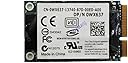
The Broadcom BCM970012 Crystal HD PCIe mini card is a hardware video decoder designed to enable smooth 1080p HD playback on Intel Atom-based PCs and netbooks. Supporting multiple video codecs including H.264, VC-1, MPEG-2, and WMV, it reduces CPU load with under 2W power consumption, making it ideal for low-power, mobile, and industrial platforms. While effective for enhancing HD video playback, some users report stability issues on older Apple TV models, suggesting newer alternatives for flawless performance.
| ASIN | B003TU07GU |
| AV Output | MPEG-2, WMV |
| Antenna Location | Security |
| Brand | Habey USA |
| Compatible Devices | Personal Computer |
| Customer Reviews | 3.9 out of 5 stars 29 Reviews |
| Manufacturer | Habey USA |
| Recommended Uses For Product | Security |
| UPC | 883633201187 |
| Video Capture Resolution | 1080p |
| Video Standard | MPEG-2, WMV |
M**Y
brought my nettop to life
I have a Jetway Minitop with a D525 and an Ion2 graphics card, aka HBJC600C99-52W-BW. I had serious issues with the internal graphics and processors being bogged down with very large HD movies, and all sorts of codecs, players, and overclocking would not let me play back these properly. To make sure that I was not doing anything improperly, I removed VLC, Media Player Classic, all Codec Packs like the CCCP, K-light, etc. I popped this thing in, installed the drivers (link below), and alas, it did not work! BUT... After I installed this, I read all the instructions and walkthroughs people had here, and I used MPC and the Combined Community Codec Pack (CCCP), and wow, it is working perfectly. A 23GB HD file plays fine with no issues. MPC is necessary for hardware decoding to take place. Here is my short set of instructions on how to get this working. 1) install card 2) install drivers 3) install CCCP 4) run C:\Program Files\Broadcom\DTS_Info.exe 5) make shortcut of C:\Program Files\Broadcom\DTS_Info.exe and move it to the start menu folder "Startup" 6) play movie 7) Miller Time Drivers are found here [...] Media Player Classic and Combined Community Codec Pack cccp-project.net This should get 4.5 stars due to lack of installation software and documentation, but it is easy enough to get.
T**I
Poor product for use as advertised, get BCM970015 instead
This product is advertised to bring HD playback to an aging Apple TV, and while it does work, it does so very poorly. I originally ordered this card and placed it in my AppleTV running the Crystalbuntu distro and running XBMC with the PlexBMC plugin. Playback of HD content, while better than the raw decoding without the card installed, was hit or miss. Seeking through files would often freeze the device and frames were dropped on all files larger than a few gigs in size and over 480p in resolution. On some videos, the AppleTV would simply crash about 10 or 20 minutes into the movie without warning, requiring a restart. After searching online, there are a number of known issues discussed relating to this card, and there is a general consensus among people who comment that the card is not great. Enter the BCM970015. The BCM970015 is a similar card to the BCM970012, but is about half the size and is a newer model. After being unhappy with the BCM970012, I ordered a BCM970015 on Amazon for about $10 more than what I paid for the BCM970012. It worked perfectly. 1080p content played back flawlessly, and there were no more frame drops, no crashes, no skips during seeking, and everything was just that much smoother. If you're considering buying this card, save yourself the trouble and buy the BCM970015 instead. It's a few dollars more and is infinitely less buggy. You'll be happy you did.
T**E
Useless for my HTPC
Recieved this fast! No problem with shipping. However, this was completely useless in my HTPC, a Foxconn NT-3550 with an AMD Dual Core E-350 Processor @1.6ghz and Radeon HD6310 APU. Video is nice in SD mode, but with Netflix HD the video and audio is out of sync...bought the HD Decoder in hopes of playing netflix HD but no luck. Not real worried since I can still do Netflix HD on my PS3...would have been nice though.
T**R
Doesn't work with Apple Tv 2
I brought the card based on the reviews and the product discussion that it fits with Apple TV. the product itself is great, i saw it working on my friends apply TV 1. yet seems it only work with Apple TV 1 not 2. that should be clear in the product description. my bad luck.
R**N
Its OK, Helps A lot
This is the Habey HB-VD904 (aka BCM70012). I was fortunate enough to find someone selling their Acer One D250 for $100 which left me with spare money to Max out the RAM to 2Gb and upgrade the battery from the 3 cell to 9 cell. I was a bit upset that AOD250 was jittery when playing videos on Youtube even at MAX processing power from A/C power. Luckily my netbook has a full size mini pci-e slot and a hidden half size mini pci-e slot (occupied by wireless card). I bought this full size mini pci-e card. The card doesn't come with screws to hold it down so I had to take it from another part of my netbook. At first I thought it wasn't compatible but after updating the BIOS, the netbook identified the card instantly. The card runs hot when connected to A/C power source, I believe it only works when connected to A/C power, because its not hot when on battery power. The system goes on a power saving mode when on battery so natually its slower and video is choppy. When the card is working the CPU usage level goes down as well. This card needs a good video player with all codecs to view video at high rate 720p. What worked for me was Media Player Classic with a codec pack. Media Player Classic by itself doesn't use a lot of system resource. Ive ran the same 720p video on other players as well and they all were either slow, choppy, and out of sync. Players that I tried were: Windows Media Player and KMPlayer. To sum things up: card runs hot when its working, PC must be connected to wall outlet for it to work, must use a good video player like Media Player Classic, system and video runs smoother and in sync when it works. My next upgrade will be a half size mini PCI-e wireless N card from Atheros. If all looks good, I will upgrade my SATA drive and try to dual boot XP Home and Linux on the netbook.
J**M
For the price and what it's intended to do ... WOW!
First and foremost i'm going to start with the setup that I have. I am running an Acer Aspire One with 2 gb Ram, 160 Gb HD (Not SSD), and a Graphics booster that allows my processor to run a 2037 MHZ. I have the acer aspire one that has the upgrade panels on the bottom so I can access the HDD, Ram slot, and PCI bus (where wi-fi is). The installation was easy and then the setup for the Broadcom driver was quick too! I can now watch my HD videos that I record with my Canon T3 DSLR smoothly and audio/video accurately. Youtube videos can now be watched flawlessly in 720P, but 1080 still has buffering issues which I think can be fixed if I get an SSD Hard drive. Overall, this product is definitely a must have If you want your little baby acer to be playing high quality videos. This card also works well with emulators and some pc games. So if you want to make minor upgrades that give a major impact on your little baby acer, you should get 2 GB Ram stick, this broadcom hd mini card and an SSD hard drive. You can make this little thing do alot of stuff! Have had mine for about 2 1/2 years using it everyday and after my modifications it just keeps getting better and better!
B**L
Mostly useless
I tried this product in an Intel Atom N450 netbook and it didn't live up to my expectations. Whereas if you are streaming a 1080p YouTube video you get no hardware decoding, but if you download the same video and then watch it from the file you get the hardware decoding. My understanding that there is not enough software support for this device for it to work in more applications. For me, its uses are very limited. Very disappointing product. I am returning mine.
G**O
Works fine, but it took some work.
To keep it short, the card works well (though it took some tinkering). The biggest chalange was lack of directions. The following is based on my experience with upgrading my HP Mini-210-1018 netbook and may save somebody hours of googling around. 1. Update Bios (probably optional). 2. Upgrade RAM to 2GB (probably optional, follow "how-to" video onYoutube). 3. Install the BMC970012 card into mini-PCI slot (follow "how-to" video on Youtube). 4. Install drivers for Broadcom Crystal HD from the HP support site. 5. At this point check if you have a Gray icon on Windows task-bar which when hoovered over with mouse reads "Broadcom Crystal HD Inactive". 6. If you do not have it go to C:\Program Files\Broadcom and find an application DTS_Info. 7. Click on it twice and it should install the gray icon on the Windows task-bar. 8. Copy the DTS_Info file to your Startup folder in Start/Programs menu. 9. Start Windows Media Player play some video and check if the icon on the task-bar turned red-green. Hoover over it with mouse and it should read "Broadcom Crystal HD Active". 10. Start Internet Explorer, go to Youtube, play some video and check if the icon on the task-bar turns red-green. Hoover over it with mouse and it should read "Broadcom Crystal HD Active". 11. If it is not getting active you may have to update your Adobe Flash Player plug-ins. (To get the card work in Google Chrome I had to disable the embedded Flash Player and manually install the latest version from Adobe website.) Good Luck, Geo
Trustpilot
1 month ago
2 months ago