We remain fully operational. Our teams are working around the clock to ensure your deliveries continue safely.

DOWNLOAD THE APP


Customer Services
Copyright © 2025 Desertcart Holdings Limited
DOWNLOAD THE APP

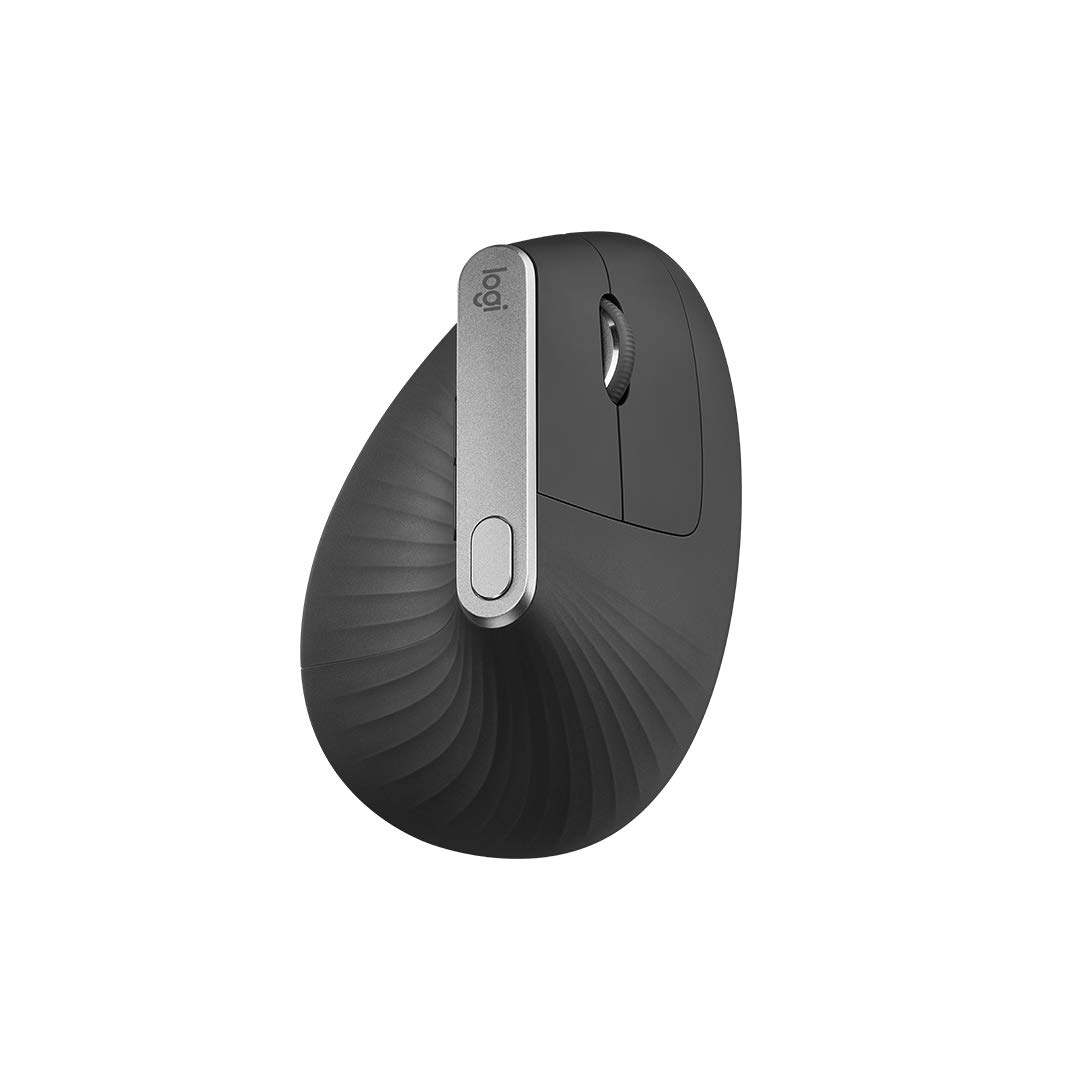

🖱️ Elevate your workflow with ergonomic precision and unstoppable multi-device power!
The Logitech MX Vertical Ergonomic Mouse features a 57-degree vertical design that reduces wrist pressure by 10%, a high-precision 4000 DPI optical sensor for reduced hand movement, and multi-device connectivity via Bluetooth or USB receiver. It offers up to 4 months of battery life with fast charging, supports Windows, macOS, iPadOS, and Linux, and includes Easy-Switch and Logitech FLOW for seamless device transitions—making it the ultimate productivity tool for health-conscious professionals.

| ASIN | B07FNHV4MW |
| Antenna Location | Gaming |
| Are Batteries Included? | Yes |
| Are Batteries Required | Yes |
| Battery Average Life | 4 months |
| Best Sellers Rank | 1,081 in Computers & Accessories ( See Top 100 in Computers & Accessories ) 52 in Mice |
| Box Contents | 1 product |
| Brand Name | Logitech |
| Button Quantity | 4 |
| Colour | MX Vertical |
| Compatible Devices | Laptop, Laptop, Desktop, Smartphone |
| Customer Reviews | 4.4 4.4 out of 5 stars (13,206) |
| Embellishment Feature | Logo |
| Enclosure Material | Cotton |
| Global Trade Identification Number | 05099206081901 |
| Hand Orientation | Right |
| Hardware Platform | Linux, Mac, PC |
| Item Dimensions L x W | 127L x 102W centimetres |
| Item Type Name | Logitech MX Vertical Ergonomic Mouse for Stress Injury Care |
| Item Weight | 4.59 Ounces |
| Manufacturer | Logitech |
| Model Name | MX Vertical Advanced Ergonomic Mouse |
| Model Number | 910-005448 |
| Mouse Maximum Sensitivity | 4000 Dots per Inch |
| Movement Detection | Optical |
| Network Connectivity Technology | Bluetooth |
| Number of Batteries | 1 Lithium Polymer batteries required. (included) |
| Operating System | Windows, macOS |
| Pattern | Rough grip pattern |
| Power Source | Corded Electric |
| Product Features | Wireless |
| Product Finish Type | Rubberized Grip Coating |
| Product Warranty | 2-year manufacturer’s guarantee |
| Range | 4 meter |
| Style Name | Grafite |
| Theme | Ergonomics |
| Unit Count | 1.0 Count |
D**E
Looks good, feels great, works well
This is the second vertical mouse I have owned, the previous being from another manufacturer. I am very happy with this device. First of all, the mouse is more comfortable to hold, being as the shape provides sufficient support for the whole hand, and not just the thumb, which combined with a slightly grippy soft touch rubberized texture allows the hand to sit stably on the mouse without any grip force. The soft texture is also more comfortable to hold than the hard surface on some devices. The device also benefits from a built in rechargeable battery, and comes with a USB-C port and USB-A to USB-C charging cable which also allow the mouse to be used as a wired USB peripheral whilst charging - or in case wireless connectivity is not available. The device will connect via bluetooth (which synchronises instantly and without any delay to an Apple MacBook Pro - which is not the case for all bluetooth peripherals). I've experienced no lag or breaks in connectivity connecting via bluetooth. A compact USB:A wireless dongle is also provided in case of no / poor bluetooth connectivity - although I've not needed to use this myself. The device works out of the box without driver installation on a mac - but provides additional functionality if Logitech options software is installed, such as Battery Status indicator, button programming, DPI setting (with switchable profiles on a dedicated button), ability to set application specific settings, and "Logitech Flow" which allows automatic switching of wireless profile to a different device (computer / tablet etc.) when moving mouse to the edge of the screen, also allowing copying and pasting between devices. Device supports 3 separate wireless profiles which can also be switched manually using a button on the base of the device - as well as automatically using the logitech flow software, allowing device to be used with multiple computers / mobile devices. I'm particularly impressed with the (perceived) build quality of the device - the materials feel solid, the button and wheel action is positive, and the device feels "quality". It's too soon to say if this will translate to long term reliability... however this feels much better made than my previous device from another manufacturer, which started failing after only ~2 years of use. In terms of negatives... The thumb buttons (which are mapped to forward / back actions be default) don't feel completely natural to use - especially the front button, which due to its positioning has to be pressed with the end of the thumb, and can result in pushing the mouse or accidently left clicking at the same time... this is probably something which may improve with familiarity, and is fairly insignificant overall. It's also worth mentioning that no provision has been made for the storage of the wireless dongle in the base of the device - so in the event that you don't normally use the dongle, then have a device that requires usage of the dongle, then the dongle will probably be lost in the bottom of the "safe place" where you have stored it... or maybe that's just me! All in all, if you are looking for a wireless vertical mouse, especially one with full mac compatibility without requiring a separate dongle, then you'll probably struggle to find a better alternative.
R**K
A great Ergonomic mouse
A really comfortable and accurate mouse. Easy to use, charge lasts a long time, sensitive (and adjustable) and rests so easily in your hand. Would recommend
L**N
Precise, battery longevity, additional buttons, changeable features, reduces wrist fatigue.
A very unusual mouse, it will take you a little while to get used to it. However it’s very good, more comfortable, precise with a few extra features than you will find on a regular mouse. I use lots of slightly different standard mouse’s (not mice in computer terms) with a support role. This pretty much gets rid of wrist fatigue, which most will know is common when using a regular mouse. I used to really like trackballs, but they seem to have gone out of fashion and are difficult to get these days. Anyway, I would highly recommend this. Once you get used to it, you won’t go back. Just IMHO.
J**N
great mouse, good price
great mouse and good value at the current £61 price. I looked at some others but I disliked how they talked about saving battery by shutting off after not detecting input for a minute, when used via bluetooth. This one doesn't do that so is always responsive - and yet, the battery lasts forever! I haven't plugged it in for a couple days and somehow it is still almost fully charge. Also works very smoothly with no lag or issues, the shape is good. I only have one issue with it, which is that you have to press strongly for the middle mouse button. Considering I brought this because I have tendonitis, I don't want to have to press any harder than necessary, and with my work I happen to use middle mouse quite often. But I swapped the middle mouse button to one of the thumb buttons which is much softer to click--all except the middle mouse button are fine--so problem solved.
A**N
A honest review
had plenty of time before this review to be unbiased and actually be able to give a proper review, the mouse is great it doesnt feel cheap and weights a comfortable amount (ive used in gaming compared to an actually gaming mouse and it feels almost the same in comfort of use i have quite big hands so its slightly smaller but not to much to the point its an annoyance the shape actually is a benefit to making feel like its not too small really easy to use its a little weird at first with it being a mouse essentially tilted but after a week or two you get used to it and lastly ive both used this mouse wired and with the usb adapter wired its exactly the same as all mice in this category and most mid to low high end gaming mice with the usb adapter it feels just as responsive if its not ive not actually noticed what so ever in terms of bluetooth ive not actually used it without the adapter so i cant comment on that batter life is amazing i got this 18th of December ive used it for around 6-7 hours daily apart from weekends and ive not had to charge it once which is a testament to the quality of the mouse, id like to also add ive been using this in linux most notably between my gentoo build and endeavouros build it has work flawlessly in both i cant comment on windows as i dont use it over all id give this 5 stars and 9/10 in my personal rating reason its not 10/10 is it takes a little bit to get used to being a different shape to normal mouse which some people will either pick up straight away or get used to after a while, id definitely recommend it to those who struggle with wrist problems as i dont get half as much wrist ache from gaming or general use.
A**O
Excelente para no forzar mi mano. Tengo tres equipos y solo un mouse
A**O
En resumen, si pasas muchas horas en frente del ordenador por trabajo ( o por otro motivo) y notas alguna molestia en la mano, este ratón es tu solución. Yo trabajo en oficina y me paso 8 horas al día en frente del ordenador, y con el tiempo, el uso de ratones "clásicos" me estaba produciendo una ligera molestia en la parte de la muñeca. Con las rebajas del black friday, decidí comprar este ratón del que había leído muy buenas opiniones, tanto de este ratón en concreto como de este tipo de ratones. Era bastante escéptico de que un ratón con esta forma fuera cómodo. Tengo que decir, que la primera vez que lo pruebas es bastante raro, el primer rato con el no te acaba de convencer del todo esta forma, pero en la misma jornada de trabajo, te acabas haciendo y con el paso de un par de días observas la comodidad de este tipo de agarre, haciendo que para trabajar, como es mi caso, no quiera volver mas a un ratón tradicional. En cuanto a este modelo en concreto, su ergonomía es muy buena, el tacto se nota de calidad. El único pero es que al final del día ves las huellas (por el sudor, etc.) en el ratón, pero lo limpias con un paño y listo, haciendo este único mantenimiento. Esta hecho para una mano relativamente grande, si no es así, igual es mejor decantarse por su hermano pequeño el lift. En cuanto a la batería, dura muchísimo, yo solo lo he cargado una vez en dos meses, usándolo 5 días a la semana 8 horas. Parece un ratón para durar mucho mucho tiempo. En definitiva, si te lo estas pensando, no lo dudes puesto que no te vas a arrepentir, es una inversión muy pequeña para la cantidad de beneficios que te puede dar.
S**N
Ürün elime tam oturuyor ve kullanması gerçekten çok rahat. İlk elime aldığımda garipsedim ancak ilk dakikadan alıştım. usb girişini laptopa takıp anında kullanmaya başlayabiliyorsunuz. aynı zamanda altında küçük bir düğme var, o düğmeye basarak iki farklı cihaza daha bluetooth ile bağlayabiliyorsunuz. ve yine o düğmeyle geçiş yaparak saniyeler içinde üç farklı cihazda tek mouse kullanabiliyorsunuz.
D**E
Très bonne souris ergonomique. Batterie tient longtemps. Très agréable à utiliser. L’utilise au quotidien 👍
D**L
Have both this and the LIFT. Both come up short in the same way and each has their own ergonomic problem. The problem with both is that the mouse buttons are too high up, yes even on the smaller LIFT, meaning you end up straining your hand just in a different orientation... Even in the 'handshake' position, your fingers want to naturally point downwards toward the desk and stack on top of one another, not be constantly pointing straight and spread open to reach the left click button at the 'top' of the mouse. Really, the left click button should be where the right click button is located and the dead space at the bottom of the mouse (under the actual right click button) should be the right click button. Individual ergonomic issues: Started with the LIFT but there is not enough bulk to the palm section to support the hand properly, (despite hand measuring as an M on Logitec's own guide) so the palm feels unsupported and kind of makes your hand form a narrow claw. Ring and small fingers have nowhere to rest, other than stacking on the table (which restricted moving the mouse). Changed to the MX Vertical as it looked like it was bulkier and would support the hand better. It does, and there is more room for your fingers, but again, with the buttons being too high, you can feel your finger strain as it is again having to fight the natural downward position of the fingers and now technically is also fighting gravity somewhat as the mouse itself is that much higher than the LIFT. Also, the MX Vertical has straight buttons, rather than curved ones, like the LIFT has, this adds to the discomfort as there is no real natural shape for your finger (think about it, even a cheap normal mouse usually has somewhat curved buttons). So, in short, both are not great. Solution, make the LIFT shape larger like the size of the MX Vertical and move the button location as described, in a more angled down position. Honestly, the pros and cons of each are enough not to bother with either, but if you really want to try one because you are in a lot of pain with a standard mouse, the LIFT would be the better choice as it at least has the curved buttons and you can use it like you're pinching it, giving you some relief over a standard mouse, but don't expect great palm support. But, again, neither are great. Logitech should have committed to a steeper angle and better orientated buttons.
Trustpilot
3 weeks ago
1 month ago