


🚀 Elevate your Makeblock experience—wireless, effortless, unstoppable!
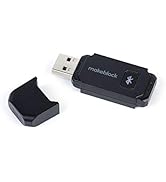
The Makeblock Bluetooth Adapter is a compact USB device designed to enable wireless programming for Makeblock’s popular robotics kits. It offers high transmission efficiency and low latency for stable connections, supports multiple Makeblock models, and eliminates the need for cables, making it an essential tool for seamless, on-the-go coding.






| ASIN | B07G7NPYXW |
| Best Sellers Rank | #131 in Bluetooth Network Adapters |
| Brand | Makeblock |
| Customer Reviews | 4.1 4.1 out of 5 stars (101) |
| Date First Available | April 4, 2018 |
| Is Discontinued By Manufacturer | No |
| Item Dimensions LxWxH | 4.72 x 3.15 x 1.18 inches |
| Item Weight | 0.32 ounces |
| Item model number | P5010002 |
| Manufacturer | Makeblock |
| Product Dimensions | 4.72 x 3.15 x 1.18 inches |
| Wireless Type | Bluetooth |
D**N
Works well
Was as advertised. We had no problem with range or installation as others have in reviews I read.
L**A
Does NOT work with mBlock v5.4 - (UPDATE)
I changed my review from 1-star to 5-star. Yes, it was an unpleasant experience troubleshooting bluetooth connection (live mode), wasn't able to access the forum. But the support team saw my review , gave us an apology and offered to send over replacement and extras. We finally got it to work, we even went to their official website and ordered more add-on to show support. It's not easy to create something that is non-programming-parent-friendly. We don't mind the glitches as long as they have someone to listen and back up the product. Thank you! Original review: I ordered this for my son because we couldn't get mbot to work with his PC's bluetooth receiver. Fine I pay $15. Still doesn't work with mbot v5.4 then I tried signing up for a forum account so I can reaching someone to resolve this. Their signup system doesn't work, I could reach no one. Do you know how much time I invested on this just so my kids can run mbot live without a USB cord attached to the computer? So disappointing. If your software is not ready, do not release it. And if your device cannot support it, LET BUYERS KNOW!
E**V
Works seamlessly for me
First I tried to make it work without reading any instructions: plugged the adapter into the PC and just waited when the mBot give me a signal that it is connected. Silly me. Then I googled how to connect adapter to mBot and it said what to do: (1) plug it to pc; (2) press a button; (3) Keep mBot near and turn it on. I expected that in "connect" command a new source (in addition to UCB) would appear. Nop. The decided to use it anyway (as USB) - PC was successfully connected, and everything started working perfectly. So reading manuals is useful. Though treating WiFi as USB was a bit confusing. Anyway, everything is working after 7 minutes, and I am now preparing to my grandson arrival.
J**N
Good parts quality but instructions could be better
Use kit for family entertainment. There were no missing parts as far as I can tell and quality of parts is good. My only complaint is that the assembly instructions only cover 3 of the 10 items that can be assembled from the kit , some of the electronic assembly is a little vague, i.e. which cables to use where, and there are some parts in the kit that I haven't yet determined what their use is. The software downloads are fine and the robotic arm vehicle we built operates quite well using my cell phone. All in all a pretty nice kit.
H**R
EXCELENTE PRODUCTO
EXCELENTE PRODUCTO
W**R
connects imediately
This is what you need for Mbot. However take it out when not using as it appears to interfere with other devices
L**Y
This doggle does not work with the mega mbot no matter what
I have windows 11 and this doggle does nothing to allow the mbot5 pc software. Connection does not happen. Not even with the software and the regular USB cable.
H**N
Just got a chance to try it out and it worked.
It is easy to connect and worked with out with no problems.
I**I
Senza questo device mbot ranger funziona solo con collegamento USB via cavo
P**U
in Kurzform: * Der "Bluetooth Dongle" ist weit mehr als ein normaler Bluetooth-Stick - er erlaubt den Betrieb des mBot sowohl im Scratch-Mode als auch im Upload-Mode, hat also sozusagen die Funktionalität eines "drahtlosen Kabels". Entsprechend erscheint er im mBlock-Verbindungsmenü auch als "USB" (COM-Port), nicht als "Bluetooth". Gerade der wichtige Upload-Mode ist über eine Standard-Bluetoothverbindung nicht zugänglich (zumindest in mBlock v3 bzw. mBlock v5.01), nur mit dem Dongle. * Der Verbindungsaufbau PC zu mBot erfolgt über den "Bluetooth Dongle" wesentlich schneller und unproblematischer als mit einem internen oder externen Standard-Bluetoothadapter, zudem ist die Verbindung stabiler. Etwas ausführlicher: Man kann den mBot zwar über einen generischen Bluetoothadapter aus mBlock heraus ansprechen, das funktioniert leider aber nicht sehr zuverlässig, und man handelt sich etliche Beschränkungen ein: Mit der aktuellen mBlock-Version [v5.01] klappt es nur mit Bluetooth 4.0, es ist weder abwärts- noch aufwärtskompatibel. Das Koppeln dauert lange und geht nicht verläßlich (zumindest bei unseren beiden Rechnern). Zudem steht ausschließlich der Scratch-Mode zur Verfügung, bei dem das erstellte Programm auf dem PC läuft und per Bluetooth nur Laufzeit-Steuerbefehle an den mBot übertragen werden. Ein Upload des eigentlichen Programmcodes auf den mBot (so daß er ohne PC-Verbindung auf dem mBot selbst abgearbeitet wird) ist leider nicht über normales Bluetooth möglich. Da Upload der viel häufiger benötigte Modus ist, stöpselt man ständig das Kabel ein und aus.... (Scratch-Mode ist zwar nutzerfreundlicher, aber viel zu langsam schon bei einfachen Timinganforderungen, zudem wird bei nicht perfekter Funkverbindung gerne mal ein zufälliger Programmschritt ausgelassen - das verdirbt schnell den Spaß.) Der "Bluetooth-Dongle" hingegen vereinfacht das Leben enorm: An den PC gesteckt (plug & play unter Win10), einmal auf die Pairing-Taste gedrückt und den mBot verbunden - die Bluetooth-Verbindung ist augenblicklich da! Das Pairing bleibt erhalten, beim nächsten Mal muß nur noch der mBot eingeschaltet werden und ist direkt wieder gekoppelt. In der mBlock-Software erscheint der Dongle genau wie ein Kabel, und funktioniert auch wie ein Kabel - nur eben ohne :-) Das schafft Flexibilität: Sowohl Scratch-Mode, als auch Upload gehen nun drahtlos - zudem kann man bequem zwischen beiden Modi wechseln, da der für die Rückkehr zu Scratch-Mode nötige Reset der mBot Firmware nun auch drahtlos möglich ist! Obgleich man sich sicherlich gewünscht hätte, daß das alles bereits mit generischen Bluetoothadaptern ginge, ist es unter den gegebenen Umständen eine absolut lohnenswerte Anschaffung. NB: der Hersteller-Listenpreis ist 14,99 Euro - sofern der Dongle hier nur anderweitig zu Mondpreisen angeboten wird, sorgt eine Mail an den freundlichen Makeblock-Service für raschen Nachschub :-)
A**R
It works. It is a low power way to communicate with MegaPi board.
J**Z
Muy útil.
G**Y
Perfekt. Funktioniert einwandfrei.
Trustpilot
2 months ago
3 weeks ago



