


๐ Elevate your home network to warp speed with Deco BE85!
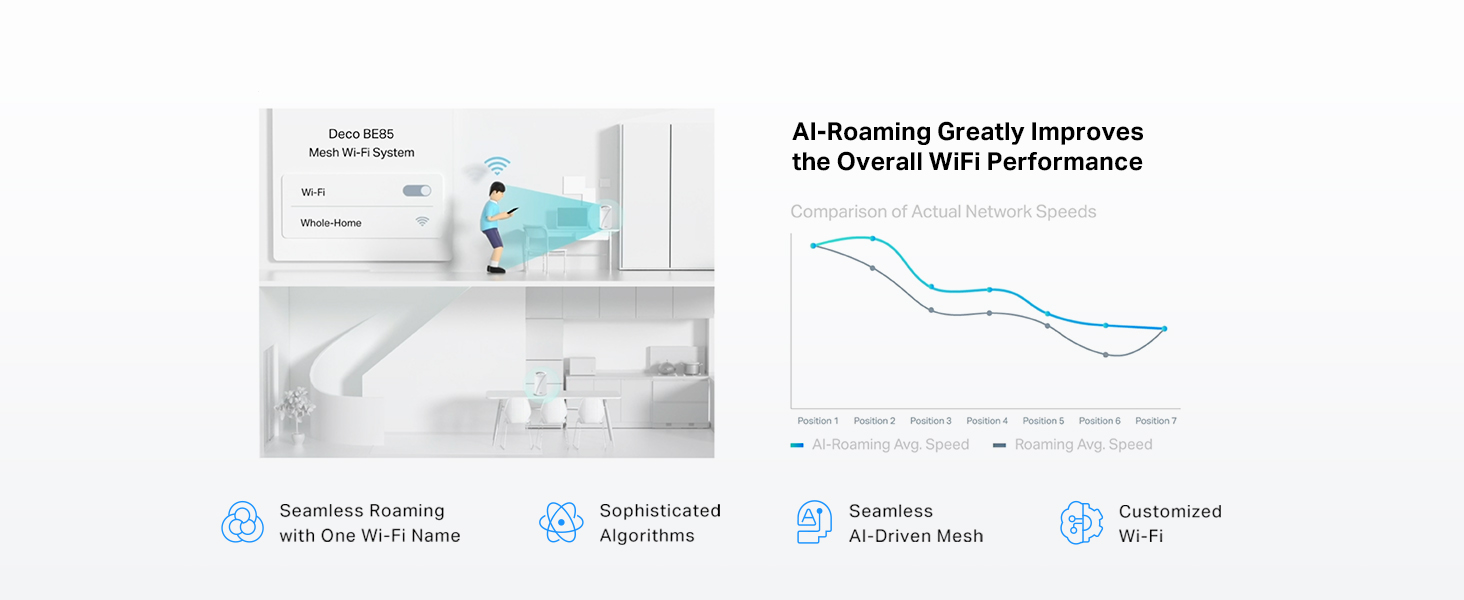
The TP-Link Deco BE85 is a cutting-edge WiFi 7 mesh system delivering up to 22 Gbps tri-band speeds, equipped with dual 10G WAN/LAN ports and simultaneous wired plus wireless backhaul. Designed for seamless AI-driven roaming and robust security with HomeShield and VPN support, it effortlessly connects over 200 devices, making it the ultimate future-proof solution for high-performance home networking.





| ASIN | B0CR5C4RZN |
| Antenna Location | Gaming, Home |
| Antenna Type | Internal |
| Box Contents | 1 Deco BE85 unit, 1 Power adapter, 1 RJ45 Ethernet cable, Quick Installation Guide |
| Brand Name | TP-Link |
| Colour | White |
| Compatible Devices | Smartphone |
| Connectivity Protocol | Wi-Fi |
| Connectivity Range | 6500 Square Feet |
| Connectivity Technology | Wi-Fi |
| Control Method | App |
| Controller Type | App Control |
| Coverage | Up to 6,500 sq ft |
| Customer Reviews | 3.8 3.8 out of 5 stars (46) |
| Data Transfer Rate | 22 Gigabits Per Second |
| Frequency | 6 GHz |
| Frequency Band Class | Tri-Band |
| Has Internet Connectivity | Yes |
| Is Modem Compatible | Yes |
| Item Dimensions L x W x H | 12.8L x 12.8W x 23.6H centimetres |
| Item Weight | 3.22 Pounds |
| LAN Port Bandwidth | 10 Gbps |
| Manufacturer | TP-Link |
| Manufacturer Part Number | Deco BE85(1-Pack) |
| Maximum Upstream Data Transfer Rate | 10 Megabits Per Second |
| Model Name | WiFi 7 Mesh System |
| Model Number | Deco BE85(1-Pack) |
| Number of Antennas | 8 |
| Number of Items | 1 |
| Number of Packs | 1 |
| Number of Ports | 4 |
| Operating System | TP-Link proprietary firmware |
| Other Special Features of the Product | Access Point Mode, Guest Mode, QoS, Remote Access, WPS |
| Router Firewall Security Level | Basic |
| Router Network Type | hybrid |
| Security Protocol | WPA-PSK |
| UPC | 840030706943 |
| Unit Count | 1.0 count |
| Wi-Fi Generation | Wi-Fi 7 |
| Wireless Compability | 802.11.be, 802.11ac, 802.11ax, 802.11g, 802.11n |
M**D
ุฌูุงุฒ ู ู ุชุงุฒ ููู ุงููุตู ูุญุชุงุฌ ุชุตุญูุญ
ุงูุฌูุงุฒ ู ู ุชุงุฒ ู ู ูุงุญูุฉ ุงูุฃุฏุงุกุ ุงูุซุจุงุชุ ูุณูููุฉ ุงูุฅุนุฏุงุฏ. ููู ุงูู ูุชุฌ ู ูุนูู ูู BE22000ุ ุจููู ุง ุงูุฌูุงุฒ ุงูุฐู ูุตููู ู ูุชูุจ ุนูู ุงูุนูุจุฉ BE19000. ูุง ููุฌุฏ ูุฑู ูุงุถุญ ูู ุงูุงุณุชุฎุฏุงู ุงูููู ูุ ููู ูุตู ุงูุณุฑุนุฉ ูุง ูุทุงุจู ุงููุณุฎุฉ ุงููุนููุฉ. ููุถูู ุชุตุญูุญ ุงููุตู ูุชุฌูุจ ุงููุจุณ ููู ุดุชุฑูู.
L**Y
A worthy upgrade to existing deco network, as main node
TP-Link Deco BE22000 Tri-Band WiFi 7 Mesh System (Deco BE85) - 12-Stream 22 Gbps, 2ร 10G + 2ร 2.5G Ports Wired Backhaul, 8ร High-Gain Antennas, VPN, AI-Roaming, 4ร4 MU-MIMO, HomeShield (1-Pack) This is a pretty beefy WiFi node. It's double the size of the older WiFi 6e Xe75 NODE units. There's a tonne of reviews out there. So I'm going to offer my thoughts for my deco mesh upgrade I have 8 Indoor xe75 and 3 outdoor x50s in my mesh. One main xe75 malfunctioned in a brownout so I needed to replace it. Luckily it still boots up but for whatever reason it was ultra flakey. I briskly bought this newer be85 as a main node replacement. Deco app allows you to do a "replace main" node procedure. It basically takes you thru a series of boot ups and configuration transfers and then ultimately it makes you swap the Ethernet cables form old deco to new be85. This process was not smooth. The config transfer failed a couple times for whatever reason, but tirs times a charm. It worked!! My entire router setup including vlan and isp login worked flawlessly once the transfer was a success.. I was able to keep all my existing satellites and just swap this main node . Very happy ! Otherwise it means I need to make a new network and re-add all the satellites, very time consuming process That out of the way my network is humming really well. Able to get full 800mbps from my fiber optic Internet wired. WiFi wise , I get around 500mbps. I setup the MLO wifi (basically carrier aggregation with 5 and 6 ghz bands) and this works however I found it Slower than just 6ghz. With MLO ssid I get around 400mbps. (Tested in same location with my pixel 9 XL pro WiFi support). I'm not sure why MLO is slower. But what MLO offers is a stabler setting with multi band support. I'm happy to have it but likely not going to use it much. With such a complex network I find things seem to work better with this be85. It's likely because the CPU cores are much faster. Things seem to run quicker on my network. File transfers quicker inler load , network reboots make satellites reconnect really really fast compared to older xe75, and oddly enough my 2ghz iot devices seems to drop less and keep stable. Even if you're not needing wifi 7, this is actually a worthy networking upgrade due to the speed of things , in a complex mesh network. I'm very happy to have upgraded to this be85 rather than buy yet another xe75 replacement main node. The 2.5g Ethernet is a nice future proofing . Met network is just 1gbps so I can't take advantage of that . So if there are any folks out there who have similar large mesh network with decos , I recommend buying this newer gen be85 unit to be your one main node whilst keeping your other xe75's or x60's as satellites Since the time of review , I have bought a be65 WiFi node to replace my busiest satellite node. The extra processing power for be65/85 series is a notificible enough ugorade. It really is that good.
R**D
Drops connection daily
I've done everything I possibly can to get this thing running a consistent signal but it drops nearly daily. This is not worth your time, effort or money. Stay away from this product
A**K
Fast, Reliable, and Packed with Insight
Really impressed with this system. The TP-Link Deco BE85 WiFi 7 Mesh System has been fast, stable, and a noticeable upgrade over my previous setup. Coverage is excellent, and it handles multiple devices without any issues. The app provides a lot of useful insight into network performance and connected devices, which is a big plus. Overall, a powerful system that works really well.
D**H
Powerful stable unit
Used as a router/NAT, then completely switched to AP mode. Works fine, stable, can provide MLO connection.
Trustpilot
2 weeks ago
3 weeks ago