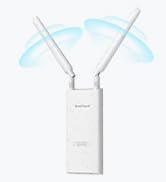
🚀 Elevate your Linux WiFi game with speed, range, and security that professionals demand!
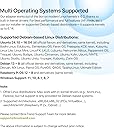
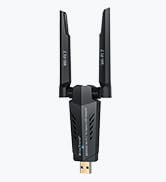
The BrosTrend AC1200 Linux WiFi Adapter is a high-performance USB 3.0 wireless adapter designed for professional Linux and Windows users. It delivers dual-band speeds up to 1200Mbps (867Mbps on 5GHz and 300Mbps on 2.4GHz) with two adjustable 5dBi antennas for extended range and stable connections. Compatible with a wide range of Linux distributions (kernel 6.2+) and Windows versions, it supports multiple architectures including x86 and ARM, making it ideal for desktops, laptops, Raspberry Pi, and virtual machines. Featuring advanced WPA3 security and easy driver installation with expert support, this adapter is a reliable, versatile solution for enhanced wireless connectivity in demanding environments.


| ASIN | B07FCN6WGX |
| Best Sellers Rank | #213 in USB Computer Network Adapters |
| Brand | BrosTrend |
| Built-In Media | 1 X 1200Mbps Long Range Linux USB WiFi Adapter, 2 X External High Gain Antennas, 1 X 5-Feet USB 3.0 Extension Cradle |
| Color | Black |
| Compatible Devices | Desktop, laptop, computer, PC, notebook |
| Customer Reviews | 4.2 out of 5 stars 1,771 Reviews |
| Data Link Protocol | IEEE 802.11ac/n/a 5GHz, IEEE 802.11n/g/b 2.4GHz |
| Data Transfer Rate | 1200 Megabits Per Second |
| Hardware Interface | USB 3.0 |
| Item Dimensions L x W x H | 3.7"L x 3.9"W x 7"H |
| Item Type Name | Linux USB WiFi Adapter for Long Range, Kali Linux USB WiFi Adapter, USB WiFi Adapter Linux, Linux USB WiFi Adapter, Linux Compatible WiFi Adapter |
| Item Weight | 60 Grams |
| Manufacturer | BrosTrend Technology LLC |
| Product Dimensions | 3.7"L x 3.9"W x 7"H |
| UPC | 742186982243 |
| Warranty Description | Register for 2-Year Warranty |
D**R
Easy install on Linux.
I recently purchased the BrosTrend Linux WiFi Adapter, and I must say I am thoroughly impressed with its performance. This little device has made a significant difference in my overall computing experience, and I couldn't be happier. First and foremost, the installation was an absolute breeze. As someone who has struggled with setting up other WiFi adapters in the past, I was pleasantly surprised at how straightforward the process was. It seamlessly integrated with my Linux system, and within a matter of minutes, I was up and running with a stable and reliable internet connection. The signal strength and speed of this adapter are exceptional. I live in a large house with multiple walls and floors, and I was worried about the range and signal quality. However, the BrosTrend Linux WiFi Adapter has exceeded my expectations. It provides a strong and consistent connection throughout my home, and I no longer experience any lag or buffering when streaming or gaming. What's also worth noting is the compact and sleek design of this adapter. It's small enough to remain inconspicuous when plugged into my laptop, and it doesn't obstruct other USB ports. Plus, it doesn't get in the way when I'm on the move, making it perfect for both home and on-the-go use. I also appreciate the driver support for Linux. BrosTrend has done an excellent job ensuring that their product is compatible with a wide range of Linux distributions, which is a big plus for users like me who prefer open-source operating systems. Overall, the BrosTrend Linux WiFi Adapter has made a significant difference in my daily computing activities. It's reliable, fast, and hassle-free. If you're a Linux user looking to improve your wireless connectivity, I wholeheartedly recommend giving this adapter a try. It's a fantastic investment that will undoubtedly enhance your online experience.
R**7
Great WiFi Adapter for a Good Price
I've been a Linux geek for thirty years and I have a long list of experiences with hardware that was supposed to work well with Linux but either didn't do that or only did it after after hours (and hours!) of frustrating research and experimentation. So it's nice when a product shows up that is just as advertised and a good performer as well. This adapter qualifies on both counts. I needed an additional adapter for a laptop I use for WiFi systems analysis and this one has good reviews and recommendations. Also, BrosTrend is known in the Linux world as a solid company. So I bought it. I ran into a glitch installing the driver, didn't immediately understand the problem, and clicked on over to the troubleshooting area on the BrosTrend website. Bingo. In, literally, a few seconds the site indicated that the problem was because UEFI Secure Boot was enabled. I should have noticed (I've only been doing this stuff forever!) but I didn't. Thanks to the thoughtful and well-written troubleshooting info on the BrosTrend site, I fixed the issue with a few keystrokes. The adapter works exactly as expected and I have another helpful gadget for analyzing the messy and crowded wireless networking universe. The adapter is recommended and BrosTrend is *highly* recommended.
K**Y
Another Winner from BrosTrend
Great reception. Worked with the drivers already in Kubuntu. Nice stable connection where a standard USB WiFi kept dropping out.
L**R
Several Scares with a Perfect Result
I brought the first scare on myself by ordering a product with only ONE review, something I virtually never do. But this device offered what I needed, so I took the chance. And I'm mighty glad I did. The Ethernet connection on my old PC (running KDE neon 5.13.1) had suddenly dropped from a download speed of 6 Mbps to a little over 1. Some tests indicated that the culprit was a degraded hardware component on the motherboard. My second scare came when the device arrived. The very attractive package was a blister pack you could actually open with your bare hands. However, the included Quick Installation Guide included instructions only for Windows and OS X. Uh, oh. A mini CD was enclosed and the Linux directory included a bewildering array of files, including PDFs and source code. Scare #3! I went back to the Amazon page and found this paragraph: Comes with an expertise Linux Support Ticket via email for installation on Linux OSes listed above, please send us an email at [email protected] for help, please tell us your OSes type and order number in the email. My email got a fast response that attached a PDF installation guide. I was pleased to see that the guide WAs brief and very specific for Ubuntu/Debian systems. You execute a command that installs software needed to compile the driver and then does the compilation and installation of the driver. The procedure requires a wired connection to the Internet, which could be a problem. A link is provided that would enable you to download the .deb file on another machine. However, they recommend that you not use this approach unless you have to. After the prompt was returned I plugged the device in and it was immediately recognized by the system. I shut down the PC, disconnected the Ethernet cable, and rebooted. I used the KDE System Settings to add the woreless device. My "perfect result" is that I am once again getting downlaod speeds of over 6 Mbps. Update: After using this device for a month, here are some added observations. On my hard drive I have three Linux systems in separate partitions with the device working on all of them: Linux Mint-XFCE, KDE neon, and Lubuntu. Doing a major update that included the Linux kernel caused me to lose the connection with the device. Help from TrendTech support got me going again. I just had to execute two commands: sudo dpkg-reconfigure rtl8812au-dkms sudo modprobe 8812au Today I did similar updates with Linux Mint and KDE neon. The fix was again necessary with the former but not with the latter. I continue to be very pleased with my purchase.
S**N
Great WiFi adapter for Linux machines
I bought this after our previous USB WiFi adapter failed; it arrived quickly, and with a mini-DVD installer for Linux installation. I bought it specifically because it highlighted Linux support, which most USB adapters don't have. I was a bit chagrined to learn that installation "required" Internet access; out Linux machine is two rooms away from the cable modem and WiFi router, and I didn't want to have to disconnect, move, and reconnect our desktop setup to just install the drivers. So I wrote a somewhat snarky email to BrosTrend's tech support. Then I read their documentation and learned that there is an off-line installer; so I fired up my PC laptop, downloaded the offline installer & dropped it onto a thumb drive. The installation iteself took all of 10 minutes (laptop & download time included). After restarting the Linux box, the WiFi router was working perfectly -- and it's far faster than our old WiFi adapter. On top of the ease of installation and setup, BrosTech's tech support people were responsive, polite (despite my snarkiness), and exceedingly helpful. They especially get top marks for going above and beyond. I'd recommend both the device and the company highly, and will be happy to buy from them again when possible.
I**K
Worked for a while, then died.
Edit 2: The seller ended up refunding my money, so I can't find any fault with their support. Edit: The adapter worked great for about a week or two, then slowly started becoming less and less reliable. My connection would fail, and I would have to re-seat the adapter, or reboot. The activity light would either come on solid blue, or turn off entirely. Today the adapter stopped working entirely. It initially looked like the provided extension cable might have been part of the problem. I removed the extension cable and plugged the adapter directly into the back of my PC. That initially brought it back to life, when it hadn't been working at all. However, within a few minutes, the light turned solid blue and the adapter stopped working. My prior adapter, an internal TP-Link card, began constantly dropping the connection, and would take forever to reconnect. The problem seemed to start when I moved the router a little further away from my desktop, but no other wi-fi device was affected, even in the same room, and signal strength was still over 50%. I decided to see if I could find a better, more stable adapter. I was somewhat hesitant to buy from a brand I had never heard of, but BrosTrend seems to be the only company that has wholeheartedly embraced the linux community, so I was willing to give them a chance. So far, I have not been disappointed. The install was easy, although you do need to have an internet connection to download the media. Now that I'm up and running, I have not lost connection once, and my signal strength and download speeds are consistently better than they had been before. If you have reservations about buying from a smaller brand, it's worth remembering that all of the wi-fi adapters on the market, no matter who sells them, all use chipsets from the same five or six vendors. In this case, it's a Realtek chipset, and they make chipsets for all the big companies.
S**K
Best Adapter for Linux packet monitor/inject
Works great with Arch linux right out of the box. Supports monitor/injection and is fast and efficient, especially for the price. 100% solid product.
M**R
Probably not a real Realtek RTL8812BU or RTL8822BU chip, as advertised
I've had this for a while and spent a decent amount of time tinkering while trying to run it on a Debian Linux distro. It is advertised as Realtek RTL8812BU or RTL8822BU chipset but it would not function with drivers for those. I nearly returned it, as in already had the return label. I did find that you could download a functioning driver from Brostrend's website (linux.brostrend.com) though even that took some detours through the alternative commands after the first few failed. That being said it seems to perform very well and seems to reach farther than the built in wifi on the computer. I was making an access point so this is ideal. The lead cable to the antenna also means I can move it to get best reception. I wish the install were easier but it still seems to be a solid performer at a good price. I probably would prefer a real Realtek RTL8812BU or RTL8822BU chipset to future-proof the product.
Trustpilot
2 months ago
1 month ago