
DOWNLOAD THE APP


Customer Services
Copyright © 2025 Desertcart Holdings Limited
DOWNLOAD THE APP
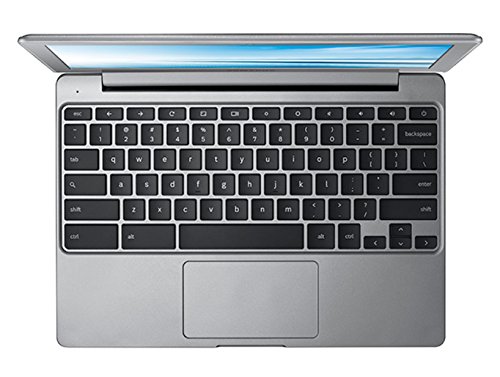


🚀 Power up your productivity, wherever life takes you!
The Samsung Chromebook 2 XE500C12-K01US is a compact, lightweight laptop featuring an Intel Celeron 2.16 GHz processor, 2 GB DDR3L RAM, and a 16 GB SSD for fast boot times and smooth Chrome OS performance. Its 11.6-inch anti-glare LED display delivers crisp visuals, while an 8-hour battery life and fanless design ensure all-day, silent productivity. Preloaded with Google apps and 100GB free Google Drive storage for two years, it’s designed for professionals seeking a reliable, portable device for web-based tasks and cloud computing.
| ASIN | B00NJGRLUY |
| Audio Output Type | Speakers |
| Audio Recording | No |
| Audio features | [IN] Audio features are mentioned, but no specific description is provided. |
| Automatic Backup Software Included | Google Drive |
| Battery Average Life Standby | 9 Hours |
| Battery Cell Type | Lithium Ion |
| Battery Life | 8 Hours |
| Best Sellers Rank | #79,787 in Computers & Accessories ( See Top 100 in Computers & Accessories ) #13,380 in Traditional Laptop Computers |
| Bluetooth support? | Yes |
| Brand | Samsung |
| Built-In Media | AC adapter, AirDroid Premium, Wunderlist Pro, Little Bridge |
| CPU Model | Celeron |
| CPU Model Generation | 12th Gen |
| CPU Model Number | Celeron N2840 |
| CPU Model Speed Maximum | 2.16 GHz |
| Cache Memory Installed Size | 1 |
| Color | Silver |
| Compatible Devices | External storage devices, mice, keyboards, printers, and other peripherals that support USB, Bluetooth, or Wi-Fi connectivity. |
| Connectivity Technology | Wireless |
| Customer Reviews | 4.3 out of 5 stars 1,053 Reviews |
| Display Resolution Maximum | 1366x768 Pixels |
| Display Technology | LED |
| Display Type | LED |
| Form Factor | Laptop |
| Global Trade Identification Number | 00715407512215, 00887276039022 |
| Graphics Card Ram | 2 GB |
| Graphics Coprocessor | Intel HD Graphics |
| Graphics Description | Integrated |
| Graphics Ram Type | DDR4 SDRAM |
| Hard Disk Description | SSD |
| Hard Disk Interface | Solid State |
| Hard Disk Rotational Speed | 1 RPM |
| Hard Disk Size | 16 GB |
| Hard-Drive Size | 16 GB |
| Hardware Interface | USB 3.0 |
| Has Color Screen | No |
| Human-Interface Input | Touch Pad |
| Item Dimensions L x W x Thickness | 11.4"L x 8.06"W x 0.66"Th |
| Item Weight | 2.7 Pounds |
| Keyboard Description | Gaming |
| Keyboard Layout | QWERTY |
| Lithium-Battery Energy Content | 30 Watt Hours |
| Manufacturer | Samsung IT |
| Memory Clock Speed | 1600 MHz |
| Memory Speed | 1600 MHz |
| Model Name | Chromebook 2 |
| Model Number | XE500C12-K01US |
| Model Year | 2014 |
| Native Resolution | 1366 x 768 pixels |
| Number Of Cells | 2 |
| Number of Ports | 2 |
| Operating System | Chrome OS |
| Optical Storage Device | No optical drive |
| Other Special Features of the Product | Anti Glare Coating |
| Processor Brand | Intel |
| Processor Count | 2 |
| Processor Series | Celeron |
| Processor Speed | 2.16 GHz |
| RAM Memory Installed | 2 GB |
| RAM Memory Technology | DDR3L SDRAM |
| RAM Type | DDR3 SDRAM |
| Ram Memory Maximum Size | 2 GB |
| Resolution | 720p |
| Screen Finish | Anti-glare coating |
| Screen Size | 11.6 Inches |
| Speaker Description | High-power |
| Specific Uses For Product | Business |
| Total Number of HDMI Ports | 1 |
| Total Thunderbolt Ports | 2 |
| Total Usb Ports | 1 |
| Touchpad Feature | True |
| UPC | 715407512215 887276039022 |
| Video Output | USB |
| Video Processor | Intel |
| Voltage | 3 Volts |
| Warranty Description | 1 year coverage for labor, 1 year coverage for parts, 6 months coverage for the battery |
| Warranty Type | 12 |
| Webcam Capability | Yes |
| Wireless Compability | 802.11ac |
| Wireless Technology | Bluetooth |
J**Y
Amazing side-computer
A few months before I had bought this chromebook, I purchased a Toshiba Satellite Laptop to replace my older Dell laptop. The Toshiba is amazing, but very heavy, and after my wife bought a chromebook, I decided it seemed like a good idea to have as a carry-around laptop. I purchased it from Amazon Warehouse Deals, and have had it for four months now. I am loving it! The computer is small and light, and is probably comparable to any other Chromebook on the market. Honestly, there is nothing statistically that sets this apart from other chromebooks; it has 2GB of RAM, a low-end Intel Processor, almost no memory on board, and runs Chrome OS. But what one does get by choosing the Samsung over, say, the Asus or Acer, is the amazing quality of Samsung computers. There has been some controversy about their computers, but the fact is, this is a Chromebook, it is what it is as fair as pre-loaded programs (there is nothing other than the Chrome OS). But the keyboard is a very intuitive one. On my Toshiba, the keys are stiff and the trackpad is pitiful. These feel very natural, accurate, and all around is one of the best keyboard/trackpad combo I have ever used. As far as Cons go, there really isn't much to complain about. I suppose if I were to get really picky, the RAM is not great, but that is fine because of a point I will make later. Also, I said that the processor is low-end, but that isn't a bad thing on the Chromebook; actually, it acts in the favor. The Chromebook does not require an amazing processor because it doesn't have much to run, as Chrome OS and the Google apps are the only things that WILL run on this. There is one large tip I have: get the Chrome Desktop Remote extension from the Chrome Store (different from Google Play). If you have a true computer of any kind and are willing to download Chrome Browser for this, it is worth your time and effort. I am a relatively tech-savvy person, but one should not need to be to figure this out. It sets up a remote control that one can use from their Chromebook to control everything on their other computer (given that the other computer is turned on). This is why I bought the Chromebook and this is why I love it. I do use the Chromebook itself, but I mostly end up using the remote desktop, so I can access my Toshiba, run Windows 10, and use my 8GB RAM, i7 Processor computer without needing to carry the actual computer. Also, possibly for the more technologically inclined, there is a way that your can revert the Chrome OS back to its Linux running base OS and use it as a true, Linux computer, but you then have the struggle of the processor and the RAM. I have another Samsung Chromebook that I have done this on and where this are not too large of hindrances for my purposes, that is because I have the Toshiba (as well as a work Desktop (Dell)). That being said, if you have the backup computer, it is well worth it to go into the crosh and run it back to Linux. This can, of course, always be reverted by resetting the computer with a powerwash.
A**R
A computer for people that just like to compute.
Bought this for my wife that was constantly having to do Windows Updates. This does get updates, they are just not as noticable as a Windows Update since they have a smaller OS and Chrome to update. She wanted to give it 4 and a half stars because she is not use to it yet. She does like it though and thanks me all the time. She is not a heavy user yet, but she mostly uses it to play Spider Solitare, check her gmail, edit an occasional Google Docs or Spreadsheet. Look up stuff for her brother. This fits the bill rather nice for that. I have been using one of the first Samsung Chromebooks for over a year now. The new one appears faster and if it is like mine, that will not change. I use mine for a little picture editing, No, I am not a professional, but there are programs in the Webstore that does a pretty good job these days. For those wanting to use MS Office, I have an Outlook Account and use One Drive if I have to open a MS Word file or Excel Spreadsheet that Google can't open. I do have to admit, if I am working on a Document, I prefer Google Docs to MS Office Online and that is probably just me. They are both changing for the better fast. No, you will probably not use this machine for CAD drawings. It is nice to open it, and be logged in within about 9 seconds from boot up. That battery seems to work well. Probably several good hours of use and it depends on what you are doing. It is not a gaming machine although you can play some nice games on it. It's sound quality is good enough to pass the time, I also have an 808 Canz speaker if I need it loud. Yes I would recommend this to friends and family. There appears to be no maintenance as it is all handled through the OS. You open it, login, and start computing. No defrag, virus scan on startup, still boots and is ready to type in 9 seconds. I hate having to work on my Windows computers at work anymore. I am not a patient man. This just works. And yes there is a learning curve on what you can and can't do. Read the onboard help to find out software substitutes.
M**O
Loyal Apple User For Over 30 Years Is Impressed
I have been a Amazon Prime member for years. I order so many products, for myself and my businesses, from Amazon, I'm sure I have put several of their employees children through collage...lol. I own two business. I have been an independent graphic designer and image consultant for over 25 years. I have exclusively used Apple products since 1986. In 2011, I purchased a health club and moved all of it's computer hardware to the Apple platform. My health club uses an online club management software. The software can be run from any browser and any platform. I love my Apple computers and believe that the platform is so far superior than anything else out there. Having said this, I decided to order a Chromebook because it would address my needs while being extremely cost effective. THE NEED: I needed a laptop computer at my health club for new members to activate their membership. I had been using an iPad Air and Apple bluetooth keyboard for a few years as the main access for members. This worked fine, but the software proved to be a tad clunky when accessed through a tablet. I knew that a laptop would be an answer, but I didn't want to drop over $1,000 for an Apple computer when it would be a waste. I just needed to access a web browser. I didn't need to run any software of the computer. I debated for month about the idea of using a Chrome platform, but the choice was easy...the Samsung Chromebook 2 is under $230.00! THE EXPERIENCE: I received my Chromebook 2 overnight and I can say that the set up was extremely simple and fast. If you have a Google account, you are on the web in just a few minutes. The build of the machine is quite good. Now, nothing can compare to the build quality of an Apple computer. Apple sets the bar extremely high and their craftsmanship is extremely on point. With that said, I was impressed with the quality of the laptop at this price point. The keyboard feels nice and study. Although made of plastic, the casing feels well designed and every cease and connection feels strong and tight. The matte screen displays pleasing colors. Although the viewing angles aren't wide, the overall viewing experience is pleasurable. Remember, this is coming from a guy who uses Apple's Retina Displays for his computing and smartphone. Even my watch (An Apple Watch) is Retina display! The processor id quite responsive. I noticed no noticeable la in bringing up websites. Youtube videos played quickly and were easy to scrub through to find specific points in a video. If you own a printer which offers Google Cloud Printing, printing from your Chromebook is very easy. You might not have as many choices as a direct driver from a MAC or PC, but for your daily business printing needed, this service is more than adequate. WHAT'S NOT TO LIKE? I would be hard pressed to criticize this machine for what it offers at this price point. It think for what it is, it is OUTSTANDING. The only reason I did not give it five stars is because I ultimately have to compare it to a Apple computer, which in my view is beyond five stars. The only criticism is that the trackpad could be a little smoother. It seems to jump at point rather than move smoothly. In full disclosure, this could be due to my sole experience with the Apple platform. I do recall PC trackpad being somewhat less responsive. I have noticed that the smoothness has seemed to increase. Maybe this is me just getting use to the differences. If you are on a budget and you need a computer to access the web and email, this is the computer for you. If you are already using Google Mail and Google Drive, a Chromebook 2 will be a Godsend. This Apple guy is very impressed.
D**O
Either I am really unlucky or quality control on these are terrible. Good product, disregarding defects.
Edit: It does seem to be a defect in the particular Chromebook I bought. Lightly resting my finger on the spacebar also yielded an input, which convinced me it really was just this particular one. Will be returning this one and buying another one to replace it. Check your keys before you throw away the box I guess! Edit2: Have received what was listed as a new Chromebook. Did not come with shrink wrap over the screen as my last one did, and that one was listed as an Amazon Warehouse Deal refurbished one. The space bar is fine on the new one, but I have run into a new problem. There is slight play in the touchpad. When I say play I mean if you rest your finger on the touchpad then lightly press down, let go, press, let go, repeat, it will produce a light clicking sound as there seems to be a small space between the surface of the touchpad and whatever lies beneath it. I'm not sure if this is return worthy, but I'll definitely be considering trying a third time and hopefully getting that perfect one, quality control might be a little iffy on these Chromebooks it seems. If I could take the spacebar of the second Chrombook and the touchpad of the first one, we'd be in business, but how it is now, they both have crippling defects. I'll be uploading a video showing both of these defects shortly. Link to video: https://www.youtube.com/watch?v=ULwuYqH2720 Here you can see the space bar of the right Chromebook will input spaces without fully depressing the key. The left Chromebook's touchpad will produce a slight clicky noise even when not fully depressed and if you keep an eye on the bottom left corner you will see that it moves quite a bit. Comparing it back to the Chromebook on the right, its touchpad produces absolutely no noise and has almost no movement when lightly pressed. I am writing this just as a precaution to potential buyers. I just encountered a slight hardware "quirk" where you CANNOT use this on an uneven surface. This ranges from a lumpy bed to a table with a few papers on it. The bottom of the laptop will come into contact with the surface and flex and it will constantly input the space key. At first I thought it was a software issue but then I tried to recreate it by picking the unit it and flexing the bottom of the Chromebook by hand and it started hitting space automatically. Otherwise, I really like this Chromebook's styling and I personally prefer a matte screen over a glossy one. If you're looking to browse Reddit, Youtube, Twitch, etc, and do light spreadsheet work, word processing, etc this Chromebook is super portable and has a very long lasting battery life. For me, I use my Chromebook between classes, so maybe 2-3 hours a day and I can go 2-3 days without charging it.
S**M
Great, Solid Unit
I have a Samsung 7 Chronos and a Samsung S4 Active. I like Samsung so I decided to go with their chromebook for mobile work and school so I wouldn't have to lug the Chronos around with its massive power cord. To summarize: It's definitely worth the price. It's a mobile unit that's fast, simple, and efficient. It's not a replacement for windows (I need visual studio, CAD software, and other windows-only products for school and work) but this allows me to squeeze in work and study where it wasn't easily done before. I can open it during lunch and reply to co-workers or have it open on a counter while cooking. I can also finally leave my monstrous 17" Chronos at home most days. Awesome stuff: This unit has an incredibly fast boot time, is 100% silent (no fans), and has a quiet keyboard so I don't feel guilty typing past midnight. Google OS is a lot smoother than I had imagined. I don't miss windows at all when I use it. It's not weird like MAC. (There is no need for option & command instead of shift alt & control!) I'll never switch from a windows console due to the software I need, but Google has my respect for quality OS. Other Pros: Very good looking Crisp key-presses Good touch-pad Bright, mostly-matte display with higher resolution than I expected Good OS that synced immediately with the rest of my chrome products Cons: Noticeable lag when quickly navigating the internet. While working I juggle through a dozen or so websites researching or pulling up information, none of which have any graphics heavier than a company logo. If I take a call afterhours or work at home, I notice it's delay. Its not a bad unit, and I can handle delay when I'm not on the clock, but I would not use this as a primary console for any tech-heavy job. It's faster than any MAC I ever had. (I've used three between home and work). I don't know if its a defect or if someone sent the wrong charger, but the first unit I had came with a power cord that didn't charge well. The power cord issue I had with my first unit did not occur with this one. I bumped up rating to 5 stars.
S**N
Forth Time Was The Charm
this is honestly the best chromebook that i have purchased. this is my 4th chromebook. these are an acquired taste. the first chromebook i got was an acer which was over a year ago. the next day i sent it back. the second was an lg chromebase. very nice computer. issue was that it was only 1.2 gb ram. which would have been fine if i did not listen to youtube while i was surfing the web. there were dark pages between loads. the thing i liked about the lg chromebase was the fact that it had an hdmi in. which came in handy since chrome doesnt quite do everything i want it to do yet. it let me have my computer connected and used the chromebase as a monitor. but i took it back the day after christmas because it was too slow. the 3rd was an acer chromebase. the information on the site was horribly wrong. the people at best buy didn't even know if the hdmi was out or in. i received it and took it back. those horrible chromebooks bring me to this little beast. it costs about what a tablet would. so i thought why not give it a try. i bought it. once again each site saying separate things about the specs. youtube wasn't even good for the info i was looking for (most videos were done with handhelds and very poor lighting). but i am very happy with my new purchase. the end of life for this chromebook is October 2019 or longer i believe which is fantastic since i usually get a desktop every 3 years anyways. this price is worth the sacrifices that i am willing to make waiting for this to become the awesome OS that i believe it will eventually come. amazon also had the lowest price out of every retailer i looked at. the screen size is great. the processor is fine. i can stream music from amazon and youtube videos with no shuddering. i would definitely recommend this tablet for anyone who wants just a computer. nothing to fancy. something just right.
H**Y
Best Looking Chromebooks. But missing the IPS screen and needs a better keyboard.
We checked all the chromebooks on the market at Bestbuy for our last minute gift. We compared all the chromebooks that was instock and found this Samsung chromebook 2 the best looking chromebooks ever. Bestbuy had this for $199, Amazon at $189, the decision was easily made to use my prime account. Well Done Amazon. The leather-like finish of the top cover looks elegant and you won't feel this is a $199 notebooks. The build quality is truly amazing, very solid build not flimsy screen like the HP and Toshiba on display at Bestbuy, after setting this up (took 1 minute only including all updates), we tested the performance on this chromebooks, it's extremely fast even thought this is only a 2GB RAM chromebooks, we had 10 tabs opened at the same time and not experiencing any lag. All to all, I am truly impressed by the build and performance. However, there are 2 key features that is missing from this chromebook, an IPS screen, thinking about samsung who makes the best screens we were expecting the screen to be much better in quality, the vertical viewing angle is really poor, there is no mentioned of the IPS screen in any specification details from both Amazon and Samsung site, we just assumed it would come with IPS because of the brand name of Samsung. Another area that can be better would be the keyboard, the keys are somehow smaller than the 11.6" windows notebooks we had, the space gapping each individual key is pretty big, so I am missing the accuracy when typing on this chromebooks, the keyboard also has a short travel distance, it's not easy to type and not comfortable as what we used to have. All to all this is a great looking and high performance chromebook, if you are not picky as we are on the screen and typing comfort, look no further. "THIS IS IT." "Buy IT"
L**D
Battery Indicator Problem
No matter how long the battery was charged, the indicator showed about the same charge. Either the battery will not charge or the battery indicator is defective. Battery percentage is not shown on the home screen. When I clicked on the battery symbol, it brought up the entire settings panel, and would include the strange battery notation of 100- 8.74 left (the 100 was grayed out). When I went to the settings area and clicked on battery, hoping to find a way to alter this notation, it would instead bring up a page showing all the recent web pages I had just viewed. I did this repeatedly with the same result, so something is messed up. I clicked on the ? symbol which is suppose to bring up a sort of overall manual. When you type battery it brings up absolutely nothing. Nothing on such a basic thing as the battery icon etc.!!! It then takes you to a forum where you are to ask strangers who are just random home users (not professionals) on how to solve your problem, hoping they do. I do not know if this is just Samsung or chrome in general that is at fault, or both
Trustpilot
2 days ago
3 weeks ago