🚀 Make it Massive, Make it Multicolor, Make it Masterpiece!
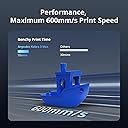
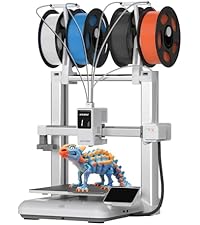
The Anycubic Kobra 3 Max is a powerhouse 3D printer boasting a colossal 420x420x500mm build volume and blazing 600mm/s print speeds enabled by advanced dual-axis mechanics. It supports vibrant multicolor printing when paired with ACE Pro units, delivering up to 8 colors in a single print. Intelligent AI-driven print monitoring ensures error-free results, while auto bed leveling and robust customer support make it a reliable choice for professionals seeking large-scale, detailed, and colorful 3D prints.


| Best Sellers Rank | #11,978 in Industrial & Scientific ( See Top 100 in Industrial & Scientific ) #23 in 3D Printers |
| Brand | ANYCUBIC |
| Color | gray |
| Compatible Devices | Personal Computer |
| Customer Reviews | 3.9 out of 5 stars 1,599 Reviews |
| Item Weight | 47 Pounds |
| Material | PLA, PLA+, TPU , ABS, ASA, PETG、Matte PLA、Silk PLA |
| Product Dimensions | 29.5"D x 32.25"W x 7.25"H |
L**A
Some false advertisements, great for detailed prints
This is my second 3D printer (first was an Ender 3 Pro), and it runs much more reliably and prints with higher detail than the Ender 3 Pro did. However, few things worth noting about this printer, especially for beginners. 1) Installation is *not* 1-2-3 steps easy as shown in their marketing video. You have to hold the printer almost completely upside-down to get screws into it, which sometimes trap cords underneath the frame bits, and after you've finished with the elbow grease assembly (screwing the frame together, screwing the LCD panel in, clamping the filament holder in), then you have to plug in virtually *all* the cords for this thing. For every step motor (4?), for the LCD screen, 3 for the hotend, connect the tubing, connect the larger black cord etc. Thankfully the cords are at least labelled with X, Y, ZR etc but the places they are meant to be plugged into are not labelled. Didn't count, but felt like there were at least 12 cords that needed to be plugged in to various places. Then after that, you have to channel your inner contortionist to cut all the zip ties that are buried on this printer without nicking any of the necessary cords or belts, in incredibly poorly visible spots like under the center of the bed. None of the tools provided could reach these zip ties, so I ended up folding myself in half with my cell phone flash light trying to carefully cut a zip tie with a pair of shears. This is not "beginner" level installation, and I would not recommend it for anyone who has even a minor disability or handicap. 2) The machine is *not* silent. It is very quiet, don't get me wrong, but it does make noise when it prints (a humming sound along with the whirring of the fans usually but occasionally a sort of buzzing thud if the nozzle catches on the print). The fans an be turned off, but even with them at 0% the printer still makes noise. I would guess its a little louder than the level of a loud AC unit or refrigerator. Again, ignore the marketing lies, this printer will make noise. 3) The filament feed is *not* direct to the hotend. This is important because that feature can reduce the amount of potential clogs for filament being fed into the printer. This printer (like most 3D printers) uses bowden tubing with a gear setup to feed filament into the hotend. I saw this in the specs on this amazon listing page and it is blatantly false advertising. 4) The scraper tool included with this printer is basically a putty knife. It is almost completely dull. I would not recommend it for actually scraping up prints, buy yourself a finer scraper made of metal and not plastic. Most of the time this tool is not necessary to get prints off the bed due to the textured surface that the Anycubic Vyper uses, but in the rare cases where you do need a little bit of extra oomph, don't waste your time with this scraper. 5) This printer runs quite a bit slower than average. A print that might take 1h or the Ender 3 Pro could take 3-4 on this printer. I think its due to the finer details this printer can achieve while printing, but worth knowing. You can change your print rate in the settings on a per print basis, but because of the fixed rate of filament extrusion, I haven't messed with this too much. I was worried it might affect the quality of my prints. If you're looking for fast production efficiency, this probably isn't the right printer for you. Some pros of this printer for beginners include the auto levelling bed, the easy to remove prints bed, and the touch screen. This printer works well, and has some very nice features. Auto levelling bed, textured and flexible bed for easier print removal, SD card reader with included microSD and SD cards, data cable for direct hookup to raspberry pis or arduinos, touch screen, 'quiet' printing all come to mind. I haven't had the printer clog yet (been using it for a few days 24/7), and the prints come out with very fine details (lines much less visible than on other 3D Printers I've tried), and they are easier to remove from the bed as well (I have only had to 'scrape off' one print so far and it was with a filament that is notoriously tough). I also haven't had any leaks or issues with this printer thus far. The inclusion of 5 or 6 alan wrenches was a nice touch, personally I really appreciated the data cable as well. The microSD card came preloaded with some test files (and formatted) so that was nice as well. The pliers that came with this printer are pretty poor, so maybe pick up a better pair for yourself if you're buying this printer. The zip ties were also a nice touch for the bowden tubing. If you're looking for highly detailed prints and don't care how long they take to produce, this is a top notch printer. If you're a beginner or looking for high production output, this is probably not the right printer for you.
I**N
Anycubic Kobra S1 combo - IT JUST WORKS
Wow! I couldn't be happier with this printer and ACE Pro unit combo. It simply works, and works so well. Everything about it makes 3D printing easy. Its print quality is amazing, as well as its speed and consistency. Over the past two weeks I have printed approximately 100 items, big and small alike. None have been a problem. I've printed with PLA and ABS without issue. Bed adhesion is flawless with no need to continously tweak settings. The unit itself was easy to assemble and fit perfectly (with the ACE one the side) in the space that I had available (24" x 48"). On one instance I had an issue with the ACE getting filament miss routed which required some easy disassembly to get it un-stuck. That was my issue for not feeding it straight down into the hole. The accompanying Anycubic Slicer Next software (Orca variant) and phone app are also fantastic. Very simple to use and yet so functional and powerful. Loving the notification when a print is complete and the ability to check in on the print at anytime from anywhere. This was a major step up from my Ender 3 v1 and a great buy for only $429. Highly recommend!
A**H
My second Anycubic printer purchased, the second that's a piece of junk
I bought this printer after my first Anycubic Kobra stopped heating the bed. Apparently that's a common problem with the first series of Kobras, but Anycubic's customer service is useless. After trying a couple of fixes on the first one, I gave up and just bought this version, because it seemed to be better reviewed. It arrived fine, but due to a variety of reasons, I didn't start it up for about 8 months. I put it together, went through all of the set up, ran the first test print, everything seemed fine, so I started my first real print. The quality of the first print wasn't great, so I made some adjustments and tried again. Better, but still not good. I read numerous articles and threads on a variety of sites, eventually coming up with a solution. The biggest issue is that, while the printer might be able to run at 500 - 600 mm/sec, unless you have filament that can keep up, you're still going to be limited to 100ish mm/sec. Even lower if you don't want the prints to look awful. But, whatever. I ordered some high-speed filament and just slowed down the print speed. Things look pretty good. Then, after about 18 hours of printing across a half dozen prints, in the middle of a print, I realized the extruder wasn't actually extruding any filament. When I took the thing apart, I found that the filament had hardened inside the nozzle and then the printer kept feeding filament into the hot end, completely destroying the thing. So, I ordered a new OEM hot end and an upgraded ceramic hot end. I installed the ceramic upgrade, and after three misstarts (because the ceramic item is also junk, apparently), I was FINALLY able to finish a test print. Everything looked great, but, considering all the problems I've had with FDM printers, I decided to try another test print. Less than 30 seconds into the print, the hot end was clogged with filament backing up. Bottom line, I've done everything I was supposed to do with these printers, and they STILL fail after only a few hours of printing. None of the components are high quality, and Anycubic's customer service is absolutely useless. I will NEVER purchase another Anycubic product again, and my experience with this crap has pretty well convinced me to give up on 3d printing completely. UPDATE: Anycubic customer service decided to reach out to me and offer me a new hot end, despite it being out of warranty. Like they're doing me some kind of favor, replacing a garbage component on their garbage printer when the component failed after less than six hours of use. Because apparently these clowns think that replacing a component on their POS printer will somehow solve all of the many issues this POS has. I may take them up on the offer just so I can replace it, follow all of their asinine instructions to the letter, then show them that the printer is still garbage. The worst part about this entire fiasco is that this is actually my THIRD FDM printer. My first was a Creality Ender 3 that absolutely would not level. I followed all of Creality's instructions, looked for solutions online from all kinds of places, and literally spent six months trying to get that piece of junk to work. I eventually gave up and purchased the first Kobra...and it worked, right out of the box. I didn't have a bit of issue getting it set up, getting it to print, nothing. Print quality was great, speed was decent, I had absolutely no problems with it. Until the stupid thermistor error that bricked a huge number of those first-gen Kobras. Now, the Kobra 2 Pro is arguably WORSE than that useless Creality I had. UPDATE TWO: I received the new "official" Anycubic hot end (which is identical to the aftermarket parts I purchased...they're probably made on the same assembly line at the same time and just packaged differently). Installed it, tried running a print, and to no one's surprise, it failed. I followed all of the instructions provided by Anycubic (all of which were things I had already done to troubleshoot the problem), and they didn't fix a thing. On the tensioner side of the X-Axis, the Z-offset was pretty good, and the filament was depositing pretty much the way it should. After a few passes, however, the filament was no longer adhering to the plate, and there were gaps between each "bead" of filament being extruded. That continued until the extruded filament was no longer even touching the plate. I decided to check the printer's overall level/alignment, and that of the X-Axis gantry's alignment to the hot bed to see if that might be the problem. The printer is about as level as I can get it.. With the gantry pressing on the block on the belt tensioner side, it's sitting more than 4mm ABOVE the block on the motor side of the gantry. That's AFTER I've loosened everything and adjusted the gantry as much as possible. It physically CANNOT be adjusted any more than it is. I have no idea if it's bent somehow (definitely not obviously so), or if Anycubic is simply incapable of the level of manufacturing precision required for something like this. I'm currently waiting on yet another response from Anycubic...which I assume will tell me to do things I've already done that won't actually work. UPDATE 3: After messing with Anycubic's useless customer service for nearly a month, I gave up working on this piece of crap. After nearly 6 months, I finally decided to try following the useless instructions from their last message again. After following those instructions to the letter, the X-Axis gantry arm *STILL* cannot be leveled to the bed. I don't know if the clowns who manufactured the thing drilled the holes for the screws improperly or if the arm is slightly bent, but it absolutely *CANNOT* be adjusted properly. I absolutely hate this company and their products. Never again will I purchase anything from Anycubic.
A**N
Works great and easy to setup.
Been printing great and was easy to get setup and printing, but if you want do online printing need to separated 2.4-5g WiFi channels (can’t be shared) had an older router I was able to use to get it online.
A**L
So far so Good. Anycubic S1 Combo
I am giving this 4 stars for now because everything up to doing small print jobs has been very good. I have little experience with 3d printers, but my nephew does. He recommended I take a look at the Anycubic S1 combo for a first printer. I did my research and of course saw all the self proclaimed expert's opinions. I chose the Anycubic S1 Combo. I purchased it from Amazon for $550.00. Normally $599.00, but it had a coupon. Also purchased some PLA. Only a small sample of PLA for the test print comes with it. I also purchased the 4 year warranty for $85.00. I usually don't buy warranties, but I felt I needed to with this purchase. The packaging was in great shape and the entire unit was packaged very nice. No scratches or dings of any kind. All of the accessories were packaged very nice as well. Setup was easy. Watch a YouTube video or just read the instructions. Learning the design program and getting freebie print jobs may be a little difficult for some. Sign up on line for their program. Download it along with the app. Do any software upgrades prior to printing. Remember, a 3d printer takes patience. Nothing happens instantly. Be prepared to wait a long time for results. Also be prepared for a learning curve. Take some time and print simple things and then work your way up to bigger and better. August 28th. After using the machine for 100 hours straight I have been non stop printing all kinds of stuff. I tend to think this is a great 3d machine for any newbie or even average user. Everything has worked perfectly and the slicer program is not hard for general printing. Its gets a little harder as one tries to print more difficult jobs, but with a little practice it gets better. Most filaments from various companies seem to work fine, but I am sticking with Anycubic brand PLA if at all possible. If your looking for a good machine that has worked excellent for me then I would recommend the Anycubic Kobra s1. Get the acer pro as well. I think $550.00 for both is a steal.
M**Y
Good budget printer. Needs a few upgrades.
This is my 5th FDM printer, I was looking to add another to my printing business and size didn’t matter so wanted to try one by AnyCubic. The printer is boxed nicely and is easy to unpack. Setup is straight forward with only 8 bolts. The hardware seems of better quality then my other printers, and the tools were better as well. The wrenches are probably what impressed me the most being 4” long (about) and twice as thick as normal. I’ll be tossing my other cheap ones to keep these on hand. I would like to see some zip ties included to secure the cabling better. I really like the XT60 connectors on it. The limiting switches I’m not a huge fan of how they connect, but it works. The switch nearest the screen was very tight on mine so I undid the wrap and reran it. I notice the power and a bundle of wires are quite close to the bed limiter and need to be up tied out of the way. The bundle does hit the bed. I’ll need to address this. Install was simple. Instructions were very clear. Now for printing. When I turned it on the first thing I noticed was it doesn’t have a silent board. This thing sounds like your run of the mill 3D printer and is the loudest of the 6 that I have. I usually have my newest printer running prints next to be for a week before relocating it to the shop. Not the case for this one. I’ll be moving it because of the noise. -1 star Anycubic for this. Printer in this current range of around $200 should be silent. I believe this printer originally released closer under $200 per some reviews I’ve read. On to print quality. The owl it printed was a hot mess once it got to the beak area. I believe that’s because it printed hollow and the included filament- I need to look into that. The filament is labeled as PLA+. I got a lot of stringing with it, and it’s spooled super tight. I moved the filament holder to the front just to hold it for now. I ended up switching to some leftover Hatchbox filament for my Benchy and got a better print. I provided a video on leveling the gantry as mine as expected was loose. Oh, and the profiles they provide on the no brand SD card for Cura don’t work. I ended up comparing it to the .1 profile Cura had and made some adjustments. Going to need some fine tubing for this. Thing I liked: Easy assembly, good instructions Good hardware and tools Has a corner level option in the menu which speeds things along Seems to print decently. I ran a print though this and my Ender 3 and this actually came out better. Things I don’t like, none of which affect the printing Non-silent stepper drivers Bed springs are so skinny they bind. Going to try my upgraded Ender springs. (Tried and Ender springs worked great!) Some poor cable management (fixed with zip ties) Generic PSU No name SD card (not sure how many r/w it will take but works fine) Cura profiles on sd card don’t seem to work Would I recommend this printer? For the right price, yes.
H**Y
ANYCUBIC Kobra s1 combo gone bad update
Printed fantastic until it didn't. I bought one in 3 /5/2025 and in 11/26/2025 it was dead. I did not get my money worth out of it for sure. It has 152hrs & 7 mins on it. It acts like it can't remember where the printhead is after 3-4 layers and goes crazy printing every where. I'll never buy ANYCUBIC printers again. I reported it to their support team but have not heard back yet. I'll update this when I do. UPDATE: After working with Anycubic customer service. Doing things they suggested by the support team. No fix was concluded so the support team went the extra mile and we agreed on a replacement. They sent me a free return label and I shipped mine to them. I received the replacement on 12-18-25 and it is printing as expected "GREAT". Thank you Anycubic for your kind service and going the extra mile to support your customers. I changed my rating to 5 Stars
J**N
4th one - 1 star with 4 star potential [updated x1]
Why is this a "frequently returned item"? They fail weeks before the return window closes. [update x1] replacement parts aren't available often and 3rd party parts are failing for me : ( The claim that "ai" is protecting them is nonsense; it's not even available. *** Their "ai" requires that you install their camera and it uploads every frame to their cloud for spaghetti detection - you must purchase the camera separately - YOU must print the housing for the camera (which is useless. By default, the camera is positioned below the plate and you can't see the print, or edge peeling up...) - you must install their app - you must give their app full access to your mobile camera - Even after successfully getting a better mount made/designed/printed, the spaghetti detection fails constantly. - Dozens of false notifications and interrupts, back to back - DOES NOT IDENTIFY THAT THE OBJECT HAS COMPLETELY TORN OFF THE PLATE *** read that again ^ - ANY piece of filament can be swiped off by the print head, grab other pieces and the machine will just keep running. ** It drags filament, 'poops', support trees... underneath the bed and coils around the belts and pulleys... and just keeps running. ** AI does NOT prevent or stop this in my 3-4 months of putting up with this. ** It pools filament into a puddle and swipes that all across the bed **** It fills its OWN PRINT HEAD UP WITH FILAMENT and just keeps running !!!???? - it just doesn't have any useful protections or preventative capablity The Trap with Amazon and AnyCubic: - Buying the Combo and getting the ACE Pro deal - Printer fails in a couple days - Return printer, kept ACE * All the time building, then taking apart and repacking -- they want you to own 2 ACE Pros so you can print 8 color ** Order another combo, now I have 2 ACE pros - Printer fails quickly. After THREE bed levelings, it etched its own bed running its own demo print. - Return printer and order another - Out of box printer rattles and makes all kinds of weird noises but got some prints done finally - Return windows on ACE PROs closed - Printer noises get worse, fails print and fills itself with filament *** Feel stuck with Anycubic brand because the ACE Pros - which seem WAY OVER PRICED. - PICTURES I'M SHARING ARE FROM THE FOURTH PRINTER. ACE Pros: - no manual feed or rewind ? $300 ? - no setup to really run 8 color as advertised w/o buying more parts, and even then, there's nothing to keep the 8 filament tubes together. Firmware issues - after updates, you lose functionality - could change with a future update - gray print option (not able to print) but get on app and it prints fine? Anycubic wants YOU to pay for and fix everything that breaks. - Why do this if it's under the return window? - They should include ALL the replacement parts in multiples for how quick it breaks if they don't want returns. Why 4 star potential? - When it works it's great, but take my 4 star claim as an amateur opinion, unfamiliar with other brands or capabilities. - It's my first time messing with 3D printing, but I have a 3D design background. I was thinking 10 years and price drops meant it was ready for me : D - I've had to build a makeshift housing as well. Have to stop drafts 100% - I've used an old TV box and blanket to trap heat and stop drafts - I've used my heaviest table, marble and lots of leveling - I'm ready to print and can't because I have to clean up another mess and hope I don't have to buy more parts. - I've had this one for 6 days... SIX DAYS
Trustpilot
2 months ago
1 month ago