Buy anything from 5,000+ international stores. One checkout price. No surprise fees. Join 2M+ shoppers on Desertcart.
Desertcart purchases this item on your behalf and handles shipping, customs, and support to Iceland.
⚡ Power up your play—never pause, always dominate.
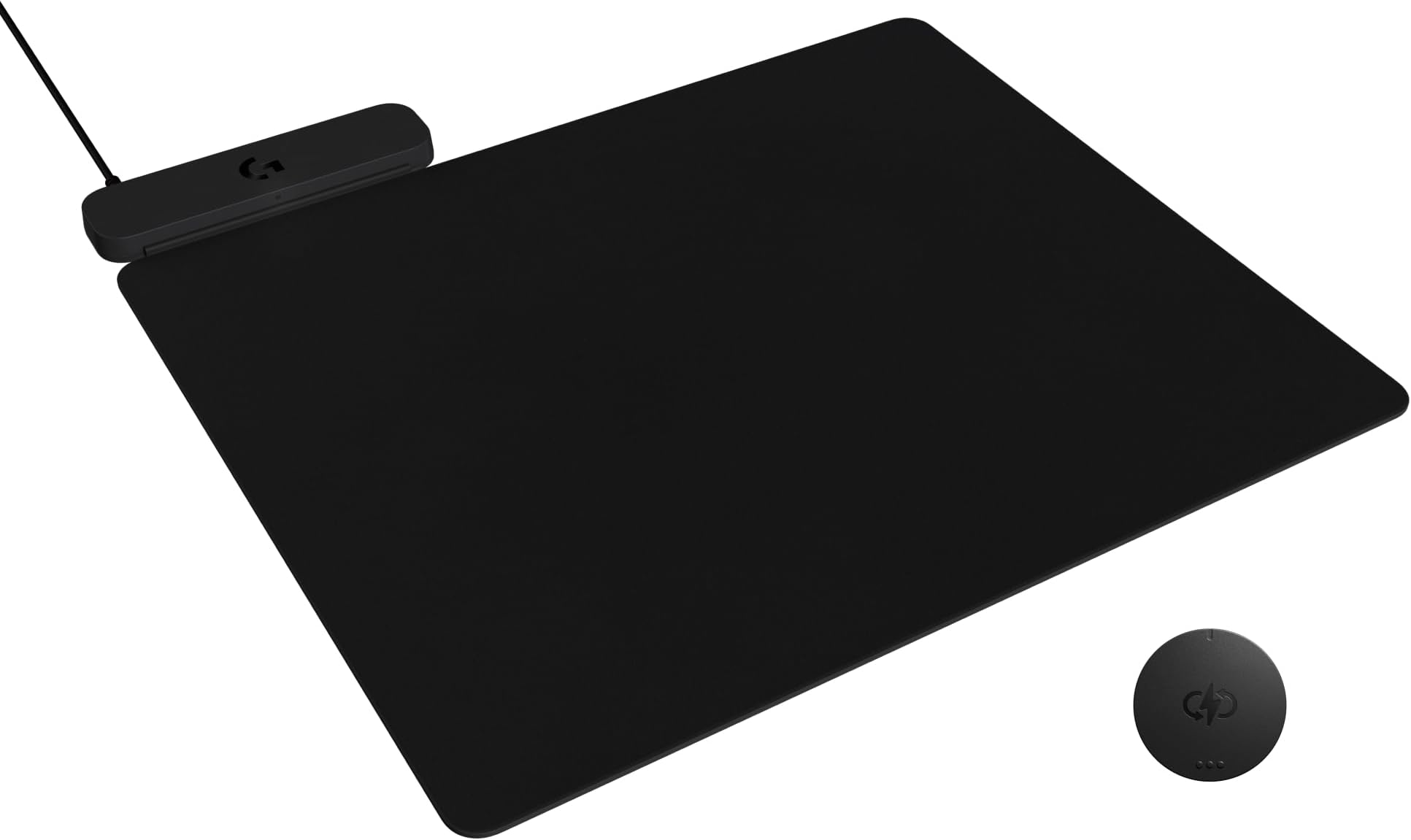
The Logitech G POWERPLAY 2 Wireless Charging Mouse Pad is a cutting-edge accessory designed for professional gamers and power users. Measuring 13.5 x 11.2 inches with a slim 3.5mm profile, it delivers continuous wireless charging to compatible Logitech G mice, eliminating downtime. Its optimized surface ensures precision tracking, while universal PC and Mac compatibility and plug-and-play setup make it a seamless addition to any high-performance setup. Built for durability and comfort, it’s the ultimate fusion of innovation and style for the modern gamer.


| ASIN | B0DMCZKQCW |
| Additional Features | Non-slip, Smooth |
| Antenna Location | Gaming, Office |
| Best Sellers Rank | #12,729 in Office Products ( See Top 100 in Office Products ) #186 in Mouse Pads |
| Brand | Logitech G |
| Color | Black |
| Customer Reviews | 3.8 out of 5 stars 198 Reviews |
| Enclosure Material | Plastic |
| Item Dimensions L x W | 13.5"L x 11.2"W |
| Item Thickness | 3.5 Millimeters |
| Item Weight | 0.81 Kilograms |
| Manufacturer | Logitech |
| Material | Plastic |
| Mfr Part Number | 947-000001 |
| Model Number | 947-000001 |
| Product Dimensions | 13.5"L x 11.2"W |
| Recommended Uses For Product | Gaming, Office |
| Shape | Rectangular |
| Size | 13.5L x 11.2W inches |
| Special Feature | Non-slip, Smooth |
| Theme | Gaming |
| UPC | 097855201270 |
| Unit Count | 1.0 Count |
| Warranty Description | 2 Year Limited Hardwrae Warranty |
J**M
Game Changer Love This Wireless Charge Pad
⭐⭐⭐⭐⭐ Logitech G POWERPLAY 2 Wireless Charging Mouse Pad — Review The Logitech G POWERPLAY 2 Wireless Charging Mouse Pad is a game-changing accessory that redefines what a mouse pad can do. If you’re using a compatible wireless gaming mouse, this pad seamlessly integrates high-performance surface material with perpetual wireless charging — and it delivers flawlessly. Performance & Precision This mouse pad is more than just a surface — it’s engineered for precision tracking. Whether you’re playing fast-paced FPS titles or navigating productivity workflows, the optimized texture provides consistent glide and accuracy with Logitech’s HERO sensors. Responsive tracking: Excellent for high-DPI, low-lift, and fast flicks Uniform surface: Delivers consistent friction without hotspots Size options: Available in multiple sizes to suit every desk setup 📌 Verdict: A finely tuned surface that enhances sensor accuracy and control, no matter your playstyle. Wireless Charging Technology What sets POWERPLAY 2 apart is the built-in wireless charging system. Once paired with a compatible Logitech wireless mouse, such as the G502 X Plus or G Pro X Superlight 2, it keeps your mouse charged continuously while you play — eliminating downtime and battery anxiety. Qi-based power delivery: Efficient and steady charging Seamless integration: No clipping or contact issues Consistent performance: Even during intense gaming sessions 📌 Verdict: The perpetual charging system is genuinely transformative — no more guessing battery percentages or pausing to charge. Build Quality & Design The G POWERPLAY 2 pad is sturdy and feels built to last. The surface material strikes a great balance between smooth gliding and enough resistance for precision movements. The base grips the desk firmly, preventing unwanted sliding. Premium construction: Durable and resilient Cable management: Clean routing keeps desk clutter down RGB lighting (if applicable): Customizable LIGHTSYNC zones add flair and can sync with game events 📌 Verdict: A premium build that complements high-end gaming setups. Ease of Setup Plug-and-play simplicity makes this a breeze to install. The pad connects via USB, and Logitech G HUB automatically detects compatible mice to enable charging features. Setup takes seconds — no complicated calibration required. 📌 Verdict: Intuitive and user-friendly — even for non-technical users. Pros Perpetual wireless charging eliminates battery downtime Excellent tracking surface optimized for gaming sensors Solid build quality with stable desk grip Clean cable management and optional RGB integration Works with multiple sizes and desk configurations Cons Requires a compatible Logitech wireless mouse to unlock full benefit Premium price point reflects its advanced feature set ⭐ Final Verdict The Logitech G POWERPLAY 2 Wireless Charging Mouse Pad is a standout accessory that transforms the wireless gaming experience. It combines elite-level tracking performance with futuristic, perpetual charging — a rare combo that truly enhances daily use. If you own a compatible Logitech wireless mouse, this mouse pad isn’t just nice to have — it’s a game changer that eliminates battery worries and elevates precision. Highly recommended for gamers and power users alike.
A**U
This is powerplay 0.33, not powerplay 2
This is powerplay 0.33, oh my god. The minus points are talked all over and over, no need to go over again. Anyway, the only point, which might be good, is you don't need to plug into a computer. Any usb power will work, so you can charge while computer shutdown. Umm yes, i know it is meaningless orz. My powerplay 1 died, no longer charges (both coin and pad). I have no choice....
D**M
Excellent lightspeed wireless charging mouse pad!
-Excellent wireless charging mouse pad -It's compatible with most Logitech lightspeed wireless mouse, as long as you inserted the Powerplay coin which is included out of the box -cloth mouse pad itself is slightly thinner than its predecessor -However, it doesn't come with built-in receiver, nor it doesn't come with RGB lighting which you will need to use your own lightspeed USB dongle receiver in order to take of wireless capability, regardless the mouse you're using. -Other than that, it's working perfectly, easy to setup, and had no issue with battery life and input lag!
G**G
Drawbacks outweighed by benefits.
First of all - this is awesome. I always had a wired mouse because I hate wasting batteries. This is the best of both worlds. I'm coming from a Corsair MM800. My thoughts: - They don't tell you the top cloth mat is removable. Like, really easy to remove. - The bottom isn't as grippy as my MM800 was. - I'm using this underneath a LTT mousepad and it works fine. - The little light means it's working. The software doesn't tell you if the mouse is connected to the pad, unless the battery is low enough that it starts charging again. - Not a detachable cable, so if it goes bad, you're screwed, unless you want to break it open and do a little PCB soldering. - Unlike the V1, it doesn't have a wireless dongle built in. - Unlike other mousepads (MM800), it doesn't have a USB passthrough to plug your dongle in to. I'm very opposed to using two USB ports for a single mouse, I'm getting a USB splitter that does a power + power/data split to see if that will get them to a single port. Although, finding any info on how much power draw the powerplay actually needs is nearly impossible.
D**K
Solid mousepad with wireless charging solution for your logitech mouse.
Hi amazon peeps! Lets talk about the power play 2 real quick. I have owned the original for a few years and now this one for a couple days and its pretty clear to see some of the pro's and cons of this charging mat. Here are my thoughts below: Cons: Lets start with the biggest con: I have a full metal desk in the Secret Labs Magnus Pro. On the Logitech website in the FAQ's it does clearly state that this pad will NOT work on full metal desks such as mine. This is completely true. My desk comes with the rubber pad on top of the desk and when you sit the powerplay on top of that pad it will not work at all, does not show the charging light even for a split second. HOWEVER, you can use other work arounds to get past this. As an example, I have the full glass razer mousepad I have flipped over glass side down, and another longer traditional mouse pad below that. All of this I assume is because of metal blocking/disrupting the charging signal sent to the pad so I put as much rubber and materials in between my desk and the pad to block that blockage lol? I digress, then on top of the glass mouse pad I have the powerplay 2. It stays connected about 90% of the time. It will still disconnect but its very in frequent and will work and get the job done. Is this annoying to do, yes, but if the goal is to NOT have to worry about your mouse dying then I am fine with dealing with this minor annoyance. Con# 2 (kinda): Yes, the mouse no longer connects directly to the mouse pad which means potentially, you will need to use 2 USB ports to use this combo as opposed to one. However some might see this as a benefit as well because you now don't have to have the mousepad powered by the computer. You can use a standard charging brick and plug it into the wall or if you have a USB hub built into a desk or a standalone, you can just plug it into that and still power the pad. Con# 3: Yes the mouse pad only comes with a standard cloth pad. My unit came with the cloth pad already attached to the mat itself ready to go. It would have been awesome to have the other hard pad in the box but it is what it is. Con# 4: This is just a personal preference, but I wish the mouse pad was a little bigger. Compared to other premium mouse pads, this one is about 2/3 the size of them but I find myself having to adjust the pad to find that comfortable spot where I don't slide the mouse off the pad while gaming, or hit the top of the charging interface on the top left of the pad. Pro's Pro# 1: Mouse battery never dies. I mean that's the whole reason you buy this setup right? Mission accomplished. Pro# 2: Easy setup, takes 2 steps, plug it in, and insert powerplay coin into mouse and you are good to go. Overall Thoughts: The powerplay 2 is a great system when used in the optimal conditions (non-metal desk users). It does exactly what you want it to do by keeping your logitech mice fully charged all the time. The software is easy to use and works 90% of the time...unlike razer synapse. If you can get past my personal con's listed above or those don't bother you, you will be in great shape and I would fully recommend this mat with a logitech mouse. Obviously, this only charges Logitech mice when used in conjunction with the powercoin that comes with the mouse pad and wouldn't necessarily recommend this pad with a non-logitech mouse.
L**T
Best mousepad I’ve owned.
Game changer. I do not have to worry about my mouse being low on battery.
F**.
Lasted 3 Months... (Update: Customer service was awful)
Bought this item end of October 2025. It is completely unresponsive in January 2026... While it worked, it did it's job charge my mouse nothing more nothing less. For the amount of time this lasted I cannot recommend this to anyone. Product seems nice but it is not worth it. I would stay away. Will attempt to contact Logitech, will post any updates. -------- Contacted Logitech. Useless. Wasted an hour of my time. I will look elsewhere going forward. I am no longer supporting this trash.
A**S
Full surface area charging.
I’ve seen people complaining that the mousepad doesn’t connect wirelessly. I do not know what Powerplay pad they had before but that was never a feature. I do miss the Logitech symbol lighting up but that’s okay. The fact this pad uses the entire surface area to charge is amazing. The cloth pad is removable as well. Maybe Logitech plans to make a hard pad later on that can be purchased later. It keeps my mouse charged and seems like it charges faster than the Powerplay pad previously. All in all I do like this mouse pad and recommend it to others that use Logitech mice.
Trustpilot
2 months ago
4 days ago