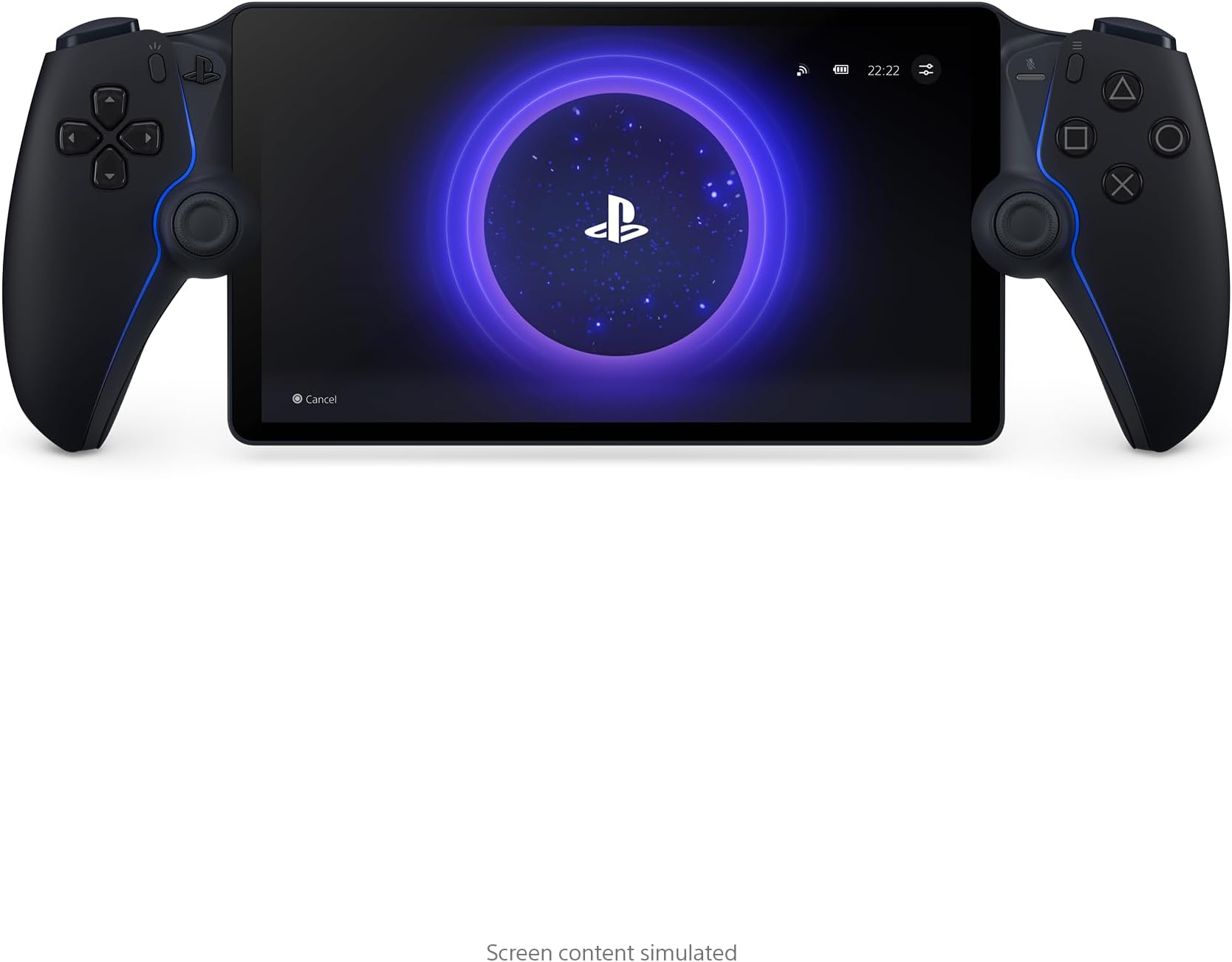





PlayStation 5 Portal Remote Player - Midnight Black
Product ID: 692202819
⚡60fps at 1080p smooth gameplay
🌐Wi-Fi remote streaming
📱8-inch Full HD screen
Desertcart purchases this item on your behalf and handles shipping, customs, and support to Iceland.
🎮 Your PS5, untethered and unstoppable.
The PlayStation 5 Portal Remote Player in Midnight Black lets you stream compatible PS5 and PS4 games installed on your console via Wi-Fi to an 8-inch Full HD screen at up to 60fps. Featuring Tempest 3D AudioTech and DualSense controller support, it delivers immersive gameplay with adaptive triggers and haptic feedback. Requires a PS5 console, broadband internet, and PlayStation Network account.










| ASIN | B0DSLTZ6M3 |
| Additional Features | Wireless |
| Best Sellers Rank | #133 in Video Games ( See Top 100 in Video Games ) #6 in PlayStation 5 Controllers |
| Brand Name | PlayStation |
| Button Quantity | 13 |
| Color | Midnight Black |
| Compatible Devices | Playstation 5 |
| Compatible Video Game Console Models | Sony PlayStation 5 |
| Connectivity Technology | RCA |
| Controller Type | Gamepad |
| Customer Reviews | 4.5 4.5 out of 5 stars (7,115) |
| Global Trade Identification Number | 00711719588269 |
| Hardware Platform | Gaming Console |
| Item Dimensions | 13.89 x 5.99 x 3.79 inches |
| Item Dimensions D x W x H | 5.8"D x 14.1"W x 3.9"H |
| Manufacturer | Sony Interactive Entertainment |
| Manufacturer Part Number | 1000044180 |
| Model Name | CFI-Y1001 |
| Model Number | CFI-Y1001 |
| Package Quantity | 1 |
| Power Source | Battery Powered |
| UPC | 711719588269 |
| Unit Count | 1 Count |
| Warranty Description | 1 Year Manufacturer |
L**N
PS Portal: A Smooth and Immersive Remote Play Experience—With One Key Requirement
The PS Portal delivers a smooth and convenient way to enjoy your PS5 games remotely. Setup is straightforward, and once connected, the gameplay feels surprisingly responsive with very little noticeable lag on a strong Wi-Fi connection. The screen is bright, clear, and large enough to make games feel immersive, almost like you’re holding a handheld PS5 experience. Controls are identical to the DualSense, which makes the transition seamless and comfortable for long sessions. However, customers should understand that performance depends heavily on Wi-Fi quality. A weak or unstable connection can lead to lag, disconnects, or reduced experience quality. It also does not support cloud gaming or standalone play—you must have a PS5 running to use it. Overall, it’s an excellent device for PS5 owners who want flexibility to play in another room or while traveling, as long as they have reliable internet.
C**H
Interesting
It’s a good console if that’s what u call it. But you need a good WiFi connection or it won’t work. Definetly try it out if you like gaming from a distance just make sure you keep your PlayStation on rest mode and have a good connection.
A**R
I love this thing, but not for everyone.
I love the PS Portal. I didn't get it. I still don't. But I love it. Pros: - Can game anywhere in your home wifi network pretty well. Graphics look almost as good as the PS5. It has had a few drop outs while in the bathroom for some reason and it stutters. But generally only has happened a few times. - Works decently on phone hotspot. It's playable, granted it hiccups more than I'd like it too. And the graphics don't look as sharp as home network. - Feels like playing PS5 on the go, in bed, or lying on the couch. Almost the same graphical power and look- it doesn't look quite as good as tv but it's very close- especially coming from the antique switch. Cons: - No browser, so you have to use hotspot/wifi over connecting it directly while on restaurant/hotel wifi - No blu tooth audio, that's a big issue, but maybe due to latency? Wired headphones work great though. - No downloadable playable media. If it had this, this game system would be the king. - Hard to get (check out the app Hotstock. I found one in less than two days casually looking on the app). - Screen is quite reflective, so hard to play outside in the sun. - It sometimes drops wifi connection and it's laggy or slow during those moments, not great for multiplayer games where speed and accuracy is an asset. - It takes around 20-30 seconds to boot up. So if you're a grab and play for a few minute kind of person, huge disadvantage vs a switch, where I could pick it up and play immediately for 5-10 minutes. This is a bit more of a time commitment. - YOU HAVE TO keep your PS5 on rest mode or this won't function at all. If you have a home power outage while on a trip, you're carrying around a portal for nothing. Not only does it need to be on, but you need to be logged into your account on your machine. - My hands aren't quite as large so the controller is a little big in my hands compared to the smaller switch, so it's a little less comfortable, but doesn't bother me that much. - get a case, this thing is big and more delicate. The case makes it feel really solid. I got a clear case with a screen protector, it's nice. Reasons I got a Portal: I love handheld gaming - I've played my switch 90/10 to my ps5. My biggest drawback to using a switch or a steam deck, I like being able to play on the TV and on handheld- but the switch has huge graphical drawbacks, so I never hooked it up to the TV. It's really cool to have your games all be on one cohesive network of games and saves. The screen is really nice and looks about as nice as playing on my TV. Anyone that approaches this with an open-mind will love it. I'll probably keep my switch for trips and keep the portal at home for playing in bed or lying on the couch. I've enjoyed it- once they get a PS5 connected handheld that can download games and create a cloud saving- I'm completely in.
B**O
Fantastic Device
Although my absolute wish from Sony would be for a dedicated handheld, this will do for now. Form factor and ergonomics - Very comfy to hold and not heavy. Essential a Dualsense controller shopped in half with a screen attached in between. So regular Dualsense users will feel right at home. The only thing that takes getting use to is the PS button and the touch screen for obvious reason. I really like how the power, volume buttons are designed to be away from the top of the screen bezel compared to other handhelds. This prevents accidental button pressing and is easy to reach. And for once, the controller (I'll call it lightbar) is visible while gaming, so seeing games interact with this light is amazing. Playing the Portal (wired internet connection to PS5) - Although the latency is there, most games are very playable. Playing first person shooters are difficult, especially games that require fast reaction times, but playable. Playing games away from my home also works great. It was highly hesitant about playing games with slow latency, but being able to catch up on games while in bed or when the TV is being used is a huge win for me. Current game I am playing is Silent Hill 2 and it runs great on the Portal. Minor downsides - Battery life, I think can be better. I'm getting roughly 3 to 4 hours of game play with full Dualsense features, speakers, and screen brightness high (not full brightness). I think it's a given that if I disable most of the Dualsense features the battery would last longer, although all the features are so nice to have on a portable device. The speakers could also be better, although fairly loud, the clarity and low tones such as bass are missing. At least comparing to Steam Deck, the speakers are much better here, where you can actually here more details in games. With the Portal, I found that it was lacking that clarity, Silent Hill 2 for example, it is hard to hear the ambient background noise, and surrounding enemy direction. The other sounds are amplified such as character grunts and voices. Overall I'm really enjoying this streaming device, and only hope Sony will come out with a dedicated handheld with the same form factor. I will definitely continue using the Portal for a long time coming.
K**P
Finally a standalone handheld console with Cloud Streaming!
Edit 11/9/2025: Upping this to 5 stars. PlayStation released cloud streaming recently and it is AMAZING. All the connectivity issues with Remote Play back to my PS5 are nonexistent with Cloud Streaming, and there are nearly 3,000 games available. The Portal finally feels like a standalone handheld console, rather than being tethered to a (sometimes) finicky Remote Play connection I really wanted to use this device more. I loved the idea of having the ability to play my PlayStation 5 from the couch with something else on TV. However, there are some limitations: 1) Your PS5 must be plugged in via ethernet for this to work well. For whatever reason, the WiFi on this device isn't as strong as something like an iPhone when my PlayStation 5 was connected via WiFi. 2) Not a great device for traveling. Due to the device size, it's hard (especially adding a case) to fit this in a smaller bag or easily pull out on a plane. Obviously, this is limited too by the fact that it needs to connect back to your PS5, and I had pretty consistent issues trying to use hotel WiFi or hotspots to connect. If you don't mind the above flaws, this device feels great, the feedback is great, and as a controller it's the closest thing to a DualSense controller. My only gripe with the controller itself is the sticks are smaller than they are on normal controller, and I would've liked the bigger size.
J**R
Solid handheld with restrictions
Overall the PS Portal is a great device. I’ll list my personal pros and cons but the takeaway I want to leave it is that if you have solid and dependable WiFi, then the device should be considered. If not, even for travel, then it’s not going to be worth it in my opinion. I did try and use this for travel such as airplanes and it was ok for some points but not very dependable. Also, since this device now offers cloud gaming I’ll split my views on both as well. Pros: - Perfect size and lightweight. If you’ve held a PS5 controller then this feels practically the same as far as grip and comfortability. -The screen is up to 1080p and up to 60 fps so pretty clear and smooth as long as you have consistent and strong WiFi. - The power and volume buttons are on the top and easy to access and pretty tactile so you’ll know when they’re pressed down. - Thumbsticks and overall buttons on the controller feel the same as the PS5 controller. Thumb sticks are smaller and more sensitive, so they’ll move around a bit more freely compared to the actual controller. - The system does have haptic feedback, so games that use this feature like Guardians of the Galaxy will use this to the full capability. Feels like you’re much more immersed into the game. - Battery life was good. I was able to get over 4 hours for remote play and for the cloud. - Easy to pick up and play. For remote play, the system picks off whenever you last were, based just off of rest mode on the PS5. You’ll turn on the power button, and depending on how far you are from your PS5 and your overall WiFi it’ll take up to a minute or two in my experience to connect to your PS5. I was able to connect to my PS5 from across the country pretty easily. For cloud, this would be even easier since no PS5 is required. Depending again on your WiFi, this will take up to a minute. - Device price. For $200, having an official ps controller in your hands with a 1080p screen and able to seamlessly play PS5 games is a pretty solid deal for remote play. You can use ps5 remote play with your phone or even other handhelds, but having actual controller trigger and haptic feedback is what makes this system great to me. Now if you’re purchasing this for cloud, I put my opinion as a con. Cons: - WiFi, WiFi, WiFi. If you want to use the system, you have to have solid WiFi that won’t drop in speed or connection. If at any time the connection drops, for remote or for cloud, the game quality significantly drops to pixels, followed by getting disconnected from your PS5 or cloud. You’ll have to go through the process of reconnecting. If your WiFi isn’t strong, this is a repeating cycle and takes away from gaming. - Not for geared for multiplayer games. Cloud does have a few multiplayer games at the moment like dead by daylight, and works pretty good. But multiplayer games for remote play isn’t quite worth it if that’s your reasoning of purchasing the system. Even when sitting right next to the system, there’s a small but noticeable input lag for games. Single player games can get away with this most of the time, but multiplayer games will end up hindering the experience. I tried playing Marvel Rivals through remote play and although the game looked great and was overall smooth, the connection felt much demanding and any movement was a bit delayed. You can definitely continue to play if your WiFi is strong, but I’d stay away from more competitive multiplayer games. - No Bluetooth on the device. This one is pretty shocking considering it is a modern system, but Sony decided the only native Bluetooth headphones you can use are the ones they made specifically for the system. These are a separate purchase, and are the only official way to use Bluetooth headphones. There’s a button on top of the device that’s for connecting to these Sony buds. If you don’t have them, the button does absolutely nothing when pressed. You may be able to get around using Bluetooth headphones if you really want by putting in a Bluetooth adapter into the headphone jack. Otherwise you’ll have to just use the system speakers which aren’t bad, or use the headphone jack which is in the bottom of the screen itself. - Gestures and touchscreen. Gestures don’t really work. I connected remotely to my PS5 and played Detroit become Human on this device, and overall the experience was good but when fast action sequences start, the game thinks you’re playing on a PS5 (technically a PS4 for this specific game) and wants you to turn your “controller” certain ways to dodge or move in-game. The PS Portal does support this but it’s often not smooth as swinging an actual controller. You’ll likely miss events like that from games. Touchscreen is also not designed very well. Games that expect trackpad inputs, you’ll have to touch the screen and deal with your fingerprints smudged on there. Not great, but I guess to keep this price point adding a back touchpad like the PS Vita wasn’t an option. - Cloud pricing. Cloud is great overall, the list of games seems to grow every week at the moment. The games launch quick and are pretty smooth. To note the list of games available is completely different than the cloud games on the PS5. The cloud games on the PS Portal are unique to this system and currently not as many as the PS5. The reason why this is a con for me is its pricing. You’re not only paying for the console, but you’re paying a monthly or yearly subscription to play these games. Sure you don’t have to worry about storage, but paying continuously for a system that quite literally depends on WiFi is a bold move. This wouldn’t be terrible if you really want to take this on the go and are ok with paying extra every year, but when have subscription prices ever dropped for anything? Ps Plus prices will likely and inevitably rise, and that’s something to consider always when purchasing PS Plus. - Travel. I actually bought this as the main intention for travel. Despite more technical reviews I thought I’d give it a shot and took this across the globe with me to a few countries. At airports, this device barely worked. Because you need strong and reliable WiFi, I could only play on this system in lounges and even that was finicky at times. Airplanes? Forget it. Hotels it worked ok, but I disconnected pretty often for remote play, but was ok for cloud gaming, I was mainly getting 720p instead of 1080p. I think the only ok way of travel play would be your mobile hotspot, but this varies completely depending on your plan and connection. Staying over at families and friends and using their WiFi worked pretty good. Remote play in this scenario took about 5 min to connect but the input lag was horrendous, making it unplayable. Cloud worked perfect though. Overall if you want play PS5 games, with the same controller feeling and feedback, while at work in your office or in another room, patio, or family/ mfriends house with dependable and strong WiFi, this system is solid. If cloud is what’s drawing you that’s great, but consider the overall cost again and be comfortable with a sticky, fixed and likely growing subscription. Consider where you’ll be using this system and the WiFi in that area.
Y**.
Fantastic device for what it is: a PS5 remote player with all the functionality of a PS5 controller
The PS portal is a remote play device that connects to your PS5 allowing you to play games without use of the television. This is what it is advertised as doing, and it does this very well. There has been a recent update to the device that allows you to stream games from the PS Plus library of games if you are a PS Plus subscriber, completely bypassing your PS5. As of this review, the feature is still in beta, however, from my testing it works well. If you have a good connection from your PS5 to your router and have a good WiFi connection outside, you can even remote play your PS5 while you are not at home, such as in a hotel. I suggest using your phone's hot spot on a 5G connection to do this. For a more responsive and lag free experience make sure your PS5 is connected to your router with an Ethernet cable instead of connecting via WiFi. This will provide a stable experience on your PS Portal. Remember that this is not a stand alone console like a Switch or a Steam Deck allowing you to play games directly on the machine. The PS Portal connects to your PS5 or can stream games from the PS Plus library if you are a subscriber. The PS Portal itself has all the functions of the PS5 controller which is awesome. That means when you play a game that makes use of the adaptive triggers, the PS Portal will feel just like your PS5 controllers. For instance, pulling an arrow back on a bow in a game with the actually feels like there is bow string tension in the trigger. This is light years better than just getting a set of controllers that attaches to a phone for remote play. It also has all the buttons like the PS button, screen capture button, and options button. The only thing missing is the touch pad. In order to use the touch pad, you actually touch the screen on the PS Portal and a virtual touch pad pops up on the screen. My favorite feature is that the PS Portal allows you to wake up your PS5 from sleep mode. If someone in the house is using the TV, no problem. Just pick up your PS Portal, connect to your PS5, and starting playing your games!
E**T
Its getting better, but theres still room for improvement.
UPDATE: My experience with the PS Portal has gotten a bit better since I purchased it. The most recent update slightly boosted the bitrate cap leading to smoother local play experience. I also had the opportunity to use the Portal in "Remote Play" mode at a hotel, and I was thoroughly impressed with the experience. It was, ironically, smoother there than with Local play at home. I do not subscribe to PS+ Premium, so I have no experience with Game Streaming. The service is too expensive for me to consider subscribing to it. So I increased this to 3 stars due to the fact that the update increased performance on the Portal, and my experience using it at a hotel (Remote Play) was very good. 1ST REVIEW: I really want to love this thing but Sony needs to do better. I have a gigabit mesh network and have spent the last week adjusting network settings solely for the purpose of getting the PS Portal to run better. My PS5 is already hardwired, I have adjusted my network to force the PS portal to use only 5Ghz on the main router that’s hardwired to the PS5, I have adjusted channels to the network, I have reverted from 160hz channel width down to 80hz (which allegedly works better for the PS portal) I have even done tests where I know for sure the portal is using local play and other tests where I know it’s using online remote play (I have 1gbps connection) and no matter what I do I cannot get this thing to run smoothly, to the point that the resolution drops as low as 360p, games severely lag, or it just flat out disconnects from the PS5 (even while maintaining a Medium-Strong WiFi connection). For whatever reason, Sony caps their download rates for the PS Portal to 15mbps. I haven’t seen the Portal go over 13mbps download even when I’m within a few feet of my main WiFi router, and my router can support transfer rates of 2.4gbps locally. I’m not sure why Sony is limiting the capabilities of the PS Portal, especially on the local remote play aspect but it’s clear that limiting this to just 15mbps (and not a stable 15mbps) is just not going to work. The fact that it’s been over 2 years since its release, and this issue hasn’t been resolved, tells me how little effort Sony is putting into improving this expensive add on. Recommendations from other folks have included going as far as disconnecting the HDMI cable from the console, changing the settings on the console to reflect the PS Portal’s capabilities (turning down 4K res to 1080p, turning off HDR, etc.), adjusting graphical performance through in game settings, and some have gone as far as to disconnect everything from their network while using their portal…. This type of work and troubleshooting is completely unacceptable for a product like this. Honestly, the PS5 display/game settings should automatically change through a autodetection feature when using the PS Portal, the same way a PS5 autodetects a connected TV's capabilities to turn on/off settings for the best gameplay experience. I really want to like this thing. The controller is nice, the device feels like it was built well and the screen, while not being OLED, is still a very nice to play on. When the PS Portal has functioned properly (which is rare in my case) playing at a full 1080P 60FPS is an amazing experience. But the lack of stability with this product, the hoops you have to run through to get it to work (and it still doesn’t in my case) and the fact that Sony’s not doing much to mitigate these issues other than forcing people to spend another $160/yr for Cloud streaming, tells me that this things a huge fail for someone like myself who just wants to play the games they already own remotely. Save your money, and just get a controller attachment for your smartphone. You’d be better off and honestly, I’ve had a better gaming experience using PS Remote Play on my iPhone than with the PS Portal.
A**I
روعه
روعه جدا
M**.
Empfehlenswert
Funktioniert nur mit PS5 Account. Top Teil…
A**P
It's Genuine and Authentic Product
Chat with the seller and discuss all your queries before buying like I did. Its authentic product and works perfectly. There will be no warranty on this product though because you are buying from third party. Now when it comes to PS Portal it's an accessories not and handheld don't get confused or deluded by negative brain dead comments by illiterate users......its for time crunch on your games when you are not using PS5 and while you are travelling. Just connect your PS5 to ethernet with strong internet connection and your good to go. Perfect if you wanna play while you are away from your home and wanna play games of your console.
C**S
Vale la pena cada maldito centavo!!
Excelente producto!! calidad Sony Para empezar debes saber que no es una consola portátil, esto debe quedar claro. este funciona de manera muy sencilla esto funciona a manera de extensión de tu pantalla, es decir si no te dejan jugar en la pantalla por que la están viendo puedes prender control y ver ahí tus juegos, sin necesidad de interrumpir la película del crio. Cabe resaltar que debes tener buena conexión a internet ya que de lo contrario te encontraras con una gran frustración al realizar tus comandos para esquivar o atacar y que no se realicen en tiempo es decir un delay. Otra cuestión, si se actualiza tendrán que ver de nuevo su consola en el televisor para configurarlo de lo contrario les dirá que no encuentra la consola
S**I
Very good.
Works well, but you need to make sure that you have an internet speed AT LEAST 5 Mbps before using it outside the house, or it'll be very laggy and won't connect.
Trustpilot
2 days ago
1 day ago