Buy anything from 5,000+ international stores. One checkout price. No surprise fees. Join 2M+ shoppers on Desertcart.
Desertcart purchases this item on your behalf and handles shipping, customs, and support to Iceland.
๐ Elevate your home calls with HD clarity and nonstop connectivity!
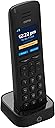
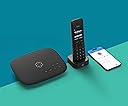
The Ooma HD3 Handset is a sleek, cordless VoIP phone designed exclusively for Ooma Telo users, featuring HD voice quality, a 2-inch color screen, and up to 10 hours of talk time. It supports online phonebook syncing, caller ID, voicemail access, and multi-handset operation, delivering a premium, integrated home communication experience tailored for modern professionals.


| ASIN | B078H4FHGJ |
| Answering System Type | Digital |
| Best Sellers Rank | #46,960 in Office Products ( See Top 100 in Office Products ) #21 in VoIP Phones |
| Brand | ooma |
| Built-In Media | AAA Ni-MH rechargeable batteries (2), AC adapter, Charging cradle, Ooma HD3 Handset, Quick Start Guide |
| Color | Black |
| Compatible Devices | Ooma Telo |
| Customer Reviews | 4.1 out of 5 stars 1,164 Reviews |
| Dialer Type | Single Keypad |
| Enclosure Material | Plastic |
| Global Trade Identification Number | 00811008021610 |
| Is there Caller ID | Yes |
| Item Dimensions | 1.2 x 1.9 x 6.9 inches |
| Item Type Name | Ooma HD3 Handset |
| Item Weight | 0.25 Pounds |
| Manufacturer | Ooma, Inc. |
| Material | Plastic |
| Mfr Part Number | 811008021610 |
| Model Number | HD3 |
| Multiline Operation | Multi-Line Operation |
| Number of Batteries | 2 AAA batteries required. (included) |
| Phone Standby Time | 150 hours |
| Phone Talk Time | 10 Hours |
| Power Source | Battery Powered |
| Recording Capacity | 16 Minutes |
| Telephone Type | Cordless |
| UPC | 811008021610 |
| Unit Count | 1.0 Count |
| Warranty Description | One-year limited warranty |
W**R
Works seamlessly with the OOMA Telo Air. Nice phone!
Well, it's a cordless phone; so how great can it be? It's pretty great. I have used OOMA for about 6 years now and I always had a 3-phone Panasonic cordless system connected to my OOMA Telo by a phone cord. That setup worked; but I was having problems on occasion when I would pick up a call; it would hang up. I was going to buy another cordless phone system until I saw this OOMA HD3 handset and I thought.... why not? I was hoping that the HD3 would seamlessly integrate with my OOMA Telo and would give me a better experience overall. Well, it met my expectations. I did replace the cheap rechargeable batteries with the Panasonics that another reviewer suggested. I figured it made sense because manufacturers typically ship with the lowest grade batteries available; the Panasonics are working. But let's talk about the phone: 1. It is very similar to form and fit as most cordless phones on the market. No real surprises here. The buttons and menus are what you would expect and what you are likely used to. 2. It connected effortlessly to my OOMA Telo Air. Just press a button on the Telo and make a selection on the phone and they paired immediately. Very easy. 3. I tested this on a call with a family member who I normally talk to. They remarked that the clarity of the call on their end was very clear; much better than when I was using the Panasonic system. Everything was great on my side as well. 4. I can now check my OOMA voicemail on my phone with a click of a button. I had to go online or to my OOMA Telo for voicemail with my old phones. 5. I can easily update my contact list (telephone directory) online at my OOMA account and they show up on the phones contact list; something I couldn't figure out before with a regular phone. There may even be other good features that I haven't discovered yet. But the bottom line is that this phone integrates very well into the OOMA Telo and OOMA system, making for a frustration-free experience. The range seems to be quite good as well. I do think that the price point for the single phone (approximately $50) is a bit steep; I think it should be offered lower. But there is a price to pay for convenience...I understand that. I will probably purchase another if I catch a sale; but one is good for me now. If you are new to OOMA or thinking about OOMA service in lieu of a telephone landline....do it! You will save SO MUCH money in the long run for a small initial investment. My recommendation for a new OOMA user is to buy the OOMA Telo VoIP Home Phone system with three HD3 handsets (TELO3HD3); that is a pretty good deal at $149.99 and will give you everything you need for whole house coverage and a good experience. I am personally happy that I found OOMA and made the decision to switch years ago; it has probably saved me nearly $5000 over the six years that I have had the service.
G**N
Easy to Setup and Sounds Great at Close Range
The Ooma HD3 arrived with two AAA Ni-MH rechargeable cells, charger base, and wall-wart power supply. First thing to do: Toss the included junk batteries and insert two Panasonic Eneloop AAA cells. This move will provide you with longer time between charges and reduce the possibility of a gooey mess accumulating in the phone. We charged the handset for 30 minutes, then the LCD screen asked to be paired with the Telo base. Note that the HD3 only works with second generation or later Telo units. If you have an older Telo, either upgrade to a newer model or purchase an HD2. The screen said to press and hold the PAGE button on the Telo. (It is hidden on the back of our unit). The HD3 then asked to be linked. Yes! Then it spent a few minutes automatically downloading the latest firmware. That is it. All done. Now we were able to make and receive calls, review our voicemail, and see caller ID and optional photo on the LCD screen. There is no provision for external headphones. The handset earphone sound quality was very good; Loud and clear. The speakerphone sounded like a tiny speaker coming from the back. Well, it is. While idle, the LCD screen displays the local time. Setup was a snap so we did not require assistance from Ooma, however I have noticed that customer support has improved tremendously over the years. The phone helpline is usually only a 2 minute wait and the people I spoke with are helpful, easily understood and efficient. This is our first experience with a DECT 6.0 2 GHz handset, and range was not as spectacular as we had hoped. You might get 100 meters/300 feet if you mounted it on your front porch and walked down the street. In our real world situation inside we got about 35 feet before dropouts. Suggest that you give some thought to mounting the Telo base at a central location, maximizing the range. This is not so much a complaint against Ooma but pointing out the limitations of the DECT specification. Third parties make DECT 6.0 repeaters and they might work with the Ooma system and HD3, but we have not tried that yet. Perhaps another customer review will expand on this possibility. One feature worth noting: You may press a PAGE button on the base to make a sound from the HD3 speaker. It is loud enough to be heard through sofa cushions. A feature missing is the ability to copy a phone directory entry to favorites. While you may press keys to search for a specific contact, there should be an easier way to move a contact into the short favorites list. As it is now, you must select from the call log. In summary, the Ooma HD3 handset looks nice, works great at close range, and is easy to setup. We are pleased with the purchase.
S**K
Patience!
I am very happy with how well this phone works with my Ooma Telos. It sounds great and is well made. I am deducting a star for two reasons: 1. Once the phone is paired with the Telos base the screen seemed to lock up and simply say "CONNECTING" on the display. It stayed like this for two hours and I was sure it was broken. I was about ready to send it back! I called the support line to see what the problem might be. Even though it was a Sunday I was able to actually get someone on the phone who explained the phone was actually downloading firmware and it will take a while. Boy, they were right. The overall process took about 4 hours before I was able to use the phone! This should be better documented, and maybe display "downloading firmware" instead of just "connecting". Anyway, I'd recommended letting a new phone sit all night in order to update properly. 2. The included rechargeable AAA batteries are junk, the cheapest available in my opinion. Toss them and put in a good pair of Powerex or Energizer rechargeable AAA cells instead. You'll be glad you did.
E**S
works well easy setup
This one works well.
G**M
Will the HD3 work with your Telo? Even Ooma doesn't know!
Before I ordered this Ooma HD3 handset, I was surprised to read so many customer reviews on Amazon reporting that the HD3 was incompatible with their Ooma Telo base station. After all, Ooma's description of this handset, whether on Amazon or on Ooma's own website, makes no mention of any compatibility concerns. Paying heed to the customer reviews on Amazon, before I placed my order, I contacted Ooma directly: the Ooma representative took information about my Ooma Telo base station, then assured me that this HD3 handset will definitely work with my Telo. But the Ooma representative was wrong. The first problem I had with this HD3 handset is that the cheap rechargeable NiMH AAA batteries that Ooma included in the box were Dead On Arrival: they would not take a charge. Without good batteries, the HD3 handset itself is dead. Fortunately, I had a couple new Panasonic Eneloop rechargeable NiMH AAA batteries on hand, so I charged them up and installed them in the HD3. When the HD3 handset came alive, I tried to pair it with my Ooma Telo base station. But the HD3 would not pair with my Telo, displaying the error message that my Telo hardware is incompatible with the HD3. How is this possible? Ooma's description of the HD3 doesn't describe any compatibility issues. Before buying the HD3, I contacted Ooma directly and was assured that the HD3 would work with my Telo. But the HD3 doesn't talk to my Telo. How can Ooma design, manufacture, and sell a handset without knowing it will communicate with their own base stations? Obviously, I'm returning the HD3. The effort I put into researching the HD3, then making this purchase has been a total waste of my time. UPDATE (March 2019): The Ooma website has been upgraded: now, if you go to the Ooma website and login to your account, then navigate to the Ooma Store and view the page for this HD3 handset, the site will tell you whether or not the handset is compatible with your Ooma Telo base station.
S**A
Not a good phone. Disappointed
I waited to long to return this phone. I should have returned it after 1 week but I thought it would get better. The sound is muffled. Very hard to understand the person on the other end of a call. It drop calls and the battery only last about 1 1/2 hours of talk time. I recently signed with Ooma and it has not been good as the reviews suggest. I regret buying this phone and now I'm stuck with it.
6**7
Nice looking device that integrates with features of the Ooma Telo - see notes on pairing after software upgrade
I got 4 HD3 handsets to go along with my new Ooma Telo Air 2. I wasn't even aware the Ooma supported cordless DECT-type phones when I bought it. A nice plus. Just a few things to watch for when you setup a new HD3 phone. Put in batteries in and the phone was ready to be paired with the device. Press and hold the page key on the back of the Telo to initiate pairing. No problem. The device paired in a few seconds. The message on the phone said the device needed a software upgrade and to place it on its charging cradle. The software upgrade took a few minutes with the phone displaying upgrade progress. So far so good. The phone rebooted itself and started looking for the base unit. Looking... Looking... I let the phone look for about 10 minutes and nothing was happening. What to do? The fix for this issue is pretty easy. It involves making the Ooma Telo and the phone forget about each other so they can be paired again. Connect an ethernet cable between your home computer and the HOME port on the back of the Ooma Telo. This gives you access to the Telo's web-based maintenance page by entering a web address in a browser of 172.27.35.1. In the maintenance page, click on the "DECT" section and a list of registered cordless handsets appears. Click the "Remove" button for the handset and refreshed the web page. I had to do this remove option twice to get it to remove the device. On the phone handset, press the "Menu" button and select "Unregister Device" option. This makes the handset forget its original pairing and a message appears requesting for the phone to be paired with an Ooma Telo. Using the Ooma Telo web page, you can press the "Register Device" button to pair again with the phone. This time the pairing only took a few seconds to pair. With that all done, you can disconnect the ethernet cable from the Ooma Telo and you're all set.
J**S
Great product
Great clarity and easy to set up. I like them but they have a lot of features and the user instructions are bigger than the one for the Telo. But it works well and sounds great. Recommended as an upgrade over just plugging in a regular phone.
J**0
Finally an amazing handset to go with your Ooma phone system.
The greatest flaw with Ooma was always the lack of a great handset. I had the previous versions of this handset and the volume was never loud enough and the range poor. Ofcourse, you can always plug in your existing home phone.. but the wireless hand sets i had never quite works well with the Ooma. This time they nailed it. This great handset has excellent volume, is much lighter than a cell phone so it doesn't exhaust your arm, has great functionality and a nicely lit screen. It also has great range. i have the Ooma base station in the basement on the opposite side of the house and the handset still picks up the signal no problem.
J**Y
great upgrade
This is our second set, the old one was 5 yrs old so it was time for a change. Great unit, work like a glove, OOMA was easily reachable to re-set our account and keep the same number.\, that was important. Plug it in, everything works fine.
A**R
great handset - Awful batteries
aside from the batteries not being any good and needing to replace them immediately. the handset is great
1**K
batteries need flipping to recharge after completely draining?
When the phone is charged up it works great but once the batteries drain completely it's like the phone needs a reboot and I have to flip the batteries around before placing on the charging cradle to make them recharge on the cradle - otherwise just a blank screen and no charging. If I let the batteries totally discharge with the handset off the cradle, they won't recharge unless I do this routine. If I leave the phone on the cradle after each use, it is not an issue but who remembers to take the phone back to the cradle---might as well have a cord!
A**R
Excellent Online Phone!
The Ooma System is amazing (and quite inexpensive)! It costs me $17.00 per Month and I have free calling to anywhere in North America...and, I also have second phone number as a part of the package. I would buy it all again!!
Trustpilot
2 weeks ago
3 weeks ago