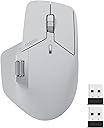
🚀 Elevate your workspace — multitask smarter, not harder!
The RAPOO MT760 is a versatile wireless mouse featuring tri-mode connectivity (Bluetooth 5.0/3.0 and 2.4GHz), 7 adjustable DPI levels up to 4000 for precision, and 11 programmable buttons for personalized shortcuts. Its ergonomic design supports all hand sizes with silent, comfortable clicks, while an 800mAh rechargeable battery offers up to 90 days of use on a single charge. Ideal for professionals juggling multiple devices, it enables seamless cursor control across computers with M+ Cross-Computer Technology, making it a productivity powerhouse for the modern office.


| ASIN | B0CMZ1PQV6 |
| Best Sellers Rank | #51,869 in Computers ( See Top 100 in Computers ) #1,499 in Computer Mice |
| Item model number | MT760 |
| Manufacturer | Shenzhen Rapoo Technology Co., Ltd. |
| Product Dimensions | 12.32 x 5.41 x 0.25 cm; 110 g |
B**N
This mouse is honestly amazing for the price and as long as you are looking for a simple mouse, this will fulfil 99% of the requirements. Build quality: 9/10, the only reason I deducted a mark is because it does look a little cheap, got some rough edges but other than that in the hands it feels great. How it feels: The clicks aren't your typical cheap mouse clicks, they feel solid but also don't make a snappy click sound, but rather a dampened "thump" sound/feel. I say sound, but in reality it's dead quiet and perfect for the office. Some people have said that the middle mouse button is easy to press and I will slightly agree with them. It is not light enough that you would accidentally trigger it and you may get used to it very quickly however it could be a bit light for some people. Side buttons feel a bit mushy but are okay. The side scroll wheel is amazing. Driver: The driver is truly atrocious, the UI even looks bad. Don't expect much from the macros, you can only bind simple things that combine ctrl, or shift, or alt, or win, PLUS one other key. This means you can't create any complex macros like you could in Logitech, so this is definitely not going to be a powerhouse users. As an engineer, this is fine for me. As a video editor this may not be fine for you. Features: This does feature bluetooth connectivity as well as the ability to move your cursor between two completely different devices if you have both of them plugged into the same LAN network and have a usb receiver in both of them. Additionally, it has 1000hz polling and the sensor feels extremely responsive. Cons: This does not have the free scroll that the mx master has, depending on your profession this could be a deal breaker. For me, it is fine to not have it. All in all, I would have given it a 4/5 if this was any more expensive than it is, but for the price, you are getting a solid piece of kit as long as you aren't expecting it to be an MX Master. If you want an MX Master, simply get an MX Master, you will be severely disappointed if you get this mouse.
M**D
Love it.
D**K
Better than expected. Works great with my Mac- the side-scroll was the most important feature for me because I use it a lot on the Magic Mouse that I'm replacing with this mouse. I connected via BT with no issue at all; put the mouse into BT mode and saw it show up in my BT menu on my Mac within seconds. The left and right clicks are very quiet. The Mouse is soft-to-the-touch and fits like a glove, for me. This is also my first ever ergo mouse because it I could never find one with side scrolling. Again, that is by far, the most important feature about this mouse, for me. Closely trailing this side scrolling in the #1 spot, it the fit. My hand fits comfortably, feels natural- the side scroll wheel doesn't feel too far away from my thumb, which was a concern when I was "window-shopping". Very happy with this purchase so far and the added convenience of the page-back and page-forward buttons (literally) right at my fingertips, makes it even that much easier to enjoy this mouse. I strongly recommend it.
L**S
I really love how you can connect three devices via Bluetooth and two with the little usb for those times you need to help a friend out and you can just connect it their device quickly or leave plugged in to your home device and it’s uncle chargeable as well
R**F
I really, really wanted to like this mouse. It was exactly what I was looking for. I compared it against the Logi MX Master 3S, Citlla Pro MXE510 and Tecknet MS029. This was the most comfortable mouse and has amazing button placement. The side scroll wheel is placed perfectly above and between the forward and back buttons, allowing you to use the pad of your thumb to go forward, your knuckle to go back and then with a slight lift, your knuckle would be on the side scroll wheel. No lifting your fingers or thumbs off the mouse to reposition. The build quality was on par with the Logi device. It connects quickly over Bluetooth, and I did not see any lag during use. However, it was missing two features that the Citlla & Logi have. They each have a thumb button that would minimize all windows and return you to the desktop. This is a cool feature with nosey neighbors around or if you are searching through numerous open windows or documents. Most importantly, the Logi & Citlla have a smoother scroll wheel (magnetic, I think) that allows for precise one to three lines scrolling or super speed when you give it a spin. The Rapoo has a click-click-click type scroll wheel. If they only changed the scroll wheel, this would be the best office productivity mouse on the market, besting anything Logi is producing right now. Adding both features, would corner the market and dominate. I ended up keeping the Citlla and returning the rest (same price as the Rapoo, $45). The Tecknet is not worth the $15 price, the Logi is not worth the $90 price (and it was sold as new but was actually used).
Trustpilot
1 week ago
5 days ago