
🚀 Future-Proof Your Home Network with TP-Link Deco 7 BE25 – Speed, Coverage & Security in One!
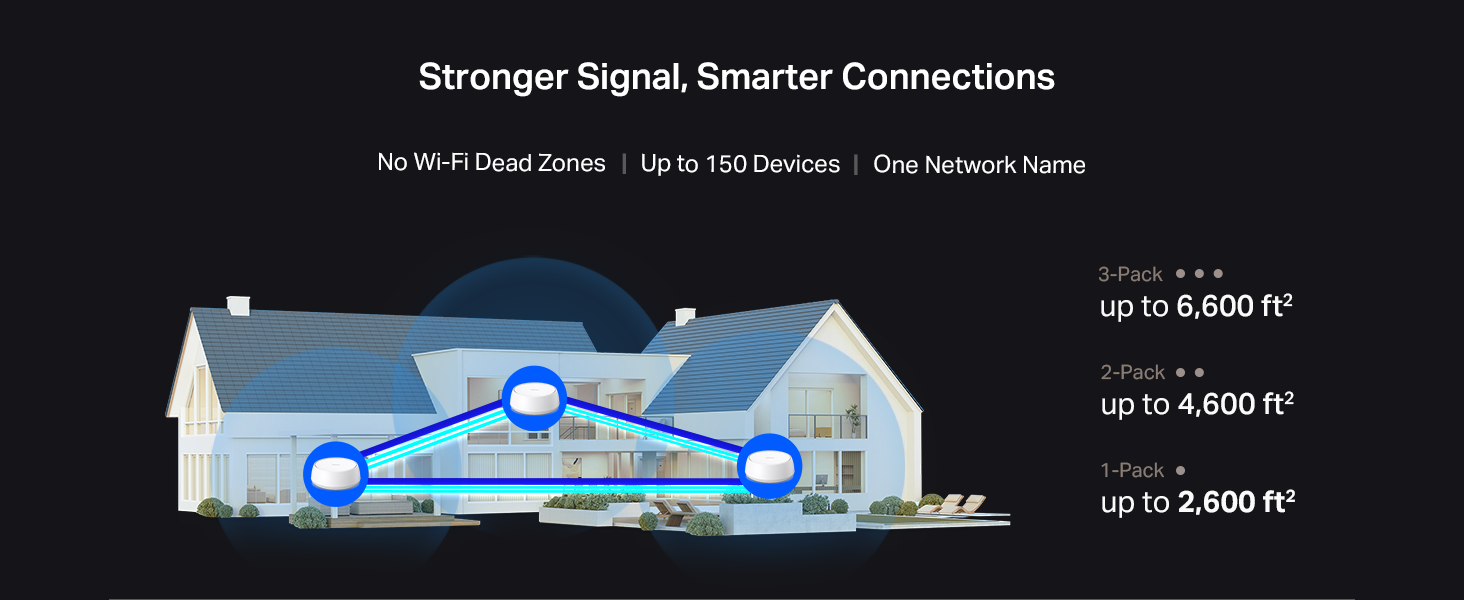
The TP-Link Deco 7 BE25 is a cutting-edge WiFi 7 mesh system delivering ultra-fast dual-band speeds up to 5 Gbps, expansive coverage up to 6,600 sq.ft, and robust support for over 150 devices. Featuring 4-stream BE5000 technology, dual 2.5 Gbps wired backhaul ports, AI-driven seamless roaming, and advanced security with HomeShield and VPN support, it’s designed to future-proof your home network with reliable, high-performance connectivity.




| ASIN | B0DKVDZXSN |
| Best Sellers Rank | #131 in Electronics ( See Top 100 in Electronics ) #1 in Whole Home & Mesh Wi-Fi Systems |
| Customer Reviews | 4.4 4.4 out of 5 stars (17,150) |
| Date First Available | November 11, 2024 |
| Item Weight | 3.28 pounds |
| Item model number | Deco BE25(3-Pack) |
| Manufacturer | TP-Link |
| Product Dimensions | 5.91 x 5.91 x 2.44 inches |
S**O
⭐️ Excellent coverage and consistently strong performance
I live in a two-story home and always struggled with dead zones, especially in the rooms farthest from the router and in the backyard. Since installing this device, the WiFi now reaches the entire 2,500 sq. ft. area without any issues — and even a bit beyond that. Overall, this TP-Link is absolutely worth the investment. If you’re looking to extend your coverage, improve stability, and eliminate dead zones, this model is a great choice. I would definitely buy it again. Setup was incredibly easy. The TP-Link app walks you through every step, and I had everything up and running in under 10 minutes. I really like that the system automatically manages the best band for each device, switching between 2.4 GHz and 5 GHz seamlessly. You never notice it happen, but the network stays stable at all times. The speed improvement has been significant. Before, I dealt with buffering while streaming movies or constant cutouts during video calls. Now I can have multiple devices connected — TVs, laptops, phones, and smart home gadgets — and the network doesn’t slow down. Even during peak usage hours, everything runs smoothly. Overall, this TP-Link is absolutely worth the investment. If you’re looking to extend your coverage, improve stability, and eliminate dead zones, this model is a great choice. I would definitely buy it again.
J**H
Impressive performance
It works very well. First the setup; it's really simple to do, pretty much plug and play. I was intimidated at first about setting it up, but it was really easy, just follow the app instructions as the system does all the work. I have an AT&T wifi router modem and didn’t know if this would work with it, as the router is already wifi capable, and by connecting this, is it going to cause any conflict or confusion? Absolutely not! It totally works fine with it. The system figures everything out. Just give it the time it needs to figure out connect once you plug it into your router /modem. The performance; it does everything I needed it to do as it extends my coverage and has stronger signals for my ever-growing many many wifi devices. I think I have about 30 devices that run off of wifi, LoL. I highly recommend this TP-Link Deco X55 AX3000 WiFi 6 Mesh System to anyone who needs more coverage and has a lot of wifi devices.
B**R
Fast, reliable whole-home Wi-Fi that just works
The TP-Link Deco X55 mesh system has completely transformed our home network. Setup was really simple using the app, and it walked me through everything step by step. Once everything was online, the coverage improved noticeably — even in rooms that used to be dead zones. Speeds are solid across multiple devices, and Wi-Fi 6 makes a big difference when lots of phones, tablets, and laptops are all connected at once. Streaming, gaming, and video calls all feel smooth and responsive. The system feels modern and well designed, and the app makes it easy to manage parental controls, guest networks, and device priorities. If you want strong, stable Wi-Fi throughout your home without a headache, this Deco mesh setup is a great choice.
N**A
Good router
Had to deal with a faulty unit. Assuming that is a one off issue, here is my review: It is easy to connect and range is good. The setup is straight forward and once the main unit is setup, the rest of them are super easy. The speed is also good. My internet connection is 100 mbps up and 20 mbps down and I am getting over that on wifi. So, that is awesome. The only downside is I have a Tplink router with easymesh and I found out even though it has easymesh on it, this deco is not compatible with archer series tplink router. So, that is something people should check. Just because the device has easymesh may not be compatible. Other than that, good powerful router
J**.
UPDATED: Now 5 star! Super fast Wifi-6, easy install, good choice to upgrade to a mesh system!
Thanks to Prime Day it was time for me to finally upgrade my home network. I was looking for a reasonably priced WiFi-6 mesh system with 3 stations (1 main + 2 satellites), at least AX3000 speeds, and a price tag of up to $300. It came down to two choices: the Eero 6+ and what I chose instead, the TP-Link Deco X55. Both systems had similar specs, but I liked how the TP-Link Deco had 3x Gigabit ethernet ports per satellite (the Eeeros have just 2). That meant I could wire each satellite in a daisy-chain configuration for a wired backhaul AND connect the 3rd ethernet plug to the gigabit switches I had at each satellite location. This meant that all of my hard-wired devices could stay hardwired, while adding mesh WiFi at full speeds (no bandwidth reserved for transmission thanks to the backhaul). Installation was quick and easy - I simply turned off my cable modem, disconnected my previous router, installed one of the Deco X55's in its place (in my bedroom), and turned everything back on. After downloading the TP-Link Deco app I had an internet connection set up and good to go in less than 5 minutes! Once that was working, I added the other two Deco's into the mix - one in the living room and one in the family room - with all three forming an almost perfect triangle for whole-home coverage. In less than 15 minutes after opening the box, I had a fast, Wifi-6 mesh system in my home. I had been using an older AC1900 router for almost 10 years now and back then it was just fine - but with more and more smart home devices being added to my home, it no longer was enough. I have a medium-sized amount of smart home devices (around 50 devices including hubs) and on occasion, I'd experience signal dropouts on some of the farther cameras, and other devices would sporadically go offline/online at random. With the X55 mesh installed, all of my issues disappeared! My smart cameras used to show a signal strength of between 80% (indoor cameras) down to around 55% (outdoor cameras). With the TP-Link Deco mesh in place, the signal strength changed to 100% indoor and 95% outdoor - a major improvement for sure. Pulling up live and recorded footage from the outdoor camera is so much quicker now. All of the other indoor smart devices I have all show 98-100% signal strength. Needless to say, this was a definite upgrade! As for my rating, I give it a solid 4-stars. There are a few small details that keep me from giving it a full 5-stars: some missing features that I had with my old router. One of them is being able to bulk reserve IPs by entering them into the app beforehand; with the TP-Link Deco, the device has to be connected to the network FIRST (with whatever DHCP IP address the Deco gives it), then you have to go into the app to reserve it with a static IP. I would rather have the more common table where you just enter each Mac address, static IP, and device name and it's done. Another missing feature is being able to have at least 2 separate SSIDs (not including a guest SSID). With the Deco you can only have one main SSID and one isolated guest SSID. Finally, to see some speed numbers I ran speed tests using both fast.com and speedtest.com, and the day before installing the mesh system I had an average internet speed of around ~260Mbps. The day after I installed the TP-Link mesh system my speeds went up to well over 490Mbps! Downloading is a lot faster, and streaming is super snappy as well. So in the end, I am very happy with my purchase of the TP-Link Deco X55 Wifi6 mesh system. Aside from the small feature complaints above, everything is awesome! I no longer have devices going offline/online. My internet speed has almost doubled (my old router was the bottleneck!) and streaming seems quicker as well. If you are looking for a mesh system to upgrade your current home network to the current WiFi6 standards, I would say that this is definitely a good buy! ------------ EDIT 02.18.2024: TP-Link Improvements Are Awesome! TP-Link has been steadily pushing out Deco firmware and app updates, and my -1 star complaint no longer exists thanks to two added features that completely address my complaints: - CUSTOM IP RESERVATIONS First, I don't have to play the game of connecting a new device, letting the Deco assign a DHCP address to it, then having to go back into the app to manually change the reserved IP. Now I can go straight into the Deco app and under the "Address Reservation" tab I can now select "Custom"; this brings me to a page where I can manually type in a MAC address AND the local IP address that I want to assign to it - without having to connect the device first. - SEPARATE IoT NETWORK My other complaint was that I only had the option to have two SSIDs - one main and one guest network. I wanted to be able to configure another SSID specifically so I could group all of my Smarthome devices, and after a couple of firmware updates later TP-Link not only gave me that option, but an even better one: they added a dedicated Iot (Internt of Things) network! Not only does this group my sparthome devices separate from my main network, but it also restricts communications between networks so that the IoT devices stay isolated. This is exactly the feature I wanted them to add during my initial review. - VPN COMPATIBILITY TP-Link has also added the option to use a VPN (server or client) directly through the router, as opposed to having to VPN each individual device manually. Furthermore, the VPN can be assigned to the network in two ways: either all devices (every device connected to the mesh will go through the VPN) or I can select specific MAC addresses that must pass through the VPN before reaching the Internet (tI chose option #2). With this I can make sure that certain devices that like to "call home" can only do so through the VPN, helping to protect my network and privacy. All in all, TP-Link has done a great job at supporting these devices, and their ability to add additional features over time have made me feel confident to revise my initial review now give this system a worthy 5 stars!
A**N
Keeps disconnecting from the . unstable operation. I returned 2 of them, got stuck with one because I lost the box.
A**Y
Much better than my BT extenders!! Was easy to set up and install and the network is much more stable now. Was recommended by a friend and can't fault the mesh network!!
M**D
كنت بعاني من ضعف اشارة الوايفاي بالمنزل لما اكون بعيد من الراوتر، ومنتج الـDeco X55 حل هذه المشكلة بكل جدارة. المنزل بالكامل الان اصبحت اشارة الوايفاي 2.4G/5G تغطيه وبسرعات ممتازة بل حتى خارج المنزل صارت توصل اشارة الوايفاي! يستحق كل ريال.
A**O
Estaba dudando si usar o no una red mesh, pero realmente fue una gran decisión, el x55 me sirvió perfecto compré el nodo en buena oferta y me solucionó mis problemas de conexión, automáticamente se habilitó el protocolo wifi 6 y ahora lo puedo usar tanto para mi computadora de trabajo como para la de jugar, celulares, Alexa, cualquier cosa Es una maravilla la app, lo recomiendo para México, si tienen Telmex con fibra óptica, les va a cambiar mucho la conexión
A**R
Performance and Coverage WiFi 6 Technology: The Deco X55 supports WiFi 6, which offers faster speeds, greater capacity, and reduced network congestion compared to previous WiFi standards1. Coverage: It can cover up to 6,500 square feet with a three-pack setup, making it ideal for larger homes2. The system uses multiple units to create a mesh network, ensuring strong signal strength in every corner of your home1. Features Speed: With speeds up to 3.0 Gbps, it handles high-bandwidth activities like 4K streaming and online gaming with ease2. AI-Driven Mesh: The system intelligently learns your network environment to provide optimal WiFi unique to your home2. Security: TP-Link HomeShield offers comprehensive network protection, robust parental controls, and real-time IoT protection2. Setup and Usability Easy Setup: The Deco app guides you through the setup process step-by-step, making it user-friendly even for those who are not tech-savvy1. Design: The units have a sleek and modern design that blends well with home decor1. Pros and Cons Pros: Super-fast WiFi 6 speeds1. Extensive coverage with seamless connectivity2. Simple and intuitive setup process1. Cons: Slightly expensive, but the performance justifies the cost. Only one Ethernet cable included in the box1. Overall, the TP-Link Deco AX3000 WiFi 6 Mesh System (Deco X55) is a solid choice for anyone looking to upgrade their home network with reliable and high-speed WiFi coverage
Trustpilot
2 months ago
2 weeks ago



