We remain fully operational. Our teams are working around the clock to ensure your deliveries continue safely.

DOWNLOAD THE APP


Customer Services
Copyright © 2025 Desertcart Holdings Limited
DOWNLOAD THE APP

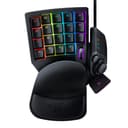

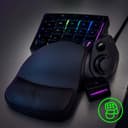
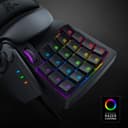

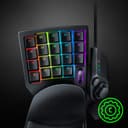

🎯 Elevate your game with precision, comfort, and style — don’t just play, dominate!
The Razer Tartarus V2 is a cutting-edge gaming keypad featuring 32 programmable Mecha-Membrane keys, a detachable ergonomic palm rest, and an 8-way directional thumbpad. Designed for both gamers and creative pros, it offers full macro customization via Razer Hypershift and immersive RGB lighting with Razer Chroma, syncing across multiple devices for a truly personalized experience.


| ASIN | B07754PYFK |
| Antenna Location | Gaming |
| Best Sellers Rank | 20,013 in PC & Video Games ( See Top 100 in PC & Video Games ) 128 in PlayStation Accessories 163 in Xbox Accessories 4,035 in PC Consoles, Games & Accessories |
| Box Contents | keypad |
| Brand Name | Razer |
| Button Quantity | 20 |
| Colour | Black |
| Compatible Devices | PC |
| Connectivity Technology | USB-A |
| Customer Reviews | 4.3 4.3 out of 5 stars (12,127) |
| Enclosure Material | Rubber |
| Generation | 2nd Generation |
| Global Trade Identification Number | 00814855024810 |
| Hand Orientation | Ambidextrous |
| Item Dimensions L x W x H | 6L x 2W x 15.3H centimetres |
| Item Type Name | Razer RZ07-02270100-R3U1 Tartarus V2 Chroma - Mecha-Membrane Gaming Keypad |
| Item Weight | 0.8 Pounds |
| Keyboard Backlighting Color Support | RGB |
| Keyboard Description | Mecha-Membrane Gaming |
| Keyboard Layout | QWERTY |
| Manufacturer | Razer Inc. |
| Mechanical Keyboard Switch Model | Razer Green |
| Model Name | Tartarus V2 |
| Model Number | RZ07-02270100-R3U1 |
| Number of Keys | 32 |
| Number of Sections | 3 |
| Power Source | Corded Electric |
| Processor Count | 4 |
| Product Features | Backlit, Ergonomic |
| Series Number | 702270100 |
| Style Name | Tartarus v2 - Mecha Membrane Switches |
| Switch Type | Mecha membrane |
| Theme | Gaming |
| UPC | 814855024810 |
| Water Resistance Level | Not Water Resistant |
P**Y
Altho it's expense worth the cost
Well I find it the nest way to not have to use the keyboard just love it
R**E
Very comfortable
New to pc gaming, I find a normal keyboard too uncomfortable. This keypad helps, due to the raising of the palm. Software is intuitive and the lighting is very customisable. Its not high grade enough for the lights beneath the keys to be individual - you will get a bit of 'bleed' between the colours (the V2 Pro fixes this issue with a more defined lighting set up - but for an extra £50 just for that and a more of an analogue feel to the key presses, the V2 will do me fine). The main downside is it is too light overall, I am constantly sliding this device across the table. No amount of rubber stops can hold this in place, and the rubber feet underneath don't really have much of an anti-slip property. Still getting used to it, so maybe over time I wont be as heavy handed with it. Easy to customise macros and key presses to individual keys - so using things like Photoshop, Premiere, After Effects is great as you can have CTRL+Z, or SHIFT+CTRL+Z on their own keys - not really saving that much time, just makes things a hell of a lot easier. Would recommend
P**L
It is nice to use.
was well excited whenit arrived, so many functions to play around. All buttons are able to be set up to what you need. Only bad thing i had, was that my hand crampt up after 30mins of use and made gaming not fun than. But this might be just me as i played 9 years on consol and only recently converted to PC gaming (even struggle at times with Keyboard)
F**B
Great
Awesome bit of kit my grandson loves it,made his FPS game's much better he says
G**G
Pretty good investment.
Not bad, not great. Sits there looking cool most of the time on my desk. Very, very specific use case item. Works for what I need it for, nothing more, nothing less. These days, there should be some kind of AI agent that suggests and sets up some default key bindings for popular games.
D**Y
(geschrieben von meinem Mann nach 6 Monaten Gebrauch bei Schadensfall ) Das kompakte Design ist gut für längeres Spielen. Die unterste Tastenreihe ist nicht gut erreichbar. Die Tasten haben nach meinem Empfinden einen langen Weg bis zum Druckpunkt. Beim Tastendruck entsteht ein deutlich hörbares Geräusch, ich finde es laut. Die Beleuchtung ist mMn. Unsinn und störend. Aber das ist natürlich Geschmackssache. Weil es hin und wieder bei Berührung aufleuchtet, wenn ich es nicht spiele, habe ich es oft abgezogen. Die Software zum Konfigurieren finde ich sehr gewöhnungsbedürftig. Manche Begriffllichkeiten erschließen sich mir nicht. Treiber und Software laufen zuverlässig und machen keinerlei Probleme im Betrieb (Windows 10). Das Handbuch zum Pad (PDF) ist leider für mich an vielen Stellen zu oberflächlich. Die angepriesenen "Mecha-Membranentasten" scheinen aber normalem Spielbetrieb nicht stand zu halten. Ein Bekannter der sein Pad fast zeitgleich kaufte, hatte es bereits wegen einer toten Taste in Garantie. Bei mir ist jetzt nach 6 Monaten ebenfalls eine Taste am Daumenjoystick funktionslos (tot). Von anderen Kunden habe ich die gleiche Problematik auch schon gelesen, sogar hier in einer Rezi. Ich rechne damit, dass auf mein Pad ganz knapp aus der Garantie raus ist, wie bei einem Kunden hier. In dem Fall werde ich kein Pad mehr von Razer kaufen, obwohl ich mich gut an das Gerät und die Software gewöhnt habe. Bewertung mit nur einem Stern, weil: Ich meine, bei einem schon recht beachtlichen Preis für nur 20 Tasten und einen Daumenstick - im Vergleich zu einer vollständigen gaming-Tastatur - ist die gebotene Qualität zu schlecht, für meine Ansprüche. 6 Monate Lebensdauer für ein Gaming-Produkt ist zu wenig. Mein vorheriges Gamepad eines anderen Herstellers hatte immerhin um 4 Jahre gehalten und war im Preis günstiger. Nur weil es nicht mehr hergestellt wird und Razer überall positiv dargestellt wurde, habe ich mich zum Kauf entschieden. Die Entscheidung war für mich nicht positiv.
S**H
يمكن تخصيص جميع الازرار وحركة analog مخصصة عن طريق اسهم الكيبورد جدا رائعة
A**O
El teclado se siente un tanto ligero pero no deja de ser robusto. Funcionalidad: - Las funciones que se pueden asignar a las teclas son bastantes y funcionan de manera correcta. - El poder tener diferentes perfiles con las teclas personalizadas de diferentes formas ayuda demasiado y siento que es el punto fuerte del producto; hasta el momento yo tengo un perfil para programar, otro para diseño en illustrator (si lo juntas con un digitalizador con pluma es una barbaridad la mejora del trabajo), un perfil lo tengo para gaming. COMODIDAD: El producto es cómodo de usar, tiene una almohadilla para reposar la muñeca y junto con el diseño dan un buen soporte a la mano. En mi caso, el teclado es un poco grande para el tamaño de mis manos por lo que alcanzar los botones de la fila superior me es complicado; sin embargo, el acceso a las demás filas de botones es bueno. Los botones se sienten bien al dar click. EXTRAS: La personalización de los efectos de luz es buena en cuanto a hay demasiados colores y esquemas de movimiento para usar, sin embargo, cuando comfiguras teclas con diferentes colores, la luz de estas se mezcal y no es tan fácil diferenciar el color. El cable es se siente de buena calidad, tiene un largo bueno para uso en escritorio y soporta bien los dobleces.
P**M
Excelente teclado, já tive o Orbweaver Chroma e comprei esse para usar como meu notebook, muito confortável e valeu muito a pena.
D**D
Pros: -Ergonomics -Added game functionality within easy reach -Great RGB -Quality, tactile keys Cons: -Noisy keys (sone might like this, personal preference) Amazing device. I have been a keyboard and mouse gamer since the days of Doom and Sim City Classic. I was skeptical for years about these and asked myself, “how would this be different than using the keyboard?” It is… so much better. I have always been the guy that has to remap everything to the arrow keys on a keyboard and the surrounding area. As a result, I also had to either have my wrist at an angle or the keyboard at an angle to reach them. I tried many times over the years to use WASD but the alignment of those keys wasn’t right. My brain needed them to be perfectly aligned like the arrow keys…. And this keypad. Maybe that is why there was almost zero learning curve when I started using this keypad. The keys are all perfectly aligned just like my brain already expected having used the arrow keys for so many years. And now, there’s all these additional keys within easy reach! The only minor learning curve was therefore my thumb. For years it had sat idle while I game. Now I have trained it to operate the buttons on this controller and it has been a game changer. I think the best part though is the ergonomics. Everything feels more comfortable when I game now. I use a CouchMaster that rests on my gaming chair and now when I game my arms are in comfortable positions with the mouse on the right of my keyboard and this keypad on the left. Still handy to have the keyboard accessible for when you need it during gaming but now used rarely for gaming and more for work. The wrist rest is perfect. There’s only two positions for adjustment of it but it works great for me. I went with the Mecha Membrane keys and I really like the feel of them. I will say they are louder than I would usually go for, but I almost always game with headphones so it hasn’t bothered me. I have seen in reviews that people pull out the metal clip to make them more quiet but I like the clips as they aid in the “snap back” feel when you release the key. I didn’t go with the upgraded keys because I didn’t think I would use the additional features that were advertised. Specifically, I don’t think my brain would utilize the concept of having different functions or commands based on how hard you press a key. The RGB is great. I always create game profiles so games have unique lighting that matches the theme or feel of the game. It uses the Synapse software which all Razer users will know is a bit of a love-hate relationship. Super powerful software that lets you control not just the lighting but remap keys. Some games I have specific remaps in this software if the game itself doesn’t let me remap a button I want to. For example, I have the far upper left key remapped to ESC because it’s used in some games but they sometimes won’t let you remap it in the game. All that said, Synapse can be frustrating and unintuitive at times. It has a steep learning curve. I am lucky to have pushed past that curve, but for newcomers to Razer just understand that and be ready to hit YouTube. I would highly recommend this product, especially for keyboard and mouse gamers that are already used to using the arrow keys.
Trustpilot
2 months ago
2 weeks ago