Desertcart purchases this item on your behalf and handles shipping, customs, and support to Iceland.
🎨 Unleash your inner artist—no desk required!
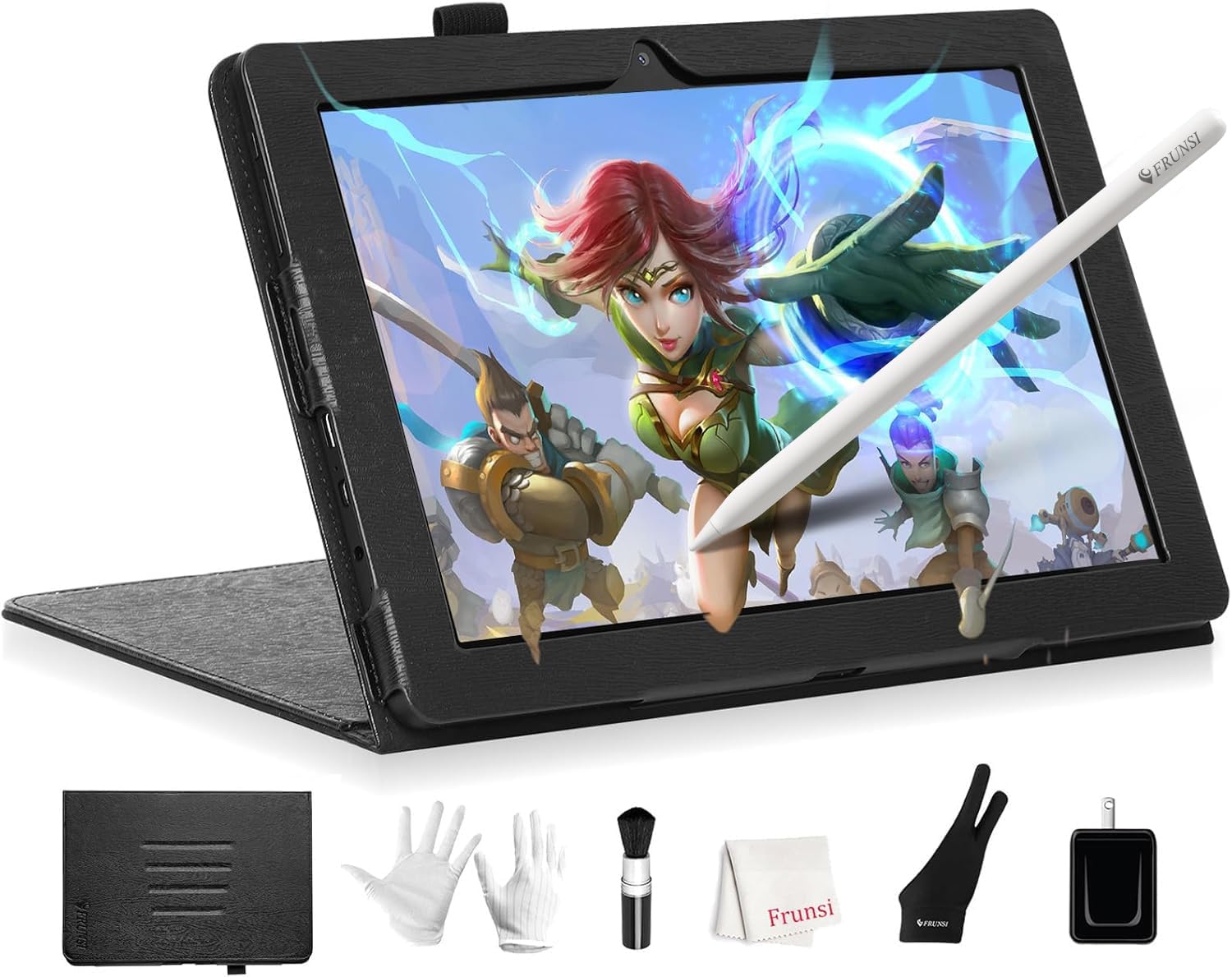
The Frunsi T8 Standalone Drawing Tablet is an 8-inch, high-resolution digital canvas powered by Android 13 and a robust MTK quad-core CPU. With 2048 levels of pen pressure sensitivity, 4GB RAM, and expandable storage, it offers professional-grade performance without needing a computer. Perfect for on-the-go artists, it includes pre-installed apps and tutorials, plus a 20-hour battery life to keep your creativity flowing all day.


| ASIN | B0DHRQDNDT |
| Active Surface Area | 8 inches |
| Additional Features | standalone drawing tablet no computer needed |
| Best Sellers Rank | #71 in Computer Graphics Tablets |
| Brand | Frunsi |
| Built-In Media | 1 x Detachable Keyboard, 1 x Stylus Pen, 1 x Screen Protector, 1 x Cleaning Cloth |
| Color | Black |
| Compatible Devices | Tablet |
| Connectivity Technology | Wi-Fi Built In |
| Customer Reviews | 4.5 out of 5 stars 563 Reviews |
| Manufacturer | FRUNSI |
| Mfr Part Number | RubensTab T8 |
| Model Name | RubensTab T8 |
| Model Number | RubensTab T8 |
| Native Resolution | 1200x800 |
| Number of Items | 1 |
| Operating System | Android 13 |
| Pressure Sensitivity | 2048 levels |
| Screen Size | 8 inches |
| Special Feature | standalone drawing tablet no computer needed |
| Specific Uses For Product | Digital Drawing, Graphic Design, Digital Art |
| Warranty Description | 2 |
M**Y
Great backup tablet
I decided to update to 5 stars! I think my artist gave it 4 the first time around simply due to size; she is used to the larger tablet. However, she said the T8 works just as well - see original review below. She mentioned giving the T8 to her sister who is taking a digital art class, but I heard her say last night that she wants to use it some more before deciding if she's going to share it. In addition, customer service has always been excellent with Frunsi when we've had questions. I got this for the young adult artist in the family, who has been using the T11 for several years. She reports that the T8 works just as well as the T11 as far as apps, clarity, and functionality; it's just a lot smaller (see photo). The pen for the T8 must be charged and there is no holder for it in the case. The T8 is a good tablet for a beginner and a great little backup for T11 users.
J**N
Great tablet for beginners
The frunsi T11 is the perfect entry level tablet for the aspiring digital artist. I decided to try my hand at digital art after getting tired of lugging around an entire bag of traditional art supplies and this tablet is perfect for it. Nice and compact and fits easily in a small backpack. I was impressed right out of the box by all the accessories that come with it. The case is pretty nice and feels like it will hold up well, and the magnetic stand is a really nice feature and lets you find the perfect angle for drawing. The tablet itself preforms extremely well and has run all the drawing apps I've tried so far (sketchbook, krita, hipaint, and Ibispaint x). While using some of the more taxing brushes there can be a bit of lag or jitter, but that can easily be overcome by slowing down. There's also a bit of jitter while slowly drawing diagonal lines, but if you tweak the line smoothing a little it's barely noticable. It also runs regular apps like YouTube, Facebook, Amazon, etc. perfectly fine. Overall, if you're looking for an affordable pen tablet for starting out in digital art or just for daily use, this is a great option.
M**N
Great Drawing Tablet and Even Better Customer Service!!
I don’t usually leave reviews, but I had to share my experience with the Frunsi Drawing Tablet because it really exceeded my expectations—both the product and the customer service. My tablet suffered an issue that was covered under warranty. I was so disappointed at first when the issue occurred, but Frunsi's customer service turned the whole situation around. I reached out to them and got a fast, friendly response. They made the return process incredibly easy, and I have a replacement tablet on the way as we speak. The communication was top-notch—polite, professional, and genuinely helpful. Their agents were so incredibly efficient and kind while being detail oriented in solving my problem. It’s rare to find that kind of support these days! As for the tablet itself: **amazing value for the price.** - The pen is super responsive with excellent pressure sensitivity. - The drawing surface has a nice texture that feels great to work on. - It works perfectly with all my favorite programs, and I enjoy the ability to download apps to the tablet. - Setup was so simple, and I love the software that come preloaded on the device. This is a fantastic choice for anyone looking for a reliable, budget-friendly drawing tablet. The product is great, and the company stands behind it. Highly recommend!
S**K
I've drawn a few things with this tablet.
This tablet is actually pretty nice. A full battery of drawing in sketchbook gave me less than 3.5 hours of battery. There is a slight delay from when you draw to when the line actually appears. When this gets extreme the tablet is unusable & must be charged, but this happens very rarely. Overall this is a great tablet for the price. If you want something better you have to spend over $1,000 on an I-something or a phone like the Z Fold. The size is perfect & the pen has a great feel. A major setback for me was the case does not have a pen holder. I bought cases that hold the pen but there were issues with those cases that caused me to take them back. This is not a big deal but worth mentioning. Sketchbook & Krita work great on it. It has a great feel, reminding me of drawing in a blackbook without having to carry a bag of markers with me. It is probably the best “drawing tablet” on the market. Unless you can afford a galaxy tablet, ipad or a phone like the Z Fold this device is great. It’s not just good for the price it is a good item but remember it is a $200+ (now less than 200) item so you are not getting this great tablet. It’s for drawing & can do a few other things & that is it’s function. It is great for people with carpal tunnel like myself.
L**N
Good Tablet for Beginners
I've had my T8 for a few months now, and I really enjoy it. It can run Clip Studio Paint without much lag, and the battery life is pretty decent. It's small, so it's portable, and the little case it comes with is nice. The pressure sensitivity is good too. I would say my only complaints are the lack of palm rejection and the fact that there doesn't seem to be an app to control the pressure sensitivity. But, for an inexpensive tablet, I'd still consider it worth it. Also worth noting that Frunsi customer service is great. Very fast response and very helpful.
A**Z
A fantastic tablet for beginners!
I want to start this review off by saying I'm no stranger to using tablets, especially for digital art. I tend to use screenless drawing tablets on my computer to make most of my art, but I've really been wanting a way to make art on the go when I'm not at my computer, so when I saw that this little tablet didn't need a computer to work, as well as coming with a stylus AND a case? I picked it up immediately. Some major pros of this device I wanna state off the bat: Durability - This little guy is TOUGH. It's a bit thicker then I expected to be, especially with the case on, but it makes it so I'm not afraid to toss this thing into a bag or be afraid the thing will shatter if I drop it on accident. Only sad downside for me, the imagery and marketing show that the case has a pen loop to help hold the pen, mine didn't come with one, but that's not a deal breaker or anything because the case is still solid. Size - I know most people say bigger is better, but as someone who loves small things and carries around a mini backpack day to day, the size of this tablet is perfect. The 8 inch screen is large enough for me to see all the details I need to when drawing, while not being uncomfortable to hold if I need to. I was also a bit worried about the battery life of the 8 inch tablet compared to the larger 10 inch tablets they sell, but the battery life's been great! I've been using it the tablet on and off for a couple of days and the battery is still going strong. I'm still getting used to drawing on a screen tablet, so that's been a curve I've been trying to get over, but this tablet has been an amazing help in that aspect!
A**Y
A great little drawing tablet
This tablet is wonderful for drawing on the go or wherever you need it! I bought it for travel to and from hospital stays and when I can't be on my computer for extended periods. It runs Clip Studio very well, I've had no issues with it at all. I've been able to use it for sketches, doodles and coloring. The pen is responsive, and I haven't noticed any lag at all. I will say that if you use clips studio you need to have it in the "studio"/mobile mode or else the brush size isnt accurate. Customer service has been very quick to respond and help with any issues I've had as well. I would recommend these tablets to others and even was looking at getting the T11 for myself for the larger screen size.
K**Y
Awesome product and customer service
I ordered this for my daughter who loves drawing and designing! She wanted a drawing tablet and this was the perfect beginner/advanced tablet! There’s several different apps to use with it and it’s easy to use! Has a great picture and the overall design is awesome! It’s truly a great piece of equipment. I love the standalone capability and the graphics are stunning. The accessories are all of good quality as well! It’s very high end for the price! Frunsi has great customer service as well! The first time I ordered this product the screen stopped working! I messaged them and they were quick to respond and even though it took me forever to send it back (my fault totally) they were very attentive to my needs and responded quickly! They mailed me a replacement immediately and we are several months in with the new device and it’s working perfectly! I would definitely recommend this to anyone!
F**I
Zeichentablett
Das Zeichentab ist soweit ok , funktionierte alles ,Anschlüsse für englische Steckdosen mit dabei , da die Ware ja aus England geliefert kommt. Es ist aber auch ein usb C Kabel dabei, sodas auch das Tab in Deutschland geladen werden kann. Zubehör war alles mit im Paket , wie beschrieben. Sprache ist in deutsch einzustellen , wie bei jeden anderen Tab, man benötigt z.b ein Google Account / Konto damit man das Tab benutzen kann. Für mich aber, sollte dieses Tab rein fürs Malen und Zeichnen gedacht sein , nur das diese installierten Apps nicht das waren was ich für mich möchte , entspricht nicht das was ich mir vorgestellt habe. Dennoch für Kinder super geeignet. Wer ein kleines Tab für unterwegs möchte oder fürs Kind , ist es ok .
L**A
Perfecto y con accesorios
Me encantó, y mi hija podrá empezar con sus dibujos.
M**A
Digital Drawing Made Easy—No laptop Required!
This is my first ever drawing tablet, and honestly, I’m loving it. I’ve always enjoyed drawing anime characters, and the RubensTab has made it super easy to dive into digital art without feeling overwhelmed. It came with everything I needed to get started—apps like SketchBook and ibis Paint X, a stylus, and even some tutorials that helped me get the hang of things quickly. The screen is small but bright, and the stylus feels smooth and responsive. I’ve already sketched a few of my favorite anime characters, and it handled the details surprisingly well. What I really love is how portable it is. I took it to the park last weekend, sat under a tree, and sketched for hours. No laptop, no cables—just me, the tablet, and a bit of sunshine. It’s lightweight and the battery lasts ages, so it’s perfect for drawing outdoors. It runs drawing apps really well, so it’s great for sketching and staying focused—but it’s not really built for anything heavy. That said, for someone just starting out, it’s more than enough. If you’re a beginner who loves anime and wants something simple, portable, and fun to use, I’d definitely recommend it. It’s helped me turn my paper sketches into proper digital art, and I’m excited to learn this.
G**.
Affordable and convenient to use!
I bought this drawing tablet to learn digital art and couldn't be happier with my decision. Not only does it come with two high-quality drawing apps, but it's also incredibly easy to use. The 1920x1200 screen resolution is fantastic, offering clear and vibrant visuals that truly enhance the drawing experience. The tablet size is just right 10 inches—not too big, yet large enough to comfortably see what I'm working on. The display is impressive, and the tablet itself feels sturdy, with a screen that resists scratches. It's comfortable to hold or rest on my lap, making it perfect for extended use. The MTK 8183 octa-core processor ensures smooth performance, allowing me to run multiple apps without any lag. I love that it functions similarly to an Android phone, making the transition seamless. The interface is intuitive, it boots up quickly, and everything is easy to navigate. The pressure sensitivity is spot on, enabling fluid strokes and precise details in my drawings. Plus, the pre-installed screen protector is a thoughtful addition. The tablet also comes with a stylish case and a drawing glove and a Cleaning kit (cleaning brush, cleaning cloth, cleaning gloves), which are great bonuses. Overall, this tablet is a fantastic investment for anyone looking to dive into digital art without breaking the bank. It’s perfect for both kids and adults, and I highly recommend it to anyone starting their artistic journey!
Q**G
Perfect for budding artists
An Outstanding Drawing Tablet – Perfect for Artists of All Levels! I recently purchased the Ruben’s drawing tablet, and I have to say, it has completely transformed my digital art experience. From the moment I unboxed it, I was impressed by the sleek design and premium feel. It’s lightweight yet sturdy, making it perfect for both home use and taking on the go. Display & Performance The screen is absolutely stunning! The colors are vibrant, the resolution is sharp, and the anti-glare coating makes it easy to use for long hours without straining my eyes. The pressure sensitivity is fantastic—every stroke feels natural, from the lightest sketch lines to deep, bold shading. The response time is incredibly fast, with no noticeable lag, which makes the drawing process smooth and enjoyable. Stylus & Customization The stylus feels very comfortable to hold, even for extended periods. It’s well-balanced, lightweight, and doesn’t require batteries, which is a huge plus. The pressure sensitivity levels allow for precise control, making shading and line work feel incredibly natural. The customizable buttons on both the stylus and the tablet itself are a game-changer, allowing me to streamline my workflow and access my most-used tools quickly. Ease of Use & Compatibility Setting up the tablet was a breeze. It connected seamlessly to my computer, and the drivers installed without any issues. It works flawlessly with popular software like Photoshop, Clip Studio Paint, and Procreate. I also appreciate that it’s compatible with both Windows and Mac, giving me flexibility in my creative process. Overall Experience After using the Ruben’s drawing tablet for a few weeks, I can confidently say it’s one of the best purchases I’ve made for my art. It strikes the perfect balance between affordability and professional quality. Whether you’re a beginner looking to improve your digital art skills or a seasoned artist needing a reliable tablet, this is an excellent choice. Highly recommend this drawing tablet—it’s an absolute joy to use, and I can’t imagine my creative process without it now!
Trustpilot
1 month ago
2 days ago