


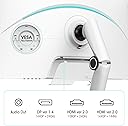

KOORUI monitor MY-GN10-US4
Product ID: 667495993
Details
- BrandKOORUI
- Screen size27 Inches
- ResolutionQHD Wide 1440p
- Aspect ratio16:9
- Screen surface descriptionMatte
⚡1ms ultra-fast response
👁️178° wide viewing angle
🖥️27-inch immersive display
🚀 Elevate your workspace with KOORUI’s ultra-responsive 27-inch powerhouse!
The KOORUI MY-GN10-US4 is a 27-inch QHD monitor featuring a sharp 2560x1440 resolution, ultra-fast 1ms response time, and a wide 178° viewing angle. Designed for professionals seeking crisp visuals and smooth performance, it operates efficiently at 5 volts and supports seamless multitasking with its expansive screen size.


| ASIN | B0CKPKKLC1 |
| Adaptive Sync | FreeSync |
| Additional Features | Mini LED Local Dimming |
| Aspect Ratio | 16:9 |
| Aspect ratio | 16:9 |
| Brand | KOORUI |
| Brightness | m2 |
| Connectivity Technology | VGA |
| Contrast Ratio | 3000:1 |
| Customer Reviews | 4.0 out of 5 stars 45 Reviews |
| Display Resolution Maximum | 2560 x 1440 |
| Display Technology | LED |
| Display Type | VA |
| Hardware Connectivity | HDMI, VGA |
| Has Color Screen | Yes |
| Image contrast ratio | 3000:1 |
| Item Dimensions D x W x H | 54.1D x 32.2W x 4.8H centimeters |
| Item Weight | 9.37 Kilograms |
| Manufacturer | KOORUI |
| Model Name | GN10 |
| Model Number | GN10 |
| Mounting Type | Desk Mount |
| Native Resolution | 2560x1440 |
| Number of Component Outputs | 3 |
| Picture Quality Enhancement Technology | Mini-LED Local Dimming, HDR 1000 |
| Pixel Pitch | 0.23 |
| Refresh Rate | 60 Hz |
| Resolution | QHD Wide 1440p |
| Response Time | 1 Milliseconds |
| Screen Finish | Matte |
| Screen Size | 27 Inches |
| Screen size | 27 Inches |
| Screen surface description | Matte |
| Total Number of HDMI Ports | 1 |
| Viewing Angle | 178 Degrees |
| Voltage | 5 Volts |
R**E
An Excellent Deal For HDR 1000 Mini-LED
First review so I'll try not to ramble. Assembled it's a nice looking monitor. The tabbed screw on the base to fix the arm in place is not especially sturdy so I won't over twist it. That's the only thing that I thought could be better built. As others have noted it's a bright crisp screen with the deep vibrant colors that is HDR 1000. The viewing range isn't wide but it's more than adequate. The screen itself can be rotated and raised but note raising or lowering the screen moves it forward or backwards some because it's a hinged arm not raised up or down on a column. I think getting the colors tuned to satisfaction will be the most work needed by end users. It may be fine as is for some. Others will want to tweak. The settings available(refresh rate VRR, ie) for that depend on whether it's HDMI or DP and if its an external screen for a laptop. VRR, local dimming, refresh rate can depend on what you use. I compared the Koorui to my laptop's 4k HDR OLED touchscreen. And it compared well. The touch overlay and OLED being OLED, the laptop was visibly better. The colors more vibrant. But. But not by overwhelming margin. That's what makes this monitor worth considering if you don't want to spend for an OLED. With some tuning, minus the laptop's touchscreen glass overlay, the Koorui looked really really good. I wasn't expecting this but tuning the Koorui on linux was simpler to set up and tune than on Windows 11. Not all linux desktops have integrated HDR completely but that is changing week by week. I used KDE Plasma 6 Wayland. On Windows 11 I got the color I wanted using NVIDIA control panel overriding Window's HDR auto HDR. YMMV, it's a preference, to my eye's kind of thing I think. But experimenting is worth it. I didn't test gaming too much just a brief let's see, any ghosting, lag tearing etc. I'm only going to say I tried Doom Eternal and Halo Infinite for the sometimes overwhelming screen action and demand they place on monitors. The HDR looked great. I had no distinct, disrupting ghosting, tearing or lagat 144Hz and 240Hz. But gamers are gamers and we can be exceptionally demanding in highly competetive games. So it's another YMMV. What you absolutely must have and what you absolutely won't. For media, movies it's just all-around excellent Rich deep colors deep blacks and bright whites. Note this monitor can be set extremely bright. I think what it comes down to is features to cost. The KTC, Innocn are in the same space here but more expensive and with features live more local dimming zones, KVM, speakers. Features that may be more to others important. To me that higher cost was enough to give an OLED a second look and think may be wait for a price move there. But this Koorui GN10 at this price is a very very very good deal.
G**A
Risk of buying an unknown brand was so worth it
Mainly using this monitor for gaming, specifically competitive shooters like Valorant and CS2. 240hz on response time mode "fast" is pretty good, minimal ghosting, not sure what the other reviewers were encountering about ghosting on this panel but maybe it's just the set of games I play. HDR performance is pretty good I'd say, based on side by side comparisons with my macbook m1 pro and my Samsung QLED TV the GN10 holds it's own against both of them. Eye searingly bright past 30 brightness for me as well(on SDR mode). I have not fully tested adaptive sync yet since that adds latency so I can't say anything about how people see flickering while using it. I can say even though I didn't use the stand, I really like how it's designed and it's very well built. Monitor build quality is solid too, no complaints there. Color accuracy is decent but it does have srgb/dci p3/adobergb modes to be more accurate. I do like the standard color mode because of the increased saturation for games but sometimes the reds can be a bit overwhelming so i have set the R G B values to 48 50 47 respectively and it looks pretty good that way. Overall I rate this monitor a 9/10!
N**N
No better 240hz 1440p monitor for the price
At the price of $350-400 this monitor is absolutely unbeatable. Mini-led gives awesome blacks and color depth, on top of 240hz performance. Also the brightness is incredible, the 550cd/m is plenty bright enough next to windows and will make me squint sometimes. There is slight ghosting on the panel (running "fast" response time setting) but it's mostly not noticeable and can be limited if you aren't worried about response time. The UI is solid, offers most settings I'm looking for and has a built in crosshair. I can't speak on the stand too much but it seemed solid, the 75mm VESA mount works great and hasn't given me any issues. The only upgrade from this for me would be an OLED panel double the price
S**Y
Terrible VESA mounting
Monitor appears to be great, the problem is that trying to mount this on any newer VESA mount is literally impossible. I don’t know who thought designing a hole in the back for a vesa mount was a good idea, but they should be fired. No modern mount comes in anything less than a 100x100 square with extra spots for 75x75. Make it so an everyday mount fits. Otherwise this thing is great, a little poorer build quality but not bad for the price point.
T**A
At $300 its a steal
I'll keep this review somewhat short Pros - 240hz at this price with its specs is crazy - The local dimming does work with HDR - The blooming is very minimal with the games and movies I've watched on this monitor - The blacks are very deep make sure to turn on local dimming or back light bleed is bad - HDR is insane with this monitor this monitor is crazy bright - PC this monitor is perfect Neutral - It does a decent job on consoles but I wouldnt recommend it Cons - The monitor will flicker sometimes let me give a example I use this monitor for comp. gaming I have 3 different monitors 2 monitors 1 tv I usually leave my ultrawide always connected and I watch shows i'll connect my tv and leave this monitor unplugged until i plan to use it however in doing that when I then plug this monitor for use this monitor will have crazy flickering as if it was losing signal constantly the only way I found fixes it is to restart my pc with this monitor plugged in in the end I love this monitor i have a Alienware QD-Oled ultrawide LG CX 65" Oled and decided to go with this entry level Comp. mini led and do not regret it I use it more than my oleds
Trustpilot
2 months ago
1 week ago