


🚀 Upgrade your speed, storage, and style—because slow is so last decade!
The SanDisk SSD PLUS 1TB is a high-performance 2.5-inch internal solid-state drive featuring SATA III interface with read speeds up to 535 MB/s and write speeds up to 450 MB/s. Designed for professionals seeking a reliable, shock-resistant upgrade, it delivers faster boot times, quieter operation, and energy efficiency, making it ideal for laptops and desktops aiming to boost productivity and longevity.
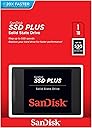


| Asin | B07D998212 |
| Best Sellers Rank | 111,582 in Computers & Accessories (See Top 100 in Computers & Accessories) 518 in Internal Solid State Drives |
| Box Contents | China |
| Brand Name | SanDisk |
| Cache Memory Installed Size | 1 |
| Color | Black |
| Compatible Devices | Computer, Laptop, Game console |
| Customer Package Type | Standard Packaging |
| Customer Reviews | 4.7 4.7 out of 5 stars (28,344) 4.7 out of 5 stars |
| Data Transfer Rate | 6 Gigabits Per Second |
| Digital Storage Capacity | 1 TB |
| Enclosure Material | Flash Memory |
| Form Factor | 2.5-inch |
| Global Trade Identification Number | 00619659167196 |
| Hard Disk Description | Solid State Hard Drive |
| Hard Disk Form Factor | 2.5 Inches |
| Hard Disk Interface | Solid State |
| Hard Disk Rotational Speed | 5400 |
| Hard Drive Size | 1000 GB |
| Hardware Connectivity | SATA 6.0 Gb/s |
| Hardware Platform | Mac |
| Installation Type | Internal Hard Drive |
| Item Dimensions L X W X Thickness | 10.1L x 7W x 0.7Th centimetres |
| Item Type Name | SanDisk PLUS 1TB 2.5 inch Internal SSD with High Speed Read/Write |
| Item Weight | 0.07 Pounds |
| Manufacturer | SanDisk |
| Manufacturer Part Number | SDSSDA-1T00-G26 |
| Media Speed | 450 |
| Model Name | SanDisk SSD Plus |
| Model Number | SDSSDA-1T00-G26 |
| Network Connectivity Technology | SATA, USB |
| Number Of Items | 10 |
| Product Features | No |
| Product Warranty | 3 years |
| Read Speed | 535 Megabytes Per Second |
| Specific Uses For Product | Gaming, Multimedia |
| Upc | 619659167196 |
User
Fit for purpose...
...and that purpose was to add storage capacity to a new 'mini-pc' [separate review soon].The SSD comes securely packaged in the usual SanDisk way and needs to be 'Initialised' and 'Formatted' to meet your particular requirements. A quick search of Google will tell you how to achieve this if you are unsure - it's actually very easy if you just follow the instructions and let your computer do the necessary preparations.There are a number of manufacturers of SSD drives and there are an equal number of claims regarding their 'Read/Write' speeds etc. Equally there are a variety of prices and I have tried a few different brands but overall I now stick to SanDisk products as a personal preference for quality etc.Once prepared and inserted I can confirm that this SSD works extremely well and that data throughput is excellent and as I would expect with one form of SSD communicating with another.As you may have guessed - I commend this item and believe it to be good value.I am very pleased to report that it works perfectly well for me and the safety of my data and on that basis I am very happy to recommend it to you.Thank you for your time in reading my feedback/review – I hope it may have helped you in your own buying decision.If this feedback/review has helped in any way please be kind enough to click on 'Helpful'.
User
Perfect budget SSD
I started using SSDs a few years ago and absolutely love them. They can make a huge difference to a computer's performance, especially laptops which often come with slower 5400rpm hard drives.This SanDisk SSD is very much a budget item. You won't get the blistering speeds of more expensive SSDs, but it's still much better than a hard drive. It represents fantastic value for money.I'm using the 120GB model, which is plenty of storage space for a laptop which is mainly used for Internet and email. Windows plus a few applications is still less than 20GB.Thankfully, with Windows 10, after the laptop has been online at least once with its original hard drive, it registers itself with Microsoft so Windows is activated and licensed. Therefore you don't need to type in a license key to reinstall Windows on your new SSD - your license is tied to the laptop's hardware. I used a Windows 10 ISO image downloaded from Microsoft and saved it to a USB drive. Then I used the USB drive to install Windows on the laptop with this SSD installed. Worked perfectly first time and the speed boost was immediately obvious.
User
This was the most powerful machine in 2004 with the NORTHWOOD P4 processor
I bought this drive for my ageing PC Northwood Mesh PC. This machine was very sought after in 2004 with the latest graphics card and latest and newest afforementioned processor. In 2004 a P4 3.4Ghz was the 'in thing' at the time. I have preserved my Mesh PC from then till now and I have upgraded the system with this fantastic SSD.I am using the original keyboard to write this review. It came with the said machine that I bought 16 years ago. The motherboard is Sata1 but thankfully the drive I bought is appears to be backwards compatible.When this machine starts up it gets to the desktop and starts up VERY quickly despite being XP.You might be thinking why not use it in a more up to date machine? For me this machine has "sentimental" meaning for the last 16 years and it is faster than ever (although the browser is very slow now), it works with the WIFI 5G system despite only being USB2.When I say faster, I mean when I click on My Computer for example the window opens immediately.My rig used to have a 1x 500Gb Sata3 and 1 x 250Gb IDE. Due to problems with the IDE this is why I now use the afforementioned disc in this machine to encompass both old discs.SSD is DEFINETELY the way forward, especially the new ssd which slots into the motherboard.My rig: 3.4 Ghz Northwood Mesh PC, 1Tb Sandisc SSD, CD RW, DVD RW (both IDE), MS 6743 mobo with dial up modem (obselete), 1394 ports, and Creative Sound Blaster 2 Zs platinum (still works a treat!) with 7.1 sound. Bluetooth and 5G wifi on usb2.
User
Very good drives
I bought two of these quite a few months ago to upgrade a spinning disk on my now dated machine, which was quite slow on the initial boot up, but otherwise ran quick enough the rest of the time (I had plenty of RAM). I also wanted to set up Raid-1 on the C: drive, so if a drive fails I didn't lose the whole machine. I tried to do the migration by setting up a mirror between my spinning disk and the new drive and it all went wrong for me as they are incompatible for Raid purposes (so don't migrate your system that way). But anyway, I rescued the system in the end.And now I am very happy with my new SSD based system. It boots up much faster now. Since I got everything working properly I haven't had any problems with the new drives and would happily recommend them to anyone looking to upgrade to an SSD based system.
User
Reliable and fast! Good value for money.
Bought this to upgrade an old white MacBook and this was easy to fit and noticeable increase in the speed of the MacBook i.e. opening of web pages etc.I would highly recommend and I bought 2 of these as they were on special offer one has been fitted and the other is being kept for a rainy day!Reliable and fast!
User
Super fast
I bought this with this enclosure:"UGREEN USB C Hard Drive Enclosure 2.5" External Disk Caddy Reader UASP USB 3.1 Gen 2 Type C Case"specifically because both mentioned the fast USB protocol UASP. I checked that my laptop supports UASP before purchase.At first I was disappointed; the claimed 500MB/s fell far short at around 230MB/s. However, after switching off the USB write caching on the drive (which means I have to use the Windows USB safe eject function before disconnecting the drive - no big deal, as I always do that anyway) the speeds shot up to close that the claimed speed. Maybe a coincidence - I haven't switched it on again to check. Not entirely the full claimed speed, as there are apparently transfer overheads, but a 1.8GB file transfers in 4 - 5 seconds, which I find unbelievable, and a 250MB file transfers so fast that the Windows progress graph doesn't even have time to appear.Both products are well recommended.
User
Outstanding Product! Rapidly improves computer startup times and performance
I never knew how effective, in terms of speed and performance, SSD's were until I bought this thing.Compare this to a HDD; I previously had a Toshiba HDD installed by default, and not only are the startup speeds and times considerably different but also overall performance of the computer. The computer I got it for is five years old and I figured it was getting slow and needed replacing... until I bought this device!It now starts up in mere seconds as appose to max 30 seconds.Unless you know how to replace a hard drive by coping the OS, personal info, DLL files etc, I would get a professional to take care of the transition.Literally never really knew the significance in terms of speed when it comes to SSD's. Definitely worth the £80!!
User
Ideal for storage expansion without breaking the bank
I have a number of these SSDs in my machine now. Super easy to install, never had any troubles with the installation or them running. You'll be surprised at how quickly you can fill them! These are ideal for your average computer user or avid gamer. Most of my games are stored on these, the read and write speeds are perfectly fine.
User
Blazing fast, TYJ!
I have an older laptop, first Gen i7. I used it to run SolidWorks, office suite, internet about 5 years ago till about 2 years ago. I had windows 7 and it was doing ok but upgraded to windows 10, not by choice. I was not using it daily at the time but wow, it took 2 days to start up once after an update. I retired it but never replaced it, just used my work desktop to do what I needed to and occasionally used my wife's laptop, which is a chore because she wants me to ask for permission and is anal about settings or programs! (whatever) Before my engineering days, I was in IT, got my A+ certification (NT) and went to work while trying to go to school. Long story short - I purchased this SolidState Hard Drive to put in my old retired laptop and couldn't be happier! I ditched the windows route and put Linux mint on here. this SOB blazes facebook like a boss! takes 16 seconds to boot up. I wish I could use the software to monitor the health of my drive but SanDisk offers NO support for Linux and there isn't a Wine out for Mint edition yet. This is my first Linux install in ten years or more, so I don't know If I am going to keep it or not. Its so minimal and fast, the hard drive has no reason to kill itself! In the even this pc or the HDD or SSD (lol caught my self) dies after my one year SanDisk warranty expires, I will probably put 3 or so bullets in it! I don't game but I might purchase AutoCad to install on here. So its not in vain...
User
Boosting Efficiency with SanDisk SSD Plus: My Experience
As a crafting business owner and jeweler, I rely heavily on technology to streamline my operations and keep up with the demands of my customers. Recently, I decided to upgrade my computer's storage with the SanDisk SSD Plus 1TB Internal SSD, and I'm thrilled with the results.First and foremost, the speed and performance of this SSD have been game-changing for my workflow. With SATA III 6 Gb/s connectivity, data transfer speeds are lightning-fast, allowing me to access and save large design files, 3D models, and intricate graphics with ease. The SSD's 2.5" form factor and slim 7mm profile make it a seamless fit for my desktop setup, maximizing space without compromising performance.The reliability and durability of SanDisk SSDs are renowned, and the SSD Plus is no exception. Its solid-state construction means there are no moving parts, reducing the risk of mechanical failure and ensuring long-term data integrity. This peace of mind is invaluable in a business where every design and customer order is precious.Installation was a breeze, thanks to the user-friendly design and clear instructions provided by SanDisk. Within minutes, I had transferred my operating system and essential software to the new SSD, and the difference in responsiveness was immediately noticeable. Tasks that once took minutes are now completed in seconds, saving me valuable time and allowing me to focus on what I do best – creating stunning jewelry pieces and crafting intricate designs.Overall, I couldn't be happier with my decision to upgrade to the SanDisk SSD Plus 1TB Internal SSD. Its exceptional speed, reliability, and ease of installation have made it an indispensable tool in my crafting business. Whether you're a professional jeweler like myself or a creative enthusiast looking to enhance your computing experience, I highly recommend the SanDisk SSD Plus for its unbeatable performance and value.
User
Satisfaisant
Parfait
User
Works great
Combined with an enclosure, works well as an external USB SSD drive.
User
Wahsinniger Geschwindigkeitszugewinn
Mein Lenovo Think Pad (E530c) ist schon ein paar Tage älter. Ich arbeite gerne damit, aber in letzter Zeit, habe ich das nicht mehr so gerne getan, weil es ca. 2 Stunden brauchte um richtig einsatzfähig zu sein, wenn ich es hochgefahren habe. Ein blick in den Ressourcenmanager zeigte mir, dass die Festplatte das Problem ist. Sie ist die ganze Zeit zu 100 % ausgelastet, während der i3-Prozessor und die 4 GB Arbeitsspeicher unter 30 % laufen. Die Festplatte knatterte und knatterte und allein den Browser zu öffnen konnte 5 Minuten dauern.Also musste eine SSD her, mein IT-Kollege versprach einen 1000-fach schnelleren Zugriff auf die Daten.Der Einbau war super-einfach, einfach nur ein paar Schrauben lösen und die alte Festplatte ist draußen, die neue drinnen. Ich habe mir dann eine komplette Neuinstallation gegönnt, damit ich den ganzen Ballast, der den Rechner verlangsamt hat los bin.Der Effekt ist überwältigend! Mein altes ThinkPad ist zu neuem Leben erwacht. Ich arbeite wieder richtig gerne mit ihm. Eigentlich wollte ich auch noch den Arbeitsspeicher auf 8 GB aufstocken, das kann aber noch warten, da der Rechner jetzt so schnell ist, dass das wahrscheinlich kaum auffallen würde.Es ist so, als hätte ich mir einen neuen Rechner gekauft. Ich schalte ihn an, er braucht wenige Sekunden für den Anmeldebildschirm und wenn ich mich angemeldet habe, ist er sofort startklar. Die SSD ist absolut ihr Geld wert und ich freue mich sehr, dass ich mein ThinkPad weiter so gut nutzen kann.
Trustpilot
2 weeks ago
2 weeks ago