Buy anything from 5,000+ international stores. One checkout price. No surprise fees. Join 2M+ shoppers on Desertcart.
Desertcart purchases this item on your behalf and handles shipping, customs, and support to Iceland.
⚡ Elevate your workspace: Two computers, two monitors, zero hassle.
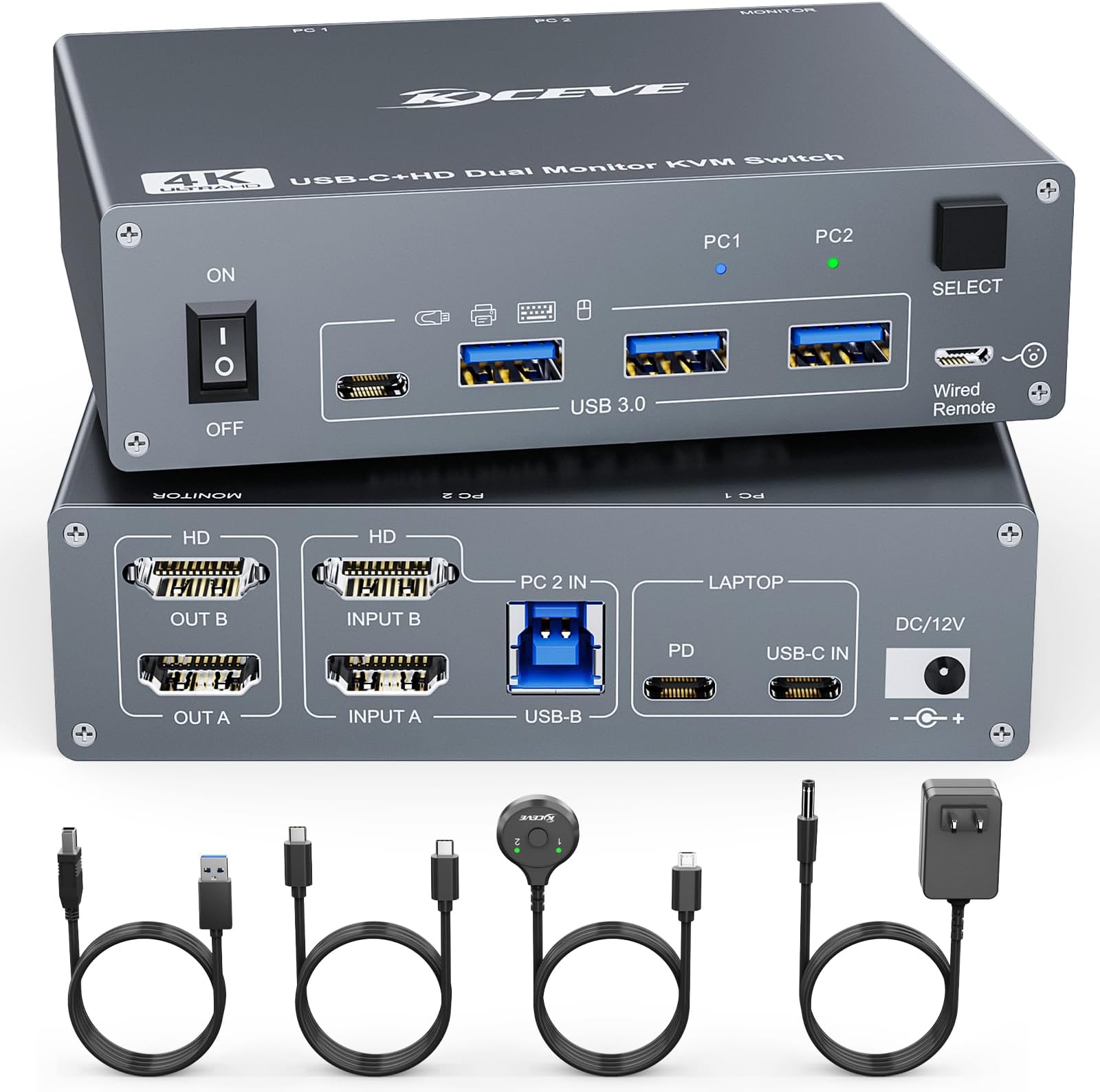
The KCEVE KVM Switch supports dual 4K@60Hz monitors and connects two computers via USB-C and HDMI, enabling seamless sharing of keyboard, mouse, and displays. It features 60W Power Delivery to keep laptops charged during use, offers both physical and wired remote switching for convenience, and requires no drivers for easy plug-and-play setup. Designed with durable aluminum and backed by a 1-year warranty, it’s ideal for professionals managing hybrid workstations.


| ASIN | B0D981X57D |
| Actuator Type | Push Button |
| Best Sellers Rank | #300 in KVM Switches |
| Brand | KCEVE |
| Brand Name | KCEVE |
| Circuit Type | 2-way |
| Connector Type | Hdmi, Usb C |
| Contact Material | Copper, Gold |
| Contact Type | Normally Open |
| Control Method | Push Button, Remote |
| Current Rating | 2 Amps |
| Customer Reviews | 4.0 out of 5 stars 49 Reviews |
| International Protection Rating | IP67 |
| Item Weight | 9.28 ounces |
| Manufacturer | KCEVE |
| Material Type | Aluminum |
| Model | KC202CHDZ |
| Mounting Type | Tabletop |
| Number of Positions | 2 |
| Operating Voltage | 12 Volts |
| Operation Mode | manual |
| Specification Met | 202chdz |
| Switch Type | Push Button |
| Terminal | Through Hole |
| UPC | 027685245519 |
| Unit Count | 600.0 Count |
| Upper Temperature Rating | 100 Degrees Celsius |
| Wattage | 100 watts |
A**X
Perfect solution
I’ve been using this setup for my home office and I absolutely love it. Its probably been close to a year that I’ve had it and I haven’t had any issues. I run 2 different laptops (1 personal, 1work) and I switch between the 2 literally at the touch of a button. Its like having 2 offices.
M**.
Works as advertised.
Simple and robust. I’ve had it for over a week and it is working as an advertised through hours of use every day. Allows me to switch easily between work laptop and personal desktop. Laptop is via the USB-C cable with power and Ethernet via original dock through the second USB-C connection on the laptop, while the desktop is via the HDMI, DP to HDMI, and USB-B 3.0 cables. The unit works well and no issues switching between the two. The displays are good and crisp for typical apps and internet, including videos. I don’t do any gaming, so doesn’t really matter if I don’t have 4K resolution. I originally had the laptop powered via the unit and it did get a little warm, though not worrisome. I switched to using the laptop’s dock for power and Ethernet as a matter of convenience (2 USB-C connections vs. USB-C + Ethernet to remove and connect every time I take the laptop somewhere) and the unit runs a fair bit cooler, barely getting warmer than room temperature. All in all, quite happy with the unit, though a nuance or two when switching to the other computer that is in sleep mode - need to push the power button to wake it up. When coming back to the same computer in sleep mode (i.e., no switching), activation of the mouse or keyboard wakes it up as it normally does without the unit.
R**T
Works, but with a lot of problems
This review is specifically for the KVM Switch 2 Monitors 2 Computers USB C HDMI, Dual Monitor USB 3.0 USB Typc C KVM Switcher Supports 4K@60Hz for 2 Computers Share Keyboard, Mouse and Monitor, the one that is designed to connect a desktop and laptop to one set of peripherals. This exactly matched my needs, which was to connect my Dell Optiplex Micro Form Factor desktop PC and my HP work laptop to one monitor, Logitech backlit keyboard, wireless mouse, headset, etc. I have it connected to the included power supply as well as a 100w PD adapter. The good thing is that this KVM switch does work and does connect both devices, allowing me to easily switch between them with the push of a button. This setup is also nice because it provides constant power to the laptop via USB-C and only requires that one cable for both charging and data/video. This is super convenient. Even if I switch the KVM back to my desktop, the laptop is still being powered. Most KVMs I've tried only provide power to the 'active' device. Also, this KVM actually has no issues with video or audio at higher resolutions. My monitor is only 1080p at 100Hrz maximum, but it handles it just fine. Every other KVM I tried could no handle anything above 60Hrz at that resolution, even those claiming they could. In most cases, even if the picture displayed, the audio over HDMI crapped out completely or was breaking up so bad you couldn't use it. When using this KVM on the laptop, via the USB-C connection, everything works fairly well, except for the video blacking out randomly. It doesn't do it too often during a typical day, so I've found I can work around it. I've also had the audio stop working through my headset for some reason, but that has only happened a few times and cases where I have to power the KVM off completely and turn it back on because I lose video completely and sometimes the mouse, when turning the laptop back on. Other than that, I have no other issues with any of the connected devices while working during the day. Now, when using the desktop through the UBS-A and HDMI connections, audio and video are fine, but I have constant problems with the other connected devices dropping and re-connecting. There are no error messages but my keyboard constantly loses connection while I'm typing, as does my mouse. Sometimes it will send the last character typed repeatedly until it reconnects, other times it just misses letters. Sometimes this is so bad that I'm about to remove the KVM completely, but I really need the ability to switch between devices throughout the day. I've thought about buying something else, like just a bi-directional USB-C switch and using my Dell docking station with that, but I won't be working at my job much longer, so it's not worth the investment. Once I stop working, I will remove the KVM and just have my Dell connected directly. The build quality of the device seems good overall. It does get a bit warm, but nothing that seems anywhere close to alarming. For the price, it more or less works, however, when I made the initial investment I would have been willing to spend more for something that doesn't have all these problems. For what it does, I guess it's a good value, but it's not without problems. The above said, the company is very responsive. I reached out to them regarding the problems I am having, and they responded quickly. They told me that they have observed similar problems with some backlit keyboards and were investigating these issues, with the possibility of resolving them in a future release. They also offered me a full refund for the product, which I felt was over the top and more than I wanted. I was considering returning it but they insisted I keep it at no cost. So, I must say that the company does stand behind their products. I told them I will be willing to try an updated version if they do release one. You mileage may vary on this and it may work ok for you, especially if you don't use a backlit keyboard, which they said may be the root cause of most of the problems I'm having (just not really sure why.)
S**K
Works
Product works as advertised for most of the part. The PD cable does not have enough power to charge the laptop, besides that the product works good. Occasional issues with detecting the pc output, but a simple unplug and reconnect will solve the issue. Wrote this after three days of testing.
R**Y
Works great!
Takes up a lot of space but works extremely well. I like the button but it was hard to find the right spot on my desk and I had to use double sided tape because it didn’t want to stay in one spot because of the cord.
R**R
Issues
Had lots of issues with device. Finally got the secon computer tork. The switch gets extremly hot and v which causes the to feak out. It also vauses the icons to lose it settings. I placed a gan on it to cool ot dowm nect the usn stopped workong. If yu plugg anything imto them connect/ disconnect costantly. Of course day to return this was yesterday. So much for this. If i was going to buy it again i would go with a different maker.
C**I
Mac and PC seamless setup
I have a MacBook that I use this as a full dock for and as a switch for my audio interface and mouse over to my pc for gaming. Works amazing!
R**.
Avoid, bad product.
Early on, I thought this would solve my issue of having two computers and two monitors, and being able to switch between them. However, this is a cheap item that doesn’t deliver to its promise. Monitors flicker all the time making it impossible to be productive.
Trustpilot
3 weeks ago
2 months ago