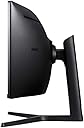
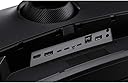
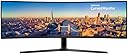
🚀 Elevate your productivity and play with the ultimate super ultra-wide powerhouse!
The Samsung USB-C Super Ultra-wide C49J89 is a 49-inch curved monitor featuring a 3840x1080 resolution and a rapid 144Hz refresh rate. Designed for professionals and gamers alike, it offers versatile connectivity including USB-C for data, video, audio, and power delivery. Its built-in 7W stereo speakers and multi-port options make it a sleek all-in-one solution that replaces multiple monitors, enhancing both productivity and entertainment.


| ASIN | B07C7YNLBW |
| Are Batteries Included | No |
| Brand | Samsung |
| Colour | Charcoal Black |
| Customer Reviews | 4.1 4.1 out of 5 stars (213) |
| Date First Available | 12 April 2018 |
| Guaranteed software updates until | unknown |
| Item Weight | 15.1 kg |
| Item model number | LC49J890DKUXEN |
| Manufacturer | Samsung |
| Number of HDMI Ports | 1 |
| Number of USB 3.0 Ports | 3 |
| Processor Count | 1 |
| Product Dimensions | 15 x 47.36 x 20.67 cm; 15.1 kg |
| Resolution | 3840 x 1080 |
| Screen Resolution | 3840x1080 |
| Series | C49J890DKU |
| Standing screen display size | 49 Inches |
| Wattage | 62 watts |
T**S
great monitor
I brought this monitor to replace 3 individual ones i had side by side. This bad boy doesn't dissapoint. Nice big clear screen, easy to set up and some great functions. The KVM switch is really useful. Took me a bit to set it up as the instructions weren't clear, but once you get your head around the inputs/outputs and usb connections its fine. Screen also comes with Easy Setting Box software. Means i can divide my screen up and snap programs to each section easily. Makes multitasking easy and tidy. Build in speakers are good as well. I wasn't expecting much from them, but have found that for everyday use that its clear.
V**L
Great monitor.
It is a great widescreen monitor. Good quality image, easy to set up and connect to devices, does what it is supposed to. Great for work, also can enjoy movies and gaming.
R**N
Perfect for what I bought it for.
I bought this as a productivity tool - I've run with 3 x 24 inch 1080p screens for years. Thats great, but the bars between the monitors mean you dont utilise the space efficiently or effectively. The double ultrawide is the same as 2 x 27 inch 1080p screens - which seems like a downgrade on paper - but man - its like having 3 but taking up less physical space. I've had the screen less than 24 hours, and I'm not going back! Ok, this is not a cheap monitor. And the price jumps around a lot on amazon. And there is not a lot in it for high end monitors - they all do a job, and (most of them) do it well. So I'll restrict this review to why I bought this one over the 100 quid cheaper Acer Nitro - which is the same size, and (aproximate) spec. 1) The Samsung is proper 144Hz - not "Overclocked" to 144Hz as the acer says it is. I'm always suspicious of overclocking - it not only shortens its life, but tends to be flakey. 2) The Samsung has a much better stand. It tilts, goes up and down, and swivels left/right. The Acer just tilts, which is pretty poor in my opinion. This alone would make me choose the Samsung 3) The samsung comes with a wall mount, ands also has cable management - I dont use either of these (see below) but its nice to have. 4) You get a built in laptop dock with USB! And you can dock 2 laptops and a desktop, and switch between them - so its a KVM as well! This saves me 100-200 quid at least just there 5) The Acer has multiple HDMI - The Samsung just has one. Why is this a plus? Because instead the Samsung has USB-C - 2 of them - capable of driving the monitor at full spec AND charging your device. The Acer doesnt have USB-C at all. 6) 7Watt speakers 7) Its SAMSUNG! 8) It looks amazing - my (adult) kids were in awe. And my desk is a lot more tidy now :) Sounds great? Well, its not all strawberries and cream. Downsides are : 1) Switching isnt instant -but TBH thats to be expected - it has to disable and enable USB ports too. If it was just switching source (like the acer does) it would switch much faster I think. 2) Sound is good, but it isnt high end. I'm ok with that - I use a USB skype set for work 3) price is a bit steep 4) the ports are in an awkward place, and are hard to get to, unless the back of your desk is not against a wall. 5) The cable management requires much longer cable than supplied - they feed through the stand, so you need an extra half metre on each cable to use it properly. So I opted not to use it - nor the plastic that covers the ports. Shame really, and probably my biggest issue. 6) dont bother with the eye comfort setting. I turned it on once and immediately turned it off. The colours go funny and washed out - its just awful. 7) My laptops are both power hungry beasts - they need more than the 95W supplied by the most powerful of the implemented USB-C ports. Both my laptops require 200W - they have HUGE power bricks - so I dont really care about USB-C charging anyway.. Although this might be a deal breaker for you if your laptop requires USB charging, AND it needs greater than 95W 8) Not really an issue with the monitor as such - but I found at lot of games dont support 144Hz - for example the max you can have in Crysis 3 and Shadow of the Tombraider is 120Hz. Although weirdly Portal 2 runs at 144Hz. There's no real discernable difference between 120 and 144 anyway, IMHO. All in all its a fantasic monitor, and I love it. I was worried reading some of the negative reviews here, but (in rebuttal) - my screen didnt have any dead pixels or any other hardware issues. - I think the resolution (3840x1080) is fine for my use - 5120x1440 is overkill IMHO, would cost several hundred more, and a waste of 144Hz, as you would need a huge SLI setup with multiple high end graphics cards to drive it at greater than 60 Hz in games anyway - or go with other quality sacrifices to get the 144Hz framerate. In my testing I get 120fs in Crysis 3 with my GTX1080 at 3840x1080 on the highest possible setting, so I'm happy. I admit that the higher rez would be better for work applications (crisper text), but it would also shrink everything - and I tell you, this monitor is so huge it needs to be at arms length. I personally think 1080p hits the "sweet spot" - for me and my poor eyesight anyway!! - I'd rather have the built in KVM/dock and wait for it to switch than not have it at all - or have to pay for seperate dock. - I'm happy with the default auto-power off setting (saves power). I just have to remember to hit the power button on the screen when I turn on my PC. No big deal. - The OSD software could be better, but once its set you never touch it again... - Oh it doesnt have freesync, but heck - I get no tearing in the testing I've done - the graphics are buttery smooth for me - so why would I need it - apart from bragging rights!! All things considered - its 5 stars. I just wish it was a bit cheaper .... EDIT : I've had it a week now, and had to knock off a star. Its still amazing, but there's a fault with it. If my PC (plugged into the DP port) turns off the monitor (ie, the monitor sleeps after a period of inactivity) - then you wake up the PC, the monitor will hang/crash. You get vertical lines down the display that slowly brighten, and it doesnt respond to the OSD buttons. A reboot is required to fix it. I've turned off monitor sleep on my PC to get around it the issue. Maybe a firmware update would fix it - but there's no firmware available for this monitor yet. Not great. EDIT2 : I raised a call with Samsung - they wanted an engineer to look at it. I didnt want to do without my lovely new monitor, so I did some more experimenting. I found that it was only when Windows was using the monitor at 144Hz that the issue happens - so I ran with it at 120Hz for a while which works fine. Then I thought - maybe its something odd with the monitor resyncing just specifically at 144Hz, so I experimented with custom resolutions in windows, and found the monitor works just fine at 146Hz - and the issue with crashing on coming out of sleep disappears!! 140Hz works as well - (and anything over 146Hz doesnt work at all). so its just 144Hz. So I'm happy - I have "fixed" the only real issue I had . Attached is a photo of the monitor working normally, and the same background when the monitor "crashes" coming out of sleep at 144Hz for reference - I hope that this helps anyone else with the same issue....
R**S
Amazing Screen
Recently bought this to help with my business and productivity. Firstly it's massive, so make sure you have a width'y desk that can hold it (luckily I do). It's extremely bright however the settings allow you to adjust this accordingly. Love the KVM switch for two laptops. Very easy. My only negative is I wish it was 4k / 5k but for what I am using the screen for, this is not so much of an issue.
S**E
Far from able to "Instantly toggle between the devices" KVM is ridiculously slow.
I came from 2 x 27 inch curved 1080 Samsungs to this. Why did I spend £750 if I wasnt gaining any improvement on picture quality or resolution? I wanted to remove the centre bezel: Achieved. I wanted to run my USB-C laptop with just one cable for everything: Achieved I wanted to run my PC normally: Achieved I wanted to run any connected device with one KB and mouse: Achieved So why am I unhappy? Because the built in KVM is absolute, total rubbish. My PC is using DP, and the laptop is using USB C, port 2 (94w) Why then, when I press the source button, does it swap from DP or USBC/2 to HDMI or USBC/1 when there is nothing connected to either, then it might take 10 -15 seconds to find the correct source, or as often as not it just reverts to where it started. And now, for some reason it's deciding that it wont allow either the laptop or the PC to sleep, instead it just keeps connecting and disconnecting a USB device, bongs and wont sleep after the computer's set time to sleep. Using the original cables. Tried on different laptop and a different PC, Same. Had it for 17 months and I live in a different country now, so I doubt anyone is going to want to look at it under warranty. Not happy about the shonky KVM and USB issues. But it does look amazing on the desk. For it only being 1080, it's prefectly good for what I want, nice display, sound is also good enough for what I want
M**I
Perfect for multi tasking
Amazing monitor, I needed multiple screens for work but this is much more professional/easier than having multiple desk tops taking up space on the desk. Definitely worth the money
P**.
Cet écran mesurant 1m25 (sans compter la courbure) est vraiment beau et très agréable à l'utilisation. Il est livré avec des câbles DisplayPort et USB-C, nous permettant ainsi de connecter n'importe quel appareil aisément. Le mode PIP (picture in picture) fonctionne très bien et permet de diffuser l'image de deux pc en même temps en scindant virtuellement l'écran en 2. Pour réaliser des montages ou pour une utilisation en multi-fenêtrage (mail et internet à côté), cet écran est juste parfait ! Je ne regrette pas mon achat !
C**N
Es ideal para realizar trabajos con mucha información en tiempo real.
T**L
Update nach einem halben Jahr und täglich 1-14h Nutzungszeit (je nach dem); er funktioniert immernoch einwandfrei. Habe auch viele "Komplimente" bekommen wenn Besuch da war, wie toll der Bildschirm doch sei. _____________________________ Vorab : Ich habe diesen Monitor vor einigen Tagen bei Amazon Warehouse Deals für knapp 620€ erworben. Diese Produktrezession beinhaltet auch nur die Erfahrung die ich in zwei Tagen machen konnte, sollte sich zukünftig etwas tun, so werde ich dies als EDIT unten hinzufügen. Ich habe das Modell mit 3840x1080. Wie ich von Amazon gewohnt bin kam alles gut verpackt an und das obwohl der Artikel schon einmal versendet wurde. Lieferumfang: Es befindet sich ein HDMI Kabel und ein USB Kabel im Karton. Dazu noch Software auf einer CD. Wer also eine "zwei-Bildschirm-Funtion" möchte, muss sich wohl noch ein Kabel dazubestellen. Die Aufbauanleitung die beiligt auf jeden Fall beachten um beim Auspacken Beschädigungen zu vermeiden! Äußerlich: Der Monitor kommt ziemlich watzig daher. Er ist gigantisch, ich war verwundert - obwohl ich die Abmaße kannte - wie groß er tatsächlich ist. Ansonten viel Plastik .... Okay, wen soll das stören? Funktion: Hier zuerst ; wenn ALLES richtig eingestellt ist, wirkt absolut NICHTS veschwommen! Entgegen vieler Rezessionen habe ich hier deutlich andere Erfahrungen gemacht. Es wirkt alles genauso klar wie bei meinen bisherigen Monitoren. Ziemlich hochwertig wirkt er schon beim Neigen, Kippen und der (recht weiträumigen) Höhenverstellung. Das geht sanft ohne und viel Kraftaufwand, so beschädigt man das Display nicht, wenn man ihn neigt. Die Position hält er einwandfrei. Auch beim Standfuß hat man gute Arbeit geleistet, er lässt sich absolut nicht verrutschen. Problematisch ist dies nur beim Positionieren auf dem Schreibtisch. Dieser benötigt allerdings viel Platz. Bei einer Tiefe von 38 cm muss der Schreibtisch auf jeden Fall breit genug sein, sodass auch der Abstand von Bediener zum Monitor groß genug ist. Die 144 Hz sehen auch gut aus, aufgrund der Rezessionen anderer Käufer habe ich diese allerdings auf 120 Hz reguliert um empfindliche Bauteile (Panel) zu schützen. Ich verwende diesen Bildschirm selten mal zum Arbeiten, meistens zum zocken. Hier finde ich, dass die 49 Zoll manchen Spielen nicht gut tun. Spiele die auf Wide Screens ausgelegt sind ( z.B. Assassins Creed) werden seitlich ziemlich lang gezogen, stellt man das Format dann runter auf beispielsweise 1920x1080 sieht das Spiel sehr unschön, verschwommen aus. Vielleicht falsche Einstellungen? Ansonsten ist die Grafik bei normalen Einstellungen ohne Widescreen-Funktion gestochen scharf. Durch ein übsichtliches Menü hat man hier noch diverse Einstellungsmöglichkeiten, um bestimmte Farben, Schärfen oder Kontraste stärker oder schwächer einzustellen. Die verbauten Boxen klingen zwar dafür, dass es sich um einen Monitor handelt recht gut, dennoch sollte man wenn möglich auf andere Lautsprecher setzen. Ein schöner Klang ist es nicht. Dauerbetrieb : Ich verwendete den Bildschirm bis jetzt lediglich einmal 10h am Stück. An den Seiten wurde er hierbei wärmer. Es ist nicht unerträglich heiß aber doch ziemlich, ziemlich warm. Da er sehr dünn ist denke ich, dass es sich nicht vermeiden lässt. Vorteile : -Groß....sehr groß -Gut einstellbar mechanisch (durch Schwenkfunktion/Höhenverstellung) -Gut einstellbar digital (durch einfaches Menü) -Lieferumfang besser als bei so manch anderen Produkten (Kabel dabei) -Fuß sehr stabil und rutschfest -Auch beim normalen Preis (aktuell knapp 800€) günstiger als andere Monitore dieser Größe Nachteile: -Benötigt viel Platz -Relativ hohe Wärmeentwicklung im Dauerbetrieb an den seitlichen Rändern Fazit: Ich bin mit dem Monitor bis jetzt absolut zufrieden und würde ihn nur ungern wieder hergeben. Man lernt die Größe und die Auflösung doch relativ schnell sehr zu schätzen und gewöhnt sich binnen kurzer Zeit daran. Ich würde ihn nach aktuellem Stand wieder bestellen.
E**S
Für die Büroarbeit und Videokonferenzen ist der Bildschirm praktisch. Der augenschonende Modus ist allerdings eine Katastrophe und an der Kabelführung darf gern nachgearbeitet werden. Für Spiele befanden ihn die Teenager als ungeeignet und zu langsam. Für meine alltäglichen Arbeiten ist er mein bester Freund geworden.
I**A
Un ordenador grande, con prestaciones, calidad de imagen buena, sonido bueno, pero imposible de leer nada durante más de diez minutos. Muchos cambios de configuraciones, cambios de absolutamente todo lo imaginable y o bien aparecen unas sombras rojas o bien las letras son difusas. El servicio de atención de Samsung deplorable. Para empezar personal maleducado, borde y que cortan la comunicación refiriéndote a un 902 de atención al cliente, algo que no es legal. Después de revisar varias webs uno se da cuenta de que está ante el peor servicio al cliente de España, que ya es decir. Tras darle varias oportunidades, ya que al ser ultrawide debería ser cómodo para trabajar y pedir un monitor nuevo cansa bastante, no merece ni de lejos la pena. Pros: - Las películas se ven muy bien - El sonido es bueno - No tenía píxeles muertos - La regulación en altura e inclinación funciona bien y es útil Contras: - Horroroso para Ofimática, no se lee bien y cansa la vista. - Servicio de Asistencia de Samsung indigno de ese nombre. - Muy pesado y de difícil manejo. - Puertos posteriores de difícil acceso. - Software de paneles propio de los años 90. - Fugas no pequeñas, aunque no para devolverlo. Un Monitor en el que destaca que se puedan ver películas y el sonido pero sin calidad mínima en ofimática por este precio no es adecuado. Para esto, mejor cualquier televisión y más barato. Lo mejor: - Amazon genial, como siempre. - Te das cuenta de lo que te puede pasar cuando tienes un problema con un Samsung: un servicio postventa deplorable que hace que nunca más vuelva a comprar nada de esa marca.
Trustpilot
1 month ago
2 months ago