


Desertcart purchases this item on your behalf and handles shipping, customs, and support to Iceland.
๐ Elevate your network game with Festa FR205 โ where speed meets smart security!
The TP-Link Festa FR205 is a high-performance multi-WAN wired router designed for small businesses and advanced home users. Featuring five gigabit portsโincluding a USB WAN port for 4G/3G backupโit delivers robust load balancing across up to three WAN connections. Its self-organizing network platform offers free centralized cloud management via the Festa app, enabling easy remote control without IT complexity. With support for over 100 VPN tunnels (OpenVPN, IPSec, PPTP, L2TP), it ensures secure, flexible connectivity. The fanless metal case and 3-year warranty make it a durable, reliable choice for professional environments.
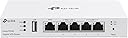


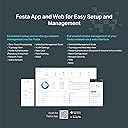


| ASIN | B0D8M7RHZ3 |
| Antenna Location | Business, Home |
| Antenna Type | Internal |
| Best Sellers Rank | #69,315 in Computers ( See Top 100 in Computers ) #977 in Routers |
| Brand | TP-Link |
| Built-In Media | Festa FR205, Power Adapter, Quick Installation Guide, RJ-45 Ethernet Cable, Silicone Feet |
| Color | White |
| Compatible Devices | Personal Computer |
| Compatible devices | Personal Computer |
| Connectivity Protocol | Ethernet, USB |
| Connectivity Technology | Ethernet, USB |
| Control Method | Remote |
| Controller Type | App Control |
| Coverage | Local Area Network (LAN) coverage |
| Customer Reviews | 3.5 out of 5 stars 110 Reviews |
| Data Transfer Rate | 1000 Megabits Per Second |
| EU Spare Part Availability Duration | 3 Years |
| Frequency Band Class | Single-Band |
| Frequency band class | Single-Band |
| Has Internet Connectivity | Yes |
| Has Security Updates | No |
| Is Modem Compatible | Yes |
| Item Weight | 0.84 Pounds |
| LAN Port Bandwidth | Gigabit |
| Manufacturer | TP-Link |
| Maximum Upstream Data Transfer Rate | 1000 Megabits Per Second |
| Mfr Part Number | Festa FR205 |
| Model Name | Festa Gigabit VPN Router |
| Model Number | Festa FR205 |
| Model name | Festa Gigabit VPN Router |
| Number of Items | 1 |
| Number of Ports | 5 |
| Operating System | Proprietary networking operating system |
| Other Special Features of the Product | Guest Mode, Internet Security, Remote Access |
| Router Firewall Security Level | High |
| Router Network Type | Wired |
| Security Protocol | OpenVPN, IPSec, PPTP, L2TP |
| Special features | Guest Mode , Internet Security, Remote Access |
| UPC | 810142820707 |
| Unit Count | 1 Count |
| Wireless Compability | 802.11a |
| Wireless communication standard | 802.11a |
P**Y
Great support
Didnโt work for what I needed but was able to return with no issues
M**S
Recommend
Works great
R**H
Buy something more expensive to save yourself from insanity
What a piece of junk. Try to save money and bought this for 50 bucks. First I get in standalone mode I got a wan mode and I click wan lan / one, and it reboots or something. I wait like 5 minutes and I can't get back into it it just says waiting. It never comes back online. So we do a factory reset. Wait 5 mins, still no connection. I do another factory reset. Go get my dinner come back and it's online. I set up the cloud controller and in the cloud controller you're supposed to go to transmission and load balancing. The load balancing feature is not there. So I unhook everything and then plug my computer back into this device and go into standalone mode. I hook up both Internets and then I click the Little Lan Wan Button and then finally sees both Internet. I hook in my Wi-fi router to the land port and it takes forever to connect. I reboot the WiFi router to get an IP address and it's offline. I have to wait about like 20 minutes for the teepee link to get my WiFi router online. I spent about a total of two and a half hours going back and forth working with a thing. It is so slow. So I finally get it all configured an I test it out by unplugging one of my internets, and it takes about two minutes from my WiFi router to get back online. So if you have a failover, you're going to be waiting a while before you can get back online. Do yourself a favor and buy something a little more expensive. Probably be a lot better in the long run. By the way I'm an IT guy for 20 years, so I know what I'm doing.
L**E
Great low cost dual WAN router
I use this router to broadcast my AT&T / Optimum internet connections. It is simple to set up and works well with both internet providers. I have had each of these providers lose connection (their issue, not this router) and the household network stayed up with no issues. This is a great, low cost unit to allow a wireless backup for your cable internet connection. I have both providers feed the router. The router feeds my MESH network. Works great.
E**2
Little to no customization options
It's fine if you just need a plug-and-play router. But if you need to configure static IP's or port forwarding, this does not have the capability to do so.
Trustpilot
2 weeks ago
2 months ago