Desertcart purchases this item on your behalf and handles shipping, customs, and support to Iceland.
🚀 Upgrade your USB game with pro-level speed & power!
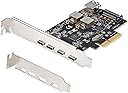
The StarTech 5-Port USB 10Gbps PCIe Card (PS4C3IA3-USB-C-CARD) boosts desktop and server USB connectivity by adding four external USB-C and one internal USB-A ports with blazing 10Gbps transfer speeds. Featuring an ASM3142 controller and optional SATA power for stable 15W output per port, it supports Windows, macOS, and Linux with plug-and-play ease. Designed for IT pros, it fits PCIe x4/x8/x16 slots and comes with a 2-year warranty and expert support.


| ASIN | B0D8WDPD74 |
| Best Sellers Rank | #3 in Internal USB Port Cards |
| Brand | StarTech.com |
| Compatible Devices | Personal Computer |
| Customer Reviews | 4.5 out of 5 stars 137 Reviews |
| Global Trade Identification Number | 00065030909174 |
| Hardware Interface | PCI Express x4 |
| Item Dimensions L x W x H | 4.8"L x 4.8"W x 0.9"H |
| Item Weight | 60 g |
| Manufacturer | StarTech.com |
| Mfr Part Number | PS4C3IA3-USB-C-CARD |
| Model Number | PS4C3IA3-USB-C-CARD |
| Number of Items | 1 |
| Operating System | Linux 3.5 and up -, LTS Versions only, Windows 7, 8, 8.1, 10, 11, Windows Server 2008 R2, 2012 R2, 2016, 2019, 2022, macOS Catalina (10.15), macOS Mojave (10.14) macOS High Sierra (10.13), macOS Big Sur (11.0), macOS Monterey (12.0), macOS Ventura (13.0), macOS Sonoma (14.0), |
| Product Dimensions | 4.8"L x 4.8"W x 0.9"H |
| Style | 4C + Internal A |
| Style Name | 4C + Internal A |
| UPC | 065030909174 |
| Warranty Description | 2-Year |
P**O
plug and play on Ubuntu 24.04
I installed this 4-PORT USB-c adapter card into a my old my work computer. I had one port previously but it had failed long ago due to overuse. Now I can plug in my SkullCandy usb-c earbuds and they work great. I can access my new phone at full speed. I connected the optional sata power cable and I can power and control external development boards. I'm running Ubuntu 24.04 LTS and there was no driver installation required, truly plug and play. I've had nothing but good luck with StarTech devices and cables. Keep up the good work.
Y**N
works as intended true plug and play
Great company usbc StarTech extension used on my XL PC on Windows 11 Pro works well no problem with installation true plug and play .. Just remember in installation to connect the Sata Power to your power supply price is reasonable
M**.
Description needs adjusting but it works
This item perplexed me. It description says that it is a 10gps PCIE 5 C ports. I installed it with and then used www to get to the web site. Only to find myself trying to find the Part number. Turns out the 1 is not the #1 but an I (eye). Finally got the driver and Winzip didn't work lol. So downloaded a freebie and started the install only to have it sputter and tell me I have to go to the App page and delete the app. Guess what? No app. Ok maybe they goofed and install they needed the installation for Windows 11 removed wondering if the app could find the unit. Nope as I expected didn't see it. That took me to thinking. Finally, the reasoning accrued and I the thoughts were this. Windows is always updating instead of being the wrong on maybe it was the right one. In my experimenting I suddenly found another conundrum. The ding dong unit was actually a 3.1 not a 3.2. So why the 10gps????? So. I looked it up and there it was. This company was not trying to switch and bait. They just didn't say it was a supper 3.1 which can give you 10gps. To be honest I don't have a program to measure the item, but I do have a ways to find out. I have a qi fi 7 adapter and this is the reason why I've been trying this PCIE out. I'm using a 10gps cable (which are expensive!!!!) hooked it up to the Wi FI adapter and Bingo. 6g connection and just under 900 using a VPN. Also bad reception because its a tight living space even in the house we live in. So yes ,although I can't measure it. It's getting the work done at a good rate. So even though you see 5 stars to get your attention I can really in actuality on give it at best 3. The window Update driver is 1/26/2026 probably way before they made and updated driver at Star Tech. That -1 star. - 2 because not saying it was a super 3.1 was a bit deceitful and it does sorta limit us now.
R**.
If you need extra USB-A ports, then this is your card. It is low cost and setup is so easy!
When I was purchasing my new QNAP DAS, I did not have any USB-A ports on the back of my machine. So I bought this PCIe card, which gives me four new ports. It connected automatically after I installed it. It was suggested to me to install it in the closest port to the graphics card and the processor. It took me NO TIME at all to install it into my Dell Precision workstation. The motherboard powers it. It is super fast and a great value for the price.
T**E
compatible with high-speed devices, high performance, and easy to install
This 4-port USB-C PCIe desktop plug-in board is an excellent product that met all of my needs. Each external port supports 10 Gbps transfer rates (USB 3.2 Gen 2). Of course, you'll only approach these speeds if you have both a device and a cable that supports USB 3.2 Gen 2. Not all USB-C cables are marked but some brands are now using marks such as SS 10. When you purchase a USB-C cable, make sure that it supports USB 3.2 Gen 2 (previously known as USB 3.1 Gen 2). I found this card to be easily installed with Windows 11 - it was immediately detected after rebooting the system. I did not need to install any special driver. A word of caution about powering a USB-C device with this card. When installing the card, you should connect an internal SATA power cable to the SATA power port on the card. I had to use a 12-inch SATA extension cable https://www.amazon.com/dp/B00V6QA4AS . You might also need a SATA power splitter https://www.amazon.com/dp/B00V6QA65G . I have successfully used this card with my new AVerMedia 4K60 external capture card (which requires USB-C power) and my StarTech.com 1:1 M.2 NVMe Drive Duplicator (which does not require USB-C power). Both of these products support the USB 3.2 Gen 2 (10 Gbps) standard. I'm very happy with this product and I highly recommend it for its performance, ease of installation, and compatibility with high-speed devices.
M**N
Works great on Windows 11 Pro...if you can troubleshoot the driver installation.
So I noticed that a lot of people here and on the StarTech product page are having trouble installing this on Windows 11 Pro. On my PC, Windows 11 was able to recognize it, but nothing I plugged in was showing up. After some driver updates and some reboots, here are the steps I took to get it working. 1) Go to the StarTech website and download the latest drivers. Under Support and Find Drivers, enter the Product ID. In my case, it was "PS4C3IA3-USB-C-CARD". 2) Extract the ZIP file. Ignore the Setup.exe because it does not work; you'll have to do it manually. Remember the folder that says "Manual Driver". 3) Go to the Windows Search Bar and find Device Manager. 4) There are two devices: ASMedia USB Root Hub and ASMedia USB3.1 eXtensible Host Controller. In my case, USB3.1 Extensible Host Controller was recognized, but USB Root Hub was labeled "Unknown Device" under Other Devices. 5) Right-click ASMedia USB3.1 eXtensible and Update Driver. Browse my computer for drivers. Then find the folder called "Manual Driver" that you extracted earlier. Don't worry about the sub-folders because Windows 11 is smart enough to sort them out. 6) Now repeat Step 5 for the USB Root Hub or "Unknown Device" under Other Devices. If it doesn't show, you probably have to reboot the computer like I did. Hope this helps! Anyways, the card works as advertised and I'm able to connect by Samsung T7 Shield without any problems.
R**K
Good quality USB-C adapter for PC desktop upgrades
I feel silly reviewing Startech items, as I've used them for much of this century so far and never had a complaint. This adapter is no exception. This adapter won't give you Thunderbolt of course, but four external 10 gigabit USB 3 type C ports with 15 watts of power each, and an internal USB 2 type A port with 7.5 watts, is a great way to give a slightly older PC some extra life and expandability. The SATA power supplement from your PSU makes that 60+ watt power possible. I'm using the internal port to hold a USB drive with an OS image for emergency reinstalls/repairs, and will hang modern SSDs off the external ones. And since I'm doing this in a SFF PC, I'm glad the adapter comes with a low profile bracket , and it was fairly easy to swap out the pre-installed full-height bracket. You can get cards like this for less than the current $70 listed price, but you're probably not going to get the same speed and power.
E**R
Excelente tarjeta
Funciona realmente muy bien en el pc.
W**W
Really fragile and short lived for such a price...
I can't consciously recommend the product, not only is the design with the protruding ports flawed by design because of how easy it is to crack open (found that out first hand), but also because after a year it randomly decided to only output up to 8W of power despite being powered by both the motherboard AND PSU through the included SATA port... When unplugging and re-plugging it will sometimes only output less than 2W for no reasons whatsoever, only to switch back to 8W when unplugging and re-plugging again...
S**6
チップはASMediaです。AIの嘘に注意。
AIのミスリードにより、ASMediaチップなのにルネサスチップの製品として提示された。 ルネサス製のチップを狙って買うつもりが、AIが誤認しうる要素が隠れているのかもしれない。 物自体は問題なく使えている。 補助電源用のブラケットは自分で用意する必要がある。
C**R
Excellent card for USB-C on Asus Motherboard
Good fast card, seems to work well with USB-C on an ASUS Prime Z790-P motherboard. Now I can connect my drives and double the read/write speeds compared to USB 2.0 / 3.0. I did not add a power adaptor
N**S
Très instable sur gros fichiers
Avec les drivers ASM aucun prériphérique usb reconnu???? Avec les drivers win 11 périphérique reconnu mais déconnexion intempestive et impossibilité de transférer de gros fichiers (je voulais effectuer une sauvegarde d'un fichier de 291 gigas et après 10 tentatives j'ai abandonné)! Transfert commence, ralentit, s'arrête puis se bloque. Reboot ordi nécessaire pour décoincer la connexion des ports usb C de la carte!? Dommange car semblait de bonne facture.
A**M
Funktioniert super
Funktioniert sofort, auch ohne zusätzlichen Stromanschluss
Trustpilot
3 weeks ago
1 day ago