Desertcart purchases this item on your behalf and handles shipping, customs, and support to Iceland.
🎬 Elevate your content game with pro-grade sound, anywhere you shoot!
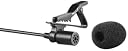
The BOYA BY-M1 is a versatile omnidirectional lavalier condenser microphone featuring a 20ft auxiliary cable and battery-powered operation. Designed for seamless compatibility with smartphones, DSLRs, camcorders, and PCs, it delivers crystal-clear audio with minimal background noise. Lightweight and easy to use, it’s the go-to mic for content creators seeking professional sound quality without breaking the bank.


| ASIN | B076B8G5D8 |
| Antenna Location | Video Conference |
| Audible Noise | 74 Decibels |
| Best Sellers Rank | #25 in Musical Instruments ( See Top 100 in Musical Instruments ) #1 in Condenser |
| Box Contents | 1 Microphone, 1 foam, adaptor and pouch, 1/4" audio adapter, LR44 battery, Microphone foam windscreen |
| Brand | BOYA |
| Brand Name | BOYA |
| Colour | Black |
| Compatible Devices | Camcorder, DSLR, Laptop, Smartphone, Tablet |
| Connectivity Technology | Auxiliary |
| Connector Type | 3.5 mm Jack, 6.35 mm Jack |
| Country of Origin | China |
| Customer Reviews | 4.0 out of 5 stars 82,823 Reviews |
| Enclosure Material | Metal |
| Frequency Range | 65 hz - 18 khz |
| Frequency Response | 18 KHz |
| Global Trade Identification Number | 00638142780049, 06971008020809 |
| Hardware Platform | Audio Recorder, PC, Smartphone |
| Impedance Unit of Measure | 1000 Ohms |
| Importer Contact Information | Dexter Ventures Pvt. Ltd - Thane, Maharahstra & New Delhi. [email protected], Dexter Ventures Pvt. Ltd [email protected] |
| Item Dimensions | 50 x 20 x 40 Millimeters |
| Item Type Name | Microphones |
| Item Weight Unit of Measure | 20 Grams |
| Manufacturer | Boya, Shenzhen Jiayz Photo Industrial Ltd |
| Manufacturer Contact Information | Boya |
| Manufacturer Part Number | BYM1 |
| Maximum Frequency | 18 KHz |
| Microphone Form Factor | Lavalier |
| Model Name | Boya BYM1 |
| Model Number | BYM1 |
| Number of Batteries | 1 LR44 batteries required. |
| Number of Channels | 1 |
| Number of Items | 5 |
| Packer Contact Information | Dexter Ventures Pvt. Ltd - Thane, Maharahstra & New Delhi. [email protected], Dexter Ventures Pvt. Ltd [email protected] |
| Polar Pattern | Omnidirectional |
| Power Source | Battery Powered |
| Recommended Uses For Product | Video Conference |
| Signal-to-Noise Ratio | 74 dB |
| Special Feature | built-in-microphone |
| UPC | 655036970393 617237121554 691191152342 691191154452 638142780049 |
| Unit Count | 1.0 Pack |
| Warranty Description | 1 year on product |
A**R
Excellent Mic for Content Creators
I purchased this **BOYA wired microphone** for recording videos on my YouTube channel and Instagram, and I am genuinely impressed with its performance. The sound quality is crystal clear, and it captures my voice with very little background noise. It has made my videos sound much more professional without spending a lot of money. The microphone is lightweight, easy to use, and works perfectly right out of the box. If you're a **YouTuber, Instagram creator, vlogger, online teacher, or anyone who records voiceovers**, this microphone is definitely worth buying. **Highly recommended! Excellent sound quality and great value for money.** ⭐⭐⭐⭐⭐
P**S
My Experience With This Mic
I’ve been using this BOYA mic, and one thing I like is that it can be used with both a mobile and a camera, so you don’t need a separate mic for each. The build feels decent, and the audio quality is good enough for regular videos, vlogs, and voice recording. The main downside for me is the wire length. It’s quite long, which can be useful if the camera is placed far away, but it also means there’s a lot of extra wire to manage. Overall, it’s a practical mic if you want something that works with both mobile and camera. The long cable is useful in some situations, but it can feel a little inconvenient when you’re recording from close range. The connectivity is good because it can be used with both mobile and camera. The connection is simple, and I didn’t have any major issues while using it. The only thing is that you may need the right adapter depending on the device. Overall, the connectivity is convenient and practical. value for money because it has decent voice recording and u can improve it in post production The accessories are pretty basic, but you get what you need to use the mic
T**I
Boya microphone FAQ, Pros & Cons – Everything you wanted to know!
I wanted an inexpensive microphone to try podcasting, something easy to use and portable. We also wanted to record some video tutorials and needed a mic that could move effortlessly with the speaker. The recommendations from podcasting and video editing pros were to spend as much as we could afford. However, we are very risk averse ladies, and we went with this clip-on mic instead. We are so glad we did! The BOYA omni-directional condenser microphone gives us decent quality sound with low handling noise while we learn how to do podcasting and video and audio editing, and it definitely didn’t break the bank. WHERE WOULD YOU USE IT? _ _ _ _ _ _ _ _ _ _ __ _ _ _ _ _ Almost anywhere. The mic is very light and the cable that plugs into your recording equipment is 6 meters long, which is plenty of space to move about if you need the mic to be plugged into a laptop or a camera/camcorder some distance away. You could also use it as an interview mic, like we did in our podcasts, by placing it on the table between the speakers – it picks up sound equally from all directions. The sound quality is surprisingly good, but as it has narrow range and isn’t directionally adjustable, there will be some noise. WHAT TYPE OF SET-UP DOES IT SUIT? _ _ _ _ __ _ _ _ _ _ _ _ _ _ __ _ _ _ _ _ _ This mic can be used with smartphones, DSLR cameras (both Nikon and Canon) camcorders, audio recorders, PC/laptops etc. BY-M1 is an omni-directional condenser microphone with 6m cable, standard 1/8 inch 4-pole gold plug and includes ¼ inch adapter so it can be plugged into most equipment with audio input option. It is ideal for presentations and will easily record nice, clean, single-person audio straight into any recording device. For multiple speakers, you will ideally need each person to have their own mic, and a mixer to handle the multiple inputs. However, it is not impossible to get decent audio quality from multiple speakers recording to a single mic, as long as they are sitting fairly close together and there isn’t any ambient noise. WHAT ARE THE PROS AND CONS? _ _ _ _ _ _ _ _ _ __ _ _ _ _ _ _ _ __ PROS: Small, portable, cheap, convenient, easy to use, simple set up. CONS: Requires LR44 battery, the cable can be a trip hazard. Not ideal for multi-person recording, sound quality is not on par with higher end podcasting microphones. WHAT ARE THE VITAL STATISTICS OF THE KIT? _ _ _ _ _ _ __ _ __ _ _ _ _ _ _ _ _ _ _ _ _ _ _ _ _ _ BOYA BY-M1 is an electret condenser lavalier/clip on microphone. It records in omni-directional pattern, which means it picks up sound equally well from all around the microphone. The mic weighs 2.5g and includes the foam windscreen and a lapel clip. There is about meter of cable between the mic and the power module which weighs 18g and houses the LR44 battery and the camera/smartphone switch. The power module also has a clip, so it can be easily attached to clothing. HOW DOES IT SOUND? _ _ _ _ _ _ _ _ _ _ _ __ It sounds pretty clean when recording a single person in a quiet room. There will be some noise if you are moving around, especially if you don’t take care to clip the microphone clear of fabric.
M**D
Quality is good but...
This boya by m1 mic is my first mic purchase for youtube and it is of very nice audio quality but before this know some things . 1. Mic performs different on different device , when I recorded from my laptop (audacity) it was crystal clear without noice but in Android phone background noice was coming alot. 2. I received the original boya mic 😃, you can check this by going on to boya website, sign up there then go on to support, serial number then look on your box a number near the bar code that starts with BY... after you put this number there if the product details came then it's original AND ONE MORE THING IF there is 1 number for the number of times product is checked then you got a new mic if the number is 2,3 or more then mostly it's a used mic. 3. There is no need of cell if you record from smartphone, laptop. It is required for camera. 4. Phones nowadays comes with no audio jack so you'll have to buy a 3.5mm jack to type c cable. Overall best mic for beginners.
S**L
Title: DOES NOT WORK WITH LAPTOP WITHOUT SPLITTER - Very Misleading
I bought a Boya BY-M1 for my *Dell Inspiron 15 3511 laptop. It does NOT work directly. The laptop only detects it as `Headphones` in playback. It is NOT showing as `Microphone/Recording device` at all. After wasting 3 days and watching 10 videos, I found out you MUST buy a separate 4-pole to 2-pole splitter for any laptop/PC with combo jack. This is NOT mentioned anywhere on the box or product page. Very frustrating. Mic quality seems good but without a splitter it's completely useless for laptop users. Laptop users, please buy a splitter too or don't buy this. Company should warn this clearly. I am sorry but I regret purchasing it.
S**L
DETAILED REVIEW with Best settings for better Sound output !!!
NOTE : @ Its ready to go Mic, which doesn't need any sound card and can be plugged and used directly even with smartphones. * Has 3.5mm jack connector built in, you can use 1/4' connector if needed. @ It has very Long cable which measures upto 20 feet, so note that. @ It has absolutely NO noise isolation and normal smartphone earphones does better job of noise reduction compared to them in STOCK condition, but with SIMPLE EDITING this mic works just fine ( Check the review below for detailed settings ) There are literally thousands of review on this product, but NONE explained the best possible settings for it when used with smartphone with Audacity software, or even in general. So I took the risk of ordering it and it turned out to be nightmare right out of the box, as the sound output was worse than my smartphone earphones. So I went to search for best settings on amazon & other sources but in vain. Fortunately I myself in experiments found the solution and now its working just fine. First I am mentioning all the pros and cons considering the settings that I found and then listing those settings, PROS : ------- 1. Built quality of the complete mic and cable is good for the price given. 2. Length of cable is insane (20 feet). * I personally didn't find it useful, as I use it with my smartphone which is just couple of feet below in my pockets, but for some users it can be very useful if using in rig setup with Camera. 3. Has universal 3.5mm jack, which is handy. 4. Its easy to use, just plug and play device, which doesn't need any sound card or external device to work. 5. Has support for multiple device right from smartphones to DSLRs and computers. 6. It comes with carry pouch which is very handy, since its a mess with such long cables. CONS : -------- 1. Biggest con is the sound quality right out of the box. Its just garbage quality and even normal ears can't bear the background noise collection, so forget about audiophiles. My normal smartphone's earphones record much better sound quality compared to this. 2. Length of cable is way too much for me and I guess for many users. I think there should have being multiple option on length to choose from, as keeping 20 feet cable wrapped and hanging or in pocket while recording is not comfortable. 3. It comes with a button cell for recording sound for devices other than smartphone and there's NO way to know whether the battery is dead or what's its charging level. Only way to check is by plugging it to a digital recorder or computer and test. So if you are carrying it with recorder which doesn't has playback feature or if you are in hurry and in case of dead battery to record all the sound, then only way to find that your efforts are in vain will be when you comfortably sit to edit it and trust me, its very frustrating ! I am mentioning, it as this scenario have happened with me once, hence I am very cautious about batteries now & use it with smartphones or digital recorders. 4. I think price should have being couple of hundred bucks less, considering the sound quality. BEST SETTING USING AUDACITY SOFTWARE : =================================== These are the settings when you record with smartphone or any other device and there are lots of background noises and you use Audacity software, which is Free ! 1. Open the software and open the audio file you recorded with this mic. 2. Select entire audio clip and open "Effects" and then " DISTORTION " 3. Start the playback of audio clip in the software, so you can listen to change in effects that you are about to make. 4.Now select " Distortion Type " option on the top of box and select " Soft Clipping ". * or select " Hard Limiter " and do the settings as it sounds suitable to you. 5. Take the "Clipping Level cursor to extreme Right end or so until you hear soft pleasant output. 6. Adjust the "Make-up Gain" cursor little bit if needed, I keep it on 49. * Here you can select which ever type, which you feel is suitable for you. 7. Now just click " APPLY ". 8. Now is Noise reduction. For that Select short section of audio which DOES NOT have your voice, but ONLY has background noises that you don't want. 9. Open "Effects" and then " Noise Reduction " 10. Click on " Get Noise Profile". 11. Now select entire audio clip and again Open "Effects" and then " Noise Reduction ". 12. Finally, click on " OK " and that's it ! Now you are good to go with soft, slightly lesser Noises and more pleasant sound output. After these steps, you can amplify the sound from same software or any other end user software. VERDICT : ----------- I personally am very disappointed with the sound quality, though the audacity tweaking gets it to bearable level, but its satisfactory enough. Plus price seems slightly more on this. I wouldn't recommend these are someone looking good sound quality specially if you live in noisy environment. Buy this only if you live in very silent conditions.
S**Y
Good
The BOYA BY-M1 is a value-for-money microphone, especially for beginners and budget users. I bought this mic for ₹810, and at this price, it delivers good-quality audio recording. The sound quality is clear and works well for voice recording, YouTube videos, and basic content creation. The mic comes with a foam windscreen, which is very good for indoor recording as it reduces light noise and breathing sounds. However, for outdoor recording, using a deadcat (furry windscreen) is recommended for better wind noise reduction. One thing to note is that in 2025, most smartphones use a Type-C port. If this microphone had a Type-C connector, it would be even more convenient for mobile users. Currently, you may need an adapter for newer phones.
S**A
Best Mic and affordable
U**1
Great
Great
C**R
Pratik keskin net...
Küçük ama bir o kadar güçlü odayı biraz sessiz tut gerisne karışma
M**S
Perfeito
Simplesmente ótimo amei
E**A
Review After Using for a While
I’m pleased with the Boya BY-M1 microphone. It’s easy to set up, very lightweight, and works well for recording clear audio with my camera and phone. The sound is much cleaner than the built-in mic, and the long cable is really convenient. For the price, it’s a great choice for simple video or interview recordings.
A**I
Cheap
High quality and very cheap
Trustpilot
2 months ago
1 month ago