Buy anything from 5,000+ international stores. One checkout price. No surprise fees. Join 2M+ shoppers on Desertcart.
Desertcart purchases this item on your behalf and handles shipping, customs, and support to Iceland.
โก Elevate your craft with the fastest, smartest dual-laser powerhouse!
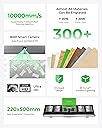
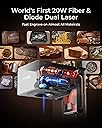
The xTool F1 Ultra is a cutting-edge 20W fiber and diode dual laser engraver combining ultra-fast 10,000mm/s speeds with a 16MP smart camera for precision auto-streamlined batch production. It supports 3D embossing and deep engraving on metals, wood, and diverse materials, offering a large, high-resolution working area and advanced safety featuresโperfect for professionals and small businesses seeking rapid, versatile, and safe customization.


| ASIN | B0D9Q787GN |
| Batteries Required? | No |
| Best Sellers Rank | #57,763 in Arts, Crafts & Sewing ( See Top 100 in Arts, Crafts & Sewing ) #135 in Jewelry Making Engraving Machines & Tools #1,341 in Craft Cutting Tools |
| Customer Reviews | 4.2 4.2 out of 5 stars (127) |
| Date First Available | July 19, 2024 |
| Item Package Quantity | 1 |
| Item Weight | 51 pounds |
| Item model number | MXF-K002-B20 |
| Manufacturer | Makeblock Co., Ltd. |
| Part Number | P5010341 |
| Product Dimensions | 18 x 17 x 24 inches |
| Size | xTool F1 Ultra Standalone |
| Warranty Description | 1 Year |
P**R
Best Beginners Laser Engraving Product
The xTool F1 Ultra is a solid laser engraver with fast speed and precision. Setup was quick with the exception of trying to conect it via my wifi but 5min later and it was connected. It feels well-built and reliable, making it great for both hobby and small business use. You definitely get what you pay for and more (I'm Based in South Africa) Thereโs a bit of a learning curve with some advanced features, but the online groups and guidlines make it easy to learn and apply as you work on your project. Did this Metal business card within 5min after set-up was done. Overall, a powerful machine with excellent results โ still have a lot to learn as I'm new to Laser engraving and cutting but im looking forward to playing around a bit more with all the features the F1 Ultra can provide like embossing and cutting and more
C**N
Awesome machine
The F1U has truly exceeded my expectations as a first-time engraver. I was looking for a machine that was simple to use but powerful enough to handle a variety of projects, and the F1U delivered on every front. After using it for about three months and engraving over 500 items, I can confidently say this machine is both user-friendly and consistently produces great results. One of the standout features is the rotary toolโsomething I never expected to be so seamless. The F1U makes working on curved surfaces incredibly easy, and the results are always flawless. Even as a beginner, the learning curve was minimal, and I know it will continue to serve me well as my client base grows. I use their software, Creative Space, for all my engraving projects, and their recent update for curved surface engraving has been fantastic. This upgrade has made the process even smoother, and I know Iโll be using it even more in the future. Customer support has also been a highlight. When I first received my machine, a screw for the rotary attachment was missing. I contacted customer service and received a prompt response within a day. Just a week later, the part arrived at my doorstepโhassle-free. That level of service is rare these days, and it made a big difference in my experience. Another feature worth mentioning is the regularly updated online library of engraving settings. It was already helpful when I started, and with the frequent updates, it's only getting better. This level of attention to detail enhances the user experience, making the F1U even more enjoyable to work with. In short, I couldnโt be happier with my purchase, and Iโm already excited about adding their P2S machine to my setup. If youโre on the fence about getting the F1U, take the leapโyou wonโt regret it and itโs far better than other engravers on the market.
E**K
Fast! Fun! And new Bench mark for all others to follow.
Iโm still in awe of the incredible speed of this laser. Itโs a stark contrast to the slower lasers Iโve used in the past, like diode and CO2 lasers. Just the speed alone makes the F1 Ultra worth the investment. But thatโs not all โ the engraving quality is simply amazing. And the camera is truly exceptional. Itโs a feature that seems so simple to achieve itโs a game-changer for anyone whoโs used other laser engraving systems. With the F1 Ultra, I never have to worry about misaligning my artwork or not even being on the material. Itโs been perfect every time. But I guess itโs not so simple if it was why havenโt other companies been able to do the same? Itโs incredible how easy and intuitive this machine is. And with fiber lasers, you can project the exact image youโre about to burn onto the material. Itโs not just a small square around your work; itโs the actual graphic youโre about to create. I could go on and on about the 3D coins Iโve made with this machine. Theyโre simply incredible. Iโm a huge fan of this company and their products. Last but not least, letโs talk about Xtool. Just two years ago, they were making waves in the laser and DIY market. And now, theyโre dominating the competition with their exceptional products. No one comes close to their offerings. Their product range is extensive, and their ease of use is unmatched. And their customer service is second to none.
C**T
Final Update & Review for F1 Ultra Laser Engraver (Updated)
Final Review - After thorough testing with two separate units of the xTool F1 Ultra, I regretfully report that both machines suffered complete laser failure within approximately 30 days of moderate use. Despite my initial optimism and appreciation for the concept behind this device, the consistent hardware issues highlight significant design and manufacturing shortcomings. While the concept of a dual-laser system (fiber and diode) holds promise, the execution is fundamentally flawed. Two distinct machines, experiencing identical failures within a short time frame, is not only disappointing but also indicative of poor build quality and lack of durability. For a device at this price point, customers should reasonably expect reliability and longevityโneither of which this product delivers. Unfortunately, the xTool F1 Ultra, though ambitious in theory, falls drastically short in practice. For anyone considering this machine, I cannot recommend it based on my experiences with its hardware failures Updated Review - After my initial review of the xTool product (which is below) customer service reached out to address the issues I had experienced. They informed me about a second version of the machine that resolved some of those problems and offered me a discount (though the product was still several thousand dollars) to give it another try. Since I appreciated the concept of the productโa versatile dual-laser machine with a "Jack of all trades" approachโand believed that the issues with my first unit might have been due to the unit being defective (which happens), I decided to take them up on their offer. Iโve only had the new version for a few days and havenโt had enough time to thoroughly test it yet. However, I wanted to share an initial update and will continue to add to this review as I gain more experience with the machine. First, I want to clarify a statement in my previous review regarding xTool customer service. I mentioned a time gap in communication, which was true (likely due to time zone differences), but this should not be mistaken for poor service. In fact, the opposite is true. xTool has been outstanding in their communication and handling of my concerns. Iโve worked with Sharon and Gabby, and both have been amazing! You can tell that xTool truly cares about their customers and their products. Kudos to xTool for their proactive customer service and willingness to address and improve based on customer feedback. Now, onto the new version of the product: The machine arrived packaged incredibly well, just like the first model. xTool excels in this area, ensuring the product is well-protected. The setup process is straightforward, and I noticed that xTool has improved the calibration adjustment mechanism I mentioned in my previous review. While I still find the placement of this adjustment a bit cumbersome, the improvements are appreciated and made the process easier than before. As xTool continues to develop this product, I would encourage them to consider moving these adjustments to an external location for easier access. Once calibrated, I attempted to connect the machine to Lightburn, as most of my files are designed using that software. Unfortunately, I couldnโt get Lightburn to connect to the device. Itโs unclear whether this is an issue with Lightburn or xTool, but I am using a Mac, and after researching online and reading through forums, this seems to be a common issue for Mac users. It appears this issue doesnโt affect Windows systems. Hopefully, xTool and Lightburn can resolve this compatibility issue in the future. While the inability to use Lightburn was initially frustrating, that frustration quickly dissipated when I opened xTool Creative Space. I cannot say enough good things about this softwareโitโs truly awesome. I didnโt realize how much I missed using it. While I like Lightburn, xTool Creative Space is far more user-friendly and packed with outstanding features. If I exclusively used xTool products, Iโd never use anything else. The software connected instantly to the laser, and I was able to redesign a few files quickly using its intuitive tools. Once my files were ready, I spent the rest of the day (and much of the night) running the machine. While Iโve only had it for a short time, the machine has been working wonderfully so far. I also noticed that I was able to tweak the settings to achieve much more reasonable processing times compared to my first unit. This was very encouraging and supports my initial belief that the first unit I received was likely defective. Defective units happen across all industries and manufacturers, so this isnโt a knock on xToolโitโs all about how the company handles the issue, and xTool exceeded my expectations. Overall, Iโm really enjoying the new machine, and Iโll continue to update this review as I spend more time with it. For now, Iโm optimistic and impressed with both the product and the companyโs commitment to their customers. Original Review - I initially purchased the F1 Ultra Laser Engraver for about $3,500 on a fall sale, I was optimistic, despite not opting for the conveyor or rotary attachments. My main intent was to do deep metal engraving (or "embossing," as Xtool calls it) using the included Xtool Creative Space software, rather than investing in additional software like Lightburn. Unfortunately, after only three weeks, I ended up returning the machine for a refund. Pros: Versatile Connectivity and Basic Software Features: I appreciated that it connected via Wi-Fi and saved files directly on the machine, streamlining workflow. While the software isnโt as feature-rich as Lightburn, it was fairly user-friendly and offered some intriguing AI capabilities (though access required paid credits after the free ones ran out). Quality of Engraving: When the F1 Ultra worked, the results were impressive. My first projectโa brass challenge coinโcame out beautifully. Cons: Calibration Issues: Initial calibration was challenging due to poor placement of the laser adjustment (tucked away and blocked by the light shield). The machine also kept losing calibration, especially front-to-back adjustments, requiring constant manual tweaks. Time-Intensive Engraving: Processing times for deep metal engraving were shockingly longโmy first coin took over 7 hours. Even with adjustments, the lowest I could achieve was around 3.5 hours per coin, making it unfeasible for any scalable production. Inconsistent Performance and Hardware Issues: The machineโs performance declined over time; after only a few weeks, the fiber laser stopped engraving as deeply and eventually lost power mid-job. Xtoolโs support tried to help, but the response time was slow, as there seemed to be a significant time zone gap. Final Failures: Near the end of my three-week trial, both the fiber and blue light lasers failed entirely. This was the final straw, as I couldnโt rely on it for any business production, let alone for metalwork. Conclusion The F1 Ultra promises versatility and performs reasonably well on certain tasks. However, for deep metal engraving, Iโd recommend investing in a dedicated, high-powered fiber laser. Itโs very possible that I received a defective unit, but if your focus is metal, you may be better off with a more robust machine.
V**K
Fun machine that is pretty easy to setup and work with
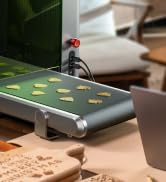
So far, I am really enjoying this machine. It did great on some coins I needed to engrave. I got the conveyor belt as well and I love that! You do need to experiment on some of the materials and glass doesn't engrave as well as I had hoped. But it is nice on metal.

R**T
Great hardware, don't use latest firmware
This would be a 5 star review if not for 2 things. First, when initially setting it up, the xTool Studio desktop software asks you if you want to install the latest firmware. DONT! I did, and it broke the laser's access point/hotspot capabilities. It still worked over WiFi for use with the desktop xTools Studio, but it wasn't entering acess point mode to allow connection to a mobile device to ise the XCS app. Now on day 2 after much searching and back and forth with customer service, they provided a link to an earlier firmware version and instructions for how to install it. I did this, and it now functions with the mobile app. The second thing that bugs me is the xToom studio desktop app has paywalled features. Some of the stuff that really works great are the AI tools. But, after paying over three grand after taxes, charging for the software to run the machine is disappointing. There is other software that will work, but its my understanding it has a steep learning curve. It's also a bit suspicious that the new firmware breaks the mobile app functionality. Customer service intimated that this is temporary. I noticed that some of the free tools in the mobile app can replace some of the paywalled tools in the desktop app. Does this mean a future firmware version will be released alongside a mobile app that has paywalled features as well? I guess we'll see. As far as functionality, I've only just scratched the surface (forgive the pun), but it seems like a powerful, versatile machine that can mark pretty much anything. If you plan on venting this to the outside, be aware that the vent tube it comes with is too small to fit a standard 4" dryer vent, so you will need to make or buy an adapter. I definitely recommend venting it to the outside, and increasing the vent motor run time after the engraving finishes, to make sure to purge all of the fumes. It comes set for a 10 second purge but I increased it to 30 seconds. I bought the safety glasses separately, but they really should include them. Also, as mentioned, the packaging was very well implemented. I would advise watching the unboxing video first because there is one step for removing some of the tape that requires powering the unit on and raising the focus head. I think they should offer a commerical license for the apps for people who will use these for business, and allow full functionality personal/hobbyist use for free. Overall I'm pleased though. It could be 5 star amazing with the fixes mentioned above.
H**E
Worth the price for what you get.
So this makes the 4th Xtool machine I own (D1, S1, F1 and now F1 ultra) great machines all still running. The build quality is superb. The size of the f1 ultra is quite larger than the f1. The F1 ultra is more powerful that the f1 allowing to engrave more stuff. Very easy to use with Xtool own software plenty of videos to teach you how to use if you are new to Xtool. The weight is still portable just not as easy as F1. You do pay more for the ultra but well worth the price with camera and being able to do curved surfaces and deep engravings in metal.
A**R
Basically everything you need
Its essentially all you need to run basically any laser safe material. Ive found very few negatives with this machine and most of them are related to material rather than the machine itself. Most of the material struggles are color related, Diode lasers dont like clear or a specific set of colors. So if you're working with acrylic alot the look at a CO2 laser. The biggest struggle is camera calibration, I still haven't gotten it dialed in. But as long as you're checking your framing before you run something, it works out fine.
J**N
Great Quality engraver
xTool F1 Ultra is an awesome piece of equipment, Iโve been putting it through its paces for a few months now, using both diode and fibre lasers to engrave everything from basic wood, to aluminium, slate, stainless steel and even Brass challenge coin embossing. I can confirm it has not disappointed. The machine itself is incredibly well made. The XTool Creative Space Mobile App and PC Software (both Free) are easy to use and user friendly for experienced creators and beginners alike. The machine can pair wirelessly with devices or is provided cable. I personally prefer the cable for faster transfer speeds.

Trustpilot
1 month ago
2 months ago