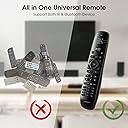
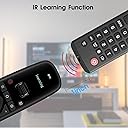
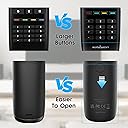
🎮 One Remote to Rule Them All — Control Everything, Effortlessly.
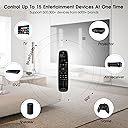
The U2 Universal Remote with APP consolidates up to 15 remotes into a single compact device, supporting over 500,000 models via infrared and Bluetooth. Featuring customizable macro buttons, a user-friendly layout, and a long-range IR emitter, it offers seamless, lag-free control for TVs, stereos, projectors, and more—all managed easily through the SofaBaton app.


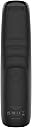


| ASIN | B0D9NTS2LX |
| Additional Features | Ergonomic |
| Battery Type | Alkaline |
| Brand | SofaBaton |
| Button Quantity | 30 |
| Color | Black |
| Colour | Black |
| Compatible Devices | DVD/Blu-ray Player |
| Compatible devices | DVD/Blu-ray Player |
| Connectivity Technology | Bluetooth, Infrared |
| Connectivity technology | Bluetooth, Infrared |
| Controller Type | Button Control |
| Customer Reviews | 3.6 out of 5 stars 209 Reviews |
| Manufacturer | SofaBaton |
| Max number of supported devices | 15 |
| Maximum Number of Supported Devices | 15 |
| Maximum Range | 35 Meters |
| Model Name | SofaBaton U2 Universal Remote |
| Model Number | U2 |
| Number of Batteries | 2 AA batteries required. (included) |
| Special features | Ergonomic |
| UPC | 741421609624 |
B**O
Inexpensive but very capable and functional universal multi-device remote.
Replacing a very old and dated Logitech Harmony remote I wanted something simple setup but still able to handle multiple devices as needed. Stumbled upon this in some forum recommendations and rolled the dice for a $50 controller I was skeptical. It has a simple backlit LCD screen you use a roller wheel to interact with, this selects you various added devices. The overall feel of the controller is sturdy and not cheap in anyway, with batteries it has a decent heft and shaped on the back to sit well in the hand of any user a very agronomical design. The buttons are a firm rubber and feel clicky without being mushy they will hopefully hold up well as the previous remote had peeling/fading keys so you could not ID them by sight anymore. Setup is easy and quick by downloading an app to your phone and pairing the remote via Bluetooth to setup the devices connecting was fast and simple. Most common brands are listed and setup is practically a few clicks, if not you can "learn" buttons from the controller so long as they are transmitted via IR to the device you are using, AppleTV has a button you need for app suspension it is not transmitted via IR so you cannot program this to the remote is why I point this out. I believe I have the general setup going in under 20 minutes, though after you have your devices added you can re-assign and change buttons for everything you need to do with them as well as setup Macros for complex operations like switching devices, turning all devices on, etc. Highly recommend setting up your primary viewing device with the options needed to control all the devices on that setting. For example we watch most content through the AppleTV so our macro is the power button that activates all the devices (TV, Sound bar, etc) then sets AppleTV to home and places the controller on the AppleTV device control. The button setup for the AppleTV is set so Volume controls are for the Sound Bar and various other inputs for TV functions. This way you're "watching TV" but all your functions are set to do so properly. Another catch was when setting a macro to power off the devices some devices may not go off, merely go to the macro and add a few extra 'power off' options set to 0.0 for that device and it will then turn off, apparently some devices require a longer power off signal than others. We've had the controller for about 3 months and so far everyone has had no major issues adjusting or complaints on function. Super happy and would consider other models from this brand in the future for sure!
L**M
A good all none remote.
After ordering, setting up, and using the first one we got, ordered this one. Same as before, easy setup and use except for one issue. This appeared to be a used product as three items were already programmed into it. Do not know if it was a test from the factory or a returned and resold product.
L**L
This is overall NOT A VERY GOOD DEVICE!!!!
Edited 4/2026: SofaBaton reached out and offered a refund. I said yes. They countered with some questions about my issues, and then never replied further. I again asked about the refund they offered and they are not replying. So, THEY LIED TO ME. Original review: Wow. NOT a great answer tor eplacing a Logitech 650, which is a smart remote. This thing never claims to be smart, and they are correct. I have two BIG issues with it: First, and almost fatal, it DOES NOT HAVE ENOUGH BUTTONS! Yeah, they cover the generic sort of play/pause/forward/rewind and volume stuff. Beyond that, there are only 3 icon labeled buttons at the top (3 lines, home and Info?) and the 4 color coded buttons at the bottom. On most any device I have, that doesn't work out well, and if you look at your original remotes, you will see why! I cannot possibly cover the functions I want with any sort of logic...I am supposed to remember I needed to program "Star" on my Roku remote as "Blue" on this? And if you use an A/V receiver, with all of it's functions, then you are just plain screwed!!!! Second, it does not have much of any "database" of devices, so you are pretty much going to have to have it "learn" every single button on every single one of your remotes!! Hell, this is their business; shouldn't *they* be helping with that? Lastly, the macros thing doesn't help much, if at all. Since it is not "state aware", it doesn't know that you are already watching on Roku, so if you program a button to "Turn on the TV and switch to DVD", it will send the power toggle instruction to the already "on" TV and turn it off, not on! Then, the LITTLE BUT ANNOYING THINGS: 1. It does not transmit IR signals if you have it sitting still and press a button. You need to pick it up to turn it on. Or hit a button to wake it and then hit the button again. So you can;t use it laying on the couch or furniture arm next to you. 2. Anytime you hit the TV on function, it sets the device to whatever the top listed device is. So turning your system back on does not put it back where it was when you turned it off. 3, Buttons are NOT intuiitively placed and lack the tactile shapes to easily identify without looking at the remote. If you have a very simple setup, this is maybe a good one remote solution. But it is lightyears away from the intelligence and adaptability of the Logitech remotes that sadly have been discontinued!
A**.
Eats up batteries, forgets some buttons. No low battery warning.
I’ve had this for almost a year. Yes it works, and it’s nice to have all the options for your devices. But, it eats up batteries quickly, so I always have rechargeable batteries ready to go. And it seems to forget certain buttons. Mainly the TV power button at the top. I shouldn’t have to keep reprogramming it. It also doesn’t tell you when the battery is low, so it just starts behaving poorly. I really think it needs an update. I also think it would be nice if the click wheel was stiffer so you don’t accidentally change devices so easily.
J**J
Not too hard to setup and works very well.
OK. Yes, a little harder to program but overall most folks should be able to do it. Add your devices first. In our case we use a Roku box, Samsung TV and a Sonos soundbar. I just programed a few extra buttons on the Roku button assignments and done. Did a simple macro to power off the TV (Roku and Sonos turn off automatically) using the main power button on the top. Replacing a Harmony that is finally giving up the ghost. I do wish SofaBaton would bring the guided setup like their more exspensive remotes to this version. Not certain why that would be so hard. I do feel like overall a good value and works as intended
Trustpilot
2 weeks ago
1 week ago