We remain fully operational. Our teams are working around the clock to ensure your deliveries continue safely.

DOWNLOAD THE APP


Customer Services
Copyright © 2025 Desertcart Holdings Limited
DOWNLOAD THE APP

🎶 Relive, Record, and Rock Your Retro Vibes Anywhere!
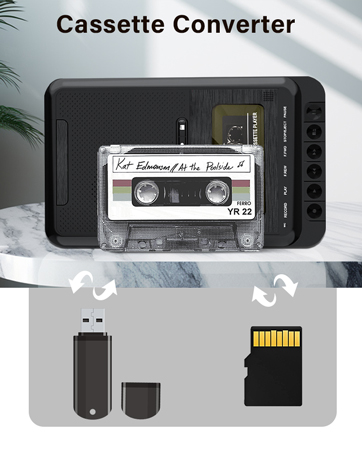
The Gracioso Cassette Player Converter is a versatile, portable device that plays cassette tapes, USB drives, and TF cards, while enabling recording to tapes or digital storage. Featuring dual power options, a built-in HD microphone, and a retractable handle, it offers high-quality stereo sound and seamless analog-to-digital conversion, perfect for preserving and enjoying your vintage music collection with modern convenience.




| ASIN | B0D62BZRRR |
| Best Sellers Rank | #29,384 in Electronics ( See Top 100 in Electronics ) #42 in Portable Cassette Players & Recorders |
| Customer Reviews | 4.0 4.0 out of 5 stars (214) |
| Date First Available | June 4, 2024 |
| Item Weight | 1.51 pounds |
| Item model number | 669 |
| Manufacturer | Dingmi |
| Product Dimensions | 5.83 x 9.65 x 1.85 inches |
A**C
Easy to use, great quality...an all around good deal!
The player works perfectly and the digital quality is great for the price. (I have seen digital transfer equipment in the hundreds of dollars with fine-tuning and EQ features, but this can't be beat!) It's easier to use than I thought! It's literally just as easy as insert tape, press 'play' and hit 'record.' **Note - If your laptop does not have a CD-ROM input, you can download the software from a link included in the user manual.** Anyone with a basic knowledge of editing and conversion apps and programs can customize each recording once the USB drive / SD card has been plugged into a laptop or desktop system. (If you're new to the idea, a quick Google or YouTube search will easily guide you.) My only gripe was that when my product arrived, the box wasn't completely sealed. I checked the contents against the product description page and everything is accounted for, but it just should've been sealed shut. Otherwise, this was a great deal. I would recommend this for anyone wanting to preserve their cassette recordings and music.
C**0
This works with no problems.
I liked everything about this tape recorder. It can record to tape, flash drive, micro chip and record from one to the other and works with the computer. I tried to load the CD for the sound program but it was too flimsy and fell into the vertical CD player. I had to pay someone to retrieve it and decided that I didn't need the feature anyway. However, I didn't mind because the tape recorder worked. It is sturdy. Affordable. Bought two. No problems. I like the white color. The built-in microphone is so good that I don't need a plug-in microphone. In fact, the built-in microphone has crisper sound. No complaints. It's wonderful when something works better than one anticipated--especially since I bought a similar item from another manufacturer and the tape recorder playback sound didn't work after a short time. That one had the convenience of the plug-into-the-wall socket feature. Instead, it has a USB plug into the computer for use instead. It's a trade-off for the quality.
P**E
Confusing instructions, but does exactly what I needed
It works, and it does some what you expect. I had hoped that I would just put in a tape, plug this into my computer, and then sorta stream the audio into my computer. I'm not sure it does it that way. If you put a micro SD card or a USB drive into it, you can totally record a cassette onto the card. It does a nice job with audio levels and gives you an MP3 file of the audio. If you just want to hit play on the cassette, record on the SD, and then transfer to your computer by plugging the SD card into your computer afterwards, that's exactly what this will do. You don't get any controls over bit rate, encoding, or anything else. It's just gonna record to its default settings. I was recording some audio books from cassettes and the MP3 quality is as good as the cassette quality, because cassette quality isn't that great to begin with. The instructions are really terse and could be clearer. To record onto an SD card, you must first press play on the tape, THEN press the record button for the SD. The instructions tell you to do it in this order, but it's very strict. If you do it in the other order nothing happens. So, yeah, read closely. And if the switch is not in the "Tape Off" position, you'll end up recording sounds in your room from the built-in microphone. Probably the worst thing about this is what they name/label things. It has a switch on the side that is labeled "USB / Micro SD" or "Tape Off". If you'd like to record your tape onto an SD card, you put it in the 'Tape Off' position. If you want to listen to what's on your SD card, you put it in the USB/Micro SD position. It also, apparently, has the ability to record digital files from the SD card onto the tape! That's neat, but not what I'm using it for. They also have a weird 3-ended cable that has "charging" on one end, "data" on the other end, and then a USB-A connector. Their instructions hilariously say: "USB function is not able to transfer data with computer via data cable. If you want USB functionality, please use a charging cable. Do not use a data cable." I have no idea what this means. Your guess is as good as mine. Finally, the micro SD slot is pretty tough to use. I hope you have fingernails. Pushing that little tiny card into the little, tiny spring-loaded slot is tough. I gave it 4 stars for a reason. Despite the small flaws, if you want to do what I wanted to do: put a cassette in, press record, and go have a cup of coffee while it digitizes your cassette, it's fine. It will totally do that. You just learn what things to press in what order, then lather, rinse, repeat. I forgot how long it takes to rewind cassettes.
H**N
Doesn't work with Windows 11
I'm a musician and have boxes of music I recorded on cassettes years of live performances. I wanted to copy them onto my computer and convert them to MP3. Yes, I know there are probably better ways of doing this but I didn't have a cassette player and for $38 I figured I'd give this a try. First off, don't think you are buying a plug and play solution here. It's not. And after spending hours trying to get the USB audio out signal recognized on a Windows 11 computer and reading a lot of support articles on the Audacity software forum, I learned that it doesn't work well or often at all with Windows 11. I have MACs also and tried a simple test with Quicktime audio recording. That worked but the audio was just horrible, very low volume and muddy. I was about to give up when I tried going from the headphone jack of the cassette player into the line in of my Windows sound card. That worked and the audio quality is acceptable but I can't hear the output since I'm using the headphone jack, so I have to record entire sides of a cassette at once and edit them once done. Overall, I'll probably keep this since it was so inexpensive but again it's not a complete solution by any means, might work, might not, and if I knew it was this much of a hassle I would have never purchased it and likely tried another approach. I still might.
R**Z
Muito bom ! Ja gravei até uns Rocks antigos na fita . Funciona 100% !
R**R
The build and sound quality of this cassette player are impressive. I own a Teac cassette player as well, and this product matches that same high standard, though it comes at a slightly higher price.
C**.
Able to record from SD card to cassette . Use it to make my mixtapes . Only in mono . Sound quality acceptable .
Trustpilot
1 month ago
2 months ago