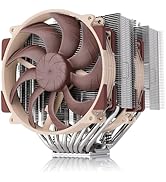
🖤 Power your rig with stealthy, industrial-grade airflow mastery.
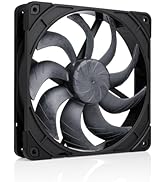
The Noctua NF-A14 industrialPPC-2000 IP67 PWM is a premium 140x140x25mm heavy-duty cooling fan designed for professional-grade systems. Featuring a robust fibre-glass reinforced polyamide construction, IP67 water and dust resistance, and a broad 500-2000 RPM speed range controlled via 4-pin PWM, it delivers exceptional airflow (182.5 m³/h) at ultra-quiet noise levels (31.5 dB(A)). Engineered for longevity with over 150,000 hours MTBF, this fan excels in demanding industrial and high-performance PC cooling applications.


| ASIN | B00KFCR0PQ |
| Air Flow Capacity | 182.5 Cubic Meters Per Hour |
| Best Sellers Rank | #730 in Computer Case Fans |
| Brand | Noctua |
| Brand Name | Noctua |
| Compatible Devices | Desktop |
| Cooling Method | Air |
| Customer Reviews | 4.7 out of 5 stars 389 Reviews |
| Global Trade Identification Number | 00842431014405 |
| Item Dimensions L x W x H | 5.51"L x 0.98"W x 5.51"H |
| Item Weight | 0.7 Pounds |
| Manufacturer | Noctua |
| Material Type | Fibre-glass reinforced polyamide |
| Maximum Rotational Speed | 2000 RPM |
| Noise Level | 31.5 Decibels |
| Power Connector Type | 4-Pin |
| Product Dimensions | 5.51"L x 0.98"W x 5.51"H |
| UPC | 842431014405 |
| Unit Count | 1 Count |
| Voltage | 12 Volts |
| Warranty Description | 6 year manufacturer’s warranty |
| Wattage | 2.16 watts |
B**G
Best fans on the market.
Have had these for nearly 1 1/2 years at the time of this review. While high priced, you get what you paid for, functionally at least. I have 4 of these fans in a large liquid cooled rig blowing over a 560mm radiator hooked up to a high end fan controller through a 4-pin specific fan hub. At least with the right monitoring and control hardware along with a distributed heat dissipation setup, these fans can cover the range of silent operation to very good performance, better than anything else I have tried and I have tried a lot of different fans over time. My preferred method of more precise control is to monitor coolant temp and adjust fan speed accordingly as CPU temp for example can jump around wildly without any real bearing on coolant temp, especially with such a large radiator holding down coolant temps pretty much no matter what and there are other components in the loop anyway. Some key points to this fan are: 1. One of the best speed / static pressure to noise ratios of any fan on the market today. 2. Motor itself is dead quiet. Only hear whooshing fan noise when revved up high. Most any other PWM fans in this category on the market has an annoying motor whine, but this one uses a quite sine wave speed controller (converting the incoming PWM signal to a variable sine wave) and smooth 6 pole motor. 3. Out of several fans purchased, all still have perfect bearings, even after 1 1/2 years. All competing fans I have tried in any volume have had at least one bad, noisy bearing in the batch, at least by this point. Especially when doing arrays of fans on radiators, this has frustrated me as it is a bit of a PITA zeroing in on that bad fan, but with these no such thing has ever happened. 4. Fan can handle water and dust very well from what I hear. I use HEPA filters to reduce dust in my operating environment and my liquid cooling setup has been leak free, so have not put these points to the real test yet. 5. Wide speed range. I have run the gamut from 250 RPM, which is half of the rated minimum speed to 2,000 RPM and these fans have operated flawlessly throughout this range. For optimal operation I have come up with the following (for my liquid cooled setup): 1. For a high powered system, distribute heat load across multiple fans so all can spin relatively slowly and quietly. 2. The fans are optimized for certain operational parameters around it. Don't place directly up against restrictive intake grates. Recess intake of fan away from restrictive grates if possible. For radiators, only use fans on one side, do not do a push / pull combo. All of these things seem to disrupt careful airflow modeling around the fan blades and cause turbulence, which leads to significant extra noise as the fans are revved up. I at first tried push/pull with these fans, but found I get better cooling performance per unit of noise with the fans on just one side as I can rev up the fans a lot higher before I hear them now and even in the higher than I need range it is still a lot quieter. 3. For fan speed in a quiet room I would not try to go above 1,100 RPM on these fans as you start hearing them after this (unless your hearing is better than mine). These fans are good enough to move quite a bit of air at this point so say two of these on a 280mm radiator for your 140W TDP CPU will probably do you well for example. Even at 1,500 RPM on these fans is fairly OK sound level wise. If say on a hot day you have a noisy window or wall mounted A/C, it may make sense to crank these up to much noisier ~1,800 RPM while under heavy load as they will probably still be quieter than a noisy A/C at this point and you may need this extra cooling capability anyway when it is particularly hot in the room. (2,000 RPM will probably be heard over most window / wall mounted A/C units.) With how I have things dialed in with the fan controller, if I ever hear the fans, it is either a fresh reboot or something is going wrong causing the temperature sensors to read abnormally high and thus the fan controller to compensate with higher than expected fan speeds before temps getting high enough to trigger an alarm and ultimately an automated emergency shutdown of the system. Anyways at the full 2,000 RPM there is a strong wind coming off of these fans even through fan grates and a thick radiator (at least for me) which provides a sense of extreme overkill. Maybe one thing to consider are the 1,500 RPM version of these fans as if you are using a crappy BIOS based fan controller that does not give you enough control of the speed range, you may find that going over 1,500 RPM is too annoying. However with a quality fan controller, I don't see why it would matter beyond you will probably find yourself not actually using that extra capability or maybe the lower top speed fan comes with prettier vibration dampers around the mounting holes than the brown only option with these.
S**Z
Love it
This fan comes in a box. In the box is the fan and four screws. That is it and it is all I needed. The fan is a plain black fan which I like, but on the corners they put removable Noctua brown colored rubber vibration dampers. This little touch still lets people know this is a Noctua fan but you can easily remove them for an all black fan if you so choose. I put this fan in the back of my Coolermaster HAF X and connected it to the fan 3 header on my Gigabyte G.1 Sniper 3 motherboard. I have the fan speed in the bios set to normal. When the system is idle on the desktop and I stick my ear right up to it I can hear a tiny buzz sound, but only when my ear is right up to it. My PC sits on my desk and I don't hear it when sitting next to it. When the system warms up and the fan speeds up I can then hear it move air but it is not annoying. When it speeds up it doesn't have any tick or weird annoying sounds. Not all fans that other people seem to like sound good to me. For example, I tried some Cooler Master JetFlo 120 fans in a case because they were getting really good reviews. They looked like nice fans and seemed to be built well. It turned out that they sounded really annoying to me. They bothered me so much that I removed them and put other Noctua fans in the system. This fan has a minimal and unobtrusive sound to it like most other Noctua fans from my experience. Typically if you want the good stuff you will need to pay for it. This fan costs a little more than your average fan but I think that it is worth it. It moves a good bit of air, it is generally quiet in my system, and when I do hear sound it doesn't make any stupid noises that would drive me nuts. It has quality written all over it, an awesome warranty, and the company stands behind their products from what I have read. I wouldn't know though; none of my other 8 Noctua fans installed in my other PCs have ever given me a problem. Overall a great fan that I wouldn't hesitate to recommend.
S**L
Its a tornado!
No user will or should use these at 100% RPM. It is unavoidably loud at that level, but given its full 2000RPM, it is expected. Perfect spot for me is up to 65% RPM, which up until that point every sound is cancelled due to my headset. That being said, I have 3 of these installed as intake fans on my P600S case, and my current gig with Arctic Liquid Freezer II 280MM is keeping my I-7-7000 OC'd at 4.8ghz at idle 30 degrees Celsius while up to 65 degrees during CPU heavy games (Squad etc.). Currently my fan speed is set at 50% intake/exhaust at all points up until 70 degrees Celsius within the bios and have not crossed that threshold as of yet. My GPU stays cool at heavy loads barely crossing 80 degrees Celsius threshold as well. Albeit summer should put these numbers to test. Overall, this is a product of fine engineering. Alternatives are available for sure, but given the warranty and the consistent RPM values, these fans are some of the best that is out there. If you are serious about keeping your system within ambient temperatures at any given season of the year, Noctua's are as reliable and trustworthy as it gets. Oh Also, NO RGB, so... yeah!!!
E**H
Moves lots of air, reliable, great for servers, classy look, no flare, not quiet for constant full speed desktop use
I am using 2 of these (off 1 Lamptron FC5 fan controller channel) at 1900rpm, on my Corsair H110 pulling air off the backside and out of my PC-D8000 monster Lian Li case. These are not quiet, but considering the air they move, this is expected. I keep my servers in the basement so the noise is not an issue for me. They are considered industrial quality. I could add 2 more of these (for safety) pushing from the other side of 2x140mm radiator as well, but I have not tried this yet. Stable 4.7ghz overclock on a 3770K and runs 60C-70C unload full load. Idle is 20C - basically room temp. I am also using 2 of the 120mm versions of this fan to exhaust air out the back of this huge case. All are working fine, but do not expect these to be quiet fans. The Lamptron controller can tame them down to around 1000rpm but no lower.
D**L
Almost great
This would have been the perfect fan for my needs, except at low/medium RPM I can hear a gentle ticking sound. I wanted a fan that would be very quiet at these low speeds. This subtle sound doesn't happen with the non-industrial Noctua fans.
A**S
Possibly best 140mm fan
I had 2 Corsair Ml140s at the top of my case for exhaust. They worked quite well but beyond 50% speeds, they seem to emit a fairly audible humming. I dealt with them because of the performance until I stumbled upon the NF-A14 iPPC-2000s. These are the industrial version of the NF-A14 that have 500 additional rpm and noise to go along with it but come in black rather than the normal tan. I wasn't sure if it was worth spending another 50$ for what could be essentially the same fans as my Corsair ML140s, but after sitting for a couple hours listening to the hum of ML140s I decided to give the Noctuas a try. I am so glad I did. The NF-A14 iPPC 2000 has a much more bearable pitch in noise compared to the ML140s and is quieter as well and actually INCREASING airflow slightly. For many, spending the extra money on Noctua fans is not worth it, but I don't like using headphones or headsets. I chose the industrial version because I valued the performance of the ML140s, but they were just too annoying. If you really want to crank it up, you can buy the NF-A14 iPPC-3000 version and they will blow you away.
E**Y
Good airflow and relatively quiet while doing so...
Exceptional fan, replaced the top exhaust in a micro atx lian li case. Inaudible at anything below 75% capacity (case is a very enclosed aluminum box that muffles noise quite well) . This combined with 3 noctua 120mm nf-f12 ippc 2000s (replacing 2 front intakes and a rear exhaust) drop every component temp by 5-12c. 3770k @ 4.4ghz on air idles at 25c now where as it sat at 32-33c before, max load temps are 60c now 75c before. Gigabyte mini itx Gtx 970s idle temps are 30c for primary 27c secondary now and previously 35c/30c. Load temps during furmark 74c/66c now vs 82c(with throttling)/71c. Ambient mb temp dropped 10 degrees. Fan controller is required if you do want a quiet experience out of the 140mm fan. Although virtually inaudible below 75% in my environment, drifting beyond 80% is rather noticeable and can drown out media audio; 90% + is offensive, like a little leaf blower but exhausts air very aggressively dropping ambient temps another 3 degrees and cpu temp by 2degrees with no change to gpus. Not worth the added noise that would relegate me to using headphones exclusively.
B**.
Best fans I've used in about 20 years of building rigs.
These things are amazing. I've always wanted to try Noctua fans (usually use Corsair or Xigmatek) and I always seem to go back to them because of the price. Don't get me wrong, they're great products. This Noctua NF-A14 blows them out of the water though. I replaced both of the stock Corsair fans on my H110iGT because one of them was starting to rattle. I also replaced the two Xigmatek fans on my side window. They're nearly all silent due to the speed control, and every temperate in my rig (two HDDs, two SSDs, CPU, MB, GPU, radiator) all dropped 10+ degrees Celsius. I couldn't be happier and will be buying Noctuas from now on. They even have rubber built into the corners to prevent any eventual rattle, which any rig builder knows is usually inevitable and extremely annoying. I can't speak for longevity yet, but I'm extremely impressed with the initial quality and results and have faith that the other reviews and Noctua's reputation will hold true for that aspect.
Trustpilot
1 day ago
3 weeks ago