Desert Online General Trading LLC
Dubai, United Arab Emirates
Desert Online General Trading LLC
Dubai, United Arab Emirates


💻 Illuminate Your Workspace with Style!
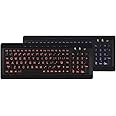
The iMBAPrice Large Font Print USB LED Backlit Keyboard combines functionality with flair, featuring large font keys to minimize eyestrain, dual LED color options for a personalized touch, and a user-friendly USB 2.0 interface for easy connectivity. Perfect for professionals seeking comfort and efficiency in their daily tasks.
J**N
BEST keyboard I have ever purchased for daily use!!
Beautiful, quiet keys, compact, and has convenient hotkeys along the top including a one touch on/off key instead of a flip switch. No lighted board has actually got engraved into the key itself design that I can find. I purchased a lighted board about 2 months back from another dealer for a lot more than this one and found the keys rubbed off the black around the lighted fonts and the keys were horrible to press because they were large and tipped which created sticking both up and down which became extremely annoying. This keyboard is a great value and I definitely love it. I am thinking of ordering a few to keep on hand. I will see how well the fonts hold up against rubbing off and will ***update*** this review later to let everyone know. A solution to fonts rubbing off is to place a square of invisible tape on the key which allows the fonts to show, does not interfere with use, and will not wear off for a quite a while.***UPDATE***Get this keyboard, it is truly the best keyboard I have ever purchased.I have had this keyboard for about 2 months now and the fonts are still intact!!! NO smudged letters, NO slipping around, NO issues.There is only one tiny annoyance. The "Home" key is right next to a rather small "Backspace" so I accidentally hit it quite often and it takes me to the beginning of my sentence. When this happens I press the "End" key and it puts me right back where I left off. I just need to be more precise in my typing and then it won't be an annoyance at all and is certainly not what I would call a real flaw.
G**A
I bought to use with a laptop....some keys are not full size, illumination and fonts are great.
I wasn't paying enough attention when I bought this, because I was focused on the illumination. I wish it was normal sized and not compressed. I bought to use with a laptop, so imagine my displeasure when I realized it sized close to my 17" laptop's keyboard. Many of the most oft used keys are undersized. This makes the keyboard more like a large laptop keyboard than a true full size. For example, shift, enter, space, etc. are all non standard sized, so I'm often hitting the wrong key adjacent, or having to spend time looking to see if I'm on the right key. It slows me down. I do like the key strokes. They offer enough feedback, and I like the included number pad which my laptop does not have.UPDATE:I've been using for a while, and the board has grown on me. I initially took stars off for the compressed keys, but really the picture shows the relative scale of the keys. As such, it is not like they are trying to hide anything. This board has been a good one to take with me (I hate most laptop keyboards), because it is light and a little smaller, but still has full keyboard functionality, including keys for media functions and most useful for me the numpad. I also like the large illuminated font. Even in a lit environment, the keys glow enough to enhance my view of them. I will be keeping this board. Happy to update my rating.
G**E
Easy to Read, Odd Layout Keyboard
Love the large font and striking blue illumination of this keyboard. Great for tire old eyes or typing in a poorly lit room. I am struggling with the keyboard layout as there is a column of keys to the right of the Enter. Instead of Home, Page Up, Page Down, and End being shift keys on the numeric keypad or being above the typical QWERTY layout, they are instead in a column on the right so I constantly hit Page Down instead of Enter. Also, the Home key is to the right of the backspace key, so my cursor often goes back to the beginning of a line instead of back one character because I hit one key too far to the right. This really has slowed my typing as this arrangement is unusual. Even laptops with small space for keyboards have the more traditional layout.
R**7
First backlit keyboard...very functional
UPDATE: OK, after a year, I have decided to retire this keyboard. It functioned just as advertised and did not really do anything wrong. The thing that finally made me change was the small back key. In my original post I stated that I believed I would get used to the small key, but in the end, I would find myself occasionally hitting the "=" key or sometimes the "home" key...this was VERY AGGRAVATING! I guess, after 40 years of typing, I built up a certain habit that I just could not completely change. When I originally had read the reviews, I was warned about the small backspace key problem but I believed I would adjust...didn't happen for me, maybe you will be OK with it. I ended up with another backlit keyboard with the large print keys that I am very happy with...it has the standard large backspace key. I bought it through Amazon of course.ORIGINAL REVIEW: I don't like a bunch of lighting in the room when I am using the computer at night. Thought a backlit keyboard would be nice so when the old Logitech went south, I figured it was a good time to give one a try. Can't really tell you why I picked this one, probably the price and the review ratings. In any case, this keyboard worked out better than I had expected. The lighting is really clear and great for those times when you aren't sure which key is which for special characters. As others have mentioned, the backspace key is smaller than normal so I am still getting used to that, but already that seems to be less of a problem.
W**S
Razer CYNOSA LITE Keyboard Failed
I am gonna put it this way. You can have a keyboard with LED lighting. But if you cant turn up or down the lighting and its always dim. You are wasting a persons time.The keyboard is so poorly lit. I had to get a flashlight to put over it so see what i am clicking! When i have to do that. YOU FAILED! Imaging trying to type and the keys are black but also the icons you want to click are also black. You cant see anything. Discontinue this. Its terrible. I have had keyboards that buttons didn't work. This is on that level.
Trustpilot
3 weeks ago
3 weeks ago
1 month ago
1 month ago