Buy anything from 5,000+ international stores. One checkout price. No surprise fees. Join 2M+ shoppers on Desertcart.
Desertcart purchases this item on your behalf and handles shipping, customs, and support to Iceland.
🚀 Elevate your dual-laptop, dual-monitor game with seamless power and speed!
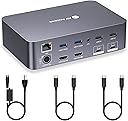
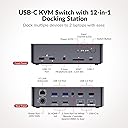
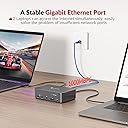
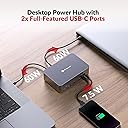
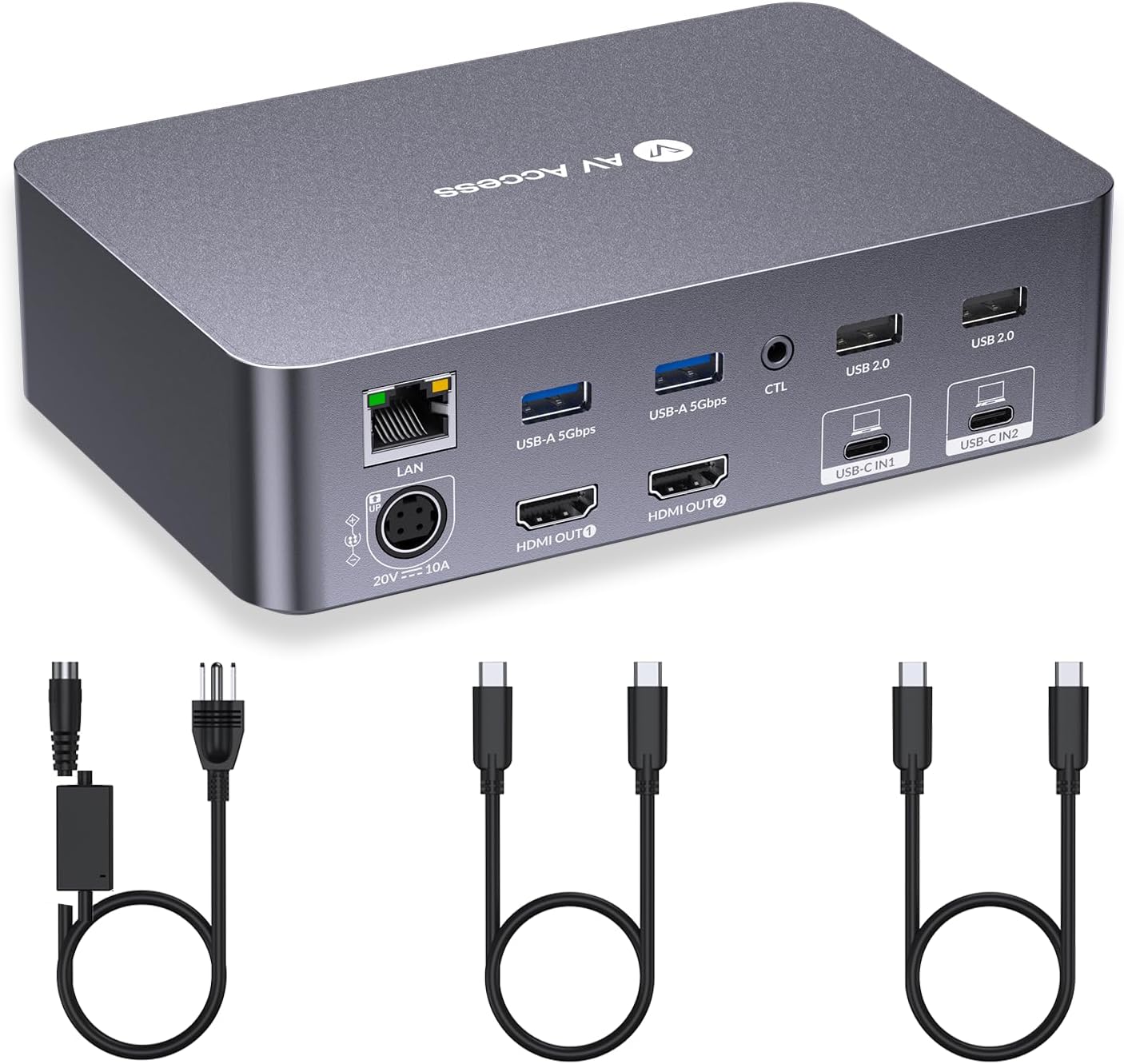
The AV Access KVM Switch Dock is a professional-grade 12-in-1 docking station designed for dual-laptop and dual-monitor setups. It supports 4K UHD resolution at 60Hz, high refresh rates up to 2K@144Hz and 1080P@240Hz, and delivers 60W power delivery to each connected laptop. Featuring 15 ports including USB-C MST, HDMI, USB 3.0/2.0, SD card reader, 3.5mm audio, and 1G Ethernet, it enables fast switching with EDID emulation and automatic wake-up, making it ideal for productivity-focused home offices and gaming environments.


| ASIN | B0CP4PD3SM |
| Best Sellers Rank | #12 in KVM Switches |
| Brand | v AV Access |
| Color | Grey |
| Compatible Devices | Full Functional USB C Lenovo/HP/Dell laptops,Macbook/iMac(macOS can't output extended dual screens) Compatible Devices Full Functional USB C Lenovo/HP/Dell laptops,Macbook/iMac(macOS can't output extended dual screens) See more |
| Customer Reviews | 4.1 out of 5 stars 356 Reviews |
| Hardware Interface | 3.5mm Audio, Ethernet, SDXC, USB 2.0, USB 3.0 Type C |
| Input Voltage | 20 Volts (DC) |
| Item Dimensions L x W x H | 4.33"L x 6.61"W x 1.87"H |
| Item Weight | 3.9 Pounds |
| Manufacturer | AV Access |
| Mfr Part Number | iDock C20 |
| Model Number | iDock-C20-US |
| Number of Ports | 15 |
| Product Dimensions | 4.33"L x 6.61"W x 1.87"H |
| Smart Home Compatibility | Not Smart Home Compatible |
| Total Number of HDMI Ports | 2 |
| Total USB Ports | 8 |
| Total Usb Ports | 8 |
| Unit Count | 1.0 Count |
| Warranty Description | 1 year |
| Wattage | 120 watts |
C**N
Great KVM if you deal with laptops at work.
Received my package quickly from Amazon. I do have another AV Access device called the iDockB30 but it's good for two desktops and a laptop and I wanted the one that can connect to two laptops to have as my work keyboard-video-mouse (KVM). It's easy to set up. Just two USB-C cables that go to the corresponding ports on the back of the iDockC20 and power. The other ends of the USB-C cables will go to the respective laptops. I'm a big Lenovo ThinkPad fan so I have a ThinkPad T14 Gen 5 AMD from my work and a ThinkPad P14s Gen 5 AMD as my personal daily driver. Turned on the unit and works well. Though the T14 had a little issue connecting but once I rebooted it worked fine. I'm able to press the switch on the docking unit to switch between the two with no issue. Looking over the build it looks solid, and the ports are labeled clearly so you know what device to plug into what. There are a decent number of ports in the back and the SD card reader is convenient to have since at my work place, I sometimes need to use the cards to read any external data. I tested out the network connectivity between the two by switching and it doesn't seem to lose the connection which is nice. Since the power distribution is 60W I would only recommend the KVM for use on business class laptops like the Lenovo ThinkPads. It would be advisable that if you are going to be connecting a gaming laptop on it like a Asus Strix G16 or a Lenovo Legion i7 having USB-C ports it will provide enough power if you plan to game on it. I would only use it for productivity work. I hope the next iteration of the USB-C ports on the docking unit will be like USB 4 or Thunderbolt 4/5 but for right now it suits to what I need to it do at my workplace. I do have dual monitors, and they worked great on them. No issue whatsoever since the monitors I have are 27-inch 1080P and a 32-inch 1440P. I have used it for quite a number of days, and I personally like the device. It is working great so far for me and does what I need it to do. Since I do IT work, I like the fact that I can plug in a second laptop and run through items without having to plug in a monitor etc.
C**S
Perfect Solution for Seamless Work & Personal Laptop Switching
This KVM switch has made my setup so much easier. I use it daily to switch between my work and personal laptops, and it works flawlessly. Dual monitors run smoothly with great resolution, and the USB-C connections keep everything powered and clutter-free. Switching between devices is instant, and all my peripherals move over without any issues. Super convenient, reliable, and perfect for a home office. Highly recommend!
D**N
Powers two laptops simultaneously without additional power source.
It does not require additional power sources for the two laptops; it powers them simultaneously through the Thunderbolt Type-C ports, reducing wire clutter. Setup is straightforward: connect the monitor via HDMI, connect the two Type-C cords to the laptop's Thunderbolt ports, then connect the power source, and the functional unit is complete. There are many spare USB ports to support peripherals. It helps a lot when switching between laptops. So far so good.
A**M
Single and therefore best device on the marked :) Still might be improved.
Using it for almost 20 days now, so here is my honest opinion: 1) First let's discuss setup: I have a personal "gaming" ROG Zephyrus M16 (2022) with 3080TI. I have some none name company Dell laptop with Ryzen 7 4750U. Laptops are using Windows 11 Pro and Windows 10 Pro correspondently. Next monitors: Internal gaming laptop have 2k 165Hz display. Internal dell laptop 1080p 60hz. External Dell monitor G3223D 2k 165Hz and Asus VA27EHE monitor with 75Hz refresh rate. 2) Review: Pros: * I don't think there is anything on the market that have 2 USB-c input and can work like a hub, so this product is the only choice! * Device split ethernet connection between both laptops so your "inactive" device will be always online. * Tons of ports, should be enough for any regular user. * Device is emulating screen for "inactive" laptop and you won't have problems with messy windows sizes/icons movement all around the desktop/strange RDP behavior and etc. Cons: * My Dell 2k 165hz monitor is NOT working in 165hz mode not it's working in 144hz mode. It's shows artefacts only and I verified that connecting it via second USB-c port directly to laptop fix the problem. HDMI cables are also good 2.1 standard cables so at least 144hz refresh rate should work, but it is not. * Device is not working with my other thunderbold-4/usb-4 type-c cables. I am not sure why, I understand that instruction says to use only original one, but why??? And when original one will wear out what I will have to do????? * Device does not support DDC/CI pass though so you will not be able to change your monitors brightness, and even my old semi-working messy Baseus hub supported that! My eyes will never recover from that :(((((((( * Other reviews mention that device get hot and this is partially true for me as well. But when I connect gaming laptop to original power break (99% of the time) looks like internal USB-C power supply can get some rest and kvm switch getting less heat and it's getting just warm, not hot hot. * Other reviews mentioned that switch between laptops can take up to 5 seconds. This is again partially true for me: 1080 display got online in 1.5 second, but the main 2k display took around 3 seconds. * Device mention "wake up" function, but it's not working for both my laptops, and I triple checked USB wake-up settings * When you turn off your laptops and than turn them back on they didn't find the external displays before you disconnect USB-c cable and connect it back. Sometimes it takes 2-3 attempts before it starts working. * For some reason I wasn't able to run all 3 displays: rather internal or 2 external. This might be the way how it works or even my laptops hardware limitations but still good to share for those who expect that setup to work. Resolution: it might look like device have more cons than pros from my review, but as I mentioned before AV Access is the only company that offer smth like. This is the only company that filled the niche and did that not badly. If we would have competitors with same price tag I would give product 3 star, but since they are the only one who "cared about us" — it's 5 stars minus 1 as regarding all cons. I am sharing the review not to stop other customers but to share feedback to the company so next generation of devices or maybe some kind of firmware upgrade will improve the quality.
A**R
Excellent Service
While this didn't work for me exactly, it was of no fault to them. I didn't read the description properly. This works as intended, and is very well put together. It switched between my macbooks very easily, and took all of 5 minutes to set up. This gets five stars because the team at AV Access helped me out a ton, troubleshooting and asking what I was trying to accomplish. They really did everything they could to help make sure I was happy, even though ultimately we couldn't do what I needed, which was having both of my monitors as their own displays. So the customer service was fantastic, and the product was too...I just didn't dig into the details as much as I should have. As soon as they have a product that can do that, I'll be a customer of theirs again.
K**R
Best KVM switch for 2 monitors and 2 windows laptops setup
I've been using this iDock for the past few weeks, and it's been a great addition to my setup, which includes both my work and personal laptops, a Logitech unified receiver for my keyboard and mouse, and a USB camera. Both laptops run Windows. My monitors are 1920x1080 and 2560x1080 resolution If you're looking to minimize cable clutter while seamlessly using two laptops and two monitors, this device is an excellent choice. It requires only a single Thunderbolt connection from your laptop, handling power delivery and video output to the monitors efficiently. I haven't experienced major issues with my personal laptop, aside from occasional blank screens. When I reached out to customer support, they recommended using a 40G USB-C cable since the included cables only support 20G. I'm unsure if that would resolve the issue since neither of my monitors is 4K. If your personal laptop is Mac or Mac Mini, it only duplicates the screen, and you cannot extend your screen. This is a limitation in newer Mac books and Mini with M chips. However, on my office laptop, I frequently hear notification sounds indicating USB devices connecting and disconnecting, which can be distracting during work. As I don't have admin access, troubleshooting is limited, but all connected devices function properly. Unfortunately, customer support's solutions didn’t resolve the issue. The device does heat up, though not to an alarming level. If you plan to mount it under a desk, I’d suggest monitoring its temperature initially. Despite these minor inconveniences, the iDock works well for my setup and helps reduce cable clutter significantly. I've also tried other KVM switches that require USB and HDMI connections without power delivery, which made cable management a nightmare. Overall, the iDock suits my needs well. I’m giving it four stars due to a few small drawbacks. Update: 7/30/25 - I am reducing my rating to 3 because one of monitors keeps go off. Whenever it happens, I have to disconnect and reconnect the thunderbolt cable or the HDMI cable to the monitor. It is so frustrating.
S**C
Don’t buy it overheated and started having issues on day 2!😡
Wow, just crazy this thing worked great out of the box, I was really hoping this was it, as the kvm switches are notoriously problematic once they overheat and guess what this one did the same thing. I know what you are thinking, well how many items were plugged in and running. Just my two laptops and two screens, I had a one usb dongle connected for the keyboard and mouse. The problems were not instant, the first day it was all sunshine's and daisies. Day 2 I had to switch my screens u know 1->2 and 2->1 nothing major I could have lived with that and it also started disconnecting and connecting one of the usb drives connected to my personal laptop. Day 3 I noticed it was no longer powering one my laptops so here comes the power cable as an extra and I was ok with that as well. Today was the last straw for me mid teams call I lose a screen and connection and the screen wont come back, I switch to my personal laptop same thing screen wont come on, I test the screen with a direct plug into my laptop and it works. What a disappointing piece of garbage, don't waste your time! The reason I am so mad about this is because I spent an hour running the cables for this thing so they were neat and not cluttered and then had to pull them all apart and disconnect so I can send this back. 😡
T**B
DON'T WASTE YOUR MONEY ON THIS
I bought this product last February & it worked beautifully - for a few months. After that, every week or so, one or the other of my 2 monitors (same make/model) wouldn't display. Re-seating the HDMI cable for the monitor seemed to fix it for about a week or so. It's gradually gotten worse until now I have to re-seat HDMI cables daily to start my work in the morning AND when I come back from lunch. In addition, one of the USB-C ports no longer works, so I can only have 1 computer connected at a time. So much for 2 laptops & 2 monitors. This purchase has ended up wasting a lot of my time, having to constantly re-seat cables to various components. I wouldn't recommend anyone spend $200+ on it...
N**A
Perfect for keeping work & personal laptop separate!
This cleaned up my whole desk setup. I run both a work laptop and a personal one, (both windows) and being able to switch between them with a single button is super convenient, everything (monitors, keyboard, mouse) follows instantly. Setup was quick and straightforward with just USB-C cables, and it noticeably reduced cable clutter. It also sits nicely under my monitors without taking up much space. So far performance has been great. Dual monitors work smoothly, switching is fast, and I haven’t run into any lag or disconnect issues. The 60W charging is a nice bonus. it powers my laptop and let me get rid of an extra charging cable. I also picked up a separate remote button for easier access on my desk, which makes switching even more convenient.
M**P
Switch between Samsung S20, which uses DEX and my laptop
I have a Samsung S20, which uses DEX. I switch between my laptop and phone all the time. The biggest reason is that Google Photos on my mobile does better editing than on the desktop.
K**E
Game changer
What a difference this makes, declutters the desk and makes live so easy.
C**R
Solid Unit - Works Perfectly
Excellent unit. I have two laptops each with a USB-C connection that I needed a KVM switch for. Seems this is an oddball combination, but this KVM switch nails it. Good size, clean and solid. I also got the remote switch and it sits right beside my keyboard for easy and quick switching. I anything, I wish there was an additional USB port with power on the front to connect a device that needs charging. If you have two laptops with USB-C connections that support the necessary DisplayPort protocols, this KVM switch is for you. Note: There are other reviews noting about an inability to use the same wired network connection (can only be used for one device, the KVM can't switch that). Network protocols could never support that function to start with, so it's not really a negative on the switch.
T**M
Supports ultra wide monitors
Just arrived yesterday and I’m already very impressed. It does everything it says it would, plus one or two things it didn’t say it could! The switching is seamless, the elimination of window resizing, sharing of peripherals - including a bluetooth mouse that is now shared across all devices (connected to the unifying receiver plugged into the Dock). One thing the product description doesn’t tell you is that it will support an ultra wide monitor at 3440 x 1440. I was forced into buying a new hub after my old one died, and now I wish I’d had a 2 laptop hub a long time ago. Well done AV Access 👏
Trustpilot
1 day ago
2 weeks ago