Desertcart purchases this item on your behalf and handles shipping, customs, and support to Iceland.
🎬 Simplify your smart home — one remote to rule them all!
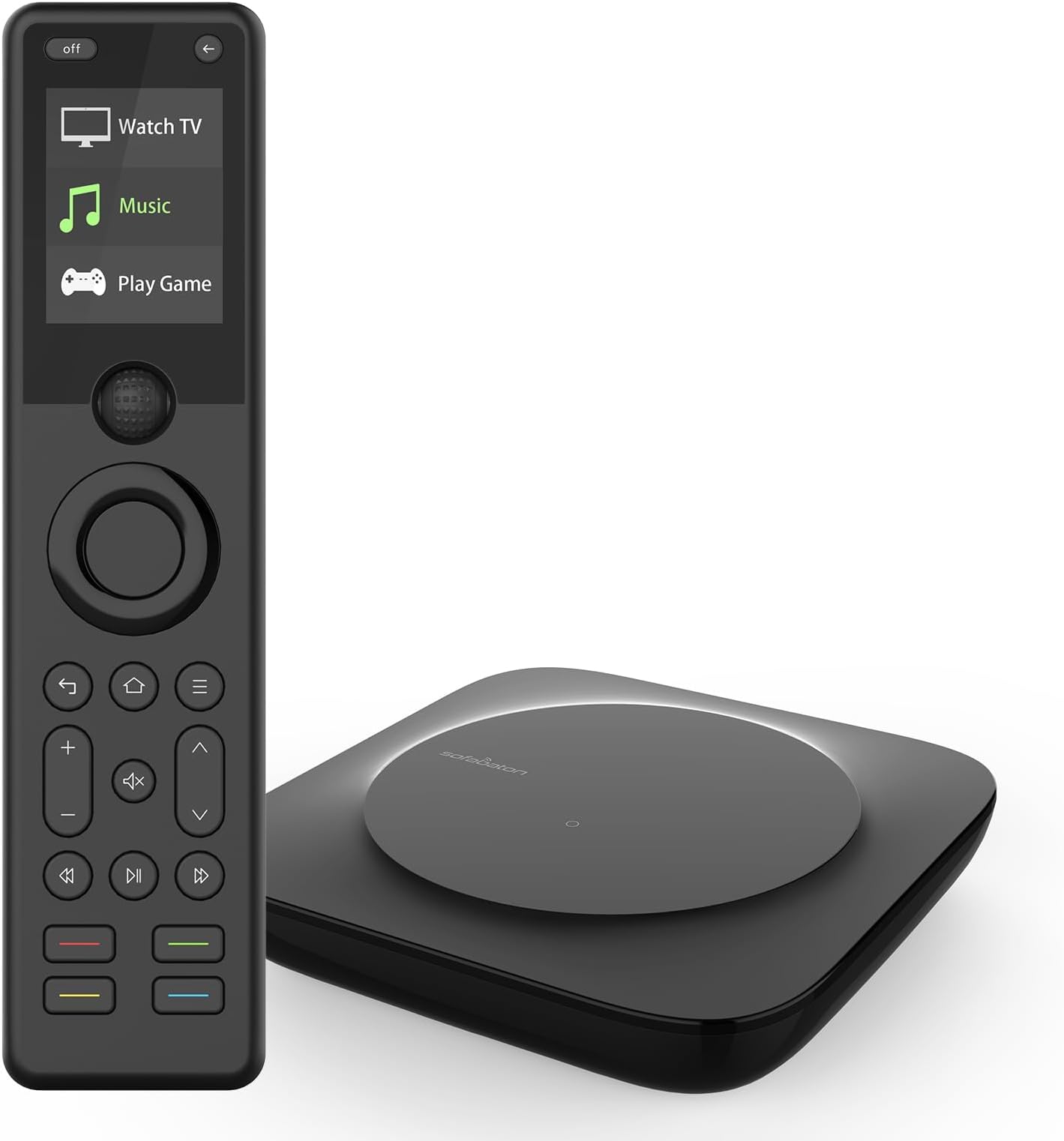
The SofaBaton X1S Universal Remote is a cutting-edge all-in-one controller designed for the modern connected home. It supports up to 60 devices via IR, Bluetooth, and WiFi, featuring a powerful cloud-updated code database compatible with over 500,000 devices. With customizable one-touch activities, voice assistant integration, and a 360-degree signal hub, it transforms complex AV setups into seamless, automated experiences. Ideal for tech-savvy professionals ready to declutter and elevate their entertainment control.


| ASIN | B0CZDVHL8T |
| Battery Types | Lithium-Ion Polymer |
| Best Sellers Rank | 8,011 in Electronics & Photo ( See Top 100 in Electronics & Photo ) 459 in Remote Controls (Electronics & Photo) |
| Brand | SofaBaton |
| Brand Name | SofaBaton |
| Button Quantity | 10 |
| Colour | Black |
| Compatible Devices | Wide Range of Devices |
| Compatible devices | Wide Range of Devices |
| Connectivity technology | Bluetooth |
| Controller Type | Button Control roni, Voice Control |
| Country of Origin | China |
| Customer Reviews | 3.7 out of 5 stars 109 Reviews |
| Max number of supported devices | 18 |
| Maximum Number of Supported Devices | 18 |
| Maximum Range | 10 Metres |
| Model Name | YQ-X1S-UK-J02 |
| Model Number | X1S |
| Network Connectivity Technology | Bluetooth |
| Number of Batteries | 1 CR5 batteries required. (included) |
| Number of Items | 1 |
| Number of Packs | 1 |
| Product Features | Backlit, IR, Universal |
| Product Warranty | 2 years |
| Special feature | Backlit, IR , Universal |
| UPC | 741421609471 |
| Unit Count | 1.0 count |
S**A
Excellent device.
As my Audio visual equipment grew, so did my individual remote collection. The need for a single universal remote that could control all my devices including my TV room lights became more apparent. After reading numerous online reviews and doing my own research I came across the Sofabaton X1S remote. I was a bit worried at the overall negative reviews on the product. However it's technical aspects and what it potentially could do regarding automation of my audio visual set up swayed me. The unit arrived quickly, it wasn't cheap to purchase in the uk via amazon. I bought the device from amazon UK because I wanted ease of return should the unit not be suitable when compared to purchasing from an American or Chinese company where returns could be challenging. The unit arrived the very next day. Once unboxed, I was immediately impressed with the units weight and size and overall modern look. Set up was easy via the app. The hub set up was straight forward too, again via the app, but the learning curve very very steep! I watched and rewatched numerous YouTube videos on the set up process. Just when I thought I'd got everything set up to my liking, up would pop an issue. Like for example when creating an activity not all devices would turn on or correct HDMI input selected. That said, adding devices was simple and straight forward. Configuration of them correctly, proved more challenging for me. Eventually after many hours going through everything I found the mistakes I'd made in my configuration set up. Once corrected, I immersed myself in understanding the units full capabilities. Patience is the key with this, you're not going to get things right first time around. Going calmly step by step is paramount. Most if not all configuration issues, can be answered through online searches, the sofabaton website or through YouTube. I have now been able to integrate my sofabaton remote with alexa voice control. I can now switch all the relevant audio visual equipment activity dependant, off and on using my voice (via sofabaton link). I've also added my miniDSP 2x4 (subwoofer control) to my device list, which the sofabaton controls effortlessly. Additionally I have created macro activities within the sofabaton app linked to my alexa app allowing me to use my voice to turn room lights off or on or dim them as I want or pair them with other activities within the sofabaton app. Like watching TV for example all relevant devices and lights turn on from one input or voice command. The Sofabaton X1S has simplified the operation of my entire audio visual system and other connected peripherals. So in conclusion this device has set up an incredible level of automation. It's functionality once configured correctly is second to non. Battery life is very good on one charge and the wake up functionality when tilted up from a flat position is an excellent feature. If you take the time to understand it's set up and configuration fully, then you'll be rewarded handsomely with cross device remote controls and device control all from a single remote. Configured button functionality is incredibly responsive. All my other remotes have now been consigned to a box in the garage. I doubt I'll be using them anytime soon. Needless to say I'm glad that I bought this unit but more that I persisted with it and got it right. If you're prepared to put the work in then this device's operation and capabilities will exceed your expectations. I 100% recommend this product provided that you are prepared put the work in to configure it properly and do the required learning which maybe steep for some.
G**E
Very happy with this purchase
Bought this as a (cheap) replacement for my aging Control4 system that's on it's last legs. I've owned Logitech Harmony remotes in the past too and was looking for something like that, but soon realised Logitech are pulling out of that game. The Sofabaton X1S was offered as a suggestion and after some research I decided to take the plunge and get one, it arrived in a few days and within a couple of hours it was doing exactly what I wanted it to do in my Lounge. I'm not sure how easy this would be for someone without my previous experience but I found it fairly straight forward to program and to tweak to navigate the challenges. I'd been using it for a couple of weeks and my only gripe was that I wished it had backlit buttons as using it in a dimmed room was awkward... then after some forum trawling I realised it should have backlit buttons, only mine weren't working, so I contacted Sofabaton who were apologetic and sent me a replacement. They were a joy to deal with and I am very happy with this device. The learning curve is quite steep so it's not for everyone but it's doing everything I want it to do well.
G**Y
Unreliable and buggy. Disappointing in so many ways.
Like many others I bought this to replace my ailing Harmony Elite. And after watching and reading a lot of positive reviews, I thought this would not only be a replacement, but an overall improvement... I was so wrong. Ok, out of the box the remote is light and easy to hold. The screen is LCD but it's good quality, the overall build quality of the remote and base are high... There ends the positives. The screen is basic text with a very limited number of device/activity icons. It does not have a charging base or a built in IR blaster. The base is the way your devices receive IR signals so you have to be very precise where you place it. An IR blaster in the remote would eliminate the constant missing of commands on some devices. The app is reasonably easy to follow, but everyday devices like my EE TV Box and my Hisense projector where not found in the 500,000 device catalogue they boast. The EE Box uses a Bluetooth remote and whilst Bluetooth is compatible there is no way to learn commands from the original remote. There is thankfully a cloud based user catalogue, where I found something similar to my EE TV and the Hisense C1 projector, but they didn't map all of the buttons. I have an amp, blu-ray, soundbar, TV, EETV, Projector, Google TV Streamer, a Manhattan DVR and a HDMI switcher, so I knew there was a bit of work to be done. But after spending the best part of 2 days (yes 2 days) programming this it was the most frustrating experience ever. As every time I tested an activity, something would either not switch on/off or select the correct inputs. I had to add delays, duplicate commands and be creative to get things to fire in the right order. Heaven help anyone who is not tech savvy. Once I believed it was all working, I tidied it all away and put the hub centrally in place, only to find it let me down when going live for the first time with the setup I had rigorously tested. Good job I had my huge bundle of remotes nearby to fix the issues. It's incredibly unreliable and I believe it's down to its poor IR firing and range, even with the extenders. The remote has a 'back' key at the top that takes you back to the previous screen to select devices or activities. It's awkwardly placed and you have to press it a lot to make selections, so it becomes a pain doing hand gymnastics trying to reach it with one hand. There are a lot more key presses involved to make something happen compared to the Harmony. For the money I paid, this is a major disappointment. I was able to set my Harmony up in a couple of hours and it never misses a command. It has a better screen and more customisable options when programming. If it wasn't for the failing battery I would carry on happily. For now the Sofabaton needs considerable more work to take the multi-remote control crown. UPDATE: The remote is now freezing every now and then. You have to reboot the hub to get it working again. This is a known issue, mentioned on community forums. I have now returned this item.
R**M
A deeply customisable macro capable multifunction smart remote - this is the best I have used!
I've had a Harmony One for the past 10 years and this is better in nearly every way but be aware that this remote will take some effort in setting up just as all the Smart Remotes or Universal Remotes do - It won't be 5 minutes and you're done. I have 9 separate devices (projector, screen, laserdisc, AV processor, games consoles etc) plus 15 activities, it all works well but it took me about 5 hours in total to get all the devices and activites working seemlessly. If you're not willing to put a bit of effort in for great functionality then this is not the remote for you. However, if you are willing to learn and want a deeply customisable macro capable multifunction smart remote then this is the best I have used. Not all of my devices were in the device database but there are comunity generated profiles available for quite a lot of devices and it's VERY simple to teach the Sofabaton remote commands from your original equipment remotes. The app lacks a little polish but everthing is there and functional and it's all done through a tablet or phone which works well most of the time. One issue I do have is that when adding functions, devices or activities the hub will sync with the remote automatically and it takes around 20 secs to complete. There needs to be a setting in the app to disable auto sync and only sync when instructed. It works pretty well with auto sync but I got frustrated with the remote trying to sync everytime I did anything in the app, the app is still usable during the sync process but my hub got confused a couple of times because I changed things so quickly in the app. Overall definite upgrade to the discontinued Logitech Harmony range of Smart/Universal remotes.
B**W
SofaBaton X1s Review - Better than expected
Having had an Harmony Elite for many years I decided that it was only a matter of time before it failed so a replacement was sought but there really was only one option, the SofaBaton. Initially I was impressed with the packaging, the handset and hub, also included were 3 blasters for if your units are in closed cupboards (not a good idea for heat dissipation). The hub power adapter (UK) confused me initially because the earth pin was too close to the other pins, on closer inspection I found that the earth pin could be slid out to the normal position. App (IOS) downloaded no problem. On trying to connect the hub to my iPad it could not make a Bluetooth connection until I went into the App Settings and found the “Allow Bluetooth” switch was off, once this was rectified everything connected fine. I now proceeded to add my TV as the first device but my exact model wasn’t listed, although the database is very comprehensive, so I picked the closest option, at this point I was sat at my desk at the opposite end of the room (fairly large) and at right angles to the TV so was very pleased when the TV responded immediately to the remote commands. I had been concerned about the strength to the IR signal since I wanted to put the hub in the AV cabinet and bounce the IR across the room and back but no problem at all. Continued to add my other unis but in most cases had to select similar models since my exact units were not listed, however everything worked fine. I did have to add a few commands from my Harmony but this was really easy with the App detailing the procedure and was very quick. Setting up Activities took rather longer mainly due to the required Power Settings but I remember having similar problems with the Harmony, all CEC settings are set to Off. Handset battery life looks good so far, whether it will make 45 days remains to be seen, we had to charge the Harmony every three days. The App is really good, comprehensive database and handset excellent with buttons small but well separated. Easy to to set up, overall really impressed, far better than I was expecting.
S**N
Mediocre at best, frustrating at worst
I've desperately wanted something to replace my aging and unreliable Harmony Elite but this isn't ain't it. My biggest issue with it is just how unreliable it is, especially with my Shield TV. It often loses connection to the Shield necessitating a complete restart of the hub to fix (I'd say around once a week on average). My second biggest issue with it is that there is no "repair this activity" option like on the Harmony, meaning if something goes wrong it's up to you to fiddle with the inputs to get things back in sync. Fine for me, but for a non-techy family member this is not ideal. Lastly the remote occasionally crashes going into an endless bootloop, to get around this I can load the app on my phone and select the "find my remote" option which kicks it back to life, but I shouldn't have to do that. Other minor niggles are the database of commands can be incorrect (though this is understandable given the sheer number of AV devices out there in the wild) and the app is quite clunky and poorly translated in places. In terms of positives the battery life is excellent lasting over 2 weeks for me and the remote itself feels nice and is joy to use (when it works!) The addition of being able to send REST commands is really useful too. Overall I feel that this is incredibly overpriced for what you are getting and it is not a production ready device.
M**N
Expensive for something so average
Not a bad universal remote and it works well for my devices (Nvidia Shield, smart TV, soundbar, Virgin TiVo). Programming the remote is a little tedious but that was expected and once done, it doesn't require dealing with again until a new device is added to the mix. However, it is too expensive for what it is even when on sale. Its main competitor is the (discontinued) Logitech Harmony series which remains excellent. Sadly, though, my Harmony remote - after many years of use - has become flaky; buttons have become spongy and inconsistent. The X1S is no upgrade. If anything it's the opposite. It misses many features that exist on Harmony and have for years: screen is basic and under-utilised; no touchscreen; no number pad potential (although there are workarounds but would require using the scroll wheel and would be a major annoyance); no charging cradle; companion app is fairly rudimentary; Google Home integration is very poor. That said, I rarely used the numpad screen on my Harmony remote; battery life on the X1S far exceeds Harmony (because of the unsophisticated screen, no doubt) so a charging cradle is unnecessary; I only used the Harmony companion app when the remote ran out of battery; Google Home isn't that great to begin with. The X1S is well built and for what it does, it is OK. It is a shame that they didn't opt for an OLED screen, especially given its price, but perhaps that's a bit risky given the static nature of what it displays; burn in after just a short time would be unacceptable. To sum up, the Sofabaton X1S is over-priced and average. If Logitech still supported Harmony and were producing new models, I would never have considered this. I don't regret the purchase but only because alternatives in the same price range, similar feature set, and have continued support just don't exist.
V**9
Very Capable Smart Remote
The remote itself is unassuming, but is comfortable in use with a clear screen and tactile buttons. The hub is small enough to be placed with your AV kit with IR blasters in the box if required. The remote is extremely customisable and easily integrates with Amazon Alexa etc. I received the X1S as a warranty replacement for my previously purchased X1 remote/hub, so was familiar with its configuration through the Sofabaton App (iPadOS in my case). The configuration is fairly straightforward, but may take some time and effort for the novice user. Making a note of each device to be added – their make and model number and the corresponding inputs to which they are interconnected will make things easier when adding them and setting up the Activities. Customer service is available via the App and in my experience, queries are responded to reasonably quickly. I was particularly pleased with the handling of my issue with the previous X1. Once set up this is proving to be a reliable universal smart remote greatly simplifying the operation of the multitude of AV kit sitting under the TV. Update: I had an issue with the new IP device configuration, whereby my URL was considered invalid. The response from Sofabaton customer support was excellent with timely updates and a satisfactory resolution. Best customer support I've had in a long time!
Trustpilot
2 weeks ago
3 weeks ago