
DOWNLOAD THE APP


Customer Services
Copyright © 2025 Desertcart Holdings Limited
DOWNLOAD THE APP


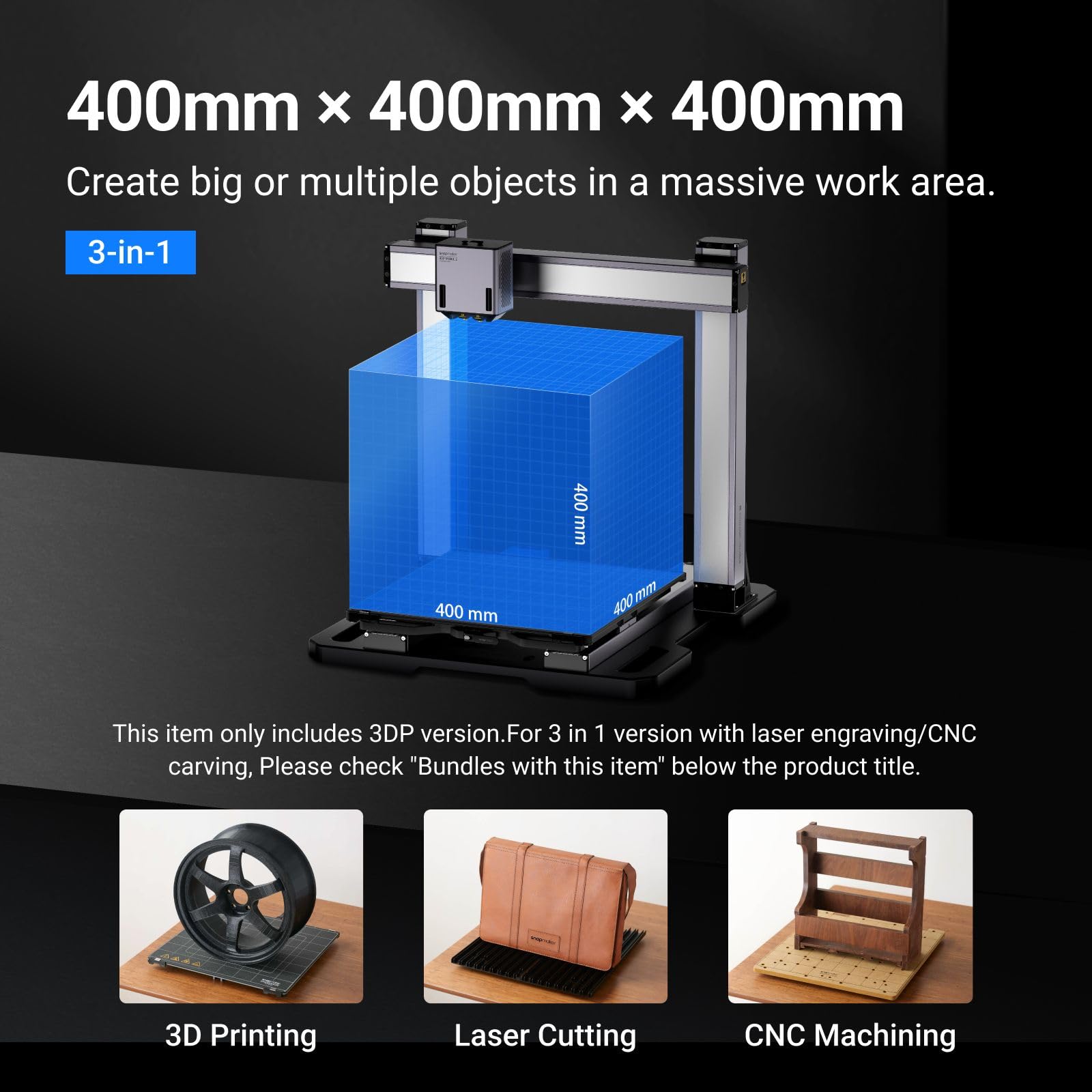


🚀 Elevate your maker game with artisan precision and powerhouse versatility!
The Snapmaker Artisan 3D Printer delivers industrial-grade precision and versatility with a massive 400x400x400mm build volume, dual-extrusion printing powered by planetary gears, and CNC-ground steel linear rails. Its quick-swap modular design and intuitive 7" touchscreen streamline workflows, making it ideal for professionals and makers seeking high-quality, multi-material prints with minimal downtime.




| ASIN | B0CW17L5XB |
| Best Sellers Rank | #118,535 in Industrial & Scientific ( See Top 100 in Industrial & Scientific ) #118 in 3D Printers |
| Customer Reviews | 4.0 4.0 out of 5 stars (391) |
| Date First Available | October 13, 2021 |
| Item Weight | 82.1 pounds |
| Item model number | Artisan 3DP |
| Manufacturer | Snapmaker |
| Product Dimensions | 24.41 x 22.83 x 24.96 inches |
J**.
An impressive IDEX that can truly do multimaterial printing
I've had the Snapmaker J1s that I've received from Amazon for a little while now and I'm very impressed so far with the capability of the printer. Having worked in 3D printing before and maintaining them in makerspaces I'm most satisfied with the multimaterial capability of the printer and with the user-friendly unpacking, setup and calibration experience. I've added a summary of some of my thoughts on the printer: Pros: -I always appreciate when printers come with all the necessary tools to care for and set up the printer. The tools that come from Snapmaker are also good quality -- ball end hex keys and nice angle cutters. -The graphical interface on the touchscreen (which I believe is an android skin) makes calibration very easy to run and follow. -I've had no issues connecting to the printer from my desktop. -3rd party filaments are handled and printed at decent quality, I'm sure I can do better with more parameter tuning. -The ability to change nozzle temperature of each nozzle on the fly during a print job is awesome. Not all printers have this feature and I think it can be very useful. -When set up in Luban, the gcode sent to the printer allows for pretty much seamless transition between the two extruders, with the other extruder heating up as it's getting close to its turn to print -TPU is often a pain to print, but the J1s handled it very well with the default printing profile on Luban, in general- be patient and allow any printer to take its time with flexible materials. -It's fairly quick! I was able to quickly model and print a flexible (TPU) and rigid (PETG) multimaterial part to test the IDEX capability and had good results in a single morning. More "beginner-friendly" materials like PLA are faster -Other multi-material solutions take a bit more work or are unable ro handle flexible materials like TPU, the J1s made it as simple as changing the filament profile on one extruder in this respect. -The snapmaker wiki and community are out there and are rich with information for you to do your own troubleshooting or debugging. I didn't run into many issues with the machine but was googling some possible upgrades for mine. Feedback: -It would be nice to have more options of printable surfaces rather than the single glass PEI plate snapmaker stocks, I'd like a finer PEI texture or a garolite g10 bed. -installing the build platform can be a little finicky -Luban is decent and fairly beginner-friendly, I can see it improving, but for myself I'd like for it to be easier to find straightforward guides on connecting with other slicers like cura or orcaslicer (though it is possible!) -Hopefully Luban adds step file support which will make multi-material printing even easier! This printer is very strong overall, it was easy to get started, it passed the soft and hard material print test I made for it and for me, walks the walk as an IDEX printer. I'd definitely recommend it as either a workhorse printer for engineering or as your first IDEX experience.
I**N
Unique printer with great performance out of the box
I have had this printer for about a week now and have only positive things to say about it. My previous printers have all been single extruder models and I was looking for a new one that had true multimaterial capability. After some research on printer types, IDEX came up and seemed like an ideal option. The ability to swap filaments with minimal time lost and waste produced was very attractive, and the possibility of printing two copies of the same part in the same time as a single one was just an added bonus! At the pricepoint of the J1S, all other multimaterial-capable plug and play printers I am aware of use a single extruder and swap filaments, meaning extremely long print times, limited material compatibility (no flexibles), and lots of filament waste. Printers with tool changers meanwhile, cost over twice as much as the J1S. After receiving the printer, my first impression was how solidly built it was. The linear rails look to be high quality and the cast z-axis carriage the bed sits on is something I haven't seen in any other printers. Packaging and shipping protection was also excellent. The removable top and large doors on the front of the enclosure make it easy to get inside for filament changes and maintenance, so I have no concerns about making changes or upgrades in the future (I plan to install the new all-metal extruders). The touchscreen on the front of the printer is responsive with easy to navigate menus, and including instructions with pictures in the UI for maintenance and calibration is a great touch. I also appreciate that you can easily load print files using a flash drive, something lacking on some other popular printers at this price point. As of the time of this review, I have run the printer with both PETG and PLA filament. Running PLA in both extruders, the print quality is good and both the mirror and copy modes work well. One thing to note is that these modes don't need to be preselected in the slicer, they can be selected on the printer as long as the part(s) occupies only one half of the build plate. This means that it is still easy to use these modes regardless of what slicer you use. Multimaterial prints with two PLA colors worked well, and I had no issues printing a print-in-place dump truck. The ability to use breakaway supports, which I think is the most useful application for dual extruders, also works very well. A PLA support test printed with PETG interface layers and a 0mm gap yielded excellent surface quality on cantilevered surfaces and the supports removed easily. In terms of slicing, Snapmaker's Luban software works well and the integrated network connectivity is a handy feature. This is definitely the slicer you want to use when first setting up the printer, and for someone who doesn't care about tuning their printing profiles, there isn't as much control available as in some other slicers. Luckily though, the printer is fully compatible with OrcaSlicer and I got excellent results using the default profiles already integrated for the J1s. I have read that compatibility with Cura and PrusaSlicer is also good, but I have not tried either of these myself yet. Overall, the J1S is a unique printer with excellent build quality at a competitive price point. If you want true multimaterial capability and the ability to use breakaway supports (truly a game changer) on all of your prints, I would highly recommend this printer. It is also encouraging to see that Snapmaker is continuing to make printer upgrades such as additional cooling fans and new hotends available so you can continue to extract as much performance as possible out of your printer.
A**W
Expensive let down
So far this machine has been quite the disappointment. I have yet to be able to print back to back successfully even if I just repeat the same model that may have printed successfully. I keep witnessing the machine miss extrusions just to return on the next layer to lay a line on top of air and everything spirals out of control from there. The extruders have multiple times collided with the model in the middle of print, moving the model and wasting the project. Time and money are flying out the window quickly with this machine. The recommended software, Luban, has been doing a poor job rendering supports. It scripts the code to begin building support material in mid air. I don't recommend this machine for it's price. Add on comment. This machine has also been canceling projects in mid progress and presents it as job complete 100%. It would be nice if there were an error to present it however there is not. Filament hasn't ran out or broke, everything was reading at temp. No telling why this has happened several times. This machine is a complete waste of time, money and energy. This is the only printer I've had this many issues with, this quickly from out of the box. Add on comment. 4 months into this machine. I keep trying to fight the good fight but this thing just will not cooperate. My other machines keep on chugging along no problem and are far cheaper. All the above issues persist minus the random stopping. There is an internal storage that apparently fills up without notice and only allows partial code to upload once it is full. The feed and extrusion on this has also become a constant issue that quickly renders hot ends inop and requiring replacements.
S**P
Not too loud or at all hard to use. Great for a beginner or a pro as you can leave it to it's own devices or you can setting fiddle as you wish. Noticeably faster than any other printer I've had (by hours) with very clean prints. Only reason for the 4 stars is you can't stop the feed tubes from rubbing against the lid so they wear out quickly (see video) also I cannot find A replacement/spare heat plate for it anywhere.
V**R
Ça marche bien! Rapide et de bonne qualité. Certes, pour le plastique PVA, nous avons dû augmenter la température à 235 degrés.
M**X
Absolutely amazing! The design and made quality reminds me of how Apple compares to others. The set up and calibration is super easy and intuitive, the large screen literally shows you how to do everything, really no-brainer and so easy to make it to be ready for best performance. As for performance, it’s incredibly fast and capable. You can print one model with two colours, or make two nozzles work simultaneously so that you can make two models at once, which doubles the efficiency. And if you want to have more details, there is also an option for it, you just gotta trade some time for more delicacy. I just love this machine (haven’t found any reason not to) and have been using it on daily basis. Plus, shout out to the two rolls of PLA filament comes in the package, that’s really thoughtful!
T**.
Top Drucker, sehr gute Verarbeitung. Durch den Dual-Extruder bietet er vielfältige Möglichkeiten. Absolute Kaufempfehlung
C**S
Was mir gut gefallen hat war, dass man relativ schnell drucken kann. Das Gerät war ausgezeichnet verpackt, nachdem der Unpackingguide gelesen wurde, konnten auch alle Transportsicherungen entfernt werden. Das Autoleveln ging fix von der Hand und der erste Druck folgte schnell. Filament einzufädeln macht keinen Spaß. Die Filamenthalter sind hinter dem Drucker angebracht, was ich sehr unpraktisch finde. Die Zuführung zum Extruder rastet nicht ein, macht keinen wertigen Eindruck. Die Extruder verstopfen in regelmäßigen Abständen. Unabhängig von Temperatur und Druckgeschwindigkeit. Der mitgelieferte Slicer Luban spottet jeder Beschreibung. Bei größeren Modellen stürzt er einfach ab. Auch das senden der Dateien an den Drucker ist umständlich. Erst senden, dann am Drucker die Datei suchen, dann drucken. Ich habe den Drucker zurückgeschickt
Trustpilot
3 weeks ago
1 week ago