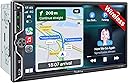
![[QLED Screen Upgrade] 7" Double Din Car Stereo with Wireless Apple CarPlay and Android Auto, 240W Powerful Sound, 4.2-Channel Audio Output, Bluetooth, MirrorLink, Backup Camera, AM/FM Car Radio](https://m.media-amazon.com/images/I/71dmmWFMGQL._AC_SL3840_.jpg)

Buy anything from 5,000+ international stores. One checkout price. No surprise fees. Join 2M+ shoppers on Desertcart.
Desertcart purchases this item on your behalf and handles shipping, customs, and support to Iceland.
🚗 Elevate your drive with next-level sound, vision, and wireless freedom!
This 7" Double Din Car Stereo by SJOYBRING features a vibrant QLED HD display, wireless Apple CarPlay and Android Auto for seamless smartphone integration, and a powerful 240W 4.2-channel audio system. It includes a waterproof HD night vision backup camera with a 170° viewing angle and supports steering wheel controls for safer, hands-free operation. Designed to fit most car models with optional installation accessories, it offers a premium in-car entertainment and safety upgrade at an unbeatable price.


| Asin | B0CWRM74FR |
| Audio Output Mode | Stereo |
| Audio Output Type | Speakers |
| Best Sellers Rank | #6,252 in Electronics (See Top 100 in Electronics) #34 in Car Audio Receivers |
| Brand | SJOYBRING |
| Built In Media | 7inch double din Head unit, Frames and Brackets, ISO Stereo Harness, Rear camera, Remote control |
| Color | Black W021 |
| Compatible Devices | Smartphone |
| Connectivity Technology | Bluetooth |
| Connector Type | RCA |
| Control Method | Touch |
| Controller Type | Apple Carplay |
| Customer Reviews | 4.2 4.2 out of 5 stars (926) 4.2 out of 5 stars |
| Format | Unknown format |
| Item Dimensions D X W X H | 3.66"D x 7"W x 3.93"H |
| Manufacturer | SJOYBRING |
| Mfr Part Number | JOY-W021 |
| Model Number | JOY-W021 |
| Number Of Channels | 4 |
| Other Special Features Of The Product | Android Auto, Apple CarPlay, Built-In Bluetooth, DSP, Screen Mirroring |
| Output Power | 240 Watts |
| Output Wattage | 240 Watts |
| Smart Home Compatibility | Not Smart Home Compatible |
| Supported Internet Services | Pandora, YouTube, iTunes |
| Surround Sound Channel Configuration | 4.2 |
| Unit Count | 1.0 Count |
| Video Encoding | MPEG-4, RMVB, DivX, AVI, 1080P, MP3, WMA, JPEG |
| Warranty Description | 1 Year Warranty |
| Wattage | 240 watts |
| Wireless Technology | Bluetooth, Wi-Fi |
User
Perfect upgrade for my Xterra
2006 Nissan Xterra (w/Rockford Fosgate system). So let me say that this unit is awesome and just what I was looking for to upgrade the factory head unit.Packaging (5/5)*Everything was nicely packaged and secure. No loose items or damage. All items were in the box and labeled clearly.Quality (5/5)After doing a lot of research and scouring forums, I was a little skeptical like a lot of others buying a fairly inexpensive head unit online. Many folks said just go with the major brands and stay away from off brands. To be honest, reviews say a lot and I took the plunge due to the positive reviews, price range, features, and backing of Amazon. I'm glad I did. I was very pleased to find the screen, finish, connectors, harness, rear camera all seemed top notch and fitment was great. I've only used it for a few weeks so hopefully we'll see on the longevity. Navigating the menus, options, features were a breeze with no issues.Instructions/Installation (5/5)The instructions that came with the unit were very clear and helpful. I will admit that I didn't use one of the harnesses (speaker wires one) due to the fact that I have the optional RF factory amp that powers the speakers and sub. I purchased this harness specifically for this setup (# 70-7551). What I really liked about this unit was the fact that it had the separate SWC harness included. This made it extremely easy to connect my SW to the unit. On my Xterra, there were 3 SWC wires (Red, Blue, Grey) on a 16pin connector (only had 3 cables connected so I knew it was the right one). SWC1 was Red, SWC2 was Grey, and Ground was Blue. I did NOT have to buy one of the adapters or special kits for the SWC to work (PAC or Axxess). This saved time and money.SWC matchup:OEM SWC1 (Red) ---- Headunit (SWC 1 Grey)OEM SWC2 (Grey) ---- Headunit (SWC 2 Green)OEM Ground (Blue) ---- Headunit (SWC Black Ground)I ended up grounding the brown brake detect wire also...RF Specific setup:Everything is simple, just make sure to connect AMP Power (blue/white cable) from the 70-7551 harness to the Blue cable on the harness coming from the unit. **You won't use the Blue only wire from 70-7551)Function (5/5)Haven't gone through all the features but everything works great (love the wireless Android Auto/Carplay), Waze, phone calls (I did purchase a separate MIC for the bluetooth mounted on the A-pillar). haven't really tested out the remote control but a fun bonus.Rear Camera install (4/5)Connections were easy. Every car is different when running the wires. Just take your time and ensure you properly wire to the "reverse" light wires. The camera cable is long but if you have a really large SUV, you may need to get a 4pin extension cable for the last few feet....just for awareness. I actually needed to do that with mine unfortunately which is why the 4 of 5 stars. I wouldn't been nice to have it longer for longer vehicles.Customer Service (5/5)Although you have to reach out to the company as they don't provide the specific firmware upgrades online with instructions, they were extremely quick to response (being a 12 hour difference) and provided all the instructions and files. I asked for the Nissan logo and they were able to provide that which was super cool. Please follow the INSTRUCTIONS exactly (re-read the instructions and take your time). You don't want to brink your device.Overall, very satisfied with the purchase for under $200.
User
WOW!!!
I’m seriously impressed with this stereo. Honestly, I expected something decent for the price, but what I got feels like a premium unit you’d normally pay hundreds more for. The responsiveness is spot-on. No lag, no frustration, just smooth performance every time I use it.Installation was much easier than I anticipated, especially for a truck setup. Everything fit well, the connections were straightforward, and it powered up without any headaches. That alone saved me a lot of time and stress.The interface is clean and intuitive, making it super easy to navigate while driving. Whether I’m adjusting settings, switching music, or using features like Bluetooth or Apple CarPlay, everything just works the way it should.Sound quality is another big win. It brought new life to my system. Clear highs, solid mids, and noticeably better overall balance compared to what I had before.Overall, this stereo exceeded my expectations in every way. It delivers high-end performance at a fraction of the price, and I’d absolutely recommend it to anyone looking to upgrade their truck without breaking the bank.
User
Very pleased with this purchase
I installed this unit in my 2008 Jeep Wrangler 4dr. Amazon says it won't fit, but it does. A Metra 95-6511 dash kit, Crux SOOCR-26 harness kit and Metra 40-EU10 antenna adapter are required for this application. Installation is not difficult for someone with mechanical experience and a bit of patience to remove the center dash panel. It isn't necessary to completely remove the panel and disconnect all of the climate control switches. Once the panel is loosened by removing two screws at the top and two at the bottom behind the trim panel, it pops out with a little bit of controlled force. I decided to mount the rear camera on top of the license plate holder light fixture. It had to be near the outer end to make room for the LR taillight assembly which must be removed to tap in the power and ground for the camera. Just run the cable behind the holder and through the existing hole in the body into the cavity behind the taillight. The camera cable will be routed up through the rubber grommet under the carpet and then along the edge (also under carpet) past the rear door and front door. Removing the plastic trim panels is required along with replacement plastic clips. Route the cable around behind the brake and accelerator pedals. It is a little difficult to get the camera cable up through the dash into position behind the stereo but I used a flexible fiberglass rod. Once the cable and harness adapter are in place the rest is just connecting the wires as shown in the manual. I used closed end cap connectors then zip tied the bundles together to keep it neat and tucked in. It is recommended that before you go through all of the trouble, first connect just the red and yellow power wire, ground and one speaker (I used green) to make sure the unit is functional and correctly connected to power. If so, you're good to go.After installation, I found that this unit does everything I need it to do. Sound quality is good (I have replaced the Jeep factory speakers with Kicker) and all of the functions work well. Setting up Bluetooth and Android Auto is easy. There are several display settings and everything operates smoothly. Depending upon how you mount the camera, there are settings to change the up/down and L/R orientation.It will probably be necessary to update the firmware after installation. The company website does not have download links for this. You must email them and include a photo of the version screen and a copy of the Amazon invoice and they will send back instructions for the update. A nice added feature is the ability to customize the boot screen with the manufacturer's logo of your car. This is available with the update package. Just tell them what you want.All in all, this appears to be a good choice. Lots of features and a low price point for a vehicle I use as an off-road toy. I've no doubt this unit will do well for a daily driver. Time will tell about the long-term durability but for now, it's all good.
User
Worth the price! Clean Fit!
This Screen is a solid 8.5/10. I’ve have had this screen for about a week now, and I can certainly say that the quality of the stereo system is very good and the price is fair. I am a big fan of the Apple CarPlay and the Reverse camera included in the kit. I am also fond of the clean touchscreen design and high quality feel the stereo has. The radio that comes with the stereo is very efficient and easy to use. I appreciate how the USB cover fits very nicely and doesn’t make the unit look cheap. the product was fairly easy to install; this unit was installed into a 2001 Toyota Tundra limited Access cab. It’s very convenient that everything is automatically uploaded as soon as you connect to Apple CarPlay via USB, unfortunately you cannot do this as easy with the USB C cable. Bluetooth is obviously still an option and once you connect the car kit automatically connects from then on. Lastly, the unit is just clean and high quality and worth the price, the install was easy and I only needed to buy a aftermarket wiring harness additionally when installing this system. All in all, I am very fond with this product and rate it positively.Cons:This unit specifically has some delay. Whenever you click apps, change songs, connect to the CarPlay, basically whenever you do anything there is some delay. The delay is minimal but it’s definitely noticeable and maybe a dealbreaker for someone looking for a flawless clean transition or a high responsive system. It’s kind of annoying that you have to follow a long-ish process to upload a specific logo for the unit boot up screen. When I placed my order I expected it to be fairly easy. I was looking forward at looking at the Toyota logo every time I started my truck, but because I don’t want to go through the process of uploading the logo, I’m Stuck with a low quality image of the company logo.The back up camera has super minimal glitches whenever in use but it does not effect or impair your driving in any way, just a small detail.
User
WOW...just WOW!!!
I did my research for weeks, was hesitant to buy this one because it comes with features that high dollar stereo systems have for a price almost half of what they cost. Thank God I finally settled on this one. It is amazing, was easy to install, the wireless android auto works perfectly, I use Waze for navigation, it works full screen, I listen to Sirusxm through my phone and it shows up full screen. I know I feel like I'm over selling this, however, I am amazed with what it does for the price. If I had any concerns, it would be that the microphone is a little weak, but it comes with an external mic that takes care of that. You can't go wrong with this stereo. Oh, forgot to mention, the display is top of the line, the backup camera comes in clear and sharp.
User
(does NOT fit 2010 Corolla) I Regret this purchase.
I saw another review with it installed in a 2010ish Corolla and thought it would work in mine. it does not - the instructions say to use the original mounting hardware, but the mounting holes on the be stereo itself do not line up. So although it's hidden, my stereo is mounted with duct tape.But with that disclaimer made...The good:-The screen is nice. Colors are vibrant and resolution is definitely sharp.-included back up camera is fine, although instructions for wiring are not helpful.The bad:-Screen is as responsive as a cheap tablet from 2003.-no matter how your phone is connected, there is a constant 0.5 second delay in everything. This extends into everything you do on the device - when Im parked and waiting and want to watch YouTube, the video is out of sync with the audio. EVERY VIDEO is unwatchable.When I contacted support, their response:"It doesn't seem to affect the use"Wow, thanks.-but the WORST: this thing forces connection through wireless, even when wired. If your phone Bluetooth is on and previously paired to the car and connect through USB, it connects to your Bluetooth. If you turn off your Bluetooth, it FORCES IS BACK ON and connects again. If you unpair and forget the car Bluetooth from your phone, it forces it to pair again. The only way for you to actually connect using a cable is to turn off your wifi and Bluetooth on your phone.At first, I thought this was just buggy. But then it started getting sketchy, and I'm thinking it's because they skimped out on a cheap USB port that can't meet the data speed requirements for Android Auto.Overall, I regret this purchase. I'm sure there's cheaper options that perform just the same, or much better options for a little higher price. But I'm not gonna have spare time to rip this thing out, so I just have to live with this duct taped into my console, hijacking my Bluetooth to play out-of-sync audio."It doesn't seem to affect the use".I mean can you believe that????
User
Good, but volume knob doesn't have great longevity
Overall a good product, BUT: the volume knob is now not working well. It doesn't want to go up or down consistently and takes way more turns than it should. It started doing this over the last couple months I assume with the additional wear as I've had it installed for probably a year.
User
Installed in a 2004 Tacoma
Purchased in April. It is installed in my 2004 Tacoma. No additional wiring harness was needed. I didn't even need the included brackets or bezels. It looks factory installed. No special tools were required. Installation instructions were adequate. Only problems installing had to do with vehicle wiring that didn't match schematics.I was surprised how much better it sounds even with just the factory speakers. I added two small rear speakers later that really brought out the bass. It paired easily with my android phone. It connects more reliably than my 2023 Toyota Crown connects. I appreciate the home and talk buttons and the volume knob. Don't have to look for them. Backup camera works, but not as polished as a factory camera.Touch screen is sharp and responsive. It's not in the best location for viewing, but it is not as much of a distraction. Hands free phone operates well also.It would be nice to have HD radio with the extra digital stations. The USB jack is a little sloppy. My thumb drive with 200 CDs jars loose sometimes, but hey. It's a four-wheel drive truck,It is a good value for the money. It performs as advertised. Installation was easy and the results are great.
Trustpilot
4 days ago
1 month ago