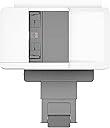
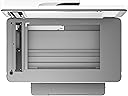
🖨️ Elevate your office game with pro-level prints that get noticed!
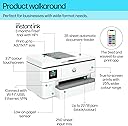
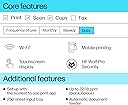
The HP OfficeJet Pro 9720e is a powerful all-in-one wide format printer designed for small to medium offices. It delivers fast printing speeds of up to 22 pages per minute in black and white, supports vibrant P3 colour gamut for true-to-screen prints, and offers seamless wireless connectivity with dual-band self-healing Wi-Fi. With a 250-sheet input tray, 35-sheet ADF, and 3 months of free Instant Ink subscription, it combines efficiency, cost savings, and eco-friendly design featuring 30% recycled plastic. Ideal for professionals who demand quality, convenience, and sustainability in one sleek package.


| ASIN | B0CJY274VN |
| Are Batteries Included | No |
| Best Sellers Rank | 3,095 in Computers & Accessories ( See Top 100 in Computers & Accessories ) 18 in All-In-One Printers |
| Colour depth | 30 bpp |
| Compatible devices | Smartphones, Tablets |
| Connectivity Type | Bluetooth |
| Controller type | Android, iOS |
| Customer Reviews | 3.8 3.8 out of 5 stars (163) |
| Date First Available | 27 Sept. 2023 |
| Dual-sided printing | Yes |
| Form Factor | All-in-One |
| Guaranteed software updates until | unknown |
| Included components | 9720e |
| Item Weight | 15.5 kg |
| Item model number | 53N95B#687 |
| Manufacturer | HP |
| Max copy speed (black and white) | 22 ppm |
| Max input sheet capacity | 250 |
| Maximum Supported Paper Size | 11 x 17 inch |
| Maximum black and white print resolution | 600 dpi |
| Maximum colour print resolution | 1200 x 1200 dpi |
| Maximum copies per run | 100 |
| Number of Ethernet Ports | 1 |
| Number of USB 3.0 Ports | 1 |
| Print media | Envelopes, Labels, Paper (plain) |
| Processor Count | 1 |
| Product dimensions | 4.45D x 5.81W x 3.06H metres |
| Scanner type | Sheetfed |
| Sheet size | A3 Centimetres |
| Warranty type | Full Warranty |
M**P
Outstanding value for money, if you can make full use of the instant ink free trial.
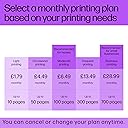
I am very pleased with this so far :) If you take full advantage of the free instant ink trial it is an absolute bargain!! Its a large unit, so you'll need to make sure you have space for it. HP Smart is a really basic app. So if you have photos you want to edit before printing, you'll need a separate app for that. The price was £89 and I was offered 5 months, interest free credit with the purchase. So am actually paying £18 pmth for the next 5 months. In addition, as others have mentioned, Instant Ink is heavily promoted. BUT HP give you 6 months free instant ink for buying their printer and Amazon gave me a voucher for a further 2 months instant ink for buying it from them. The 2 offers can be used together, so for the price of the printer, I also got 8 MONTHS worth of free ink. I subscribed to an instant ink subscription allowing me to print 300 pages per month and wont pay a penny for it until the end of January of next year!! Subscription can be cancelled at any time. As this printer allows me to print A3 size pages, I can now print the equivalent of 600 a4 pages of photos and documents every month and my only additional costs will be for paper and electricity. I think that is outstanding value for money. The subscription is based on the number of pages printed, not the amount of ink used and theres no premium price hike for printing in colour. It's important to make sure you subscribe to a package that allows you to print all the pages you'll need per month, as you will be charged for any pages over your subscribed amount, even during the free trial period. But unused pages can be rolled over to the next month. As long as the printer is connected to the internet, it monitors ink in the installed cartridges and tells HP when I'm running low, so they can send me replacement cartridges before I run out. Postage both for sending new cartridges and for returning used ones for recycling, is included. So theres no additional charge for that either. Havent tried scan or fax functions yet. But I have tried print and copy functions and both are excellent. Text documents are clean and crisp. Photo prints are, so far, true representations of the original. Double sided document printing is also flawless. Printer even dries pages as its printing them. To be very clear, this printer can print anything sent from a pc or phone etc in upto A3 size. But scanning and photocopying is limited to A4 size only. Paper drawer only takes one paper size at a time, so you have to remove and replace if you want to change paper type or size.. It also took me a minute to work out how to use HP smart to ensure prints came out the size and orientation i wanted. Printer isnt the quietest, so i wont be printing at night while folk are sleeping. But these are very minor niggles, for what otherwise is proving to be the best purchase I've made in ages. If you are anything like me and have 100s of digital photos on your phone and computer but no hard copies at all, buying this printer, while the instant ink trial is still available, may be the cheapest possible way to turn all your digital pics into real life photos. Also worth considering if you have a big event, like a wedding or christening coming up and will want lots of photos for a reasonable cost. Or are an independent artist or photographer who wants to offer prints of their work but needs to keep overheads low. Havent had the printer for long and havent had any isuses at all so far. If that changes I'll update my review.
D**B
The only printer I have actually HATED in 50 years of using printers.
Worst printer ever. Outrageously expensive ink. It has now decided that I have done the impossible and connected it to a continuous ink system and consequentially refuses to work. This is the last straw for a device that is a terrible downgrade in terms of design and usability from the analogous printer I had before and was very happy with. Every month there is some problem with quality, cleaning, connectivity, awful scanner sofware. It is time for the scrap heap after just over a year.
G**N
Great no nonsense printer just gets on with the job
Great printer no nonsense just does what you ask, will print on paper card and watercolour paper it also has a wide format and will print on A4 and A3. Great buy Great value for money I cannot fault it.
M**H
Good for a network device and A3 printing but pushes subscription ink quite hard
Before starting to compose this review I wondered what an appropriate score was and came to 4 stars. I was interested that other reviewers thought the same. At a bit under £200 for an A3 print capable printer (and A4 scanner) it wasn't bad value. The box it came in was huge and very heavy (which is a good discription of the printer) but I got it set up and network connected. The whole getting started process is good. I had decided against registration and an "ink subscription" after looking at the reviews and by saying no in numerous places I seem to have acheved it working with no account and no continuing financial commitment. The ink cartriges are very expensive (around £100 for a set of HP cartridges) but I'll see what the lifetime is and then decide what to do about that. The HP Smart software didn't seem much use but I installed a Windows 11 printer driver from HP's website and that works OK for printing. A3 paper requires the paper tray to be expanded and there is a fragile looking fold out paper support to catch your prints. I couldn't get scanning to work in the "Web Scan" which is via the management pages. It does work under MacOS using the Mac image scanning app so I might settle for that. It's a very Apple and Mac friendly device doing Airprint and Bonjour so there was no obvious need for a driver there and it printed OK. I bought it to load with A3 paper and print drawings and I've an A4 laser printer for general printing (much cheaper to run) so this will be fine but I think only 4 stars due to a general subscription approach and cost of ink. Update after a few days The web scanning was fixed by allowing pop ups on the (local) web page. The scan to a network page was a bit more annoying. For no obvious (to me) reason you only seem able to configure a network share location once you have created an HP account. It’s done via creating a “quick set”. That makes a button appear on the touch screen control panel. It’s nice but getting it working was tricky.
S**6
excellent prints good value
The best printer i have bought with the ink replacement option making it a cheap option printing both A4 /A5 it is very versatile
J**E
Lovely print quality!
Love this printer, I was in 2 minds about getting it but so glad I did. The quality of prints is excellent. I particularly like the HP constant ink supply option, so much easier than worrying about running out of ink. Also found HP particularly helpful during the setting up of the printer. Considering this printer can handle A3 prints its great value for money. No problems with connection. The screen is very intuitive recognising when different paper may have been put in etc. The only downside, which is to be expected is it's rather a lot larger than my old printer so make sure you've got the space. Luckily I have an old set of drawers/changing unit so was able to utilise the space I had. Only other thing is I don't think different size papers can be in the drawer at the same time?
Trustpilot
2 weeks ago
2 weeks ago