
🚀 Upgrade to the speed of tomorrow, today!
The Crucial T705 PCIe Gen5 NVMe 4TB SSD delivers cutting-edge performance with up to 14,100MB/s read speeds and 12,600MB/s write speeds, designed for hardcore gamers and creative professionals. Featuring Micron TLC NAND and optimized for Intel 13th/14th Gen and AMD Ryzen 7000 platforms, it offers massive 4TB storage and a heatsink-compatible design to maintain peak performance under heavy loads. Backed by a 5-year warranty and bundled with a 1-month Adobe Creative Cloud subscription, this SSD is the ultimate upgrade for high-speed storage and demanding workflows.


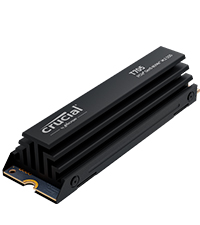
| ASIN | B0CTSSMTZK |
| Best Sellers Rank | #7 in Internal Solid State Drives #80 in Computer Internal Components |
| Brand | Crucial |
| Color | Black |
| Computer Memory Type | DIMM |
| Customer Reviews | 4.6 4.6 out of 5 stars (1,696) |
| Date First Available | March 12, 2024 |
| Flash Memory Size | 4 TB |
| Hard Drive | 4 TB Solid State Drive |
| Hard Drive Interface | Solid State |
| Item Dimensions LxWxH | 3.15 x 0.87 x 0.15 inches |
| Item Weight | 0.349 ounces |
| Item model number | CT4000T705SSD3 |
| Manufacturer | Crucial |
| Product Dimensions | 3.15 x 0.87 x 0.15 inches |
| Series | Crucial T705 PCIe Gen5 NVMe M.2 SSD |
| Standing screen display size | 16 Inches |
A**E
So far, so good, but really really hot, (T705 2 TB Drive)
This is an interesting piece of hardware. This particular NVME SSD Gen 5.0 exceeded read and write speeds for me in Crystal Disk, and that was on a working "C" drive. This Gen 5.0 drive cooks, and in more ways than one. Running this in the Gen 5.0 slot on a Gigabyte X670E motherboard. I made the error of initially installing this drive on an add in card with no heatsink to clone to as the target drive. I thought since the add in card drive PCIe slot was rated at 4.0, and not 5.0, I would not have to worry about temperatures. WRONG. The drive shut down after about 20 seconds, which I believe to be the temperature high limit was tripped. You absolutely have to run this SSD with a good heatsink, no matter what you are doing with it. I did not think the Motherboard heatsink was going to cut it, and installed a Thermalright heat pipe heat sink on the Crucial T705. This is a good heat-sink, but despite that, running Crystal Disk, and the heat-sink sitting above a hot RTX 4080 Super back plate, the drive still hit 80 Degrees C. running the Write portion of the Crystal Disk benchmark. This is in a well ventilated Case, but with an AIO over the CPU, this is kind of a dead space. I am going to get a slightly larger SSD cooler, with a fan. It helps if I run the RTX 4080 fans all the time to cool the video card and not transmit so much heat to the SSD cooler, but I am not gaming all the time nor do I want my Video Card fans running constantly. These are just some caveats to look out for. The Crucial T705 SSD is running flawlessly, and yes, games and programs do load faster. The associated Crucial Storage Executive is fine, but if you are used to the Samsung Tool Box, you will be disappointed. You are best off with an aftermarket cooling solution, as I do not think the "stock" heat sink some of the models come with would be adequate for file transfers, especially being so close to a hot Video Card. Tom's Hardware has some good testing reviews on Gen 5.0 SSD heatsinks with heat pipes. Cheers!
J**Z
Nice NVMe
Worth it, it's super fast, It has a nice design, was easy to install. The states pops up as healthy, and the temperature is around 40°c, worth it.
P**T
Buy naked version – not this heatsink version
You might think (as I did) that you’re doing better by getting this OEM heatsink version – paying about $30 extra. I learned the lesson in a hard way that; exactly the opposite holds true. Crucial periodically runs deals; selling heatsink version even cheaper than naked drive. Don’t fall for that and simply buy the naked drive, whatever the price. Otherwise (if you buy heatsink version); you’ll either have to do below surgery (which is not for the faint-hearted) or your drive will fail earlier (because of heat) and Crucial will blame you running it that way (and very likely not honor your warranty – more on that later). This Gen.5 T705 is an extremely fast M2 drive. I’m very happy with its unbelievable performance. I use it on my new Asrock Taichi Lite Z890 motherboard. After I assembled my PC, I noticed that the hottest temperature on my system is this M2 drive. Not CPU, not GPU, not RAM modules and not my Gen.4 Samsung 990 Pro M2. While PC is completely idle (not running anything); that Crucial M2 displayed 61C temperature. I stress-tested my GPU (which is milimeters away from this Crucial) and that 61C quickly rose close to 80C (mind you; I’m not even stressing that drive itself). I immediately decided to replace that tiny OEM heatsink, as it’s completely not up to par for a decent cooling job. I’ll number my attached pics – so you can relate to my text here. I use HWiNFO64 freeware to check all my system characteristics. When you look at its reporting for this Crucial drive (pic-1); you’ll see that the drive keeps (in it) record of how long you used it at above 87C (warning) and 89C (critical). So if you (without even being aware) barbecue your drive and send it in for warranty replacement (when it fails); you can guess who Crucial will put the blame on? Now all new MBs put both that Gen.5 M2 slot and Gen.5 GPU slot right next to CPU (distance has to be short). You can see from (pic-2) that; this M2 drive is literally sandwitched between towering wall of GPU (no heat escape that direction) and my humongous Noctua NH-D15 G2 CPU cooler (airflow is there, towards rear suction fan). But it’s absolutely clear that; this OEM Crucial heatsink is just too small to provide adequate cooling. I even didn’t try Asrock MB’s original heatsink for that slot (as it’s even smaller). So it’s not even a matter of preference; you simply got to replace that OEM heatsink. That’s why it’s much easier to buy a naked drive to begin with; so you can avoid below pain of surgery. Another point; those Gen.5 M2 drives are just going thru initial growing pains (in fact, Crucial is still the only company to offer such speed-demon drive). Why is it putting out that much heat?; that is the first question (even more heat than Z890 chipset itself – which works fine with about same size heatsink). You’ll see on one of my attached pics (when I took out the naked drive); there is metal body Phison controller there (where actual two RAM chips have plastic body). Probably that much heat is coming from that Phison controller – not the RAM chips. If those Gen.5 M2 drives are all to put out so much heat; then industry will probably evolve to a different casing – so they can be cooled like CPUs. Time will tell. After searching many M2 heatsinks (active and passive); I decided on this passive Thermalright HR-09 2280 PRO (pic-3). There are ones with active fan cooling. But such small fans always fail in short time and they are noisy. So I went with this largest passive heatsink I could find. I hope that Noctua also starts making large M2 heatsinks. My Phanteks full-tower case can even house twice the height. Width-wise (as you are seeing in pic-3) it’s literally 1 milimeter from CPU cooler. Even if it touches there; no problem, as nothing moving (it might even get better cooling that way). When I run my PC with this new heatsink; Crucial M2 fall back to 47C. Still the hottest component on that motherboard; but much better than previous 61C with OEM heatsink on it. My other Gen.4 Samsung 990 Pro M2 runs at 42C anyway (under Asrock’s large metal surface heatsink). If I ever see my usage pushing it to above 80C; I’ll simply tweak my BIOS fan curve, to run my case fans faster / earlier. So far, 14C saving is good enough for me. Now on to surgery : how to remove naked Crucial drive from it’s OEM heatsink. I repeat: this process needs only two special tools (that you have to use), but more importantly very precise hand control (I happened to make my living as field service engineer – so it’s all easy for me). If you slip your hand once; you can instantly ruin your expensive drive. If you are not sure; don’t even try, I’d humbly suggest. You’ll need an anti-static mat (see wrist connection on pic-4) and blade opener tool (pic-5). No, you can not use a knife or flat-blade screwdriver instead. You were warned. On the side of the drive, you’ll notice two dimple dots on the edges and one flat line (blue arrows on pic-6). Insert your tool firmly but very slowly till you only pass that middle-line (if you push it all the way in; you’ll instantly damage the board/components of your drive; you can throw it away at that point). Once you merely pass that middle-line apply sideways leverage to rock it out of its grasp. Also do the same on both dimple dots. You’ll feel that the bottom casing cover slightly moved (pic-7). Now switch to other side with your tool and do the same there. As you slowly and patiently repeat that left & right few times; the bottom cover will start to come out (pic-8). Attention to the blue sticker indicated by arrow on that pic. As slowly pulling out that bottom metal cover; you’ll be peeling that sticker. No hasty movements there, as you don’t want to damage anything. Now that cover completely comes out (pics 9, 10). Now you remain with your naked drive sticking to actual heatsink, by blue-stickers on the other side (pic-11). This is the step needing utmost precision: you insert your tool between that blue-sticker and heatsink (and NOT between blue-sticker and the chip!). See detail on pic-12. You very slowly push your tool deeper towards other side (so; sideways, not length-wise). You are separating that blue-tape from the heatsink. Don’t you dare to yank the board by pulling length-wise; It’s a very thin board and you’ll simply snap it in two. Just be patient and do above described on those 3 blue-stickers from side to side. After enough loosening of stickers; finally lift your naked drive sideways (never pull length-wise). Pic-13. Now you have to clean all remnants of blue-stickers from both side of your naked drive. You’ll use your fingers and nails doing that (do not use any tool, as you can damage those microscopic components on board. Now your drive is finally ready to be mounted on to new heatsink (pic-14). Follow the simple instructions which come with heatsink. Just pay attention to orientation before you stick on to it; so you don’t put upside down. You’ll also need to align screw-hole of your drive and heatsink. After you place the bottom metal cover; you first firmly push it towards heatsink (firm, but not crushing hard) > then you tighten 4 side screws. So it gets good thermal conductivity thru new stickers on both sides. The hole of that new heatsink lines up with “screw-hole” of your drive. My Asrock motherboard has such “tool-less” rotating notch for that hole. So I was able to slide that notch between heatsink and M2 board. Pay attention how your motherboard mounting is (actually even before starting all this adventure). Because if you need to use an actual screw to mount your M2 drive to your MB; now you’ll need much longer version of this very tiny mounting screw. If your MB also has such “tool-less” thingy, I hope that it’ll also slide in as described above. If you are reading this before you actually bought your drive; I presume that at this point you decided to buy the naked version and avoid that Crucial heatsink nightmare at all cost, correct?!
K**G
Great ssd
It’s fast, works well, no lags. Worth the money.
H**R
Great!
It is a shame that the owners are retiring this brand of the market. This NVMe is great, good capacity and faster, you will notice its speed inmediatly. I use it as my main drive for the OS and I am really happy with it.
N**R
Great Drive, Horrible Company
Very good drive. Reads and writes as advertised. Loads up everything that I need it to very quickly. Sad to see Crucial shutting down, Micron definitely sold the consumer market out for AI datacenters and it's infuriating.
A**R
Superb
So far works flawlessly. Fast drive. Very nice
G**O
très satisfait d'avoir acheté cette article , Crucial T705 SSD 2To PCIe Gen5 NVMe M.2 SSD Interne Gaming avec Dissipateur , pour tous les futurs acheteur n'ayez aucune crainte d' acheter c'est l'un des meilleurs SSD avec sont dissipateur qui fonctionne a merveille
J**S
Blazing fast and rock solid reliability - the perfect 2tb drive for AM5.
A**.
Empezar diciendo que el SSD en general funciona correctamente, algo "calentorro" si no le pones un disipador, pero nada preocupante. Sinceramente nunca he tenido problemas con los SSD Crucial. Ahora bien, para los poseedores de un procesador INTEL CORE ULTRA de última generación: NUNCA vais a conseguir las velocidades anunciadas de este SSD ni de ninguno de ninguna marca que pase de los 12000 MB/s porque estos citados procesadores de INTEL son "defectuosos". No voy a entrar en detalles técnicos, pero de forma muy resumida, la alta latencia y el bajo ancho de banda a causa de un defecto de diseño, provocan esta limitación de poco mas de 12000 MB/s. Mas que nada lo digo porque he visto muchos comentarios de gente quejándose de que su SSD no alcanzaba las velocidades especificadas del fabricante...
N**E
Speed is very good even use in enclosure and take back up for desktop
S**6
Eccezionale. Avevo necessità di mandare in pensione il mio Crucial P1 che, dopo anni di onorato servizio, iniziava ad essere un po' limitato nelle performance, soprattutto termiche. Con il T710 le performance sono eccezionali soprattutto grazie alla RAM integrata, mentre consumi e temperature sempre sotto controllo. Ho acquistato la versione con dissipatore integrato ed è davvero perfetto negli ingombri, personalmente lo preferisco al dissipatore integrato della scheda madre. L'unico modo per metterlo davvero in difficoltà è con i benchmark, nella realtà difficilmente si riescono a generare carichi di lavoro altrettanto spinti. Molto soddisfatto.
Trustpilot
3 weeks ago
3 weeks ago



