
🔥 Cut, Engrave, Create — Masterpieces Made Effortless ⚡
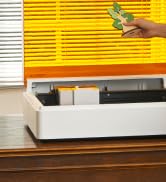
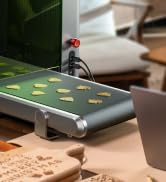
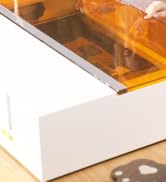
The S1 20W Laser Engraver and Cutter is a beginner-friendly powerhouse featuring a 20,000mW laser capable of cutting 10mm wood in a single pass. It offers a spacious 23.93" x 15.16" bed for large or batch projects, advanced patented positioning for precise 3D engraving, and AutoPassthrough for materials up to 118" long. Safety is paramount with Class 1 laser protection, flame sensors, and an enclosed design. Built with aerospace-grade aluminum and rigorously tested, the S1 ensures durability and professional-grade results right out of the box.































| Manufacturer | Makeblock Co., Ltd. |
| Part Number | P1030505 |
| Item Weight | 44 pounds |
| Product Dimensions | 34 x 26 x 15.4 inches |
| Item model number | P1030505 |
| Size | 20W |
| Color | Black |
| Material | S1 20W Basic Kit |
| Item Package Quantity | 1 |
| Batteries Required? | No |
| Warranty Description | 1 year manufacturer |
F**N
very easy tool full of enjoyment
I have now owned this for over 6 months and find that it has been very easy to use and set up. I have made numerous projects and gifts for the entire family. It has been very accurate and fast while making quality items. It is compact enough to fit on a small desk. It is very simple to use from day one with superb functionality.
J**S
Perfect first and potentially last laser
It took me a while to set this up but now that I am really getting used to it I like it more and more and would recommend it for use by beginners and more advanced as well. What I really love is how it makes me feel very safe. I would recommend getting things like the If2 and the fire suppression system for piece of mind but these are easy to use and add to the system. I love the things I can do with it and will probably get the 40watt laser head. The only wish I have is for a bigger work area as I want to do big projects. As long as you pay attention to thickness and use the right settings it will do the things you need without creating danger. I do feel people need to pay more attention to material type and make sure they understand the safety and practical lists of using diode lasers but that is more on the user than xTool. It literally has everything you need to get tstarted just take your time and do not skip the safety materials they are there for your benefit.
R**N
Great machine.
I have a 10 watt Creative Vista,(which I love) BUT.... I LOVE my XTool. best investment I made so far, maybe I can afford the Xtool P3 at some point. Worth the price.
J**S
Very fast and accurate
I couldn’t be happier with my new xTool 40W laser cutter/engraver! It has completely exceeded my expectations and has become an invaluable part of my business. So far, I’ve used it to cut out and engrave leather earrings, masks, and create several beautiful wooden signs, all with exceptional precision and detail. The machine’s speed is faster than I anticipated, which has allowed me to complete projects more efficiently and take on more orders than ever before. One of the standout features is how easy it is to use. Whether I’m working on leather, wood, or experimenting with custom art projects, the setup and operation are intuitive and seamless. The accuracy is incredible, consistently producing clean cuts and detailed engravings that I’m proud to showcase in my work. My Xtool S1 has opened up so many creative opportunities for me. From functional items to artistic projects, the possibilities feel endless. If you're looking for a reliable, high-performance tool to take your business or personal projects to the next level, I highly recommend the xTool 40W. It’s worth every penny and more!
M**A
I think you need this..
I conducted extensive research before selecting the Xtool S1 40W laser engraving machine, and I am delighted with my decision. As a first-time laser owner, I anticipated a steep learning curve during the setup process; however, with the assistance of my husband, we were able to assemble the machine in under an hour. The S1 is constructed with high-quality, durable materials that reflect its solid build. It's important to note that due to its size, a larger table is required, and adequate space must be allocated for the vent hose. This purchase has proven to be one of the best investments I've made. The accuracy and speed of the S1 are truly impressive, making it an invaluable addition to my workspace. I highly recommend this machine to anyone looking to enhance their crafting or engraving projects.
G**D
(Updated) Hardware issues
Last update probably Mid March 2024 Ok so I have to deduct one star. To really use this product to its potential you need a riser base at a minimum, which is extremely expensive for what you get which is just a simple riser without anything special about it. I guess one could construct one on their own but then it would look jenky and not have a good seal for the wood burning smoke that needs to be extracted. Im also comparing to recent competitor releases that include such things like riser/rotary engraver kit for less money and higher power laser. So this is more of a regret of not holding out longer for something better to come along, which is the way things work I know, but my challenge and why Im lowering a star is the very high cost to obtain additional accessories or necessities to really fully realize the products capabilities. It's worth mentioning that their software helps you save a few bucks early in, so that's a nice thing. And overall the laser works well and is a nicely polished product for the most part. I just can't justify spending as much for accessories as it would cost me to get an entirely new laser from a competitor with all of that included. If Xtool reduces their prices drastically on their accessories then I would say it would be a 5 star product otherwise. But if you only want to use the base model for what it is designed for without riser, feeder or rotary, Im sure it will be a 5 star product for you. jan/feb 2024 update Support has been great. I replaced the part and it works. Took about ten minutes to replace the part. Update, increased 1 star to 3 for now, from 2. Almost immediately after writing the review below, someone contacted me asking me for my address (Amazon's disclaimer states not to do this though FWIW). Xtool is going to send me parts to swap out to fix my Xtool. This is great because I really want to buy the riser, the rotary, and possibly yes even the track feeder and will need these USB ports working. I'm kicking myself a bit for not getting the 40w unit to be honest because I really would like to cut through some thicker pine to make ornate book shelf holders. When I use my 20w with more passes it's scorches the one side too much so I thought about using some veneer on that side and filler, but that's too much labor. I think 20w is the sweat spot for many but for me and my cutting needs over engraving I should have gone with the 40w. My mistake. We shall see if the parts fix my problems, and I have no problem swapping electronics/working on electronics as I have done electronics repairs my whole life. If the parts work then I'll likely bump it up to 5 stars. Old review: (early jan 2024) I've submitted two help tickets on their website, both of which just disappear from your help ticket history after you submit. I assumed it was just a bug on their website, and patiently waited several days until submitting another. It's now been almost 2 weeks and Ive yet to hear back from Xtool. The back of the device, there are 3 old school mini USB ports for accessories like the engraver, air assist etc. Well that entire component is just flopping around inside the case of the Xtool. So only one of the three ports are usable for me, and I have to fiddle with the wire so that it applies pressure in a direction so that the air assist will work. That's a pretty serious hardware issue, and while it may be a simple fix the manual clearly states that opening the unit will void the warranty so, here I sit waiting hoping they will get back to me. It would be a huge PITA to send this back to Amazon. The unit itself is pretty cool. While there are very limited instructions, it's important that you do a cut, and engrave test for each material you plan to use. Why Xtool doesnt have this for the various materials already fairly plotted out, is rather mind blowing. It's not difficult to figure out but just time consuming to determine what power/speed intervals one should experiment with from the start. As far as the claims to cut 10mm Cherry wood in a single pass. Hmm, that MAY be possible. I cut 1/2" pine in 3 passes with air assist at 100% power and a speed of 6. I tried cutting 3/4 solid oak without the honeycomb plate, instead using a piece of scrap wood below. I made 8 passes at 100% power 4 speed and still never cut completely through the oak but was able to push the test triangle through by hand afterwards. That's rather impressive! Now, would you want to do that for an actual craft or project? Probably not. The scorching that happens on the backside of the material is rather dramatic. Engraving on stone was fairly easy using the pre configured settings. Like any software there is a bit of a learning curve. Would this machine be a good business for someone? Eh if you are bored and dont expect to make much Im sure. It's not going to cut fast enough to really crank out enough product to make money, but you could find a nicht and have a fun little side hustle. Im sure there are countless bored housewives buying these up thinking they are going to have a thriving business. Im not saying it's not possible but you really would need to put in a large amount of disciplined work to avoid getting discouraged, and try many different things wasting hundreds if not thousands of dollars of materials to find something that may stick. Etsy is FLOODED with things you can buy that cost near nothing from engraving to cut out crafts that started from a laser cutter/engraver. So keep that in mind and determine a plan before you buy this device. This is a great way to get into the world of laser cutting/engraving at a minimal cost compared to that of a CO2 laser. While Id love to offer up a 5 star rating for this unit, the fact is that I have a defective unit and cant get support for it. $2000 USD is no joke for anyone, and to not hear anything back is absolutely ridiculous. So I'll wait for another week, keep tinkering with the unit as it does work but for how long who knows, and if I wanted to add the rotary unit or the self feeding track, i would be SOL. So I have no capability to expand my device. I should add, be prepared to fill your house with toxic fumes/smoke unless you rig a system to exhaust the fumes from your house, and then be prepared to have your neighbors ask what you are doing as it becomes quickly apparent to anyone nearby a smell of burning wood, leather, stone, and especially plastic. You will not completely eliminate the smell either. They use non standard pipe coming from the unit, to which you will need to figure out the closest dryer/hvac metal to use to connect to an in line fan (sold seperately at lowes/amazon/home depot) to then exhaust out a window. If you dont do this, these units are rather unusable unless you want early dementia, alzheimer's and likely other serious health issues.
C**N
I Miss My D1 Pro but Loving the S1
I had a D1 Pro 20w for over two years that was a workhorse . . . until it wasn't. During operation, the laser would stop emitting but the print head would still move OR the print head would stop moving while the laser kept emitting, trying to burn a hole to the earth's core. Decided to upgrade to the S1 40W and I'm loving it. While the dimensions of the unit are clearly indicated, I didn't think it was that big! Unboxing was a breeze (thank you for those Velcro straps - will repurpose the heck outta' those!). The unit is fully enclosed, unlike the D1, and has an exhaust fan. I print in my garage with the door open so I 3D printed an adapter to connect the S1 to my vac which discharges the air up and outside. I'm loving the auto-focus feature where it measures the distance between material and the laser head. Manually having to do it on the D1 was a pain. While I only have the 40w laser head, swapping to the 20w or the IR appears to be very easy. Since I've used the Creative Space software before, the Studio software was easy to figure out. Performed some material tests which came out flawlessly. Had stopped creating for a while since my D1 was down for the count but this S1 has renewed my zeal.
E**Y
Built to impress
From the moment you open the box, the xTool S1 20W impresses. Its build quality feels premium — solid materials, a sturdy, enclosed frame, and a thoughtfully designed lid that lets you see what’s going on without exposing yourself to danger. Safety is clearly a priority: the enclosure, flame detection, lid‑interlock, emergency stop, and fume‑management all work together so you can laser with confidence. Key Features That Shine Power & Precision The 20W diode laser module gives excellent performance relative to its class. Engraving is crisp, detailed, and clean. With a spot size of roughly 0.08 × 0.06 mm, the precision is high, letting you achieve fine features and sharp edges. Good Cutting Capability It handles woods like plywood or basswood quite well, especially up to moderate thicknesses. Even materials like MDF or plywood around ~10 mm are manageable. The machine cuts smoothly and, in many tests, delivers clean results with minimal scorching. Safety & Enclosure This is huge. For indoor use, being able to have a fully enclosed system with flame detection and automatic shut‑offs if something goes wrong is a massive plus. It reduces the barrier for beginners and hobbyists who may be nervous about laser safety. Work Area & Speed The workspace (~498 × 319 mm) is generous for a desktop/bench‑top laser. This gives you enough room to do reasonably large pieces without always resizing or forcing your layout. The top speeds (600 mm/s) ensure engraving is not painfully slow. User‑Friendliness & Software The xTool Creative Space (XCS) platform is well‑designed, accessible, and powerful enough for most uses out of the box. If you want more control, LightBurn compatibility is a big benefit. Features like autofocus, dynamic focus (helpful for uneven surfaces), and twin‑point positioning make setup much less tedious. User‑Friendliness & Software The xTool Creative Space (XCS) platform is well‑designed, accessible, and powerful enough for most uses out of the box. If you want more control, LightBurn compatibility is a big benefit. Features like autofocus, dynamic focus (helpful for uneven surfaces), and twin‑point positioning make setup much less tedious. Overall this is amazing and even the smell is so minimal with the outside vent! You cannot go wrong!
Trustpilot
2 months ago
1 week ago



