Desertcart purchases this item on your behalf and handles shipping, customs, and support to Iceland.
🚀 Elevate your WiFi game with Omada EAP670 — where speed meets smart cloud control!
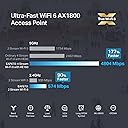
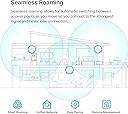
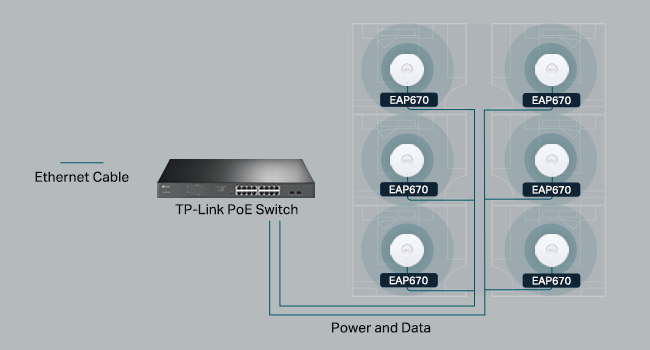
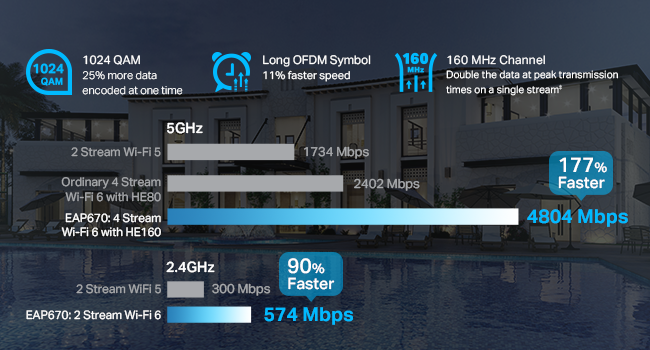
The Omada EAP670 V2 is a WiFi 6 AX5400 dual-band wireless access point designed for professional-grade performance and ease of use. Featuring blazing fast 5400 Mbps speeds, a 2.5 Gigabit Ethernet port with PoE+ for simplified installation, and free cloud management through the Omada app, it delivers extensive coverage for up to 250+ clients. Its ultra-slim design fits seamlessly into modern environments, while advanced features like mesh networking, seamless roaming, and load balancing ensure stable, reliable connectivity. Backed by a 5-year warranty and expert support, the EAP670 is ideal for offices, hotels, and smart homes seeking next-level wireless performance.


| ASIN | B0CRLYWHBL |
| Antenna Location | Business, Home |
| Antenna Type | Internal |
| Best Sellers Rank | #4 in Computer Networking Wireless Access Points |
| Brand | TP-Link |
| Built-In Media | Ceiling/Wall Mounting Kits, EAP670, Installation Guide, Power Adapter |
| Color | White |
| Compatible Devices | Personal Computer |
| Connectivity Protocol | Wi-Fi, Ethernet |
| Connectivity Technology | Bluetooth, Ethernet |
| Control Method | App |
| Controller Type | Switch |
| Coverage | Extensive coverage, up to 250+ clients, with high-speed Wi-Fi on both 2.4 GHz and 5 GHz bands. |
| Customer Reviews | 4.5 out of 5 stars 344 Reviews |
| Data Transfer Rate | 5400 megabits_per_second |
| EU Spare Part Availability Duration | 5 years |
| Frequency | 5 hertz |
| Frequency Band Class | Dual-Band |
| Item Dimensions L x W x H | 8.66"L x 8.66"W x 1.28"H |
| Item Weight | 1.5 pounds |
| LAN Port Bandwidth | 10/100/1000 megabits per second |
| Manufacturer | TP-Link |
| Maximum Upstream Data Transfer Rate | 4804 megabits_per_second |
| Mfr Part Number | EAP670 V2 |
| Model Name | EAP670 V2 |
| Model Number | EAP670 V2 |
| Number of Antennas | 2 |
| Number of Ports | 2 |
| Operating System | Omada |
| Other Special Features of the Product | WPS |
| RAM Memory Installed | 256 MB |
| Router Firewall Security Level | Basic |
| Router Network Type | wired |
| Security Protocol | WPA-Personal, WPA2-Personal, WPA3-Personal |
| Special Feature | WPS |
| UPC | 840030711671 |
| Unit Count | 1 Count |
| Voltage | 12 volts |
| Warranty Description | 5-Year Warranty Manufacturer |
| Wi-Fi Generation | Wi-Fi 6 |
| Wireless Communication Standard | 802.11ac, 802.11ax, 802.11b, 802.11g, 802.11n |
| Wireless Compability | 802.11ac, 802.11ax, 802.11b, 802.11g, 802.11n |
C**G
Amazing AP for the price!
This AP just works. This replaced a couple of work-horse Asus RT APs which I used for many years. I had to use two because one couldn't cover the entire house (two floors + basement). This AP has quite a bit more range/signal strength. It's mounted on the ceiling of my 2nd floor and has very good signal all over the house, including in the corner of the basement. It's also faster when connected with my WiFi 6 devices. Impressive. I use VLANs to segment my trusted, guest, and IoT networks. The Asus APs supported that (using Fresh Tomato firmware), but the simplicity of the UI of the EAP670 made it so much easier to set up and visualize. I was able to mimic the SSIDs of the Asus routers and all clients quickly connected. Another feature which, for me, was very important: PoE. I have a TP-Link switch with 8 PoE ports. Some of them are used for Reolink cameras, but having a spare port, it simplified the wiring and look of the installed AP. One wire for everything. This AP is a steal for it's capabilities. Easy to manage, great signal strength, and looks sleek. Definitely will recommend to others.
N**L
EAP670 V2 absolutely fantastic access point, works at distance, everything has stable WiFI!
I've had routers from many of the usual manufactures; Asus, Netgear, Tplink, Linksys, etc. They are ok, but have issues, I already have good router and I just need them to work as bridges or for their wifi, but they are pretty poor at doing just this function. In fact, I would say most work ok at routers but I don't need them for that, but are poor at WiFI with unstable, unreliable WiFi connections if they connect to devices at all!! I come across Omada range which is really commercial grade WiFi gear but I focused on their access points specifically the EAP670 V2. They are fairly easy to setup, but there is a learning curve which mobile and web app make reasonably easy to setup if you are familiar with wifi routers in general, if not, the learning videos are quite helpful. I have around 100 wifi devices in the home, and I mean everything connected flawlessly and was stable with EAP670 V2, especially in mesh and roaming mode, they would move to another EAP670 V2 as needed. I would caution not turning on all roaming features, just the core ones only, since some older devices just don't work well but EAP670 basic defaults worked well in most cases. I was so impressed I bought the OC200 to help manage all the EAP670 I had purchased, and place strategically around the home to cover all the blind spots but at the sametime minimize overlaps, ensuring to place each of access points at least 12 meters apart to keep interference low between devices. The software looks like its based on opensource SDN technology (a good thing). I would say that Omada brand has made excellent use of its features/capabilities but the most important thing has maintained a level of quality and reliability that truly shocked me after spending 18+ years working with other wifi routers and expecting another so so slight improvement, but the improvement here in terms of quality, reliability and stability overall is a great leap forwards. I have device on wifi network that parodically just failed to connect or stopped working, these now just stay connected and work flawlessly, that amazing! It should have been this way a long time ago, but I guess you have to wait for large leap forwards in quality, reliability and stability. I've had access points and controller for over a month now, working flawlessly. I highly recommend the EAP670 V2 and OC200 controller. I haven't tried Omada brand switches and routers but if their access points are this good it may worth considering in the future. I use Mikrotik brand of switches, routers and I really like them for their deep level of configurability (not for faint of heart or everyone), quality, stability and reliability, interestingly also based on open source technology.
C**S
Business-class power, right at home
I am running a full TP-Link Omada ecosystem in my home, and this is my fourth EAP670 V2 access point. At this point, I’m not testing them anymore — I’m standardizing on them. The EAP670 V2 has been extremely easy to set up and even easier to manage through the Omada controller. Adoption is quick, firmware updates are simple, and configuration across multiple APs is seamless. Roaming between units is smooth, and coverage is strong and consistent. What really impressed me is how well these handle load. I regularly have over 150 devices connected across my network at any given time — a mix of IoT devices, streaming TVs, gaming consoles, cameras, and work equipment — and these access points don’t break a sweat. No random drops, no slowdowns under pressure, and no instability when the network is busy. The ultra-slim ceiling-mount design also keeps the install clean and professional looking. The 2.5G port is a big plus if you’re running a multi-gig backbone and want to avoid bottlenecks. If you’re already in the Omada ecosystem or planning to build one, the EAP670 V2 is a solid choice for performance, reliability, and scalability. After four installs, I have zero regrets.
S**E
The perfect solution!
I've messed around with trying to place my router in my house, moving it around, changing antenna, putting in boosters... everything to try to get a better signal. I had heard about these on a podcast and decided to give them a try and they work really well. I went with the Omada ones because I picked up the OC300 as well. It has been SOOOO easy to add new access points where needed. I have one on each floor and one outside and paired with the OC300 makes setting up a breeze. Pros: * Easy to set up - if you don't get an OC200 or OC300 (or use a Raspberry Pi or computer to run their software for free), you simply log in, set up your WiFi networks and you're on your way. With the OC200/300, you just "adopt" the device and it sets everything up. I now change my WiFi every time I have people over so I can personalize it to them and it keeps them off my primary network. * POE - Don't want to run power to where you want this? No problem! Just run an ethernet cable and power it over that. * Comes with everything you need for mounting * Great signal strength and covers a lot of area. * I've bought all of mine on sale but I would pay full price if needed one in a hurry. Extremely good value for what you get. * There are hidden solutions you can get but people have commented how it looks like I have "professional wireless" in my house. These look just like what you'll find in an office, if that is important to you. Cons: * None - I've been very happy. I've switch everyone in my family to these along with an OC200 to run them. Since they have asked me to help them with their networking stuff in the past, it has made my life really easy to be able to run these. I highly recommend them.
J**E
Great Coverage, but Band Steering Needs Work
The Omada Access Point delivers excellent coverage and integrates smoothly with the Omada Software Controller, making setup and management simple. Speeds are fast and reliable once connected, and roaming between APs works well in my setup. My only complaint is the “seamless” band steering between 2.4GHz and 5GHz — it’s not truly seamless. I’ll sometimes have full Wi-Fi bars but can’t load anything for a few seconds while it switches bands, which can be frustrating during calls or streaming. Overall, it’s still a great AP for the price, but I hope TP-Link improves the band steering in future firmware updates.
R**T
Rebuttal Review: The Right Tool for the Right Job
It's clear from a past negative review that frustration played a big role in the experience, but it's important to set expectations correctly. The Omada AX5400 is an enterprise-grade access point, not a plug-and-play home Wi-Fi extender. If you approach it expecting a one-button setup like consumer-grade mesh systems, you’re going to have a rough time. The claim that "even the most seasoned IT person" would find the app confusing is exaggerated. As an actual technician, I found the setup straightforward and well-documented. While the app is an option, it's not the only way to configure the device. The web interface is vastly superior for managing VLANs, multiple SSIDs, and other advanced features—this is an enterprise product, after all. The part about the web address "leading to nowhere" is a prime example of why networking fundamentals matter. The device doesn’t always default to a static address—an ARP scan or checking your router’s DHCP leases would instantly provide the correct IP. This isn't a flaw; it's how networking devices work. Support? Sure, it's not hand-holding tier, but that’s industry standard for prosumer and business-grade equipment. Anyone who has worked with enterprise hardware knows that Tier 1 support is often basic, but the real resources (forums, knowledge base, and community support) are there if you take a moment to look. Ultimately, if you need a simple home Wi-Fi extender, this isn't the product for you. But if you're willing to learn basic networking principles, this is a powerful and reliable access point. If setup was too confusing, it’s not the device—it’s a case of using the wrong tool for the job.
J**Z
Disappointed returning customer
I have to say how disappointed I am with this product. I was genuinely excited to upgrade to a Wi-Fi 6 access point. Unfortunately, this was not my first bad experience. The last one I purchased had serious compatibility issues with my PoE injectors, and I ended up returning it as well. Because my existing access points were working fine, I was hesitant to try again, but I really wanted to move to Wi-Fi 6. From a design standpoint, the unit looks great. It is thin, has a clean shape, and powered on without any issues. My SSIDs appeared immediately, which initially gave me confidence. However, that is where the problems started. As soon as this access point was connected, my entire network performance collapsed. Speeds dropped from roughly 324 MB per second down to between 8 and 16 MB per second. At first, I assumed it was a configuration issue or a temporary problem caused by adding a new access point. I rebooted all APs and checked the network multiple times, but performance never recovered. Once I removed the new access point from the network, everything immediately returned to normal. My other access points began bursting again, reaching over 200 MB per second. Since I had purchased two of these units, I assumed the first one might be defective. Unfortunately, when I tried the second access point, the exact same thing happened. Network speeds again dropped below 15 MB per second. I do not enjoy leaving negative reviews, especially when a product has so many positive ones. My entire home network is built on TP-Link equipment, including the router, PoE injectors, and the Omada access point controller. However, over the last four years, every attempt I have made to upgrade to newer TP-Link products has resulted in issues like this. At this point, I am seriously considering moving away from TP-Link altogether. While this access point has a solid design and strong reviews, my experience has been consistent, repeatable, and unacceptable from a performance standpoint. Finally, I attempted to contact TP-Link support, and I have to say the experience was extremely disappointing. Based on the support interaction alone, moving away from this product makes sense to me. I have rarely encountered a support experience that felt so unhelpful and unprepared to address a real-world networking issue. That was the final factor in my decision to return both units and remain on my existing network for now. Over the next few months, I plan to do more research and determine which Wi-Fi access point platform I will move to going forward.
E**N
Blazing Fast, Reliable Coverage
Fantastic enterprise-grade performance. Seamless roaming works perfectly, setup is incredibly straightforward, and it handles heavy device loads without dropping a beat.
S**O
Ideal para oficinas medianas
Excelente calidad de transmisión de datos, alimentan 50 usuarios sin problema a velocidades de 800mb
T**S
Enterprise‑Level Performance at a Great Price — Rock‑Solid WiFi 6 Coverage
I installed the TP‑Link EAP670 as part of upgrading my home/office network, and it has been a huge step up in both speed and stability. This access point feels like something you’d normally only see in commercial environments, but it’s easy enough for anyone to set up. Coverage is excellent. One EAP670 easily blankets a large area with strong, consistent WiFi 6 speeds. Dead zones disappeared immediately, and devices roam smoothly without dropping connections. Even with dozens of devices connected, everything stays fast and responsive. The 2.5G Ethernet port is a big advantage. It removes the bottleneck you get with standard 1G ports, especially if you’re pushing high‑speed internet or transferring large files across your network. Setup through Omada Controller is straightforward. You get centralized management, real‑time monitoring, and the ability to tweak advanced settings if you want them. For people who like fine‑tuning their network, this is a dream. For everyone else, the default setup already works great. Build quality is solid, and the ceiling‑mount design keeps it out of the way while still providing excellent signal distribution. It runs cool and quiet, and the low‑profile look blends in nicely. If you want reliable, high‑performance WiFi 6 with enterprise features at a reasonable price, the EAP670 is an outstanding choice. I’d absolutely buy another if I expand the network.
H**.
Great for General Streaming, Poor for Latency-Sensitive Applications
Edit 2026/07/16: Devices has failed on the 5Ghz channel, did not even make it 2 years, deducting 1 start to 3 of 5. It has three times the average latency to the router (3 ms) when used as wireless access point compared with my AX92U router directly via wifi(1 ms). Both devices were tested using the 802.11ax (Wi-Fi 6) protocol for connection, with OFDMA and MU-MIMO enabled, yet I could not get the average latency down to 1 ms for the TP-Link, both devices were tested via an AX211 client. I would strongly recommend considering alternatives for gaming such as the Archer AXE75, which has been tested to excel in latency-sensitive applications, including usage as a wireless VR link where latency is key and critical to the experience therefore tested, for the same price, but I had to buy the EAP670 v2 because I wanted POE and the devices aesthetics when mounted on a wall is better with a high WAF.
R**J
Reliable, stable, and a great balance for home or small business
I’m running a full Omada setup at home with a managed switch and controller, and this has been part of the system for about 3–4 months now. It integrated smoothly and adoption was quick. For everyday use — phones, laptops, streaming, and smart home devices — everything has been very stable. No random disconnects, and roaming between APs is seamless when moving around the house. The Omada ecosystem also feels very secure and easy to manage, which gives me peace of mind. One thing to keep in mind is that the unit is on the larger side. It looks clean once mounted, but if you’re looking for something very compact or low-profile, that’s worth considering. There are higher-end models available if you want top-tier performance and don’t mind paying more. But for most home users or small businesses, I think this model offers a really good balance between performance and price. Overall, very solid and dependable. I’m happy with it.
O**S
Good but power cord is too short
I picked up two of these, broadcasting the same SSID without the TP Link management suite. Each one tops out at 700mbit or so. This is over wifi 6 / 802.11ax. The 2.5gbps quoted in the marketing materials must assume combined speed of all peers because this hasn’t come close to my 1.5gb connection. They work well, setup requires an app which wasn’t any trouble. My biggest gripe is that the power cord is too short and it’s an awkward shape to plug in beside other devices. These are supposed to be ceiling mounted, but the cord would not allow that. Clearly they only planned for PoE+ usage.
Trustpilot
3 days ago
2 weeks ago