Desertcart purchases this item on your behalf and handles shipping, customs, and support to Iceland.
🚀 Elevate your workspace with the Omada 7 Pro X — where speed meets smart management!
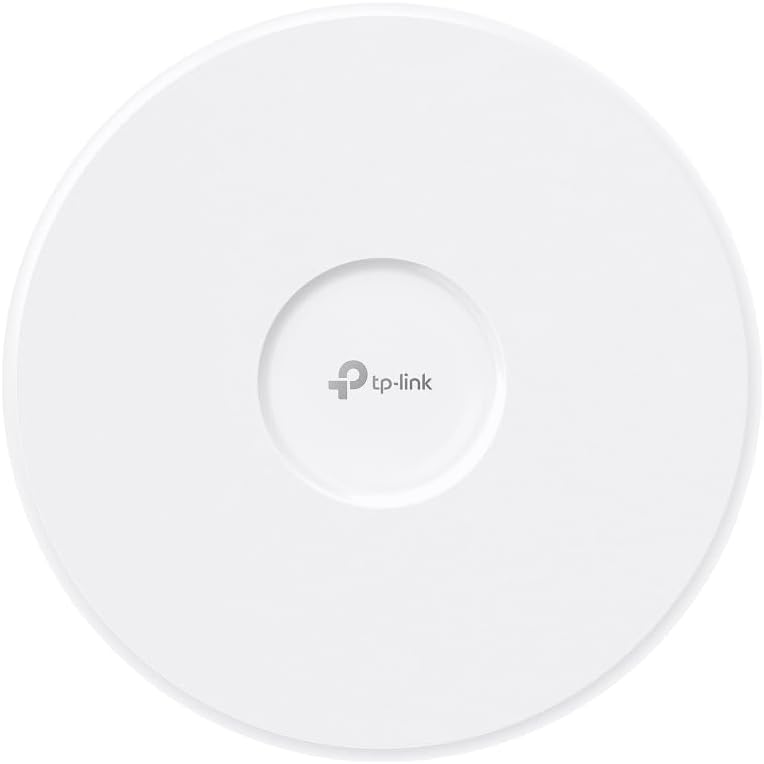
The Omada 7 Pro X (EAP773) is a cutting-edge Wi-Fi 7 tri-band access point delivering up to 5.0 Gbps speeds and equipped with a future-ready 10G port. It integrates seamlessly with the free Omada Cloud platform for centralized remote management, AI-driven optimization, and zero-touch provisioning. Designed for demanding business environments, it supports over 250 concurrent clients with advanced features like seamless roaming, mesh networking, and WPA3 security. Flexible PoE+/DC power options and a 5-year warranty make it a scalable, reliable solution for professional-grade wireless networking.


| ASIN | B0CTL1Y9YR |
| Antenna Location | Business, Home |
| Antenna Type | Internal |
| Best Sellers Rank | #13 in Computer Networking Wireless Access Points |
| Brand | TP-Link |
| Built-In Media | Ceiling/Wall Mounting Kit, EAP773, Installation Guide |
| Color | White |
| Compatible Devices | Personal Computer, Security Camera, Smart Television, Smartphone, Tablet |
| Connectivity Protocol | Wi-Fi |
| Connectivity Range | 1500 square_feet |
| Connectivity Technology | Wi-Fi |
| Control Method | App |
| Controller Type | Switch |
| Coverage | 1500 square feet |
| Customer Reviews | 4.3 out of 5 stars 122 Reviews |
| Data Transfer Rate | 11000 megabits_per_second |
| Frequency | 6 GHz |
| Frequency Band Class | Tri-Band |
| Item Weight | 1.6 pounds |
| LAN Port Bandwidth | 10G |
| Manufacturer | TP-Link |
| Maximum Upstream Data Transfer Rate | 11000 megabits_per_second |
| Mfr Part Number | EAP773 |
| Model Name | EAP773 |
| Model Number | EAP773 |
| Number of Ports | 1 |
| Operating System | RouterOS |
| Other Special Features of the Product | Access Point Mode, Beamforming, Guest Mode, Internet Security, QoS |
| Router Network Type | hybrid |
| Security Protocol | WPA-PSK, WPA2-PSK, WPA3 |
| Special Feature | Access Point Mode, Beamforming, Guest Mode, Internet Security, QoS |
| UPC | 840030711916 |
| Warranty Description | 5 year manufacturer warranty |
| Wi-Fi Generation | Wi-Fi 7 |
| Wireless Communication Standard | 802.11.be, 802.11ac, 802.11ax, 802.11g, 802.11n |
| Wireless Compability | 802.11.be, 802.11ac, 802.11ax, 802.11g, 802.11n |
M**T
It is literally 3x as fast as our current APs
I bought one of these to try out, we have APs that have just been so-so in my opinion in some ways especially for how expensive they are (the WiFi 6 5Ghz band doesn't even have the option for 160Mhz channels on our current ones...really?). For a fraction of the cost the speed is literally 3x as fast as our current APs (see file transfer screenshot). It seems the range is better and there are some options the current ones don't have. These also have 10GB uplinks which is far superior to the 1GB uplinks of the current ones, it makes a big difference and there is a POE injector on Amazon that is capable of 10GB throughput. For some reason I could not get into the AP over web browser, I ended up using the phone app, and be aware you are VERY limited on what you can do with config through the app. You can cover all the basic stuff if that is all you need, but there is a lot you are missing out on. I ended up installing the Omada Windows software, and was still sort of surprised that it will run the APs with no additional hardware or cost if you don't need anything super advanced. The Omada software is reasonably good for the most part, especially for it being a free download, and it will cover a lot of what you need in a lot of environments by itself. You do also have the option to have it sync to a TP-Link cloud account, I haven't got that far with it yet. Update: After getting my hands on a Qualcomm WiFi 7 adapter and the Win 11 24H2 update, the performance boost is significant. The same file transfer in the screenshot I posted (the screenshot was still 3x the transfer speed as the previous AP) is now pushing 150-200mbps, this is faster than the same transfer over a cabled 1GB connection. We chose to purchase 3 more of these instead of the current ones we have to expand coverage due to our satisfaction with these APs.
M**K
Excellent Upgrade from my old access point
I had an older TP-Link WiFi 6 device mounted on the ceiling using PoE. After several years (and a nearby lightning strike which also took out the router it was connected to) it failed to power up so I bought the newer model. The BE11000 is a significant improvement. Signal strength is very good, on the 5GHz and 6GHz channels I easily get 1Gbps speeds until I go to the far sides of the house and even there it's usually around 500 to 600Mbps. The 2.4GHz is slower, but all of my IoT devices connect to it and work just fine. I use the standalone web interface to configure it, it works great and is easy to use. I have separate SSIDs for guests and my IoT devices. By the way, I found that the older device, a TP-Link EAP660 HD, works if I plug in the power supply (instead of using PoE), so I now have that in my office area where I don't need to use the PoE.
S**N
Fast, reliable, and easy to manage
Love this access point. Speed is fast and it works very well. It's also very easy to control and manage. The only minor thing is that when you power it on, you need to wait a little bit before the 6 GHz network becomes available, but I believe that's for regulatory purposes and I'm totally fine with it. Highly recommend!
P**Y
Not sure if it's on the names list or not, but it's fast, doesn't phone home constantly
MLO works great. Easy as any other WiFi AP to setup. Connected to a 10G copper connection I can max out my 1G Internet connection and have speedy file transfers. Haven't tried making a mesh setup.
S**N
A bit more expensive for the performance you are getting
Wifi strength dropped a lot once got out of sight.
G**N
Don’t buy if you have a lot of wifi clients in your network
Stay away if you have a lot of devices (IoT etc). 2 units failed, burned out, check official forums, multiple reports about thermal issues. It starts with reduced speed then APs disconnect and then they fail completely, can’t be re-adopted to the network. Returning both and put my Omada WiFi6 APs back. Thought they would be be a nice upgrade but that was a big fail. $400 saved (I bought 2). Wait until they fix the thermal issues and push a new hardware revision, oh and even then wait a bit and see if it’s really solved. PS: for not many clients connected or not all bands used you probably don’t run into the issue, once you hit a certain amount of clients (I have 100+) you are in trouble and probably out of the return window.
R**D
Great WiFi 7 Option
The TP-Link Omada WiFi 7 BE11000 Access Point is great. I upgraded from WiFi 5 and the difference is night and day. The speeds are incredibly fast and consistent across all my devices, even when multiple people are streaming or gaming at the same time. Setup through the Omada controller was simple, and integration with the rest of my network was seamless. The build quality feels decent. I’m also impressed with the range one access point easily covers most of my house with strong, stable signal. Highly recommend for anyone who wants top tier speed and reliability.
J**G
Way more wifi
My situation: Environment - 1,600 sq. ft. split level home built 1993. That's 800 sq. ft. first floor, 800 square foot finished basement, sitting on 100' x 100' property, as are all the other houses are in our development. 2 adults, 2 children. Internet provided by Spectrum @ 300 mbps. Motorola MB8611 router. Deployment - Ceiling mounted at near center of main floor. POE++ powered by TP-Link TL-SG1210PP and CAT8 connected. The TP-Link EAP773 replaced our Netgear R7000 and blows the doors off that old junk. (Shout out to Netgear for never issuing a firmware update in well over 5 years) The EAP773 has a small, shallow footprint. Logo isn't obnoxious and the light blue ON light isn't even an issue, whereas on the old Netgear wifi router I had to put black tape over the ON led it was so bright. FYI - you can turn the blue ON light off if you don't like the look. So far, the EAP773 has out performed my ex-router by leaps and bounds. Fantastic coverage in all corners of the house on 5ghz band, including outside. Wall and floor penetration is better than I could have hoped for. Basement coverage and speeds are exceptional. I had planned to put another access point in the basement living room but I'm not sure I could without overlapping wifi and causing problems. Outdoors, I have fantastic wifi on the 2.4ghz band. Apps like Google Earth or Amazon's "Your Orders" page load noticable faster on my 3 year old TCL 10 Pro phone. Nothing earth shaking, but noticeable. Conclusion - obviously this AP is overkill for me but with wifi 7 and the 6ghz band, I'm future proofed. When I upgrade the homes internet speed, the EAP773 will start really working. Due to the tremendous coverage, I'll have to lower the transmission power (homes so close together I think I'm overpowering about 10 houses). Other testing (iperf, heatmap) will be performed this summer so I'll come back with that data and add it to this review. Addition of TP-Link's Omada controller will round my network off nicely. FYI ... newest firmware update 1.0.13 greatly improves 6ghz signal.
D**D
It's powerful and fast!
If you have an Omada controller - either a VM/LXC or hardware device, super easy to adopt and get up and running. It is quite large - the size of a large dinner plate. It isn't small and discrete like some of the Aruba and Ubiquti devices that are out there, but other than that, it's been it's been great. If you just want a stand-alone Wifi 7 AP, you're better off going with a more consumer level product. If you want VLANs, and a powerful device that can support lots of devices, frequencies and SSIDs, then you can't go wrong with it. If I hadn't run the wire to my main floor closet but into the ceiling of my main floor, I'd be getting near gigabit speeds with unobstructed line of site.
Trustpilot
2 weeks ago
3 days ago