Desertcart purchases this item on your behalf and handles shipping, customs, and support to Iceland.
โ๏ธ Elevate your build with pro-grade airflow and sleek design โ because your workstation deserves the best.
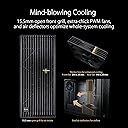
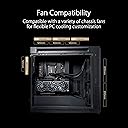
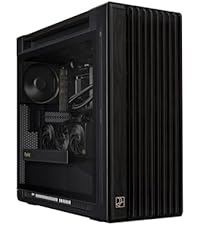
The ASUS ProArt PA602 is a full-tower E-ATX PC case engineered for high-performance builds, featuring support for a 420mm radiator, dual massive 200mm front fans plus a 140mm rear exhaust for superior cooling. It offers advanced airflow management with deflectors and a built-in fan hub, tool-less PCIe installation, a front 20Gbps USB-C port, and a front panel IR dust indicator to maintain optimal performance. Designed for creative professionals and gamers alike, it combines robust functionality with sleek, professional aesthetics and a 2-year warranty.


| ASIN | B0CPP3DWLX |
| Antenna Location | Business, Gaming |
| Best Sellers Rank | #89 in Computer Cases |
| Brand | ASUS |
| Case Type | Full Tower |
| Color | Black|Non ARGB Fans |
| Compatible Devices | Desktop |
| Cooling Method | Air |
| Customer Reviews | 4.7 out of 5 stars 124 Reviews |
| Enclosure Material | Alloy Steel, Plastic, Tempered Glass |
| Hard Disk Form Factor | 3.5 inches |
| Internal Bays Quantity | 9 |
| Item Dimensions D x W x H | 23.35"D x 9.65"W x 22.05"H |
| Item Weight | 35.5 pounds |
| Manufacturer | ASUS |
| Material | Alloy Steel, Plastic, Tempered Glass |
| Mfr Part Number | PA602/BLK/TG |
| Model Name | PA602 ProArt Case |
| Model Number | PA602/BLK/TG |
| Motherboard Compatability | Extended ATX |
| Number of Fans | 2 |
| Other Special Features of the Product | Built-In Fan, Power supply mount: Bottom |
| Power Supply Mounting Type | Bottom Mount |
| Recommended Uses For Product | Business, Gaming |
| Supported Motherboard | Extended ATX |
| Total USB 2.0 Ports | 1 |
| Total USB 3.0 Ports | 2 |
| Total Usb Ports | 1 |
| UPC | 197105338500 |
| Warranty Description | 3 year |
B**N
Bulding a high end computer? Check out this case.
This case exceeded my expectations. It is big enough to accommodate a very large cpu air cooler and EATX motherboard. They both fit easily with room to spare. The 2 huge front fans and large rear fan provide great airflow through the king sized interior. And if you're not water cooling, the top (where the radiator would go) can easily mount 3 more fans if desired. Quality of the case was impressive with clean, not flashy cosmetics. Cable management is the best I've seen. There are a host of thoughtful design items that made my build enjoyable rather than a task. Casters can be installed, which I did, to easily roll the finished computer around the floor as needed. A very useful feature incorporates "handles" as part of the case but they don't look like obvious handles. That helps a lot when you need to move or lift. For a great video review that details many features, search: proart pa602 chassis kleo yan. Watching it helped me determine this was the case I've been looking for.
B**B
Sleek Design, Great Cooling & Creative Cloud Bonus
Iโve been really impressed with the PA602 ProArt Case. The cable management is excellent, making it easy to keep the build clean and organized. The design and aesthetics are sleek and professional, perfect for a creative workstation. The included fans are powerful and efficient, providing great airflow to keep everything cool even under heavy workloads. On top of the hardware, the added Adobe Creative Cloud account makes this purchase even more valuable for creators. Itโs a thoughtful bonus that complements the caseโs focus on creative professionals. Overall, the PA602 delivers on both form and function, making it a fantastic choice for anyone building a high-end workstation or creative rig.
M**O
Excellent, high-quality case
awesome case, runs cool, silent; made it easy to build my workstation. This is a high quality case, panels attach and detach smoothly, the pre-installed large fans (front and back) are quite good (silent at normal medium speeds) and save some time. Running cool with a 24-core AMD Threadripper and Blackwell 6000 GPU - and at some point with 2 of those of GPUs (yes, there's enough space of that). One piece of warning: if you are using CPU cooling with the radiator on the top of the case (like I did), install the radiator fans before installing the CPU, for otherwise you likely won't have enough space to screw in the screws to hold the fans in place.
D**H
It's huge, beautiful and quiet!
This is the first high end case I bought, and my 10th or so tower build over 35 years. This was the easiest case I've ever worked with and it has great cable management. The quality is impressive, the 200 mm front fans and rear fan are very quiet (of course under high load you can hear them). The air filters are very well designed. I'm running an Asus Z790 MB with an i7-14700K, RTX3080, a 280 mm CPU water cooler from Corsair, and an Asus 1000W power supply. I was very surprised how much cooler this machine stays even with barely audible fans vs. my past few machines. Even with MS Flight Sim running maxed out its still pretty quiet. Also, no issues with regard to my 2 TB M.2 PCIe 5.0 x4 SSD heating wise using the stock heat sink on the MB. Everything fits well, just have one complaint. The 2.5" bays on the backside are set up such that a normal 90 degree SATA cable is backwards, so I think Asus should have included reverse 90 degree sata cables. But if you have a flexible set you can make it work, or just use one of the the 3.5 in bays with an adapter.
D**L
A Well-Built and Designed, Full Featured Case that Creatives Will Love
Let me say this from the jump, this case is for those whose computer usage requires high-end processors or multiple GPUs like the RTX 5090, i.e. editors, 3D artists, data miners, etc. Unless future expandability is a consideration, its size may be overkill for most gamers and those that don't need the extra space. I purchased this case as part of a new build due to overheating issues I encountered with my previous build, which was housed in a regular ATX case with 2 RTX 3070s. I work as a video editor and 3D artist who does a large amount of rendering and other processor-intensive tasks. With reports circulating at the time on heating issues with the higher-end Nvidia GPUs (I have two RTX 5080s) and Intels Arrow Lake CPUs (I have a Core Ultra 9), I worked on prioritize airflow when it came to case selection. 14 months later and I can say I couldn't be happier. The case itself is solid and very well-built from the dust filters to the glass panel, with parts that feel premium across the board. It comes with two large fans that run extremely quiet at high speeds, with plenty of space for additional fans or AIOs.. Its massive size not only helps with airflow, but it makes assembly that much easier even with multiple GPUs. It's also comes with wheels pre-built into the case itself, which makes it easy to move without having to physically lift it. Overall, I could see using this case for years so long as everything that can't be replaced holds up. If I can get two builds out of this case (or a decade of use) before having to replace it, I absolutely would consider it money well spent. An easy recommendation for professionals across the board.
J**W
Great case
Great case. Easy to mod to fit a 400mm monsta radiator in front with push and pull. 420mm up top and functions great. Easy cable management and air filters. Also the casters fit good on bottom for easy rolling. Stock fans are kind of weak so I upgraded them to some silver stone 140x in rear and 4 180i for the 400mm front radiator.
R**N
High quality, great for cats, but it's MASSIVE
When building a new PC I wanted to get a premium case this time around. After some research I narrowed it down to the Asus ProArt PA602, and needless to say I was not disappointed. At $280 it is on the expensive end of cases, but I was able to wait and snag the case when it went on sale for $220, which was more of a reasonable price imo. The case feels very premium and well put together. The side doors, top dust filter, and front facing dust filters all pop out easily and with no need for screws. I really appreciate some of the premium features like a dust sensor to indicate when the filter needs to be cleaned, and the power lock button to prevent accidental shutoffs. I have two cats, and they have "accidentally" turned off my PC many times. The case is great for cats who like to jump on top of PC cases. When looking for cases I was concerned about my cats jumping up on top. I feared they would track litter/dust and it would fall through the top of the PC case and damage components. Most other cases with top filters only had magnetic filters that sat directly on top of the PC. I knew if my cats found this, the first thing they would do would be to take off the filter and play/destroy it. So a big selling point for me was that the ProArt's top filter sits underneath the metal top and it can only be accessed by popping off the top section. Additionally, I liked that the case is super sturdy and I will never have to worry about my cats damaging the case by jumping on it. I originally wanted to go with a fishbowl glass panel design, but I had seen horror stories on reddit of them shattering. In terms of issues I had with the case, it's mainly due to size. This thing is absolutely overkill, sitting in at 81.36 L or (2.873 ftยณ) volume. For reference, most normal sized mid tower ATX cases sit in around 40L-50L in volume. There's a lot of wasted/empty room in the case. It makes for great airflow and it is one of the top best cases for airflow, but it the extra size doesn't offer a leg up on airflow vs it's competition. I really question the large case design choice. ProArt is made primarily for artists/professionals, but who has space for this in their office? I really wish there had been a smaller size option. I 100% would have bought that instead. (I saw that Asus makes one smaller overseas and hope it eventually comes to the US in the future) Typically I like to display my PC on my desk, but this case is so big it just looks terrible on top. I have yet to see a good example of this case on someone's desk. I read some reviews that complained about there not being enough space for cable management. I didn't experience this and had no issue with space for my cables. Maybe that's just because I am decent at cable management since I usually build in cramped mini-itx form factors, but idk. The velcro cable managers in the case made things easy imo. (I put in 4 hard drives and a NZXT Kraken 360mm CPU cooler for reference) I organized my cables and zip-tied them, but you could definitely get away with having a rat's nest in the back and no one but you would know. I did appreciate the provided zip ties that come with the case, but depending on how much you like to cable manage you might need more. I used about twice as much as what came with the case. One last note on the airflow; this thing blows! The front two 200mm fans blow so much air that the PC actually makes a draft under my desk and in my room. Can be a little chilly at times, but I hope it will be nice come hotter days in the summer. Not necessarily a complaint, good airflow is always welcome, but something to note/consider.
T**Y
Very spacious and full featured
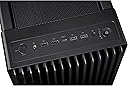
Talk about having a ton of space! Great cable management with cables running behind the motherboard panel and plenty of cutouts or ports at appropriate locations to make connections on the board. Two large front fans (extra thick with large fan blades) and a thick, decent sized rear fan. I have a 420 mm 3 fan radiator installed up top. Tons of airflow/cooling but remarkably quiet. Horizontal or vertical GPU installation capability. I have a monster Asus Nvidia 24 GB RTX4090 GPU and there's still room for more. Nice top panel USB connections - 2 @ 2.0, 2 @ 3.0 and a USB C 20gb. There's a fan control interface to connect all your fans to with the motherboard controlling speed. A speed override switch on the top panel to force full speed if desired. The only issue with that setup is that all of your fans are connected to the Asus fan header and not to the motherboard. One connector goes from the Asus fan header to the CPU Fan connector on the motherboard. With this setup, all fan capabilities are homogenized. Individual fan rpm speeds vs. PWM control cannot be determined by the motherboard/bios. I ended up not using that Asus fan header feature after I figured out that all of the fans were behaving exactly the same regardless of individual capabilities. I went back in and connected each fan to the appropriate motherboard fan header so that the bios could determine speed vs PWM control capabilities and I immediately noticed individual fans running in a more appropriate manner versus system loads. Very large footprint so be aware. Sadly, no optical drive bay. Also, no drive activity indicator on the top panel. Lastly, for some reason, Asus did not choose RGB fans for the case. The two huge 200 MM fans in the front would have been a perfect opportunity to show off some color. I eventually replaced those fans with some Thermaltake RGB fans for some color since the Asus motherboard has Aura Sync and RGB connectivity.
S**Y
Premium Roomy Case with a nearly all-metal construction, great to build in.
Best case I've ever owned, easiest case to build in, the rear-side panel even has labeled holes for where to run cables to the mobo. Included wheels made it super easy to move it in/out from under desk and the included fans are extremely quiet while pushing A LOT of air. I also really liked that the front panel/dust detector and case fan cables were already properly plugged in and very neatly managed/organized under the side panel. Built a stealthy no-lighting vertical mounted 4090 + 13900k build. If you are top-mounting a radiator make sure you check the manual online and ensure there is enough clearance for the thickness of the radiator setup. I did not do this so my radiator is just sitting on top not screwed in, however it can't possibly fall through so it's really no issue.
H**S
The Best
The Best
A**R
Super Quiet with excelent airflow and filtering, IF you do it right.
I bought this case with the matching ASUS LC 420 3 x 140mm radiator to tame a 14900k that I had previously in an olde Antec P182 with a Dark Rock 4 Pro cooler (ProArt Z690). I would recommend installing the fans to point down in a pull configuration under the radiator, for several reasons: 1-Push or Pull makes no measurable difference in cooling (tested), 2 - There is a lot of open mesh at the back of the case and with the back and rad fans pushing up and out the top and back it was difficult to keep positive pressure in the case. The result was unfiltered air coming into the case through the back mesh. 3 - It makes zero sense to me to have the top filter filtering dust out of the EXAUST air. 4 - It is MUCH easier to CLEAN both the fans and the rad in the PULL configuration, Any dust that gets past the top filter can be vacuumed off the top of the rad, and the side of the fans that get dirty (hi pressure side) are exposed on the inside of the case. In the PUSH-OUT config you have to pull the fans off completely to clean the rad. A great feature of the case is the ability to put standard office chair wheels onto it. The two little wheels on the back are cute but don't really help much. All you do is peel off the heavy rubber feet on the bottom to reveal 4 standard 11mm x 22mm wheel sockets.
W**R
A Work of Art
OMG, this case is an utter work of art. From the optical sensor monitoring the dust filter to the little wheels at the back to make it easy to roll out from under a desk, this case has everything. And it's huge. My 5090 GPU looks tiny mounted inside there. It is by far the most impressive case I've ever owned. If you're building the Krell of PC computer systems, this is the case for you.
J**S
Great Case!
Fantastic case - huge fans, quiet, tons of room to build. 10/10.
Trustpilot
3 weeks ago
1 month ago