🚀 Elevate your home network to pro-level speed and security—because buffering is so last decade.
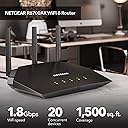
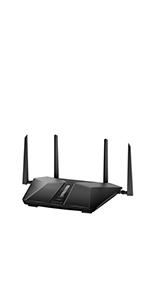
The NETGEAR R6700AX 4-Stream WiFi 6 Router delivers AX1800 wireless speeds up to 1.8 Gbps, covering up to 1,500 sq. ft. and supporting 20 devices simultaneously. It features advanced security with NETGEAR Armor, automatic firmware updates, and easy management through the Nighthawk app. Compatible with all major ISPs up to 1Gbps, it’s designed for seamless streaming, gaming, and smart home connectivity.


| Antenna Location | Security |
| Antenna Type | Fixed |
| Asin | B08KTXG8Q5 |
| Best Sellers Rank | 375,385 in Computers & Accessories (See Top 100 in Computers & Accessories) 2,611 in Routers |
| Box Contents | 4-Stream AX1800 WiFi 6 Router (R6700AX), Ethernet cable, Quick start guide, Power adapter |
| Brand Name | NETGEAR |
| Colour | black / black |
| Compatible Devices | Computer, Mobile Device, Game Console, Streaming Device, Wi-Fi/Ethernet Electronics |
| Connectivity Protocol | ethernet |
| Connectivity Range | 1500 Square Feet |
| Connectivity Technology | Ethernet, Wi-Fi |
| Control Method | App |
| Controller Type | App Control |
| Coverage | Up to 1,500 sq. ft. |
| Customer Reviews | 4.4 4.4 out of 5 stars (5,534) 4.4 out of 5 stars |
| Data Transfer Rate | 1.8 Gigabits Per Second |
| Frequency | 1.5 GHz |
| Frequency Band Class | Quad-Band |
| Has Internet Connectivity | Yes |
| Has Security Updates | Yes |
| Is Modem Compatible | Yes |
| Item Dimensions L X W X H | 35.6L x 27.9W x 10.2H centimetres |
| Item Weight | 0.01 Ounces |
| Lan Port Bandwidth | 1000 Mbps |
| Manufacturer | NETGEAR |
| Manufacturer Part Number | R6700AX-1AZNAS |
| Maximum Upstream Data Transfer Rate | 1800 Megabits Per Second |
| Model Name | R6700AX |
| Model Number | R6700AX-1AZNAS |
| Number Of Antennas | 3 |
| Number Of Items | 1 |
| Number Of Ports | 4 |
| Operating System | NETGEAR Genie |
| Other Special Features Of The Product | Parental Control |
| Security Protocol | WPA3 |
| Unit Count | 1.0 count |
| Upc | 606449152739 |
| Voltage | 100240 Volts |
| Wi Fi Generation | WiFi 6 |
| Wireless Compability | 802.11ax |
User
Fast, Stable Connection
Didn't care that they force you into the Nighthawk app. I wanted to set up my wifi on my PC and when I typed in the router address I got pushed into setting up an account and control the settings on my iPhone. After setting up the account, I was able to get in using my PC in the conventional manner through the IP address, but it was a few minutes of horsing around which was a bit frustrating.Otherwise, the install went great. With my ASUS AX3000 PCI Express WI-FI 6 adapter on my PC, I am able to get consistent performance close to 600 mbs. Router is about 75' and two walls away from my PC. Only been installed for a day, but so far everything is stable and functional. Great upgrade from my WIFI 5 router. Recommended!
User
Muy buen repetidor
Muy fácil de instalacion buen material buen acabado
User
Great Router at a Good Price
My last Netgear router lasted 10 years before it started having issues, so I decided to give Netgear another try. The price, at $99.99, was about $30.00-$50.00 cheaper than the big box stores. The setup was easy. Please note that you do not need to use the phone app to set it up! Setup was quite easy using the web app on the computer. It took me just about 30 minutes to configure the router. The antenna and beamforming works well. The router also supports 802.11ax. Most new laptops (except the cheapest ones) support that new wireless standard, so you'll get faster speeds. I'm getting nearly my maximum internet speed on my laptop all the way upstairs in a pretty big house. The router also has the latest WPA3 security (it didn't show that in the manual). While a lot of smart phones and computers don't have WPA3 security yet, it's nice to know the router is future-proof (at least for the next several years). I haven't had the router very long, but so far it's working perfectly. I would recommend.
User
A good, very basic router
I ordered this router to replace the Spectrum router I was paying $5 a month for, now having gone to $7 a month. It’s the router that looks like a charred meatloaf, standing on its’ head. It’s nothing special, so finding a substitute was like hurdling a very low bar.This R6700AX is an exact clone of the NETGEAR RAX10. The specs are identical, but not the price. Why, I don’t know. Of note is that this router omits the “NIGHTHAWK” designation, which, aside from generally lower speeds and area coverage, also lacks a USB port and an on/off switch on the back. These are not deal breakers though. My networking demands are quite modest, so I didn’t need a gaming level router. One Dell workstation, two tablets, and a 2000 square foot house, where all the activity is confined to a single quadrant.After reading the user manual, downloaded from the NETGEAR website (146 pages, does not cover NIGHTHAWK app), I opted to do a website interface, desktop installation, rather than using the highly touted NIGHTHAWK app. Though the NIGHTHAWK app has a lot of appeal for its’ simplicity and features, I wanted more in-depth control of the routers options than the app provided. For example, by electing to choose the “Smart Connect” feature, the router automatically chooses which band, the 2.4 GHz or 5 GHz, that gives the best performance for each particular device that’s connected. You can still choose to configure each band separately by assigning a different network name (SSID) to each band (and that configuration is generated, by default, in your setup procedure). But with only two devices connected at a time, the “Smart Connect” option did not offer any benefit to me. I actually went several steps further and disabled the 2.4 GHz band and both Guest Network bands leaving only the 5 GHz band active for my two tablets. A word of caution for either of these connection preferences. Unlike some other NETGEAR routers, neither option will disable the WPS feature. That’s a potential security threat lurking under the radar.The installation process was simple and straight forward. Just sit back and answer the questions, click next, page by page, and you’re done. I chose the automatic set up option, the Setup Wizard, with the ability to go back through and tune the features important to me. This is done using the routers web interface, for which you must sign back into with your newly created password. There are a couple of You Tube videos, search: TONOR NETGEAR R6700AX SETUP, and search: BROK3N1MAGE NETGEAR NIGHTHAWK, that can give you a visual “heads up” as to how the router interface is laid out beforehand. I found them helpful.And the results were, well, underwhelming. LAN speeds to my workstation were almost identical to the Spectrum router at 366 Mbps download and 12 Mbps upload, with an assigned 300 Mbps service from Spectrum. Wi Fi speeds for the tablets were about 10% faster with the R6700AX, but if not for doing a speed test, I would not have detected any difference.Overall, I am satisfied with this router. Price, features, speed and coverage are all adequate for my minimalist inclinations. I also opted for the 4-year Asurion protection coverage. If the thing blows up before its’ time, it’s replaced. If I get past 11 months, it will pay for itself in monthly rental fees.
User
So far so good
I bought this Used Like New at a fraction of full retail. I needed to replace a 10+ year old router that was dying.I took a star off because the setup process left a "Complete" window up on my screen that assumed a touch screen device. I had to force a shutdown of my desktop, unplug the router, then start both of them back up. This annoyance extended the setup time for several minutes (which would have been about 30 minutes including firmware update).My Smart TV seems to have an issue with one of the app's that didn't exist before. I have to unplug the TV from the wall each morning, then plug it back in to get things working correctly. My phones, computers, and NAS seem to be working well. I see a noticeable increase in download speeds. The NAS throughput increased by a factor of 4 or 5.I've only had it installed for a few days, so time will tell the tale.
Trustpilot
1 week ago
1 month ago