Desert Online General Trading LLC
Dubai, United Arab Emirates
Desert Online General Trading LLC
Dubai, United Arab Emirates




🚀 Elevate Your Storage Game with TerraMaster!
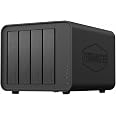
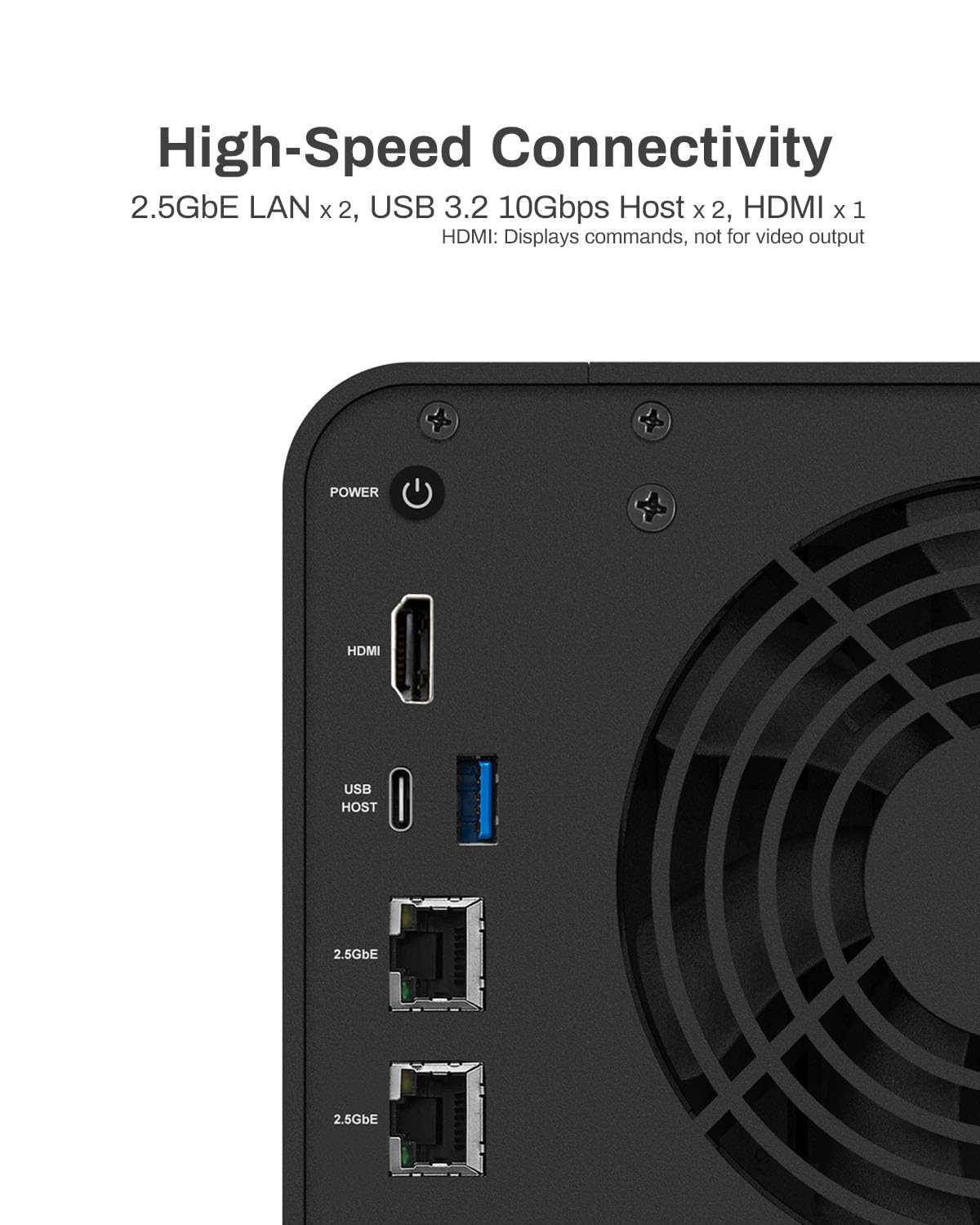
The TERRAMASTER F4-424 NAS Storage is a high-performance, diskless network-attached storage solution featuring a powerful N95 quad-core CPU, 8GB DDR5 RAM, and dual 2.5GbE ports. Designed for efficiency and speed, it offers rapid data transfer, easy SSD installation, and robust backup solutions, all while maintaining a quiet operation.
| Size | 4-Core CPU, 8GB RAM, 4Bay, F4-424 |
| Item Dimensions D x W x H | 8.74"D x 7.04"W x 6.06"H |
| Material Type | Metal |
| Color | Black |
| Is Assembly Required | No |
| Mount Type | Tabletop |
| Compatible Devices | Server, CPU, Laptop, Desktop |
V**D
Awesome Specs
This thing is a beast. I was torn between this f4-424 and another brand around the same specs. The build quality is good. The unit feels solid. The setup was easy to do. I did stick with the Terra master os, and it isn’t too bad, especially for beginners. I will probably buy or build another server and run a different os.This device is great for plex. I have had up to 4 simultaneous video streams, 2 hw transcodes, while streaming music via Plexamp without issues.Customer service is responsive. There is a lot of support out there as well.Adding drives is easy. 32gb ram. Transfer speed from windows laptop via wifi is usually around 70mb/sec. I really have no complaints. I’ve had it about 6 months now running with no issue.
K**S
Works with Unraid
I've seen lots of complaints about Terramaster's OS (both in Amazon reviews and on places like Reddit), so I was almost put off of buying this device. But in terms of the specs of the F4-424 Pro compared to its price, no other NAS offers a better bang for your buck. Luckily, I found a helpful YouTube video explaining how to install Unraid on a Terramaster NAS, so I picked this up as an upgrade to my QNAP TS-251+.Accessing the boot USB slot on the F4-424 Pro involved removing two screws from the back of the case, sliding off the side panel, then removing the four screws holding the motherboard in place. Doing so allowed me to swap the preinstalled flash drive for a flash drive with an install of Unraid.I will note, I had to buy a Sandisk Ultrafit to create the Unraid boot drive, as the clearance between the USB slot on the board and the NAS enclosure is quite small (even my Samsung FIT was a bit too tall). For Unraid, you'll want to get a USB drive of 32 GB or smaller. You can get a larger flash drive, but you'll need to format it down to 32 GB (from what I understand about Unraid). Also, Unraid's USB boot drive creation tool displayed my Sandisk drive as "incompatible", but using the manual Unraid boot disk creation process worked just fine.I've had the Terramaster F4-424 Pro running Unraid for almost a week now, and everything is working great. I've got three drives (a 12TB, an 8TB, and a 4TB), with another 12TB on the way. Unraid isn't the most user-friendly NAS solution for beginners, but videos from YouTubers like NASCompares (who hosts the tutorial on installing Unraid on a Terramaster device) and Spaceinvader One (an Unraid guru with tutorials on everything Unraid-related) have been extremely helpful and have allowed me to migrate my data from external flash drives and my existing NAS. They also have guides for setting up popular apps like PLEX, which is working great.I haven't yet allowed remote access to my PLEX server, but allowing my parents to stream PLEX in HD was another motivator for upgrading to a beefier NAS. In theory, the device specs suggest they should have no issues, but I'll report back after everything is completely set up. UPDATE: Remote Access to PLEX is working great. I had my parents and a friend both streaming 1080p remotely while I was streaming 4K HDR in the home, and the CPU was rarely getting over 50% load. So, can confirm that the F4-424 Pro is great for PLEX, both over your local network and remotely.So, if you're worried about the Terramaster OS (which, from what I've read, is continually getting better), just know that you can easily install Unraid. While Unraid might not be as easy out of the box as QNAP's or Synology's software, it only took me a few days to get the hang of things.
P**S
Great NAS with some quirks
I got the F4-424 intending to use it with Unraid. It works well, but there were some quirks I hit so I wanted to share what I found.I wanted to upgrade it to 32 GB of RAM. Reports conflicted online if it actually supports 32 GB or if it tops out at 16 GB. I ordered a stick of Crucial RAM 32GB DDR5 4800MHz CL40 -- CT32G48C40S5, and installed it... and the system was immediately unstable. I tried Memtest 86+ and it almost immediately failed. I exchanged the Crucial RAM, and the replacement also failed Memtest. (The stock 8 GB of RAM passed just fine so I knew it wasn't the system itself.) I then tried a 32 GB stick of Patriot PSD532G48002S and it passed! I doubt I got two bad sticks of Crucial RAM so something might be inherently incompatible here, but the Patriot RAM is cheaper anyway so it’s fine.Another quirk is around fan speeds. In the bios I initially set the fan manually to 100 thinking it was 100%, but Unraid quickly complained about drive temps hitting around 50 to 55c. I popped back into the bios and tried changing the fan speed to something higher and it turns out the scale is 0-255, not 0-100. I set it to 255 and it’s no longer silent, but it’s not terribly loud either. Drive temps are now under 30c all the time. It also seems like from the front it has poor air intake, but interestingly the Terramaster logo on each side is made up of many holes and serves as an air intake as well, so keep the area to the left and right of the NAS clear.Another reviewer mentioned it but the internal USB drive is tight, the Sandisk Ultrafit they recommended worked well though. You do have to take the motherboard out to swap this but it’s not terribly difficult. Everything else is really easy to do including installing M.2 SSDs.I do wish the F4-424 had more than one USB-A external port. I have 3 devices total to connect which doesn’t seem excessive but still had to get a USB hub.
Trustpilot
1 month ago
2 weeks ago