Some deliveries may take a little longer than usual due to regional shipping conditions.

DOWNLOAD THE APP


Customer Services
Copyright © 2025 Desertcart Holdings Limited
DOWNLOAD THE APP


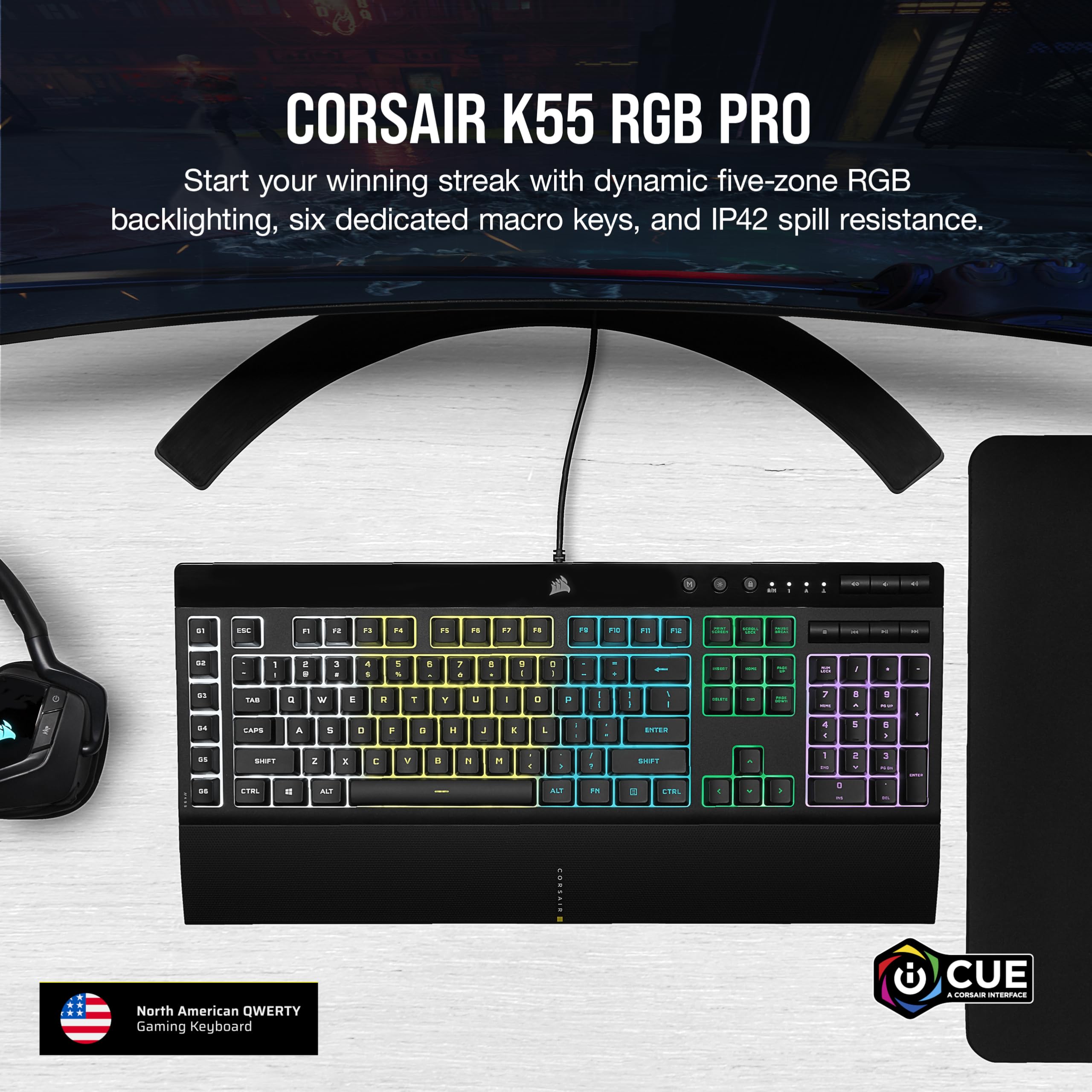
⌨️ Light up your productivity and play like a pro!
The Corsair K55 RGB Pro is a high-performance USB gaming keyboard featuring five-zone dynamic RGB backlighting, six programmable macro keys, and IP42 spill resistance. Designed for both gamers and professionals, it offers extensive customization through Corsair's iCUE software, quiet key switches, and a comfortable wrist rest, making it a versatile and durable addition to any desktop setup.


| ASIN | B08Y78FFR9 |
| Are Batteries Included | No |
| Best Sellers Rank | 226,909 in Computers & Accessories ( See Top 100 in Computers & Accessories ) 3,732 in Keyboards (Computers & Accessories) |
| Brand | Corsair |
| Colour | black |
| Customer Reviews | 4.4 4.4 out of 5 stars (870) |
| Date First Available | 31 Mar. 2021 |
| Form Factor | Extended with macro keys with macro keys |
| Guaranteed software updates until | unknown |
| Hardware Platform | PC |
| Item Weight | 812 g |
| Item model number | CH-9226765-NA |
| Manufacturer | CORR3 |
| Operating System | Windows 10 |
| Original Release Date | 2023 |
| Power Source | Corded Electric |
| Processor Count | 1 |
| Product Dimensions | 48.26 x 16.71 x 3.61 cm; 811.93 g |
| Series | K55 RGB PRO |
| Voltage | 28 |
A**R
This is arguably one of the best keyboards and a value for money purchase for both gamers and professionals alike. Tip: Pony up a little bit more and go for the K55 RGB PRO, all the characters except media keys are backlit which makes a big difference in appearance versus having opaque characters and RGB backlighting. iCUE feature one of the best RGB lighting technologies on the market so take advantage of it PROS ===== 1) Six separate macro keys to program practically any set of commands - you are limited to your imagination. One of the first macros I programmed was to bring up the Calculator app. TIP: Use it to bring up webpages, chunks of text/code/data you need to repeatedly use - this can be very useful for coders (NOTE: There is a character limitation....1-2 paragraphs of text which should be enough for most people)...etc. 2) Corsair's iCUE app allows a great deal of customization. Practically any key on this keyboard can be programmed with a macro for anyone who has an extensive number of macro functions they need quick access to. iCUE is available as a free download you can get from Corsair's official website. 2) Alternatively, you can program in macros without iCUE using the circular M key but it's more convenient to go through iCUE. 3) For anyone who cannot stand keyboards that alert your neighbours that you are busy using your computer, this is a great, quiet option. Types like a quality keyboard. 4) High-quality plastic backplate. Most keyboards use plastic backplates and Corsair has not compromised on Quality here. It feels nice to the touch. 5) Font used for characters on keyboard is not hideously aggressive so professionals can comfortably use this for work. 6) Yes, backlighting can be turned off if you wish. 7) 2 more RGB lighting zones versus the standard K55 RGB 8) Comfortable textured, plastic wrist rest. CONS ===== 1) The Corsair logo and media keys are not backlit - I am nitpicking 2) No per key RGB lighting - be realistic, getting good per key RGB lighting at this price is very difficult to find. FUN TIP: In case anyone was wondering, yes you can program that lock button at the top of the keyboard to lock Windows, not just the windows key but actually lock your Windows OS at the push of a button instead of hitting Win+L - for anyone who is not aware. Use iCUE to assign the Windows Lock macro to that button. Personally, I do not need to have the Windows key locked, so this is a better use of that key for me. You can program it to any key that you prefer.
W**Y
Even wennen aan de toetsen links maar werkt perfect
A**5
الكيبورد ممتاز وعملي ومناسب للقيمنق ، ما عليه أحرف عربية ، ليس ميكانيكل من المصنع ، له برنامج تحمله من موقعهم لمزيد من الخيارات 4/5 لو كان ميكانيكل كان احسن ، قبل الشراء شوفو مراجعة للمنتج على اليوتيوب :)
Y**A
fait le taf, frappe agréable pour un clavier à membrane.
E**D
Had this keyboard for some time now. Upgraded as mine was getting old. At first, I was highly skeptical with the extra macro keys, as it was an adjustment using standard keyboards since childhood. But within a few days, I adapted and it was easy to get used to. All in all great keyboard, heck I don't even use the macro keys but it's nice to have if I ever need. Looks great, sleek and stylish. Easy to clean. Little longer because of extra keys, so not ideal for smaller desks. Lighting is nice too
Trustpilot
5 days ago
2 months ago