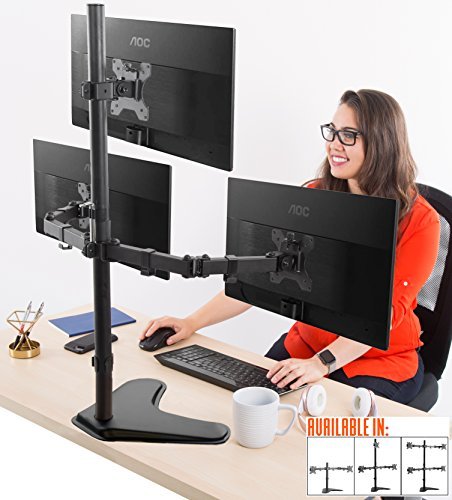
🖥️ Triple your view, not your desk clutter — Stand Steady means business.
The Stand Steady Triple Monitor Desk Stand is a premium, height-adjustable, full-articulation mount designed for 13-32 inch VESA-compatible monitors. Featuring 360° rotation, 17° swivel, and 34° tilt, it offers unparalleled ergonomic customization. Its freestanding powder-coated steel base eliminates the need for clamps, ensuring stability and easy repositioning. Ideal for home offices and professional setups, it supports expansive multi-monitor configurations while integrating cable management and quick-release mounts for a sleek, efficient workspace.


| Best Sellers Rank | #931 in Computer Monitor Arms |
| Brand | Stand Steady |
| Color | Black |
| Compatible Devices | Monitor |
| Customer Reviews | 4.4 out of 5 stars 495 Reviews |
| Material | Powder-Coated Steel |
| Mounting Type | Tabletop Mount |
| Movement Type | Articulating |
H**E
Great quality, fits many monitors.
This is an incredible triple monitor stand. The sides are quite stable and they have a great amount of moblitly! I was able to get my curved 27” monitors to line up perfectly! There is just a little side to side wobble from where the mounts meet the clasps, but for as easy as it was to move attach the monitors, I’d rather give a 5 stars than a 4 . My favorite points: - just how much you can move the side arms around. It allows for great positioning! - the top monitor tilts. This was a must have for me, to minimize glare. -they included extra screws! They had 4 different screws for just Incase your monitor didn’t take standard! They had longer screws with spacers and washers(which saved me, I had the mount sticking out of one of my monitors) -stable. This stand is built out of metal, so don’t expect a light stand. Just make sure you tighten up all the screws!!! You can store the included Alan wrenches ON THE STAND. With the cable management clasps! Steady stand out so much thought into making it an easy experience. Hats off to this company.
G**N
Unique in a Few Ways
First we are a financial office and have MANY monitors, stands, and configurations. I have been using a dual mount with a larger monitor on the desk to the side. After years of dual mount (side by side) I am so done. Having to keep your head tilted right or left (or having to glance) for HOURS all day is for the birds. I wanted to have a 32'' in the center (bottom) and 2 24'' monitors above that could be landscape or portrait. I send them a message to see if this would work and they responded promptly. This is also the first mount we have used that has a base to sit on the desk over a clamp. This think is awesome! It is BIG (it can fit 3 32'' monitors). The base vs clamp is really nice so you can move it around. One really nice feature is the VESA mounts can "slide off" (there is one screw to secure) the arms. Our other mounts do not allow this so you have to mount the monitors to the arm (with the monitors face down etc) and than clamp to the desk without damaging the monitors. No more with this product. They did a great job and we will begin to replace our other mounts with these.
J**R
Impressive Support for Multiple Monitors with Adjustable Alignment
The Stand Steady Freestanding 3 Monitor Mount Desk Stand is an outstanding solution for anyone seeking to maximize their productivity with a multi-monitor setup. This sturdy stand has impressed me with its capacity to handle up to three 32-inch monitors, allowing me to create an expansive and immersive workspace. The standout feature of this monitor mount is undoubtedly its ability to support three large monitors simultaneously. The stand's robust construction provides a solid foundation, ensuring stability and preventing wobbling or shaking of the monitors. This level of durability and strength gives me confidence that my valuable screens are securely held in place. While maintaining alignment with multiple monitors can be a challenge, especially considering their weight, the Stand Steady mount offers an adjustable configuration that allows for fine-tuning. The included allen screws enable easy adjustments, ensuring that the monitors stay perfectly aligned. Some initial tinkering may be required to find the optimal configuration, but once achieved, the alignment remains steady, providing an uninterrupted viewing experience. I appreciate the attention to detail in the design of this monitor stand. The cable management system helps keep my workspace organized and free from tangled cords, enhancing both the aesthetics and functionality of the setup. It's a small yet thoughtful feature that contributes to a clean and professional workspace. Furthermore, the freestanding design of this mount adds to its versatility. It eliminates the need for drilling holes or attaching the stand to the desk, providing flexibility and ease of installation. The stand can be placed on any flat surface, and its wide base ensures stability even with the weight of three monitors. In conclusion, the Stand Steady Freestanding 3 Monitor Mount Desk Stand is a remarkable solution for those who require a multi-monitor setup. Its ability to accommodate three 32-inch monitors is impressive, providing a spacious and immersive workspace. While alignment may require some initial tinkering with the Allen screws, the stand maintains stability and keeps the monitors securely in place. With its thoughtful design and reliable construction, this monitor stand deserves a well-earned five-star rating.
S**D
Does a great job
This monitor mount is exactly what I needed. I now have all 3 monitors on one desk and easy to see. Sturdy and definitely will hold my monitors with no problems. Pros : Nice look. Black with all parts being painted. Sturdy. Will hold all monitors without slipping. I can still adjust viewing angle and rotate monitors but unless I move them, they stay just as I put them Cable management. I give it 50/50. It works but not really great. I need longer cables for better routing but the plastic clip have a real cheap feel to them. I don't see them lasting. Cons Not the easiest to put together. Best to have someone help you if you value your monitors. You must tighten each clamp very tight. My hands do not work well so I had to use a wrench on the end of the hex keys to get enough force. tighten, slip monitor on, check to see if it holds, re-tighten, re-check. make sure you do the bottom first with arms all the way back. The Vesa mounts had a problem with the top screw. Will try to take a picture and add. basically, this screw holds the Vesa mount onto the arms after you slip it on. It screws into the Vesa mount adaptor on the lower arms. The problem is how the threads are made. basically they used the screw to make threads into a hole punched into the mount. When you try to take it out to install the monitor with the Vesa mount, it will not come out without really torquing. Then you must make sure it will re-thread. had to use a little oil to smooth it out. Top mount did not have this problem since it used a different screw. All together, I am glad I got this mount. Very sturdy and actually worth the cost. when hanging $$$ monitors, DO not cheap out.
K**C
Works surprisingly well despite physics not making sense.
I'm not going to make this super long because it's pretty straight forward. I'll update months down the line if things change, but as of right now I'm impressed. Sturdiness - Aside from when you put one monitor on one side you will need something to prop up that side while you attach the other monitor, this thing is surprisingly sturdy for having no physical mount to the desk. ALL the monitors have adjustments so you can move the monitors without it being too firm or too loose. Looks - It looks like a monitor stand. Not sure how else to state that part, it does a good job of hiding cables . Putting it together - Opening the box is a bit scary, but once you get all of the pieces out you realize there's really only a few things you have to put together and I'd say it took me less than 30 minutes taking my time with no power tools. Setup - It's kind of atypical to have an overhead mount but honestly I love it for what it is. I have 2 32 inches and 27 inch on top and I think it looks great and functionally great for work setups where you monitor, or even just a jack around screen. You can adjust the angle so it's not that much of a strain on your neck.
S**5
Game changer for telework! Love it! How did I ever work without it?!
I love this soooooo much. And their customer service is helpful, responsive and went out of their way to help me find an adapter on Amazon to attach an old monitor. Good direct so fairly simple to assemble. Very sturdy, i have a cat and am accident prone... still standing. I love it so much! I almost dread returning to the company's office cuz this has increased my productivity tenfold and made for less eye strain having multiple screens right there to compare 2 docs on 2 different monitors, then have my telemeetings, chats and emails on the others on normal sized screens. How did I ever work without this?! Lol. After using these, I'm actually kicking myself for not getting the four screen one. But I think I can buy another dual-arm from the company in the near future. Very satisfied customer.
K**S
It broke my 32" monitor
The concept is great, but this stand is not strong enough to hold three 32" monitors. I own 3 Dell S3221QS monitors, each weighing 16.25 lbs and measuring 27.92 inches x 8.15 inches x 17.64 inches. I was able to assemble the stand by myself, but had help mounting all 3 monitors. The stand originally stood with all 3 monitors, seemingly to have no problems. After going to bed I woke to a crash, and found that the stand had tipped over, cracking the monitor I had at the top. Thankfully I had insurance on the monitor so was able to get a replacement, and I am no longer using the monitor stand at all. I ended up getting a 2 monitor stand and a single wall mount, which works perfect. I would not recommend getting this stand for 32" monitors, even though it says it can hold them... I'm thinking 3 is just too much weight.
A**R
solid build
Great product - solid build -- works perfect for what I use it for -- 2 monitors and tv - above the monitors -- saves desktop space
Trustpilot
2 weeks ago
2 weeks ago



