


Desertcart purchases this item on your behalf and handles shipping, customs, and support to Iceland.
❄️ Stay Cool, Game Hard: The Thermal Pad That Means Business
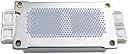
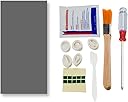
The PTM7950 40x80x0.25mm Phase Change GPU Thermal Pad by JOYJOM delivers exceptional thermal conductivity of 8.5W/mK using proprietary phase change material technology. Designed for high-performance CPUs, GPUs, and SSDs, it ensures ultra-low thermal impedance and superior interface wetability. The package includes all necessary tools for professional-grade installation, making it a top choice for gamers and tech professionals seeking reliable, long-lasting cooling solutions.




| Asin | B0BRJB8JNX |
| Batteries Included | No |
| Batteries Required | No |
| Best Sellers Rank | #28,695 in Computers & Accessories (See Top 100 in Computers & Accessories) #95 in Thermal Paste |
| Brand | JOYJOM |
| Customer Reviews | 4.3 4.3 out of 5 stars (873) 4.3 out of 5 stars |
| Date First Available | 11 January 2023 |
| Item Model Number | PTM7950 40x80 |
| Item Weight | 68 g |
| Manufacturer | shenzhenshidoulepaikejiyouxiangongsi |
| Model | PTM7950 40x80 |
| Package Dimensions | 15.29 x 10.49 x 2.9 cm; 68 g |
User
The PTM7950 is incredible and absolutely worth it.
alright, this is a game changer, first of all the packaging was pretty good, i didn't expect the packaging to be so good.The thermal pad actually does wonders, before using the pad, every gaming session, my CPU temps were always 95+ and the performance due to the thermal throttling was pretty awful. I played for an hour after applying the ptm7950 pad, and the temps only touched 81° C. it's ridiculously good, and i do think this is the original one because the packaging and stuff looked pretty premium. totally worth the buy, also my laptop is HP Pavillion Gaming 15 with Ryzen 5 3550H and gtx 1650
User
Its really worth it.
This product is genuine, I applied it on my lenovo ideapad gaming 3 with ryzen 7 5800h cpu and rtx 3050 gpu, the result is awesome. I get 89 degree celsius max on running cinebench r23 app for 10 mins as well as I got around 76 degrees on performance test app cpu mark test at room temperature. Earlier on arctic mx4 i got 100+ degrees max. The cpu idling temp is around 45 to 46 degrees. The price is on higher side but I think its really worth it.
User
Best
good product, really dropped my cpu temp, earlier temps used to cross 90°C now it goes above 80°C under heavy load only and lurks around 50-65°COnly issue i faced was applying the thermal pad, the plastic coating is very hard to remove
User
Magical stuff.
This paired with Halnziye HY236 (to cool the VRMs and VRAMs) actually works so far! I have only applied it for a day, but my HP Omen actually feels like a gaming laptop. It always used to thermal throttle before when using the ADVITS thermal pad and Arctic MX4 but now my idle temps are 60c ish and while gaming both the CPU and GPU hovers around 80-70c.It is challenging to apply though and keeping it in the fridge didn't help much. Not sure about the longevity but will update at a later time or until it stops working.Not sure about the authenticity as I read several reviews of this product, but it does the job.
User
Ptm my experience
great product it have solved my problem previously i used mx-4 in my ideapad gaming 3 laptop and it has run out problem the themal paste move out of the heat scenk and i was frustrated and then finally i ordered ptm 7950 it improves my temperature from 97- 100 peak to 75 - 84 keep in mind iam also using a cooling pad iam satisfied.
User
Waste don’t buy this PTM 7950
Absolutely Waste , if u have processor i510300h or higher and gpu 1650 series then your CPU temp will rise within 5 min of high end task or gaming , I have done CPU , GPU test and 3D mark cpu test got 85 degree on an average temperature .Waste of moneyNo Temperature reduction , your old thermal paste works better then this .
User
Dropped My CPU Temps Significantly
It’s definitely better than the arctic-mx4 thermal paste which I have used before. earlier, I had to reapply thermal paste every 2-3 weeks or at least once a month, and the temperatures would easily go up to 85°C-95°C during gaming.After applying this, the highest temperature I’ve seen is around 76°C, and most of the time it stays between 65°C-70°C. Now the temps rarely cross 75°C, even during long gaming sessions.Overall, it has been one of the best purchases I’ve made.
User
If You Have a Gaming Laptop, Stop Using Thermal Paste - Get This
I used Arctic MX-6 paste for years on my HP Pavilion Gaming (Ryzen 5 5600H + GTX 1650).Thermal paste dries on laptops due to heat cycles + vertical die mounting, so MX-6 kept degrading every few months.I repasted 3 times in 2 years and temps still shot to 100°C instantly, throttling every time.Finally switched to PTM 7950 — absolutely game-changing.Before (MX-6):Instant 100°C under loadCinebench ~7900–8500FitGirl repacks: 1–2 hoursConstant thermal throttling even at 100% usageIdle temps stuck ~50–55°CAfter PTM 7950:Temps now 85–90°C under heavy load (no spikes to 100°C)Cinebench ~9150Repacks finish in 30–40 minsCPU holds 54W properly — no throttlingIdle temps mid-40s & can actually sit at 0% usageBoost clocks stay stable in games✅ Why PTM > Paste for LaptopsPaste dries and pumps out quickly in laptops.PTM stays consistent, self-melts & reforms — feels like a 5-year solution, not a 3-month band-aid.---💡 VerdictIf you own a gaming laptop — stop repasting every few months.PTM 7950 unlocked performance I never saw even when the laptop was new.5/5 — This isn’t an upgrade, it's a resurrection. Must buy.
User
Hohe Grafikkarten Temperaturen/Hotspots? Hiermit ist schluss!
Habe mir dieses Thermopad gekauft da meine Red Devil RX 6800 XT immer eine 25-30° höhere Hotspot temperatur hatte als die normale Temperatur.Man muss sagen dass das Auftragen für jemanden der das zum ersten mal macht etwas fummelig ist - ich habe mir extra dafür eine kleine Pinzette zuvor gekauft und für mich war es das auf jeden Fall wert.Nun gut was sagen die Temperaturen nach den Wechsel auf die PTM7950?Cyberpunk 2077 1440P alles auf Max, kein Raytracing - GPU ist Übertakted und zieht ca. 330W.Voher: GPU Temp: 75° Hotspot: 97-105°Nacher:GPU Temp: 70° Hotspot: 85-89Ich bin wirklich überrascht wie gut Thermopads geworden sind, damals hieß es ja quasi immer nur das Thermopads soviel schlechter seien als Paste, aber diesen Unterschied hätte ich wirklich nicht erwartet.Achtung: Das Thermopad brauch einige Zeit(Bei mir waren es 2-3 Tage) mit Last bis man die wirklich richtigen Temperaturen sehen kann, es muss sich quasi etwas verflüssigen und sich besser auf den Chip verteilen was evtl. etwas dauern kann - allerdings hat man hier den Vorteil das sich die Temperatur nicht mehr verschlechtern wie bei Wärmeleitpaste nach einigen Monaten, für die Langlebigkeit auf jeden Fall top!
User
シンプルに良さそう
事前情報通り、やはり貼り付けについては苦心しました。CPUに直で貼るよりも、クーラー側に貼る方が作業しやすいのではないかと思われます。冷蔵庫で冷やすと剥がしやすく、スマートに作業できます。冷却性能については全く不満ありません。CPU温度をそれとなく終日監視してみましたが、高性能グリスと比較しても突発的な急上昇を抑える印象で、今のところは個人的に理想的です。これは体感の話となりますが、本格運用前にCPUベンチで70~80℃位まで上げて10分間保つなどの馴染ませをすると、より性能が安定した? 気がします。(相変化素材の特性を鑑みて……)CPU:14600Kクーラー:be quiet! DARK ROCK ELITE
User
Best thermal pad so far!!!
Excellent!! My Thinkpad P1 Gen 3 (infamous for overheating and thermal throttling) now is super cool, the thermal throttling is gone, even in games like cyberpunk 2077. The installation is quite tricky because the material is very soft, but the included sticker tabs are very handy.
User
This stuff is legit!
I am having a hard time accepting how good this actually is. I have a G513QU gaming laptop which, unfortunately, was one of the serial numbers with the faulty liquid metal solution and after a year or so it had pumped out enough that the clocks were not boosting to nearly the speeds that it was when it was new. I decided to crack it open and replace it myself instead of sending it back to Asus RMA as I know Asus has made it their life's mission to make the RMA process as horrible as possible.I opened the laptop up and took out the liquid metal and the faulty barriers. I prepped the SMDs around the dies for liquid metal and got to the point where I wasn't confident on making my own barrier so I just put paste on it to see how that went - it went poorly. My temperatures were high and clocks were low. I then found out about PTM7950 after doing some research and decided to give it a go.This stuff was pretty hard to work with before I figured it out so expect a trial run before you actually get it right. I bought a cutting mat, measuring tool, and a craft knife to get it done correctly. I measured the dies and then cut accordingly. Getting on was a bit tricky but once you learn to use tweezers to set it properly on the die and lift up from the corners to get the film off it actually is not hard to work with.Once it was on I put the laptop together and was shocked at how good my temperatures were. I added some spacers to increase the mounting pressure and with those plus the PTM7950 I am getting better temps than I did with the original liquid metal application. Now, obviously the increased mounting pressure is doing some work here but I had that going with the normal paste and my temperatures weren't even close to as good as with the PTM7950. Now, my clocks boost to max speed and even though the CPU is designed to boost to 95c and hold it actually only get to about 92c which is absolutely bonkers. The GPU is doing great as well and there is zero throttling on the laptop. I was able to pass a 20 minute time spy stress test which I was unable to do with the paste application. This stuff is absolutely amazing.One last thing to note. I did two applications where one had the PTM7950 completely covering each die and the next I uses a bit less because there was a lot of pump out meaning that there was too much used. Well, covering the full die was better as I guess the pumped out bit can catch heat coming off the sides and pipe that to the heatsink so I would definitely cover the entire surface area of the die if you're doing direct die cooling.One last thing, in the videos of people using the actual Honeywell PTM7950 the pads are a bit thicker (0.25 vs 0.2 mm) and the colour is blue versus the grey of this. I was skeptical that this isn't PTM7950 because of that and I don't know what it actually is but it cools significantly better than good thermal paste so I am guessing it is a knockoff but still the same formula.A bit expensive but totally worth it.
User
Doesn't appear to be good quality
So I picked this up keeping my fingers crossed it's real PTM7950 (which is generally hard to come by) and unfortunately, looking at the temp results, it's not.I repasted my CPU and GPU with this stuff, expecting to see some substatial temp changes. It's reasonably well packaged and relatively easy to use (super thin layer, so it can be fiddly). Unfortunately, however, after repasting and running some benchmarking tests including Cinebench, AIDA64, and 3D Mark, I was disappointed to find the temps were worse than the stock thermal paste. I then repasted with Arctic MX-5 and saw a significant improvement.I'm running an i9 and an RTX 4090m (laptop). Results were (with no overclock):Stock idle: 55ocStock Load: 90ocThis stuff idle: 58ocThis stuff load: 95ocArctic idle: 47ocArctic load: 84ocI don't know, maybe I got a bad batch here, but it really didn't perform as expected. I'd suggest looking for other sellers.
Trustpilot
1 week ago
1 day ago