❄️ Stay Frosty, Perform Bossy: Next-Level Cooling for the Power User
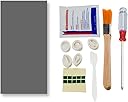
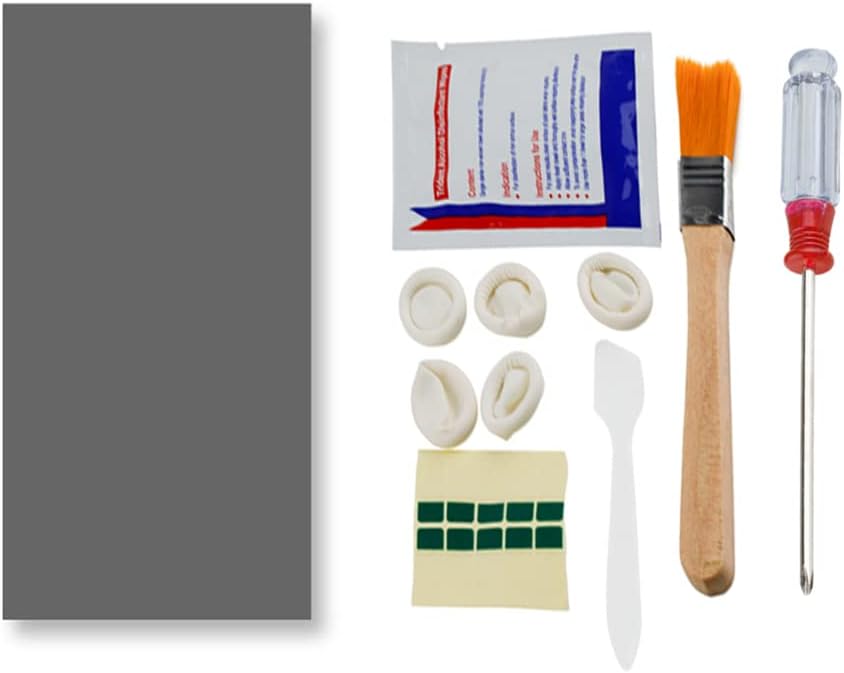
The PTM7950 is a premium 40x80x0.25mm phase change thermal pad with 8.5 W/mK conductivity, designed to drastically reduce CPU and GPU temperatures. Featuring a proprietary polymer PCM that activates at 45°C, it ensures superior heat transfer and long-term reliability withstanding 1000 hours at 150°C and 1000 thermal cycles. The package includes all installation essentials, making it the go-to solution for gamers and professionals seeking peak device performance and longevity.


| ASIN | B0BRJB8JNX |
| Batteries Included | No |
| Batteries Required | No |
| Best Sellers Rank | #4,434 in Electronics ( See Top 100 in Electronics ) #6 in Thermal Paste |
| Brand | JOYJOM |
| Customer Reviews | 4.4 4.4 out of 5 stars (684) |
| Date First Available | 11 January 2023 |
| Item Weight | 59 g |
| Item model number | 01 |
| Manufacturer | JOYJOM |
| Model | 01 |
| Package Dimensions | 15.29 x 10.21 x 2.69 cm; 59 g |
K**U
The PTM7950 is incredible and absolutely worth it.
alright, this is a game changer, first of all the packaging was pretty good, i didn't expect the packaging to be so good. The thermal pad actually does wonders, before using the pad, every gaming session, my CPU temps were always 95+ and the performance due to the thermal throttling was pretty awful. I played for an hour after applying the ptm7950 pad, and the temps only touched 81° C. it's ridiculously good, and i do think this is the original one because the packaging and stuff looked pretty premium. totally worth the buy, also my laptop is HP Pavillion Gaming 15 with Ryzen 5 3550H and gtx 1650
V**T
Worth the shot
It's unbelievable how much the temps went down. Of course, my laptop was very overdue for a cleaning, however the thermal replacement did wonder for my laptop (LOQ 15IRX9D2 for reference). Around 65-75 degrees C for AAA game that came out in 2019. Great product.
S**A
Amazing product
Amazing product. Its works well after few cycles cpu and gpu runs. Value for money.
R**T
Magical stuff.
This paired with Halnziye HY236 (to cool the VRMs and VRAMs) actually works so far! I have only applied it for a day, but my HP Omen actually feels like a gaming laptop. It always used to thermal throttle before when using the ADVITS thermal pad and Arctic MX4 but now my idle temps are 60c ish and while gaming both the CPU and GPU hovers around 80-70c. It is challenging to apply though and keeping it in the fridge didn't help much. Not sure about the longevity but will update at a later time or until it stops working. Not sure about the authenticity as I read several reviews of this product, but it does the job.
R**E
A MUST BUY FOR LAPTOP USERS !
It has helped my laptop achieve far better thermal performance (reduced 15 degC for Lenovo Yoga 7 Pro). Installation is quite tricky. The package clearly mentions that this is the Honeywell version so I guess its worth it !
M**K
Waste don’t buy this PTM 7950
Absolutely Waste , if u have processor i510300h or higher and gpu 1650 series then your CPU temp will rise within 5 min of high end task or gaming , I have done CPU , GPU test and 3D mark cpu test got 85 degree on an average temperature . Waste of money No Temperature reduction , your old thermal paste works better then this .
S**R
PTM7950 PCM
For anyone wondering if this is legit PTM7950 and work. Yes, go ahead and buy it works wonders. I've install it on my ps4 and run cyberpunk 2077, hogwarts legacy, warzone, and seige x, it runs everything wisper quiet. At times I get worried and have to check if the fan is actually working. Although for installation you may have to watch a guide for optimal set it up.
P**J
Better than thermal paste 😁
Its good better than other thermal paste.Try to use it on you pc and laptop in cold environment because it dry too fast , freeze it before using or while using.
A**S
Hohe Grafikkarten Temperaturen/Hotspots? Hiermit ist schluss!
Habe mir dieses Thermopad gekauft da meine Red Devil RX 6800 XT immer eine 25-30° höhere Hotspot temperatur hatte als die normale Temperatur. Man muss sagen dass das Auftragen für jemanden der das zum ersten mal macht etwas fummelig ist - ich habe mir extra dafür eine kleine Pinzette zuvor gekauft und für mich war es das auf jeden Fall wert. Nun gut was sagen die Temperaturen nach den Wechsel auf die PTM7950? Cyberpunk 2077 1440P alles auf Max, kein Raytracing - GPU ist Übertakted und zieht ca. 330W. Voher: GPU Temp: 75° Hotspot: 97-105° Nacher:GPU Temp: 70° Hotspot: 85-89 Ich bin wirklich überrascht wie gut Thermopads geworden sind, damals hieß es ja quasi immer nur das Thermopads soviel schlechter seien als Paste, aber diesen Unterschied hätte ich wirklich nicht erwartet. Achtung: Das Thermopad brauch einige Zeit(Bei mir waren es 2-3 Tage) mit Last bis man die wirklich richtigen Temperaturen sehen kann, es muss sich quasi etwas verflüssigen und sich besser auf den Chip verteilen was evtl. etwas dauern kann - allerdings hat man hier den Vorteil das sich die Temperatur nicht mehr verschlechtern wie bei Wärmeleitpaste nach einigen Monaten, für die Langlebigkeit auf jeden Fall top!
T**M
Re-paste my laptop Legion 5 Pro 2021
Took a risk buying this, there were 3 issues: - Product listing has "Brand: JOYJOM" but the paste should have been made by Honeywell. - Cost (I paid £25.46) is far higher than any thermal paste I know of. - Posted from China or USA (I can't tell), not sure how I'd get a refund if it's not right. I used it to re-paste my laptop Legion 5 Pro 2021 16ACH6H because the processor reached 104°C using Arctic MX4. It worked as you can see in my screenshot attachments (they were running Cinebench r23) and reducing the temps in some of my games by up to 20°C. They provided provided tools but I think they were inappropriate, why do I need a screwdriver and a brush? They should have provided a tweezer instead to remove the plastic covering the pad.
A**ー
フィルムを剥がす時に形状が崩れやすいので注意を。
よく冷えます。
A**E
This stuff is legit!
I am having a hard time accepting how good this actually is. I have a G513QU gaming laptop which, unfortunately, was one of the serial numbers with the faulty liquid metal solution and after a year or so it had pumped out enough that the clocks were not boosting to nearly the speeds that it was when it was new. I decided to crack it open and replace it myself instead of sending it back to Asus RMA as I know Asus has made it their life's mission to make the RMA process as horrible as possible. I opened the laptop up and took out the liquid metal and the faulty barriers. I prepped the SMDs around the dies for liquid metal and got to the point where I wasn't confident on making my own barrier so I just put paste on it to see how that went - it went poorly. My temperatures were high and clocks were low. I then found out about PTM7950 after doing some research and decided to give it a go. This stuff was pretty hard to work with before I figured it out so expect a trial run before you actually get it right. I bought a cutting mat, measuring tool, and a craft knife to get it done correctly. I measured the dies and then cut accordingly. Getting on was a bit tricky but once you learn to use tweezers to set it properly on the die and lift up from the corners to get the film off it actually is not hard to work with. Once it was on I put the laptop together and was shocked at how good my temperatures were. I added some spacers to increase the mounting pressure and with those plus the PTM7950 I am getting better temps than I did with the original liquid metal application. Now, obviously the increased mounting pressure is doing some work here but I had that going with the normal paste and my temperatures weren't even close to as good as with the PTM7950. Now, my clocks boost to max speed and even though the CPU is designed to boost to 95c and hold it actually only get to about 92c which is absolutely bonkers. The GPU is doing great as well and there is zero throttling on the laptop. I was able to pass a 20 minute time spy stress test which I was unable to do with the paste application. This stuff is absolutely amazing. One last thing to note. I did two applications where one had the PTM7950 completely covering each die and the next I uses a bit less because there was a lot of pump out meaning that there was too much used. Well, covering the full die was better as I guess the pumped out bit can catch heat coming off the sides and pipe that to the heatsink so I would definitely cover the entire surface area of the die if you're doing direct die cooling. One last thing, in the videos of people using the actual Honeywell PTM7950 the pads are a bit thicker (0.25 vs 0.2 mm) and the colour is blue versus the grey of this. I was skeptical that this isn't PTM7950 because of that and I don't know what it actually is but it cools significantly better than good thermal paste so I am guessing it is a knockoff but still the same formula. A bit expensive but totally worth it.
A**.
The best solution for gaming laptops!
As a specialist in servicing gaming laptops and professional graphics workstations, I recommend this thermal pad. In my opinion, it outperforms similar pads from ThermalGrizzly. Tested under full load. Highly recommended. Before use, cool it in the refrigerator, but not in the freezer. Be sure to clean the surface with 99% isopropyl alcohol. The price is quite reasonable. Experienced users will have no trouble installing it. Low temperature, Durability -3-5 years!
Trustpilot
3 weeks ago
2 months ago