


Desertcart purchases this item on your behalf and handles shipping, customs, and support to Iceland.
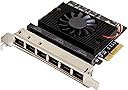
Upgrade your network to the next level with our 6 Port 2.5 Gigabit Network Adapter featuring the Realtek RTL 8125B Chipset. Experience lightning-fast speeds, seamless connectivity, and effortless installation. Whether you're a home user or a business professional, this adapter is your ticket to a smoother, more efficient network experience. Review: Great little proxmox nic with no driver issues. - works great as a desktop server nic for individual VMs no issues with proxmox driver compatibility Review: Great NIC expansion card. - Works well in my unRaid server for giving virtual machines their one direct IP.
| ASIN | B0CHXF1YVX |
| Box Contents | CD Driver, User Manual |
| Brand | IO Crest |
| Brand Name | IO Crest |
| Compatible Devices | Desktop |
| Compatible Operating System Family | Linux, Windows |
| Customer Reviews | 4.3 out of 5 stars 11 Reviews |
| Data Link Protocol | Ethernet , Gigabit Ethernet |
| Data Transfer Rate | 2.5 Gigabits Per Second |
| Hardware Interface | Ethernet , PCI |
| Item Weight | 0.22 Kilograms |
| Item Weight Unit of Measure | 0.22 Kilograms |
| Manufacturer | IO CREST |
| Minimum Required Operating System Version | Linux Mint 19.2, Windows 10 |
| Number of Items | 1 |
| UPC | 850039353246 |
| Unit Count | 6 Count |
M**S
Great little proxmox nic with no driver issues.
works great as a desktop server nic for individual VMs no issues with proxmox driver compatibility
S**I
Great NIC expansion card.
Works well in my unRaid server for giving virtual machines their one direct IP.
A**T
Works for pfSense 2.7
Was able to get this working for pfSense 2.7. You have to install the Realtek package. Try to do this prior to installation of the card or it’ll be impossible to get the packages (you need a working WAN port). 1. Enable secure shell in Advanced settings and SSH as admin to your firewall management address 2. Select 8 for shell and run “pkg install realtek-re-kmod” (the package installer will instruct you to do the following) 3. Edit boot “ee /boot/loader.config” 4. Add the two lines if_re_load=“YES” if_re_name=“/boot/modules/if_re.ko” 5. Save file by pressing ESC and answering leave editor and save 5. Reboot by typing reboot
J**T
Worked well with ProxMox hypervisor
I have a Dell T630 tower server running ProxMox. The NIC worked with OS native drivers - no custom driver installation was required. All I had to do was edit the /etc/network/interfaces file and now all the interfaces are available for use by guest VMs.
K**A
Compatible with Debian 12
Under Debian, if you see error messages in the log regarding the Realtek firmware (something like "failed to load rtl_nic/rtl8125b"), just run "apt install firmware-realtek", however, the network card works as-is, even without the extra package.
Trustpilot
2 days ago
3 weeks ago